Bookmark Navigation in JavaScript (ES5) PDF Viewer
14 Aug 20262 minutes to read
Bookmarks embedded in PDF files are loaded and exposed for quick navigation. Use the following code snippet to enable or disable bookmark navigation.
ej.pdfviewer.PdfViewer.Inject(
  ej.pdfviewer.Toolbar, ej.pdfviewer.Magnification, ej.pdfviewer.Navigation, ej.pdfviewer.Annotation,
  ej.pdfviewer.LinkAnnotation, ej.pdfviewer.ThumbnailView, ej.pdfviewer.BookmarkView, ej.pdfviewer.TextSelection
);

var pdfviewer = new ej.pdfviewer.PdfViewer({
  enableBookmark: true,
  documentPath: 'https://cdn.syncfusion.com/content/pdf/pdf-succinctly.pdf'
});
pdfviewer.appendTo('#PdfViewer');ej.pdfviewer.PdfViewer.Inject(
ej.pdfviewer.Toolbar, ej.pdfviewer.Magnification, ej.pdfviewer.Navigation, ej.pdfviewer.Annotation,
ej.pdfviewer.LinkAnnotation, ej.pdfviewer.ThumbnailView, ej.pdfviewer.BookmarkView, ej.pdfviewer.TextSelection
);
var pdfviewer = new ej.pdfviewer.PdfViewer({
enableBookmark: true,
documentPath: 'https://cdn.syncfusion.com/content/pdf/pdf-succinctly.pdf'
});
pdfviewer.serviceUrl = 'https://document.syncfusion.com/web-services/pdf-viewer/api/pdfviewer/';
pdfviewer.appendTo('#PdfViewer');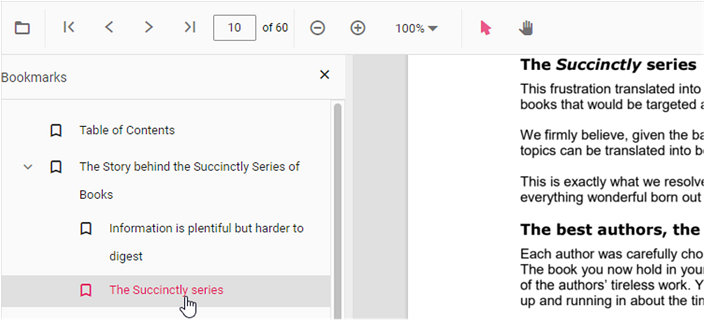
To navigate to a bookmark programmatically, use the goToBookmark method. The method throws an error if the specified bookmark does not exist in the document.
Example usage is shown below; ensure the viewer instance variable used in these snippets is the same across your integration (for example pdfviewer).
<button id="gotobookmark">Specific Page</button>
document.getElementById('gotobookmark').addEventListener('click', () => {
  pdfviewer.bookmark.goToBookmark(x, y);
});-
x— The page index to navigate to (zero-based). -
y— The vertical coordinate (Y offset) on the page to position the viewport.
Use the getBookmarks method to retrieve all bookmarks in a document. It returns a list of bookmark objects containing properties such as title, pageIndex, and destination. A typical integration maps the returned list into a clickable navigation menu that calls goToBookmark with the selected bookmark’s pageIndex and destination values.
Example usage is shown below.
<button id="getBookmarks">retrieve bookmark</button>
document.getElementById('getBookmarks').addEventListener('click', () => {
  var getBookmarks = pdfviewer.bookmark.getBookmarks();
  console.log(getBookmarks)
});