Import pages using the Organize Pages tool in Blazor PDF Viewer
14 Aug 20262 minutes to read
Overview
This guide explains how to import pages from another PDF into the current document using the Organize Pages UI in the Blazor PDF Viewer.
Outcome: Imported pages appear as thumbnails and are merged into the original document when saved or exported.
Prerequisites
- Blazor PDF Viewer (SfPdfViewer) installed
- Organize Pages feature enabled
Steps
-
Open the Organize Pages view
- Click the Organize Pages button in the viewer navigation toolbar to open the Organize Pages dialog.
-
Start import
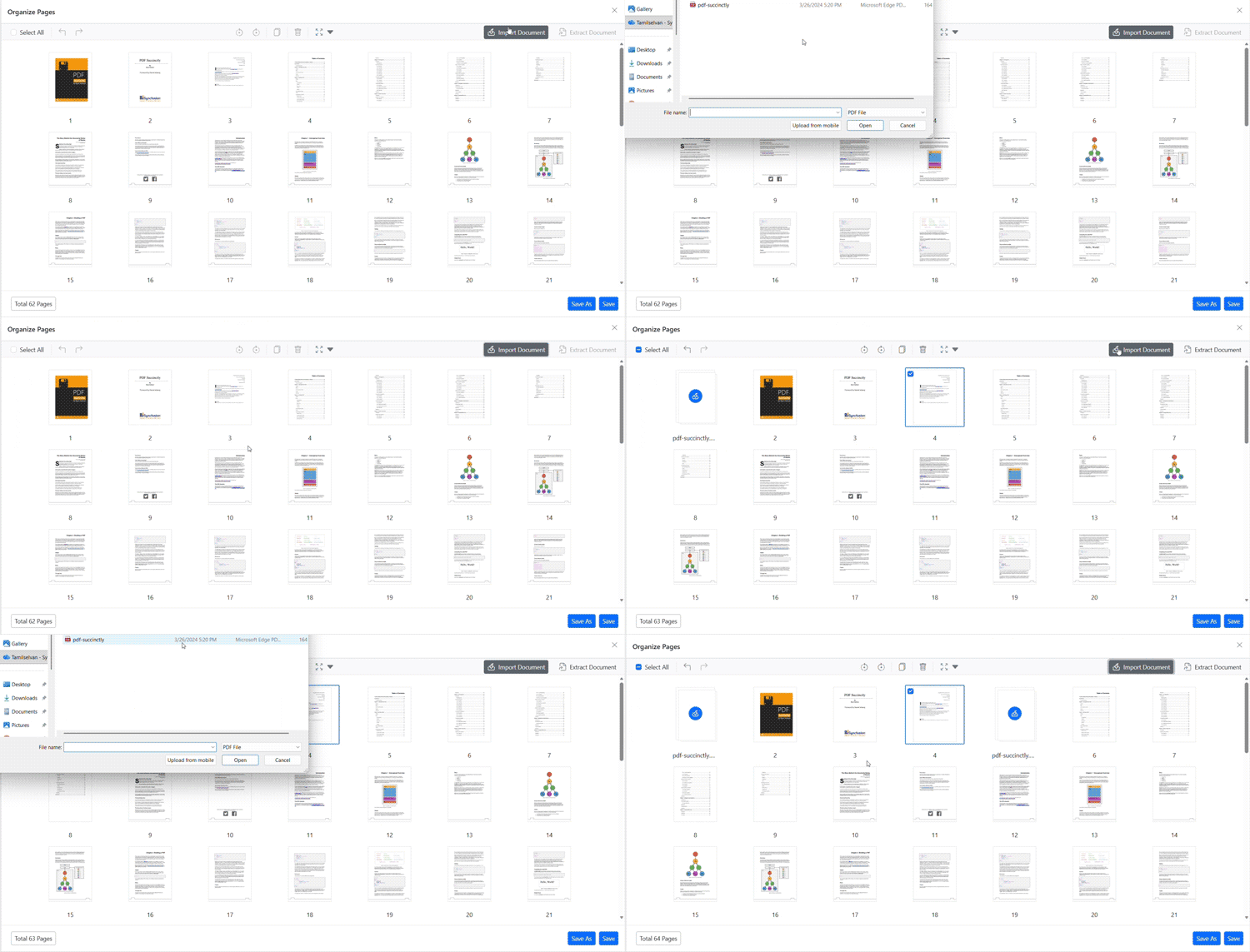
- Click the Import Document button and choose a valid PDF file from your local file system.
-
Import pages
- The selected PDF pages are imported and added to the document. If a page is selected in the current document, the imported pages are inserted after the selected page; otherwise, they are appended at the end of the document.
-
Persist changes
- Click Save or Save As to persist the merged document with the imported pages.
Expected result
- Imported pages display as a single thumbnail in Organize Pages and are merged into the original PDF when saved or exported.
Programmatic import
You can also import pages from another PDF programmatically using the InsertPagesAsync method.
Import pages from byte array
@using Syncfusion.Blazor.Buttons
@using System.IO

<SfButton OnClick="ImportMethod">Import</SfButton>
<SfPdfViewer2 @ref="Viewer" DocumentPath="https://cdn.syncfusion.com/content/pdf/pdf-succinctly.pdf"
              Height="100%"
              Width="100%">
</SfPdfViewer2>

@code {
    private SfPdfViewer2? Viewer;

    private async Task ImportMethod() {
        byte[] byteArray = System.IO.File.ReadAllBytes("wwwroot/pdf-succinctly.pdf");
        await Viewer?.InsertPagesAsync(2, byteArray, null);
    }
}
Import pages from stream
@using Syncfusion.Blazor.Buttons
@using System.IO

<SfButton OnClick="ImportMethodStream">Import Stream</SfButton>
<SfPdfViewer2 @ref="Viewer" DocumentPath="https://cdn.syncfusion.com/content/pdf/pdf-succinctly.pdf"
              Height="100%"
              Width="100%">
</SfPdfViewer2>

@code {
    private SfPdfViewer2? Viewer;

    private async Task ImportMethodStream() {
        byte[] byteArray = System.IO.File.ReadAllBytes("wwwroot/pdf-succinctly.pdf");
        using var stream = new MemoryStream(byteArray);
        await Viewer?.InsertPagesAsync(2, stream, null);
    }
}
Troubleshooting
- Import fails: Ensure the selected file is a valid PDF and the browser file picker is permitted.
- Imported pages not visible: Confirm that the changes are persisted using Save or Save As.