Getting Started with Server-Backed ASP.NET MVC Viewer
14 Aug 20266 minutes to read
This section explains how to integrate the ASP.NET MVC PDF Viewer into an ASP.NET MVC application using Visual Studio.
Starting with the 2026 Volume 2 release (July 6, 2026), no new features will be added to the Server PDF Viewer, as almost all of the PDF Viewer functionalities are now available in the Standalone PDF Viewer. If you are currently using the server-backed PDF Viewer, please refer to the migration documentation to transition to the Standalone PDF Viewer.
Prerequisites
Create a new ASP.NET MVC App in Visual Studio
Install Syncfusion ASP.NET MVC Package in the application
Install the following NuGet packages to add the PDF Viewer to the ASP.NET MVC application.
Or run this command in Package Manager Console:
Install-Package Syncfusion.EJ2.PdfViewer.AspNet.Mvc5 -Version 35.1.37
Install-Package Syncfusion.EJ2.MVC5 -Version 35.1.37
Make sure that the
Microsoft.AspNet.Mvcpackage and its dependency packages are updated to the latest version.
Add required namespaces
Add Syncfusion.EJ2 namespace reference in Web.config under Views folder.
<namespaces>
    <add namespace="Syncfusion.EJ2"/>
</namespaces>
Add the style sheet and script reference
Reference a theme and the required scripts from the CDN inside the <head> of ~/Views/Shared/_Layout.cshtml as follows:
<!-- Syncfusion ASP.NET MVC controls styles -->
<link rel="stylesheet" href="https://cdn.syncfusion.com/ej2/35.1.37/fluent.css" />
<!-- Syncfusion ASP.NET MVC controls scripts -->
<script src="https://cdn.syncfusion.com/ej2/35.1.37/dist/ej2.min.js"></script>
To learn other ways to load themes or scripts (such as NPM packages or CRG), see the Themes topic and Adding Script Reference documentation. To configure PDF Viewer with locally available script and style resources, follow these instructions.
Register the Syncfusion® script manager
Register the script manager at the end of the <body> element in the ~/Views/Shared/_Layout.cshtml file.
<!-- Syncfusion ASP.NET MVC Script Manager -->
@Html.EJS().ScriptManager()
Add the ASP.NET MVC PDF Viewer control
Add the Syncfusion® ASP.NET MVC PDF Viewer control in ~/Views/Home/Index.cshtml. Load a PDF by setting the DocumentPath property to a file name or URL, as shown below.
<div>
    <div style="height:500px;width:100%;">
        <!-- DocumentPath specifies the PDF document to load -->
        <!-- ServiceUrl specifies the controller action that the viewer uses to communicate with the server -->
        @Html.EJS().PdfViewer("pdfviewer").ServiceUrl(VirtualPathUtility.ToAbsolute("~/Home/")).DocumentPath("https://cdn.syncfusion.com/content/pdf/pdf-succinctly.pdf").Render()
    </div>
</div>
Implement server-side handlers
Add the server side code to HomeController.cs in the Controllers folder. The class should contain handler methods that process all PDF operations on the server, such as loading documents, rendering pages, handling annotations, and managing downloads.
An implementation example can be found in Github.
Run the application
Press Ctrl+F5 (Windows) or ⌘+F5 (macOS) to run the app. The Syncfusion® ASP.NET MVC PDF Viewer will render in the default web browser.
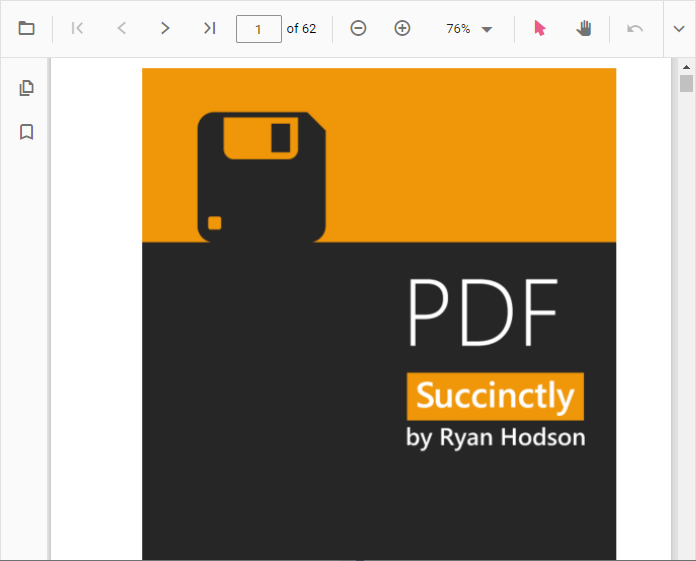
A fully functional example project is available in the GitHub repository.
Deployment notes
-
Unlike the standalone PDF Viewer which performs client-side rendering, the server-backed PDF Viewer processes and renders PDFs entirely on the server. As a result, the following files are not required and should be omitted from any deployment bundle:
pdfium.jspdfium.wasm
-
For hosting the web service on Linux, include SkiaSharp.NativeAssets.Linux.
-
For AWS environments, use the following packages:
Amazon Web Services (AWS) NuGet package name AWS Lambda SkiaSharp.NativeAssets.Linux 3.119.1 AWS Elastic Beanstalk SkiaSharp.NativeAssets.Linux.NoDependencies 3.119.1 -
The
serviceUrlcan be updated dynamically at runtime. After updating the value, invokepdfViewer.dataBind()to apply the change and then load the document. This feature is supported in version 23.1.36 or later.
@{
    string serviceUrl = VirtualPathUtility.ToAbsolute("~/Home/");
}
<script>
    function load() {
        // ej2_instances is the EJ2 framework's array of component instances attached to the rendered element.
        var pdfViewer = document.getElementById('pdfviewer').ej2_instances[0];
        pdfViewer.serviceUrl = "@serviceUrl";
        pdfViewer.documentPath = "https://cdn.syncfusion.com/content/pdf/pdf-succinctly.pdf";
        pdfViewer.dataBind();
    }
</script>
Troubleshooting
-
Blank viewer / no requests fired: verify
ServiceUrlpoints to a reachable controller action and that the script manager (@Html.EJS().ScriptManager()) is registered at the end of<body>. -
404 on
ServiceUrlrequests: confirm the route is registered (default attribute routing applies) and the controller returns thePdfViewerProcessorresponse. -
Missing native assets on Linux: confirm the
SkiaSharp.NativeAssets.Linuxpackage (3.119.1) is deployed alongside the app; check the host forlibskiasharp.soload errors. -
License warnings in the browser console: ensure
SyncfusionLicenseProvider.RegisterLicenseis called once at application start.