Extract Pages in Angular PDF Viewer
14 Aug 20268 minutes to read
The PDF Viewer component provides an Extract Pages tool in the Organize Pages UI to export selected pages as a new PDF file. The Extract Pages tool is enabled by default.
Extract Pages in Organize Pages
- Open the Organize Pages panel in the PDF Viewer toolbar.
- Locate and click the Extract Pages option.
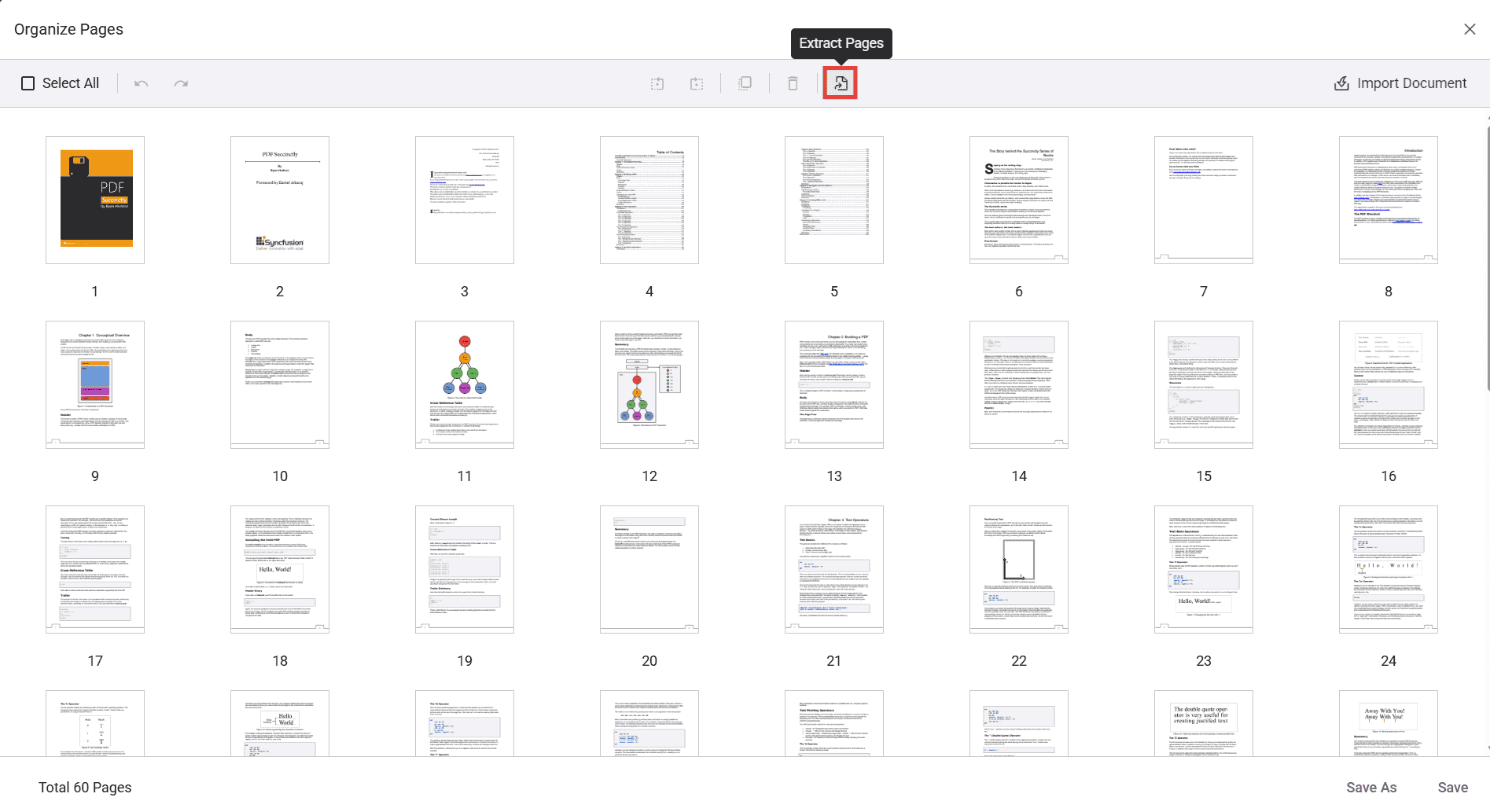
When selected, a secondary toolbar dedicated to extraction is displayed.
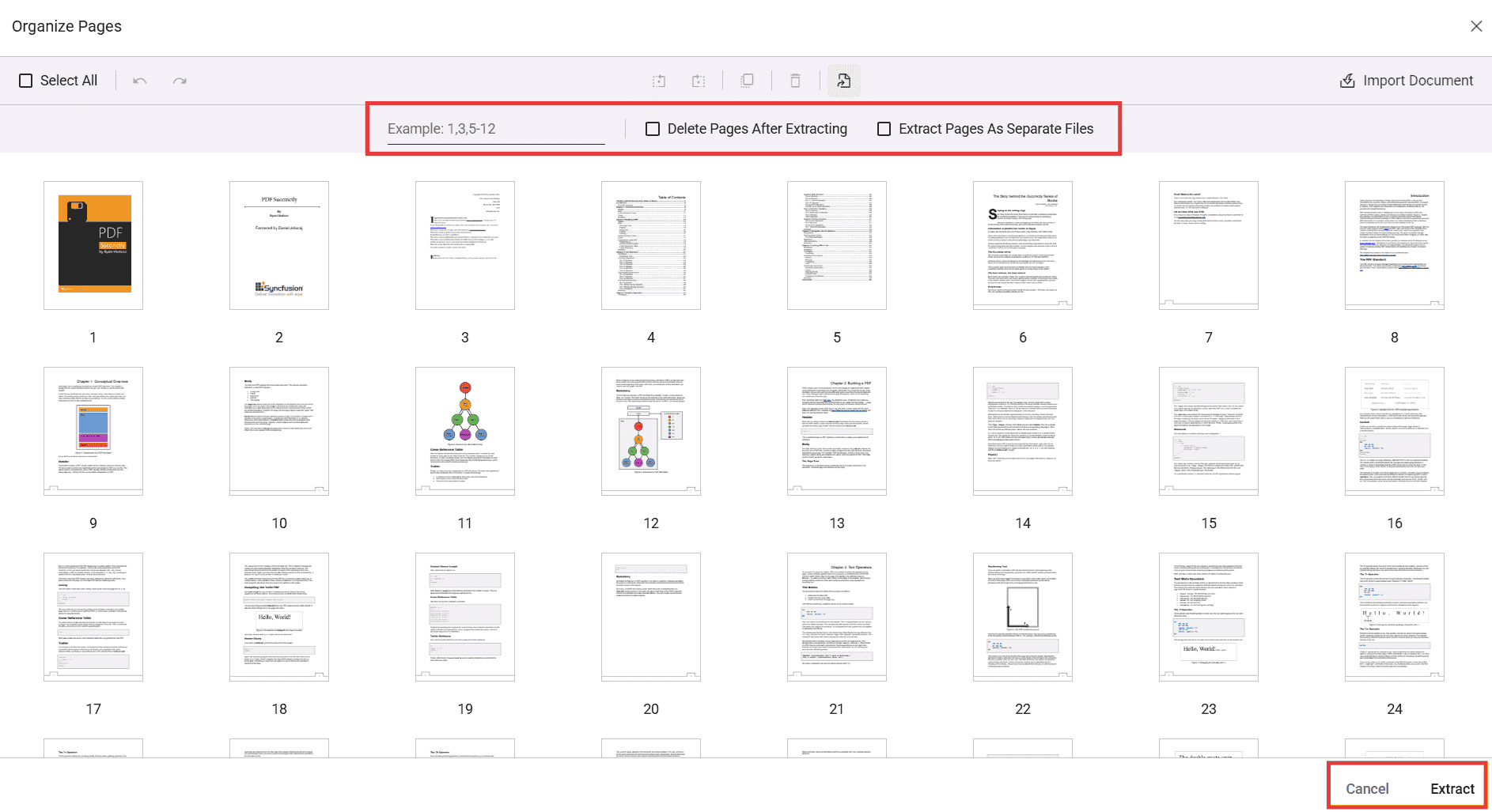
Extract pages using the UI
You can extract by typing page numbers/ranges or by selecting thumbnails.
- Click Extract Pages in the Organize Pages panel.
- In the input box, enter pages to extract. Supported formats:
- Single pages: 1,3,5
- Ranges: 2-6
- Combinations: 1,4,7-9
- Alternatively, select the page thumbnails to extract instead of typing values.
- Click Extract to download the selected pages as a new PDF; click Cancel to close the tool.
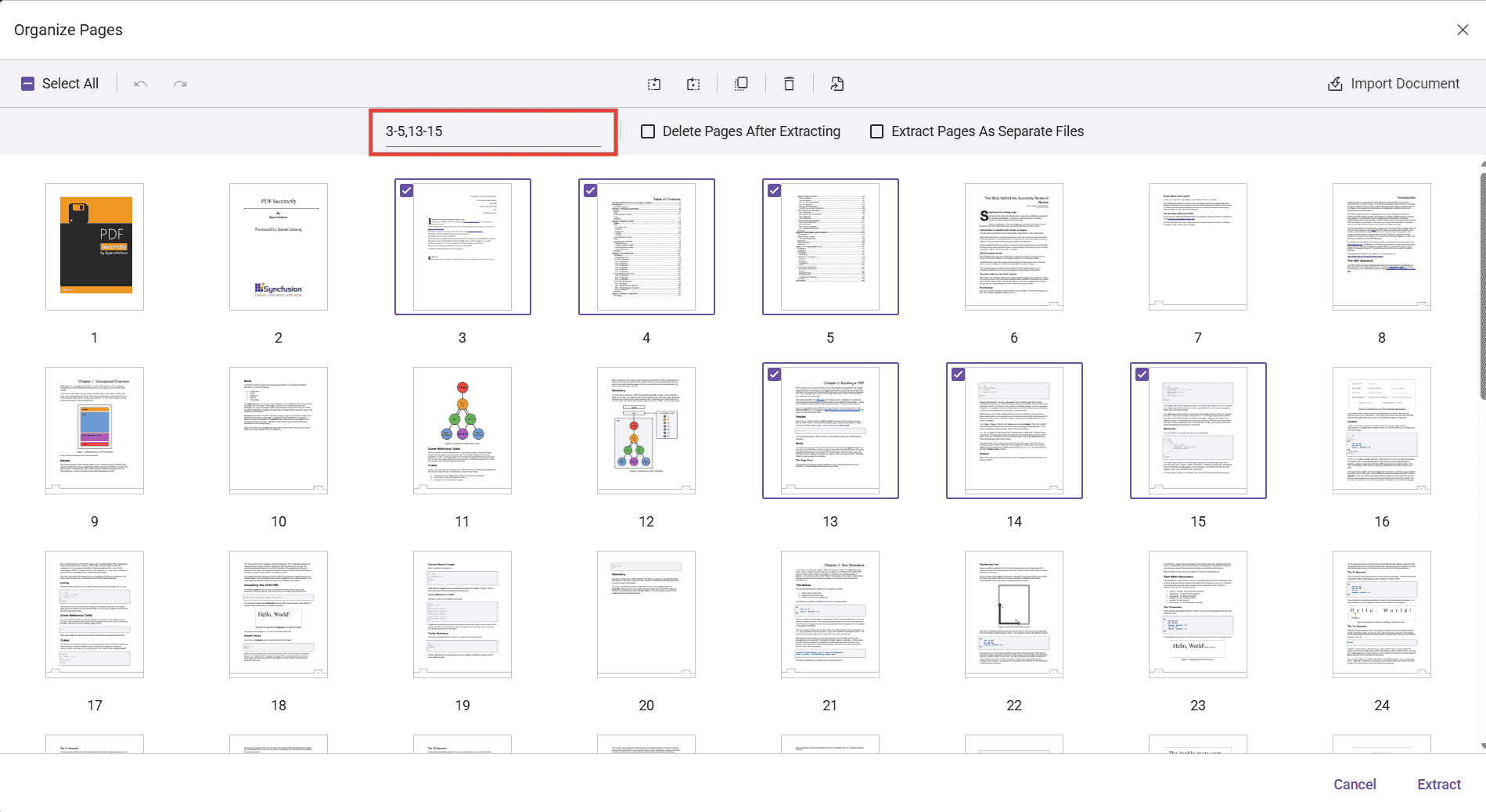
Page numbers are 1-based (the first page is 1). Invalid or out-of-range entries are ignored; only valid pages are processed. Consider validating input before extraction to ensure expected results.
Extraction options (checkboxes)
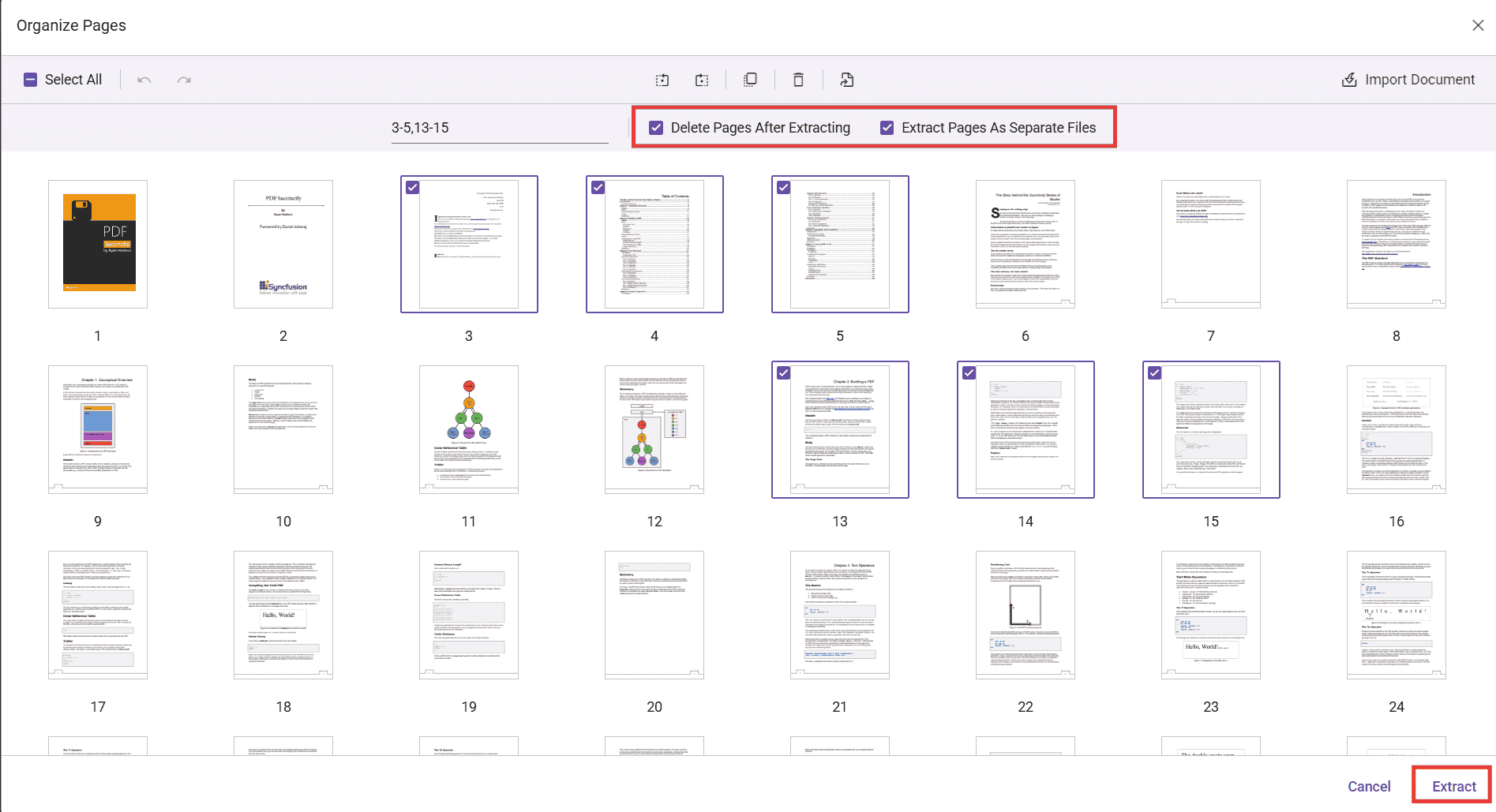
The secondary toolbar provides two options:
-
Delete Pages After Extracting — When enabled, the selected pages are removed from the currently loaded document after extraction; the extracted pages are still downloaded as a separate PDF.
-
Extract Pages As Separate Files — When enabled, each selected page is exported as an individual PDF (for example, selecting pages 3, 5, and 6 downloads 3.pdf, 5.pdf, and 6.pdf).
Programmatic options and APIs
You can control the Extract Pages experience via settings and invoke extraction through code.
Enable/disable or show/hide Extract Pages
Use the canExtractPages API to enable or disable the Extract Pages option. When set to false, the Extract Pages tool is disabled in the toolbar. The default value is true.
Use the following code snippet to enable or disable the Extract Pages option:
import { Component, OnInit } from '@angular/core';
import {
  PdfViewerModule,
  LinkAnnotationService,
  BookmarkViewService,
  MagnificationService,
  ThumbnailViewService,
  ToolbarService,
  NavigationService,
  AnnotationService,
  TextSearchService,
  TextSelectionService,
  PrintService,
  FormFieldsService,
  FormDesignerService,
  PageOrganizerService,
} from '@syncfusion/ej2-angular-pdfviewer';

@Component({
  selector: 'app-root',
  standalone: true,
  imports: [PdfViewerModule],
  providers: [
    LinkAnnotationService,
    BookmarkViewService,
    MagnificationService,
    ThumbnailViewService,
    ToolbarService,
    NavigationService,
    AnnotationService,
    TextSearchService,
    TextSelectionService,
    PrintService,
    FormFieldsService,
    FormDesignerService,
    PageOrganizerService,
  ],
  template: `
    <div class="content-wrapper">
      <ejs-pdfviewer
        id="pdfViewer"
        [resourceUrl]="resourceUrl"
        [documentPath]="document"
        [pageOrganizerSettings]="{ canExtractPages: false }"
        style="height: 640px; display: block;">
      </ejs-pdfviewer>
    </div>
  `,
})
export class AppComponent implements OnInit {
  public document: string = 'https://cdn.syncfusion.com/content/pdf/pdf-succinctly.pdf';
  public resourceUrl: string = 'https://cdn.syncfusion.com/ej2/31.1.23/dist/ej2-pdfviewer-lib';
  ngOnInit(): void { }
}
Use the showExtractPagesOption API to show or hide the Extract Pages option. When set to false, the Extract Pages tool is removed from the toolbar. The default value is true.
Use the following code snippet to remove the Extract Pages option:
import { Component, OnInit } from '@angular/core';
import {
  PdfViewerModule,
  LinkAnnotationService,
  BookmarkViewService,
  MagnificationService,
  ThumbnailViewService,
  ToolbarService,
  NavigationService,
  AnnotationService,
  TextSearchService,
  TextSelectionService,
  PrintService,
  FormFieldsService,
  FormDesignerService,
  PageOrganizerService,
} from '@syncfusion/ej2-angular-pdfviewer';

@Component({
  selector: 'app-root',
  standalone: true,
  imports: [PdfViewerModule],
  providers: [
    LinkAnnotationService,
    BookmarkViewService,
    MagnificationService,
    ThumbnailViewService,
    ToolbarService,
    NavigationService,
    AnnotationService,
    TextSearchService,
    TextSelectionService,
    PrintService,
    FormFieldsService,
    FormDesignerService,
    PageOrganizerService,
  ],
  template: `
    <div class="content-wrapper">
      <ejs-pdfviewer
        id="pdfViewer"
        [resourceUrl]="resourceUrl"
        [documentPath]="document"
        [pageOrganizerSettings]="{ showExtractPagesOption: false }"
        style="height: 640px; display: block;">
      </ejs-pdfviewer>
    </div>
  `,
})
export class AppComponent implements OnInit {
  public document: string = 'https://cdn.syncfusion.com/content/pdf/pdf-succinctly.pdf';
  public resourceUrl: string = 'https://cdn.syncfusion.com/ej2/31.1.23/dist/ej2-pdfviewer-lib';
  ngOnInit(): void { }
}
Extract pages and load the result programmatically
You can extract pages programmatically using the extractPages method.
The following example extracts pages 1 and 2, then immediately loads the extracted pages back into the viewer. The returned value is a byte array (e.g., Uint8Array) representing the PDF file contents.
import { Component, ViewChild, OnInit } from '@angular/core';
import {
  PdfViewerComponent,
  PdfViewerModule,
  LinkAnnotationService,
  BookmarkViewService,
  MagnificationService,
  ThumbnailViewService,
  ToolbarService,
  NavigationService,
  TextSearchService,
  TextSelectionService,
  PrintService,
  AnnotationService,
  FormFieldsService,
  FormDesignerService,
  PageOrganizerService,
} from '@syncfusion/ej2-angular-pdfviewer';

@Component({
  selector: 'app-root',
  standalone: true,
  imports: [PdfViewerModule],
  providers: [
    LinkAnnotationService,
    BookmarkViewService,
    MagnificationService,
    ThumbnailViewService,
    ToolbarService,
    NavigationService,
    TextSearchService,
    TextSelectionService,
    PrintService,
    AnnotationService,
    FormFieldsService,
    FormDesignerService,
    PageOrganizerService,
  ],
  template: `
    <div class="content-wrapper">
      <button (click)="onExtract()">Extract Pages</button>
      <ejs-pdfviewer
        #pdfviewer
        id="pdfViewer"
        [resourceUrl]="resourceUrl"
        [documentPath]="document"
        [pageOrganizerSettings]="{ showExtractPagesOption: true }"
        style="height: 640px; display: block;">
      </ejs-pdfviewer>
    </div>
  `,
})
export class AppComponent implements OnInit {
  @ViewChild('pdfviewer')
  public pdfviewerControl!: PdfViewerComponent;

  public document: string = 'https://cdn.syncfusion.com/content/pdf/pdf-succinctly.pdf';
  public resourceUrl: string = 'https://cdn.syncfusion.com/ej2/31.1.23/dist/ej2-pdfviewer-lib';
  ngOnInit(): void { }

  onExtract() {
    // Extract pages 1 and 2
    const array = (this.pdfviewerControl as any).extractPages('1,2');
    // Load the extracted pages back into the viewer
    (this.pdfviewerControl as any).load(array, "");
    console.log(array);
  }
}