Interaction Mode in Angular PDF Viewer
14 Aug 20267 minutes to read
The PDF Viewer provides two interaction modes for working with a loaded PDF document: Selection mode and Panning mode.
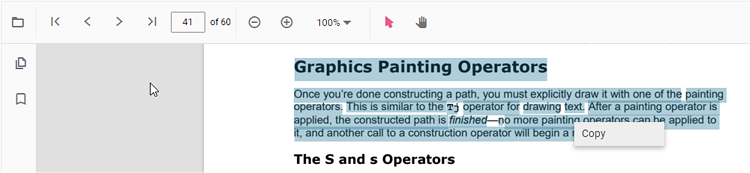
Selection mode
Selection mode allows users to select and copy text from the loaded PDF. Touch-based panning and page scrolling are disabled in this mode. Enable or disable text selection using the following code snippet.
import { Component, OnInit } from '@angular/core';
import { LinkAnnotationService, BookmarkViewService, MagnificationService,
         ThumbnailViewService, ToolbarService, NavigationService,
         TextSearchService, AnnotationService, TextSelectionService,
         PrintService
       } from '@syncfusion/ej2-angular-pdfviewer';
@Component({
  selector: 'app-container',
  // specifies the template string for the PDF Viewer component
  template: `<div class="content-wrapper">
              <ejs-pdfviewer id="pdfViewer"
                      enableTextSelection='true'
                      [documentPath]='document'
                      style="height:640px;display:block">
              </ejs-pdfviewer>
            </div>`,
  providers: [ LinkAnnotationService, BookmarkViewService, MagnificationService,
               ThumbnailViewService, ToolbarService, NavigationService,
               AnnotationService, TextSearchService, TextSelectionService,
               PrintService]
  })
  export class AppComponent implements OnInit {
      public document = 'https://cdn.syncfusion.com/content/pdf/pdf-succinctly.pdf';
  }
import { Component, OnInit } from '@angular/core';
import { LinkAnnotationService, BookmarkViewService, MagnificationService,
ThumbnailViewService, ToolbarService, NavigationService,
TextSearchService, AnnotationService, TextSelectionService,
PrintService
} from '@syncfusion/ej2-angular-pdfviewer';
@Component({
selector: 'app-container',
// specifies the template string for the PDF Viewer component
template: `<div class="content-wrapper">
<ejs-pdfviewer id="pdfViewer"
[serviceUrl]='service'
enableTextSelection='true'
[documentPath]='document'
style="height:640px;display:block">
</ejs-pdfviewer>
</div>`,
providers: [ LinkAnnotationService, BookmarkViewService, MagnificationService,
ThumbnailViewService, ToolbarService, NavigationService,
AnnotationService, TextSearchService, TextSelectionService,
PrintService]
})
export class AppComponent implements OnInit {
public service = 'https://document.syncfusion.com/web-services/pdf-viewer/api/pdfviewer';
public document = 'https://cdn.syncfusion.com/content/pdf/pdf-succinctly.pdf';
}
Panning mode
Panning mode enables touch-based panning and page scrolling of the loaded PDF; text selection is disabled in this mode.
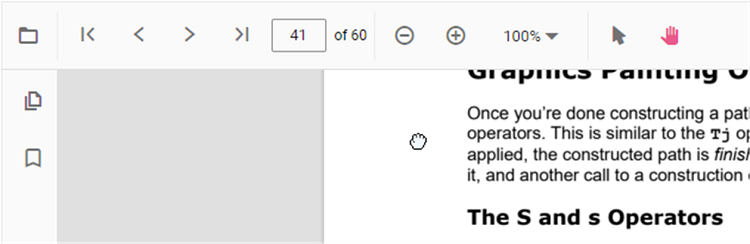
When
interactionModeis set to ‘Pan’, touch panning is enabled and text selection is not available even ifenableTextSelectionis set to true.
You can switch the interaction mode of the PDF Viewer using the following code snippet.
@Component({
  selector: 'app-container',
  // specifies the template string for the PDF Viewer component
  template: `<div class="content-wrapper">
              <ejs-pdfviewer id="pdfViewer"
                    enableTextSelection='true'
                    [documentPath]='document'
                    [interactionMode]='interaction'
                    style="height:640px;display:block">
              </ejs-pdfviewer>
            </div>`,
  providers: [ LinkAnnotationService, BookmarkViewService, MagnificationService,
               ThumbnailViewService, ToolbarService, NavigationService,
               AnnotationService, TextSearchService, TextSelectionService,
               PrintService]
  })
  export class AppComponent implements OnInit {
      public document = 'https://cdn.syncfusion.com/content/pdf/pdf-succinctly.pdf';
      public interaction = 'Pan';
}@Component({
selector: 'app-container',
// specifies the template string for the PDF Viewer component
template: `<div class="content-wrapper">
<ejs-pdfviewer id="pdfViewer"
[serviceUrl]='service'
enableTextSelection='true'
[documentPath]='document'
[interactionMode]='interaction'
style="height:640px;display:block">
</ejs-pdfviewer>
</div>`,
providers: [ LinkAnnotationService, BookmarkViewService, MagnificationService,
ThumbnailViewService, ToolbarService, NavigationService,
AnnotationService, TextSearchService, TextSelectionService,
PrintService]
})
export class AppComponent implements OnInit {
public service = 'https://document.syncfusion.com/web-services/pdf-viewer/api/pdfviewer';
public document = 'https://cdn.syncfusion.com/content/pdf/pdf-succinctly.pdf';
public interaction = 'Pan';
}