Shape Annotation in Angular PDF Viewer
14 Aug 202624 minutes to read
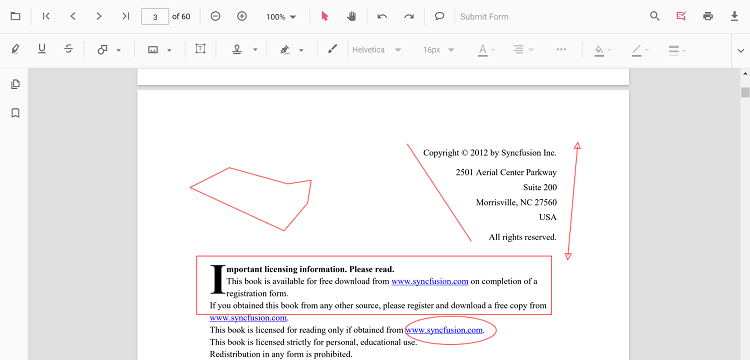
The PDF Viewer provides options to add, edit, and delete shape annotations. For details on deleting shape annotations, see Delete annotation. Supported shape annotation types include:
- Line
- Arrow
- Rectangle
- Circle
- Polygon
Adding a shape annotation to the PDF document
Shape annotations can be added to the PDF document using the annotation toolbar.
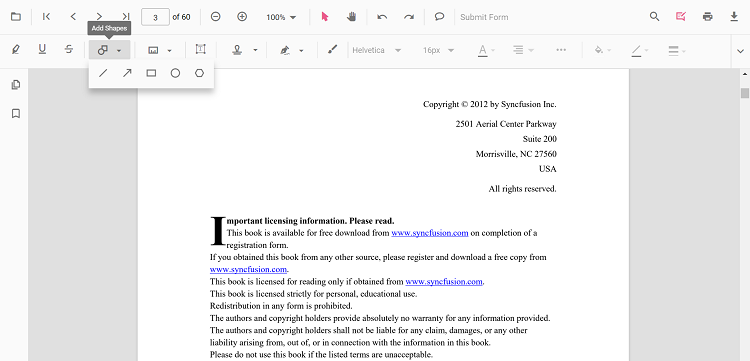
- Select the Edit Annotation button in the PDF Viewer toolbar to open the annotation toolbar.
- Open the Shape Annotation drop-down to view available shape types.
- Select a shape type to enable its annotation mode, then draw the shape on the page.
When the PDF Viewer is in pan mode and a shape annotation tool is selected, the viewer automatically switches to text select mode to ensure a smooth interaction experience.
Use the following sample to switch the viewer to circle annotation mode.
import { Component, OnInit } from '@angular/core';
import { PdfViewerComponent, LinkAnnotationService, BookmarkViewService,
         MagnificationService, ThumbnailViewService, ToolbarService,
         NavigationService, TextSearchService, TextSelectionService,
         PrintService, AnnotationService
       } from '@syncfusion/ej2-angular-pdfviewer';
  @Component({
    selector: 'app-root',
    // Specifies the template string for the PDF Viewer component.
    template: `<button (click)="addAnnotation()">Circle</button>
               <div class="content-wrapper">
                  <ejs-pdfviewer id="pdfViewer"
                        [documentPath]='document'
                        [resourceUrl] = 'resource'
                        style="height:640px;display:block">
                  </ejs-pdfviewer>
               </div>`,
    providers: [ LinkAnnotationService, BookmarkViewService, MagnificationService,
                 ThumbnailViewService, ToolbarService, NavigationService,
                 TextSearchService, TextSelectionService, PrintService,
                 AnnotationService]
     })
  export class AppComponent implements OnInit {
    public document: string = 'https://cdn.syncfusion.com/content/pdf/pdf-succinctly.pdf';
    public resource: string = "https://cdn.syncfusion.com/ej2/25.1.35/dist/ej2-pdfviewer-lib";

    ngOnInit(): void {
    }
    addAnnotation() {
      var pdfviewer = (<any>document.getElementById("pdfViewer")).ej2_instances[0];
      pdfviewer.annotationModule.setAnnotationMode("Circle");
    }
  }
import { Component, OnInit } from '@angular/core';
import { PdfViewerComponent, LinkAnnotationService, BookmarkViewService,
MagnificationService, ThumbnailViewService, ToolbarService,
NavigationService, TextSearchService, TextSelectionService,
PrintService, AnnotationService
} from '@syncfusion/ej2-angular-pdfviewer';
@Component({
selector: 'app-root',
// Specifies the template string for the PDF Viewer component.
template: `<button (click)="addAnnotation()">Circle</button>
<div class="content-wrapper">
<ejs-pdfviewer id="pdfViewer"
[serviceUrl]='service'
[documentPath]='document'
style="height:640px;display:block">
</ejs-pdfviewer>
</div>`,
providers: [ LinkAnnotationService, BookmarkViewService, MagnificationService,
ThumbnailViewService, ToolbarService, NavigationService,
TextSearchService, TextSelectionService, PrintService,
AnnotationService]
})
export class AppComponent implements OnInit {
public service: string = 'https://document.syncfusion.com/web-services/pdf-viewer/api/pdfviewer';
public document: string = 'https://cdn.syncfusion.com/content/pdf/pdf-succinctly.pdf';
ngOnInit(): void {
}
addAnnotation() {
var pdfviewer = (<any>document.getElementById("pdfViewer")).ej2_instances[0];
pdfviewer.annotationModule.setAnnotationMode("Circle");
}
}Add a shape annotation to the PDF document programmatically
The PDF Viewer library allows adding a shape annotation programmatically using the addAnnotation() method.
Here is an example showing how to add shape annotations programmatically using addAnnotation():
import { Component, OnInit } from '@angular/core';
import { LinkAnnotationService, BookmarkViewService,
         MagnificationService, ThumbnailViewService, ToolbarService,
         NavigationService, TextSearchService, TextSelectionService,
         PrintService, FormDesignerService, FormFieldsService,
         AnnotationService, PageOrganizerService, LineSettings, ArrowSettings,
         RectangleSettings, CircleSettings, PolygonSettings } from '@syncfusion/ej2-angular-pdfviewer';

@Component({
  selector: 'app-root',
  // specifies the template string for the PDF Viewer component
  template: `<div class="content-wrapper">
  <button (click)="addLineAnnotation()">Add Line annotation Programmatically</button>
  <button (click)="addArrowAnnotation()">Add Arrow annotation Programmatically</button>
  <button (click)="addRectangleAnnotation()">Add Rectangle annotation Programmatically</button>
  <button (click)="addCircleAnnotation()">Add Circle annotation Programmatically</button>
  <button (click)="addPolygonAnnotation()">Add Polygon annotation Programmatically</button>
  <ejs-pdfviewer
    id="pdfViewer"
    [documentPath]='document'
    [resourceUrl]='resource'
    style="height:640px;display:block">
  </ejs-pdfviewer>
</div>`,
  providers: [ LinkAnnotationService, BookmarkViewService, MagnificationService,
               ThumbnailViewService, ToolbarService, NavigationService,
               TextSearchService, TextSelectionService, PrintService,
               AnnotationService, FormDesignerService, FormFieldsService, PageOrganizerService]
})
export class AppComponent implements OnInit {
    public document = 'https://cdn.syncfusion.com/content/pdf/pdf-succinctly.pdf';
    public resource: string = "https://cdn.syncfusion.com/ej2/25.1.35/dist/ej2-pdfviewer-lib";
    ngOnInit(): void {
    }
  addLineAnnotation() {
    var pdfviewer = (<any>document.getElementById('pdfViewer')).ej2_instances[0];
    pdfviewer.annotation.addAnnotation("Line", {
      offset: { x: 200, y: 230 },
      pageNumber: 1,
      vertexPoints: [{ x: 200, y: 230 }, { x: 350, y: 230 }]
    } as LineSettings);
  }
  addArrowAnnotation() {
    var pdfviewer = (<any>document.getElementById('pdfViewer')).ej2_instances[0];
    pdfviewer.annotation.addAnnotation("Arrow", {
      offset: { x: 200, y: 370 },
      pageNumber: 1,
      vertexPoints: [{ x: 200, y: 370 }, { x: 350, y: 370 }]
    } as ArrowSettings);
  }
  addRectangleAnnotation() {
    var pdfviewer = (<any>document.getElementById('pdfViewer')).ej2_instances[0];
    pdfviewer.annotation.addAnnotation("Rectangle", {
      offset: { x: 200, y: 480 },
      pageNumber: 1,
      width: 150,
      height: 75
    } as RectangleSettings);
  }
  addCircleAnnotation() {
    var pdfviewer = (<any>document.getElementById('pdfViewer')).ej2_instances[0];
    pdfviewer.annotation.addAnnotation("Circle", {
      offset: { x: 200, y: 620 },
      pageNumber: 1,
      width: 90,
      height: 90
    } as CircleSettings);
  }
  addPolygonAnnotation() {
    var pdfviewer = (<any>document.getElementById('pdfViewer')).ej2_instances[0];
    pdfviewer.annotation.addAnnotation("Polygon", {
      offset: { x: 200, y: 800 },
      pageNumber: 1,
      vertexPoints: [{ x: 200, y: 800 }, { x: 242, y: 771 }, { x: 289, y: 799 }, { x: 278, y: 842 }, { x: 211, y: 842 }, { x: 200, y: 800 }]
    } as PolygonSettings);
  }
}
import { Component, OnInit } from '@angular/core';
import { LinkAnnotationService, BookmarkViewService,
MagnificationService, ThumbnailViewService, ToolbarService,
NavigationService, TextSearchService, TextSelectionService,
PrintService, FormDesignerService, FormFieldsService,
AnnotationService, PageOrganizerService, LineSettings, ArrowSettings,
RectangleSettings, CircleSettings, PolygonSettings } from '@syncfusion/ej2-angular-pdfviewer';
@Component({
selector: 'app-root',
// specifies the template string for the PDF Viewer component
template: `<div class="content-wrapper">
<button (click)="addLineAnnotation()">Add Line annotation Programmatically</button>
<button (click)="addArrowAnnotation()">Add Arrow annotation Programmatically</button>
<button (click)="addRectangleAnnotation()">Add Rectangle annotation Programmatically</button>
<button (click)="addCircleAnnotation()">Add Circle annotation Programmatically</button>
<button (click)="addPolygonAnnotation()">Add Polygon annotation Programmatically</button>
<ejs-pdfviewer
id="pdfViewer"
[documentPath]='document'
[serviceUrl]='service'
style="height:640px;display:block">
</ejs-pdfviewer>
</div>`,
providers: [ LinkAnnotationService, BookmarkViewService, MagnificationService,
ThumbnailViewService, ToolbarService, NavigationService,
TextSearchService, TextSelectionService, PrintService,
AnnotationService, FormDesignerService, FormFieldsService, PageOrganizerService]
})
export class AppComponent implements OnInit {
public document = 'https://cdn.syncfusion.com/content/pdf/pdf-succinctly.pdf';
public service: string = 'https://document.syncfusion.com/web-services/pdf-viewer/api/pdfviewer';
ngOnInit(): void {
}
addLineAnnotation() {
var pdfviewer = (<any>document.getElementById('pdfViewer')).ej2_instances[0];
pdfviewer.annotation.addAnnotation("Line", {
offset: { x: 200, y: 230 },
pageNumber: 1,
vertexPoints: [{ x: 200, y: 230 }, { x: 350, y: 230 }]
} as LineSettings);
}
addArrowAnnotation() {
var pdfviewer = (<any>document.getElementById('pdfViewer')).ej2_instances[0];
pdfviewer.annotation.addAnnotation("Arrow", {
offset: { x: 200, y: 370 },
pageNumber: 1,
vertexPoints: [{ x: 200, y: 370 }, { x: 350, y: 370 }]
} as ArrowSettings);
}
addRectangleAnnotation() {
var pdfviewer = (<any>document.getElementById('pdfViewer')).ej2_instances[0];
pdfviewer.annotation.addAnnotation("Rectangle", {
offset: { x: 200, y: 480 },
pageNumber: 1,
width: 150,
height: 75
} as RectangleSettings);
}
addCircleAnnotation() {
var pdfviewer = (<any>document.getElementById('pdfViewer')).ej2_instances[0];
pdfviewer.annotation.addAnnotation("Circle", {
offset: { x: 200, y: 620 },
pageNumber: 1,
width: 90,
height: 90
} as CircleSettings);
}
addPolygonAnnotation() {
var pdfviewer = (<any>document.getElementById('pdfViewer')).ej2_instances[0];
pdfviewer.annotation.addAnnotation("Polygon", {
offset: { x: 200, y: 800 },
pageNumber: 1,
vertexPoints: [{ x: 200, y: 800 }, { x: 242, y: 771 }, { x: 289, y: 799 }, { x: 278, y: 842 }, { x: 211, y: 842 }, { x: 200, y: 800 }]
} as PolygonSettings);
}
}Edit an existing shape annotation programmatically
To modify an existing shape annotation programmatically, use the editAnnotation() method.
Here is an example of using editAnnotation():
import { Component, OnInit } from '@angular/core';
import { LinkAnnotationService, BookmarkViewService,
         MagnificationService, ThumbnailViewService, ToolbarService,
         NavigationService, TextSearchService, TextSelectionService,
         PrintService, FormDesignerService, FormFieldsService,
         AnnotationService, PageOrganizerService } from '@syncfusion/ej2-angular-pdfviewer';

@Component({
  selector: 'app-root',
  // specifies the template string for the PDF Viewer component
  template: `<div class="content-wrapper">
  <button (click)="editLineAnnotation()">Edit Line annotation Programmatically</button>
  <button (click)="editArrowAnnotation()">Edit Arrow annotation Programmatically</button>
  <button (click)="editRectangleAnnotation()">Edit Rectangle annotation Programmatically</button>
  <button (click)="editCircleAnnotation()">Edit Circle annotation Programmatically</button>
  <button (click)="editPolygonAnnotation()">Edit Polygon annotation Programmatically</button>
  <ejs-pdfviewer
    id="pdfViewer"
    [documentPath]='document'
    [resourceUrl]='resource'
    style="height:640px;display:block">
  </ejs-pdfviewer>
</div>`,
  providers: [ LinkAnnotationService, BookmarkViewService, MagnificationService,
               ThumbnailViewService, ToolbarService, NavigationService,
               TextSearchService, TextSelectionService, PrintService,
               AnnotationService, FormDesignerService, FormFieldsService, PageOrganizerService]
})
export class AppComponent implements OnInit {
    public document = 'https://cdn.syncfusion.com/content/pdf/pdf-succinctly.pdf';
    public resource: string = "https://cdn.syncfusion.com/ej2/25.1.35/dist/ej2-pdfviewer-lib";
    ngOnInit(): void {
    }
  editLineAnnotation() {
    var pdfviewer = (<any>document.getElementById('pdfViewer')).ej2_instances[0];
    for (let i = 0; i < pdfviewer.annotationCollection.length; i++) {
      if (pdfviewer.annotationCollection[i].subject === "Line") {
        pdfviewer.annotationCollection[i].strokeColor = "#0000FF";
        pdfviewer.annotationCollection[i].thickness = 2 ;
        pdfviewer.annotationCollection[i].annotationSelectorSettings.resizerShape = "Circle"
        pdfviewer.annotation.editAnnotation(pdfviewer.annotationCollection[i]);
      }
    }
  }
  editArrowAnnotation() {
    var pdfviewer = (<any>document.getElementById('pdfViewer')).ej2_instances[0];
    for (let i = 0; i < pdfviewer.annotationCollection.length; i++) {
      if (pdfviewer.annotationCollection[i].subject === "Arrow") {
        pdfviewer.annotationCollection[i].strokeColor = "#0000FF";
        pdfviewer.annotationCollection[i].thickness = 2 ;
        pdfviewer.annotationCollection[i].fillColor = "#FFFF00";
        pdfviewer.annotationCollection[i].annotationSelectorSettings.resizerShape = "Circle"
        pdfviewer.annotation.editAnnotation(pdfviewer.annotationCollection[i]);
      }
    }
  }
  editRectangleAnnotation() {
    var pdfviewer = (<any>document.getElementById('pdfViewer')).ej2_instances[0];
    for (let i = 0; i < pdfviewer.annotationCollection.length; i++) {
      if (pdfviewer.annotationCollection[i].subject === "Rectangle") {
        pdfviewer.annotationCollection[i].strokeColor = "#0000FF";
        pdfviewer.annotationCollection[i].thickness = 2 ;
        pdfviewer.annotationCollection[i].fillColor = "#FFFF00";
        pdfviewer.annotationCollection[i].annotationSelectorSettings.resizerShape = "Circle"
        pdfviewer.annotation.editAnnotation(pdfviewer.annotationCollection[i]);
      }
    }
  }
  editCircleAnnotation() {
    var pdfviewer = (<any>document.getElementById('pdfViewer')).ej2_instances[0];
    for (let i = 0; i < pdfviewer.annotationCollection.length; i++) {
      if (pdfviewer.annotationCollection[i].subject === "Circle") {
        pdfviewer.annotationCollection[i].strokeColor = "#0000FF";
        pdfviewer.annotationCollection[i].thickness = 2 ;
        pdfviewer.annotationCollection[i].fillColor = "#FFFF00";
        pdfviewer.annotationCollection[i].annotationSelectorSettings.resizerShape = "Circle"
        pdfviewer.annotation.editAnnotation(pdfviewer.annotationCollection[i]);
      }
    }
  }
  editPolygonAnnotation() {
    var pdfviewer = (<any>document.getElementById('pdfViewer')).ej2_instances[0];
    for (let i = 0; i < pdfviewer.annotationCollection.length; i++) {
      if (pdfviewer.annotationCollection[i].subject === "Polygon") {
        pdfviewer.annotationCollection[i].strokeColor = "#0000FF";
        pdfviewer.annotationCollection[i].thickness = 2 ;
        pdfviewer.annotationCollection[i].fillColor = "#FFFF00";
        pdfviewer.annotationCollection[i].annotationSelectorSettings.resizerShape = "Circle"
        pdfviewer.annotation.editAnnotation(pdfviewer.annotationCollection[i]);
      }
    }
  }
}
import { Component, OnInit } from '@angular/core';
import { LinkAnnotationService, BookmarkViewService,
MagnificationService, ThumbnailViewService, ToolbarService,
NavigationService, TextSearchService, TextSelectionService,
PrintService, FormDesignerService, FormFieldsService,
AnnotationService, PageOrganizerService } from '@syncfusion/ej2-angular-pdfviewer';
@Component({
selector: 'app-root',
// specifies the template string for the PDF Viewer component
template: `<div class="content-wrapper">
<button (click)="editLineAnnotation()">Edit Line annotation Programmatically</button>
<button (click)="editArrowAnnotation()">Edit Arrow annotation Programmatically</button>
<button (click)="editRectangleAnnotation()">Edit Rectangle annotation Programmatically</button>
<button (click)="editCircleAnnotation()">Edit Circle annotation Programmatically</button>
<button (click)="editPolygonAnnotation()">Edit Polygon annotation Programmatically</button>
<ejs-pdfviewer
id="pdfViewer"
[documentPath]='document'
[serviceUrl]='service'
style="height:640px;display:block">
</ejs-pdfviewer>
</div>`,
providers: [ LinkAnnotationService, BookmarkViewService, MagnificationService,
ThumbnailViewService, ToolbarService, NavigationService,
TextSearchService, TextSelectionService, PrintService,
AnnotationService, FormDesignerService, FormFieldsService, PageOrganizerService]
})
export class AppComponent implements OnInit {
public document = 'https://cdn.syncfusion.com/content/pdf/pdf-succinctly.pdf';
public resource: string = "https://cdn.syncfusion.com/ej2/25.1.35/dist/ej2-pdfviewer-lib";
ngOnInit(): void {
}
editLineAnnotation() {
var pdfviewer = (<any>document.getElementById('pdfViewer')).ej2_instances[0];
for (let i = 0; i < pdfviewer.annotationCollection.length; i++) {
if (pdfviewer.annotationCollection[i].subject === "Line") {
pdfviewer.annotationCollection[i].strokeColor = "#0000FF";
pdfviewer.annotationCollection[i].thickness = 2 ;
pdfviewer.annotationCollection[i].annotationSelectorSettings.resizerShape = "Circle"
pdfviewer.annotation.editAnnotation(pdfviewer.annotationCollection[i]);
}
}
}
editArrowAnnotation() {
var pdfviewer = (<any>document.getElementById('pdfViewer')).ej2_instances[0];
for (let i = 0; i < pdfviewer.annotationCollection.length; i++) {
if (pdfviewer.annotationCollection[i].subject === "Arrow") {
pdfviewer.annotationCollection[i].strokeColor = "#0000FF";
pdfviewer.annotationCollection[i].thickness = 2 ;
pdfviewer.annotationCollection[i].fillColor = "#FFFF00";
pdfviewer.annotationCollection[i].annotationSelectorSettings.resizerShape = "Circle"
pdfviewer.annotation.editAnnotation(pdfviewer.annotationCollection[i]);
}
}
}
editRectangleAnnotation() {
var pdfviewer = (<any>document.getElementById('pdfViewer')).ej2_instances[0];
for (let i = 0; i < pdfviewer.annotationCollection.length; i++) {
if (pdfviewer.annotationCollection[i].subject === "Rectangle") {
pdfviewer.annotationCollection[i].strokeColor = "#0000FF";
pdfviewer.annotationCollection[i].thickness = 2 ;
pdfviewer.annotationCollection[i].fillColor = "#FFFF00";
pdfviewer.annotationCollection[i].annotationSelectorSettings.resizerShape = "Circle"
pdfviewer.annotation.editAnnotation(pdfviewer.annotationCollection[i]);
}
}
}
editCircleAnnotation() {
var pdfviewer = (<any>document.getElementById('pdfViewer')).ej2_instances[0];
for (let i = 0; i < pdfviewer.annotationCollection.length; i++) {
if (pdfviewer.annotationCollection[i].subject === "Circle") {
pdfviewer.annotationCollection[i].strokeColor = "#0000FF";
pdfviewer.annotationCollection[i].thickness = 2 ;
pdfviewer.annotationCollection[i].fillColor = "#FFFF00";
pdfviewer.annotationCollection[i].annotationSelectorSettings.resizerShape = "Circle"
pdfviewer.annotation.editAnnotation(pdfviewer.annotationCollection[i]);
}
}
}
editPolygonAnnotation() {
var pdfviewer = (<any>document.getElementById('pdfViewer')).ej2_instances[0];
for (let i = 0; i < pdfviewer.annotationCollection.length; i++) {
if (pdfviewer.annotationCollection[i].subject === "Polygon") {
pdfviewer.annotationCollection[i].strokeColor = "#0000FF";
pdfviewer.annotationCollection[i].thickness = 2 ;
pdfviewer.annotationCollection[i].fillColor = "#FFFF00";
pdfviewer.annotationCollection[i].annotationSelectorSettings.resizerShape = "Circle"
pdfviewer.annotation.editAnnotation(pdfviewer.annotationCollection[i]);
}
}
}
}Editing the properties of the shape annotation
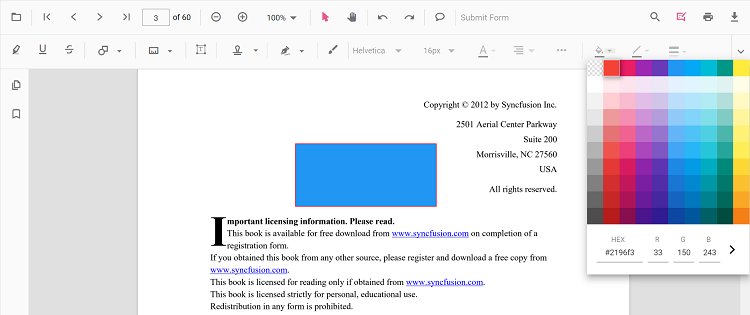
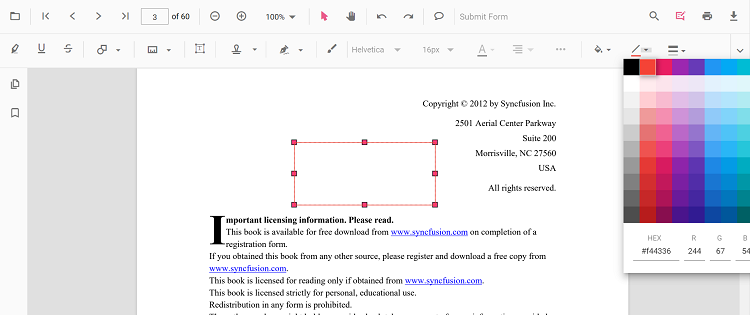
The fill color, stroke color, thickness, and opacity of shape annotations can be edited using the Edit Color, Edit Stroke Color, Edit Thickness, and Edit Opacity tools in the annotation toolbar.
Editing fill color
The fill color of the annotation can be edited using the color palette provided in the Edit Color tool.
Editing stroke color
The stroke color of the annotation can be edited using the color palette provided in the Edit Stroke Color tool.
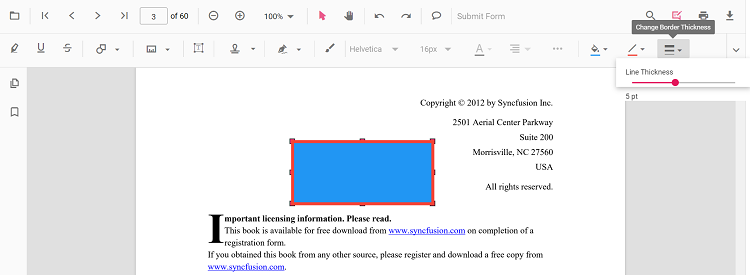
Editing thickness
The thickness of the border of the annotation can be edited using the range slider provided in the Edit Thickness tool.
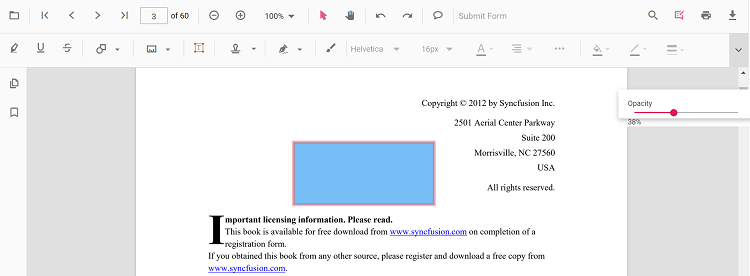
Editing opacity
The opacity of the annotation can be edited using the range slider provided in the Edit Opacity tool.
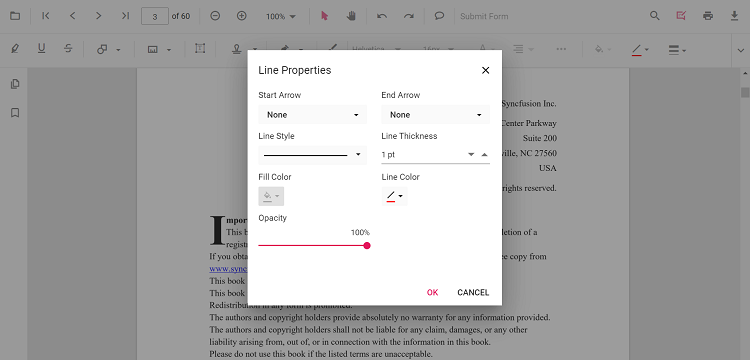
Editing the line properties
Line and arrow annotations have additional options in the Line Properties window. Open it by right-clicking a line or arrow annotation and selecting Properties from the context menu.
Refer to the following code sample to set the default annotation settings.
Set default properties during control initialization
Default properties for shape annotations can be set before creating the control using LineSettings, ArrowSettings, RectangleSettings, CircleSettings, and PolygonSettings.
import { Component, OnInit } from '@angular/core';
  import { PdfViewerComponent, LinkAnnotationService, BookmarkViewService,
           MagnificationService, ThumbnailViewService, ToolbarService,
           NavigationService, TextSearchService, TextSelectionService,
           PrintService, AnnotationService
         } from '@syncfusion/ej2-angular-pdfviewer';
  @Component({
    selector: 'app-root',
    // Specifies the template string for the PDF Viewer component.
    template: `<div class="content-wrapper">
                  <ejs-pdfviewer id="pdfViewer"
                        [documentPath]='document'
                        [lineSettings]='lineSettings'
                        [arrowSettings]='arrowSettings'
                        [rectangleSettings]='rectangleSettings'
                        [circleSettings]='circleSettings'
                        [polygonSettings]='polygonSettings'
                        style="height:640px;display:block">
                  </ejs-pdfviewer>
                </div>`,
    providers: [ LinkAnnotationService, BookmarkViewService, MagnificationService,
                 ThumbnailViewService, ToolbarService, NavigationService,
                 TextSearchService, TextSelectionService, PrintService,
                 AnnotationService]
    })
  export class AppComponent implements OnInit {
      public document: string = 'https://cdn.syncfusion.com/content/pdf/pdf-succinctly.pdf';
      public lineSettings = { fillColor: 'blue', opacity: 0.6, strokeColor: 'green' };
      public arrowSettings = { fillColor: 'green', opacity: 0.6, strokeColor: 'blue' };
      public rectangleSettings = { fillColor: 'yellow', opacity: 0.6, strokeColor: 'orange' };
      public circleSettings = { fillColor: 'orange', opacity: 0.6, strokeColor: 'pink' };
      public polygonSettings = { fillColor: 'pink', opacity: 0.6, strokeColor: 'yellow' };
  }
import { Component, OnInit } from '@angular/core';
import { PdfViewerComponent, LinkAnnotationService, BookmarkViewService,
MagnificationService, ThumbnailViewService, ToolbarService,
NavigationService, TextSearchService, TextSelectionService,
PrintService, AnnotationService
} from '@syncfusion/ej2-angular-pdfviewer';
@Component({
selector: 'app-root',
// Specifies the template string for the PDF Viewer component.
template: `<div class="content-wrapper">
<ejs-pdfviewer id="pdfViewer"
[serviceUrl]='service'
[documentPath]='document'
[lineSettings]='lineSettings'
[arrowSettings]='arrowSettings'
[rectangleSettings]='rectangleSettings'
[circleSettings]='circleSettings'
[polygonSettings]='polygonSettings'
style="height:640px;display:block">
</ejs-pdfviewer>
</div>`,
providers: [ LinkAnnotationService, BookmarkViewService, MagnificationService,
ThumbnailViewService, ToolbarService, NavigationService,
TextSearchService, TextSelectionService, PrintService,
AnnotationService]
})
export class AppComponent implements OnInit {
public service: string = 'https://document.syncfusion.com/web-services/pdf-viewer/api/pdfviewer';
public document: string = 'https://cdn.syncfusion.com/content/pdf/pdf-succinctly.pdf';
public lineSettings = { fillColor: 'blue', opacity: 0.6, strokeColor: 'green' };
public arrowSettings = { fillColor: 'green', opacity: 0.6, strokeColor: 'blue' };
public rectangleSettings = { fillColor: 'yellow', opacity: 0.6, strokeColor: 'orange' };
public circleSettings = { fillColor: 'orange', opacity: 0.6, strokeColor: 'pink' };
public polygonSettings = { fillColor: 'pink', opacity: 0.6, strokeColor: 'yellow' };
}