Comment in React Spreadsheet
14 Aug 202624 minutes to read
The Comment feature allows you to add feedback to cells without changing their values, enabling contextual discussions through threaded replies. Unlike Notes, Comment include advanced review tools such as resolve and reopen to track status, plus an optional Comments Review Pane for browsing and managing threads.
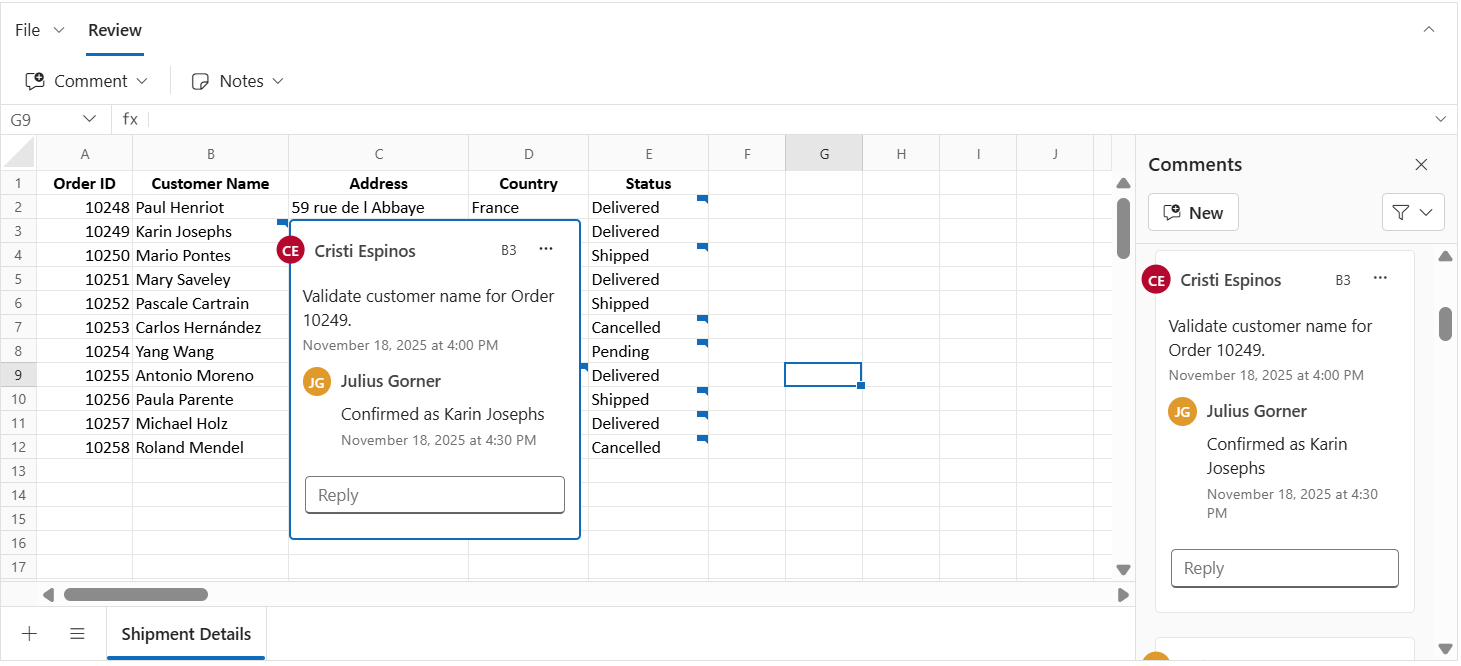
Cells that contain a comment show a small indicator. Hovering over the cell opens a preview of the comment editor. This helps maintain a clear workflow for collaboration while keeping the original data unchanged.
Author identity
The Spreadsheet does not automatically track author details. To assign an author name to new comments and replies, set the author property when initializing the Spreadsheet.
If the author property is not defined, the default value will be Guest User.
    import * as React from 'react';
    import { createRoot } from 'react-dom/client';
    import { SpreadsheetComponent } from '@syncfusion/ej2-react-spreadsheet';
    export default function App() {
        return (
            <SpreadsheetComponent
                // Set the author name, If not set, "Guest User" will be shown as the author by default.
                author='Place the Author Name Here'>
            </SpreadsheetComponent>
        );
    }
    const root = createRoot(document.getElementById('root')!);
    root.render(<App />);
If the
authorproperty is not set, “Guest User” will appear as the author for comments and replies by default.
Adding a comment
A comment can be added to a cell in the following ways:
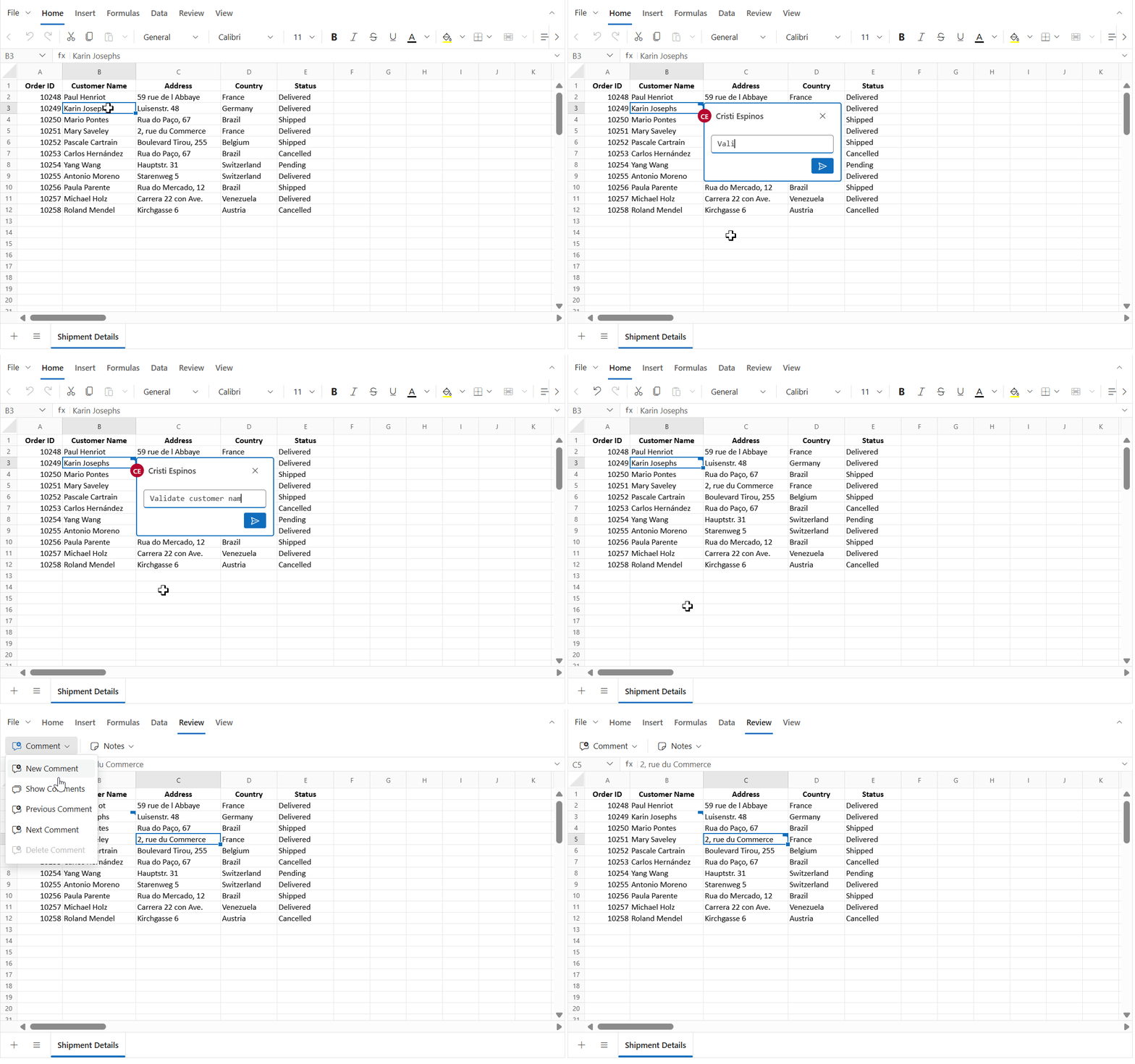
- Context menu: Right-click the cell and choose New Comment.
- Ribbon: Go to Review > Comment > New Comment.
- Keyboard shortcut: Press Ctrl + Shift + F2 to open the comment editor for the active cell.
-
Programmatically:
- Use the updateCell method with the comment model to add a comment to a specific cell.
- Bind comments during initial load by linking the comment model with the cell model.
The image below shows that once a comment is posted, the cell displays an indicator, and the comment can be previewed on hover.
Adding a reply
Replies can be added to an existing comment to provide more details or responses:
- Context menu: Right-click the cell that already has a comment, choose Comment > New Reply, type the reply, and click Post.
- Ribbon: Go to Review > Comment > New Comment on a cell that contains a comment. This opens the comment editor in reply mode.
- Comment editor: Hover over the comment indicator to open the editor, type the reply, and click Post.
- Keyboard shortcut: Press Ctrl + Shift + F2 on a cell with a comment to open the editor in reply mode.
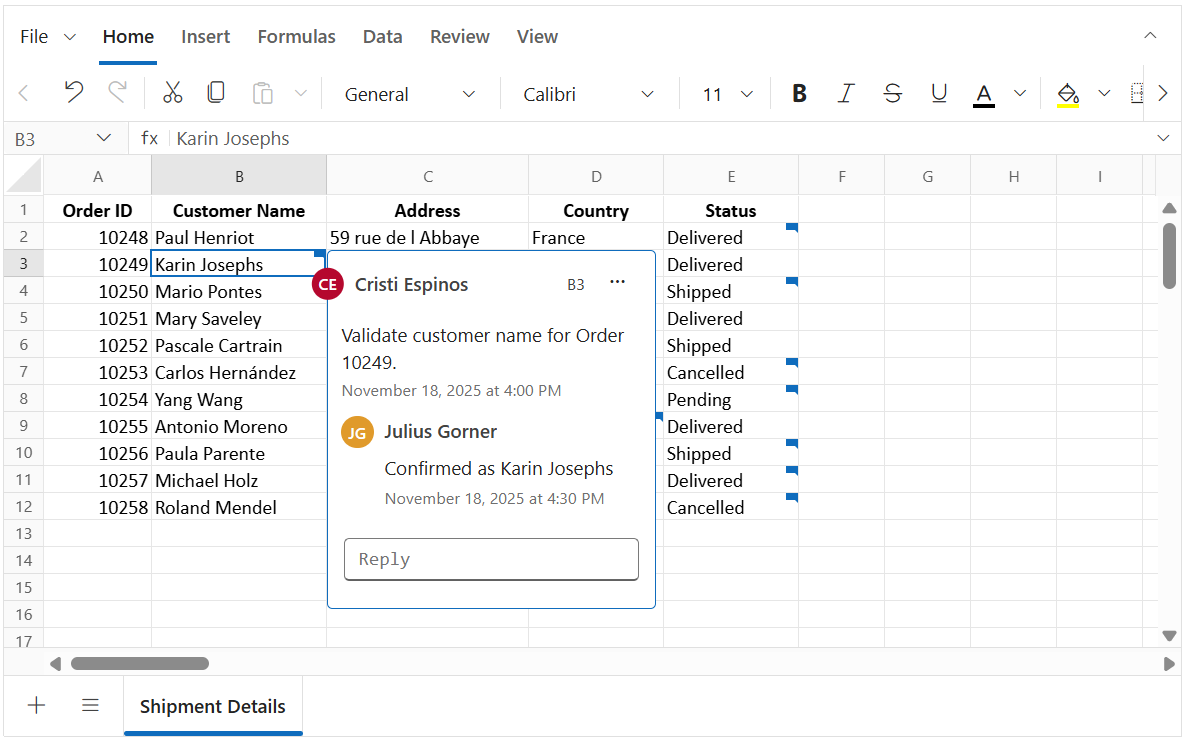
After posting, replies appear directly under the original comment in the comment editor.
Editing a comment
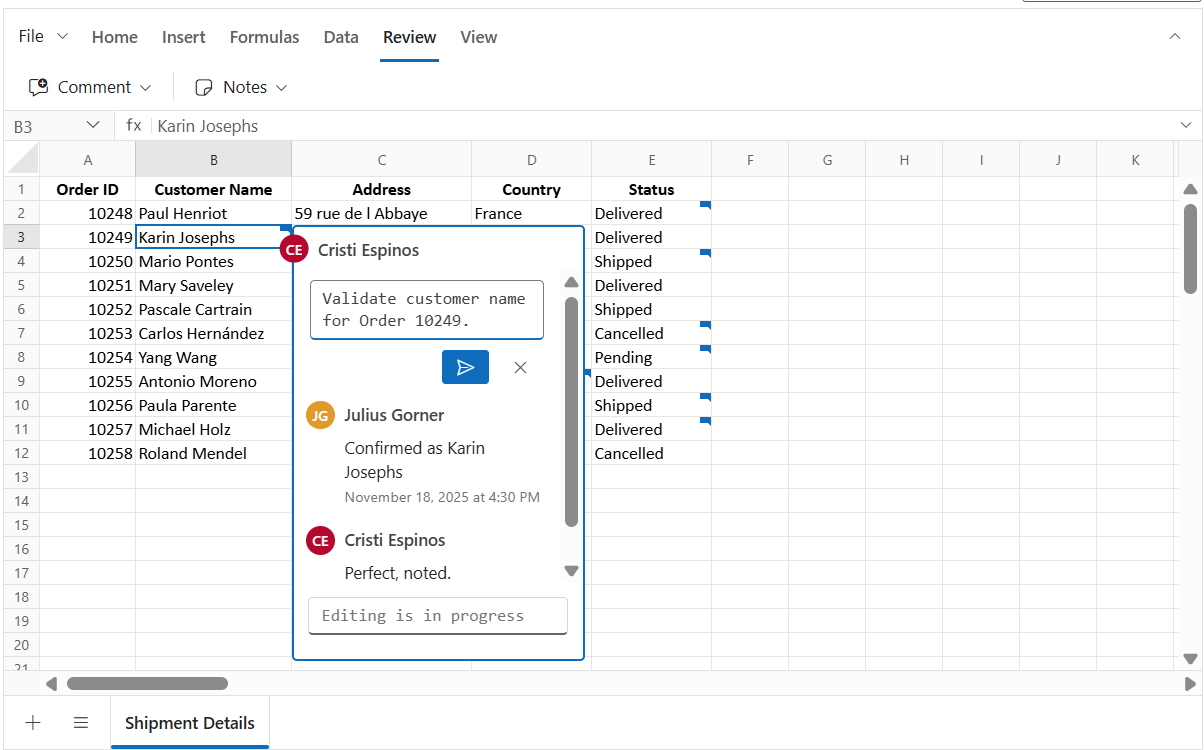
You can edit the content of a comment or its replies directly within the comment editor.
- Edit first comment: In the comment editor, click the “⋯” (More thread actions) menu in the header, select the Edit Comment, modify the text and click Post.
- Edit a reply comment: In the comment editor, hover over the specific reply, click the “⋯” (More actions), select the Edit Comment, modify the text and click Post.
Resolve and Reopen
The Resolve thread option is used to mark a comment thread as completed once the issue or discussion has been addressed. When a thread is resolved, its background color changes to show the resolved state, and the reply input box along with reply menu actions are hidden.
If more discussion is needed later, the Reopen option can be used. Reopening a thread restores it to active state, brings back the reply input box, and re-enables the reply menu actions so the conversation can be continued.
Resolve a comment
- In the comment editor, click the “⋯” (More thread actions) menu in the header and select Resolve Thread.
Reopen a comment
- In the comment editor, click the Reopen button in the header to make the thread active again.
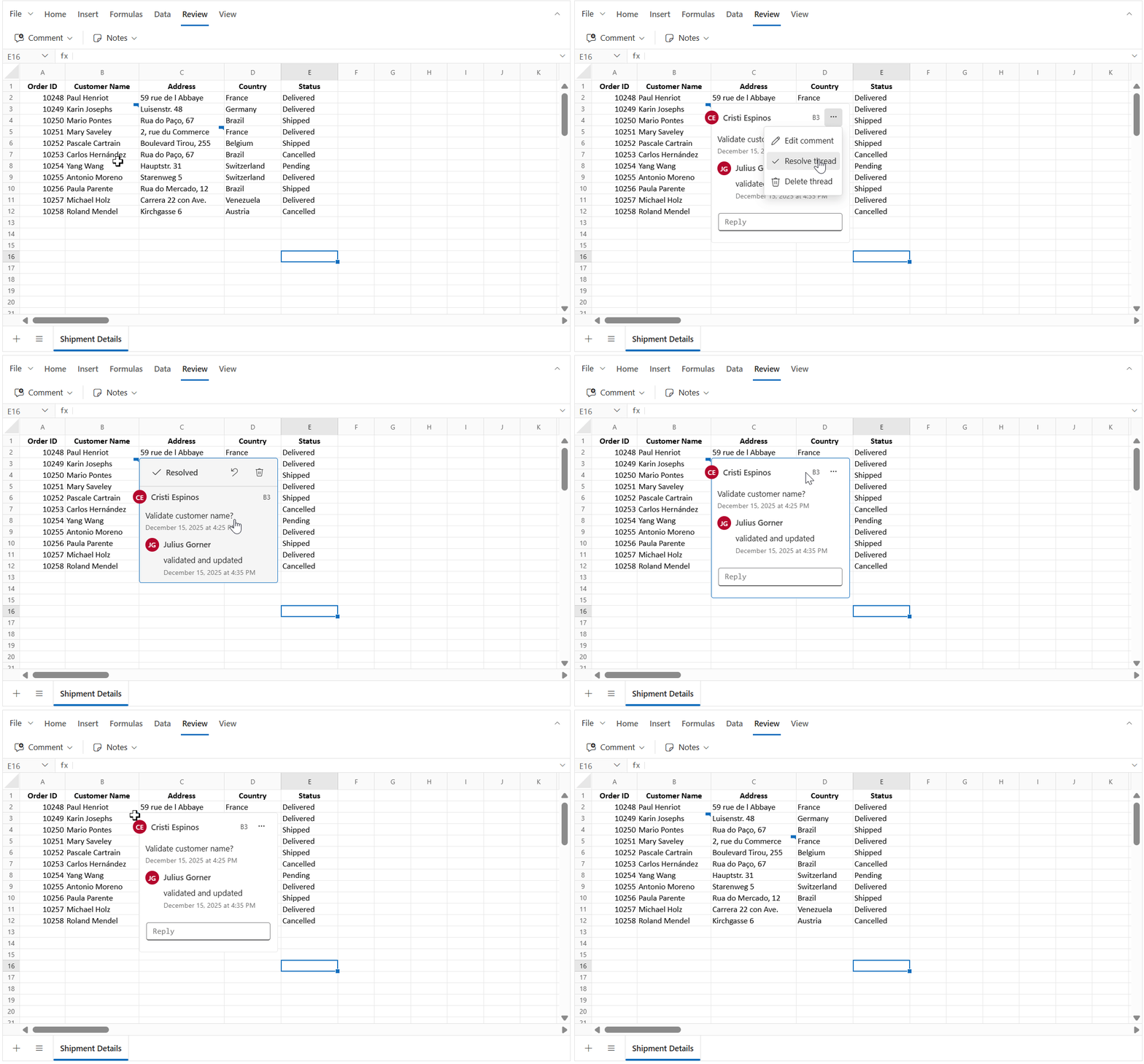
You can also use the isResolved property in the comment model when initializing or updating comments programmatically.
Example: Using isResolved property in the comment model with the updateCell method
// Update a cell with a comment using the updateCell method
    spreadsheet.updateCell({
        comment: {
            author: 'Christopher', text: 'Have you completed the report',
            createdTime: 'January 03, 2026 at 5:00 PM',
            // Set to true to mark the thread as resolved; false keeps it active
            isResolved: false,
            replies: [{ author: 'John', text: 'Yes, completed',
            createdTime: 'January 03, 2026 at 7:00 PM' }]
        }
    }, 'Sheet1!D5');
Deleting a comment or reply
You can delete either a specific reply or an entire comment thread (including all replies) using the following options:
Deleting a comment thread
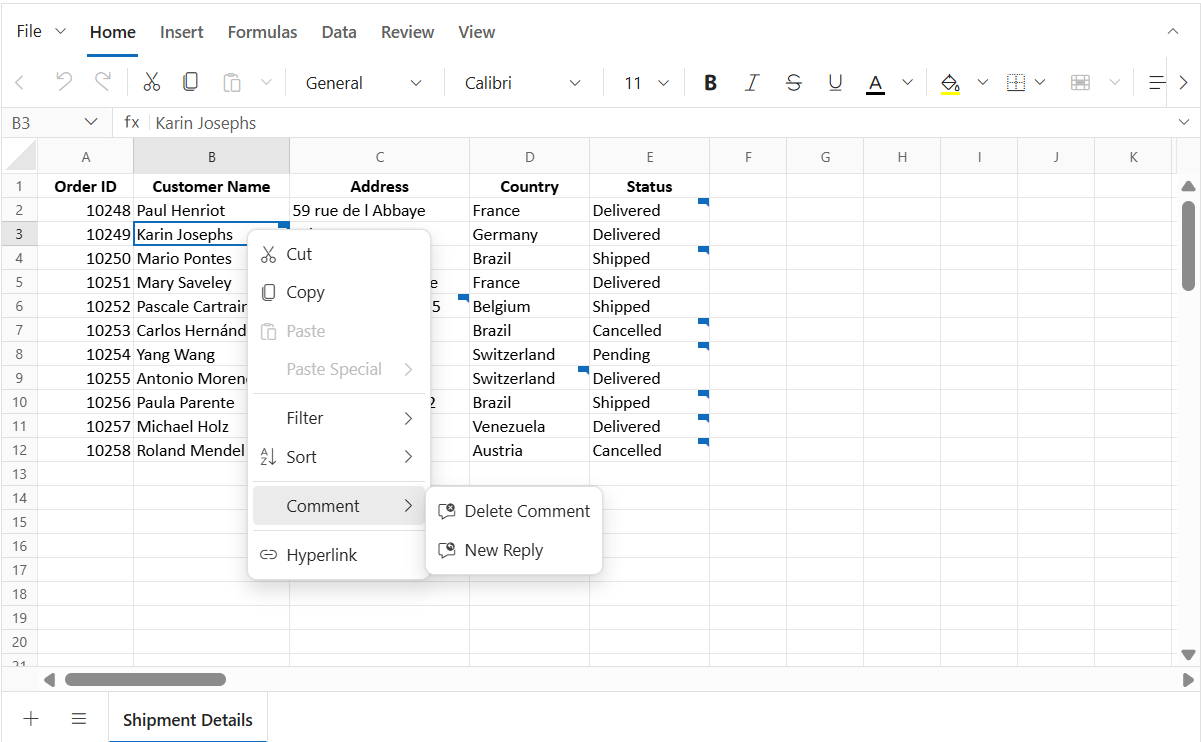
- Context menu: Right-click the cell that contains the comment and select Comment > Delete Comment.
- Ribbon: Go to Review > Comment > Delete Comment on a cell that contains the comment.
- Comment editor: In the comment editor, click the “⋯” (More thread actions) menu in the header and select Delete Thread for an active comment, or use the Delete Thread button in the header for a resolved comment.
Deleting a thread removes the comment and all of its replies from the cell.
Delete a reply
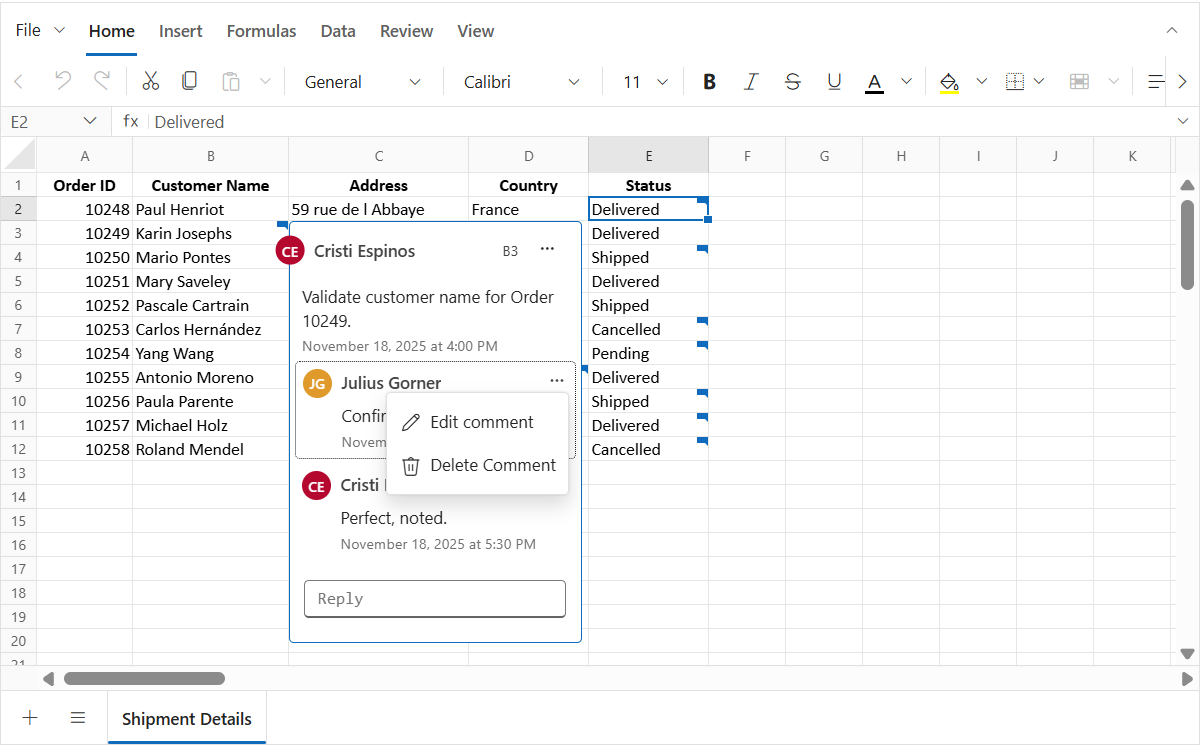
In the comment editor, hover over the reply and click the “⋯” (More actions) menu then select Delete Comment.
Next and Previous Comment
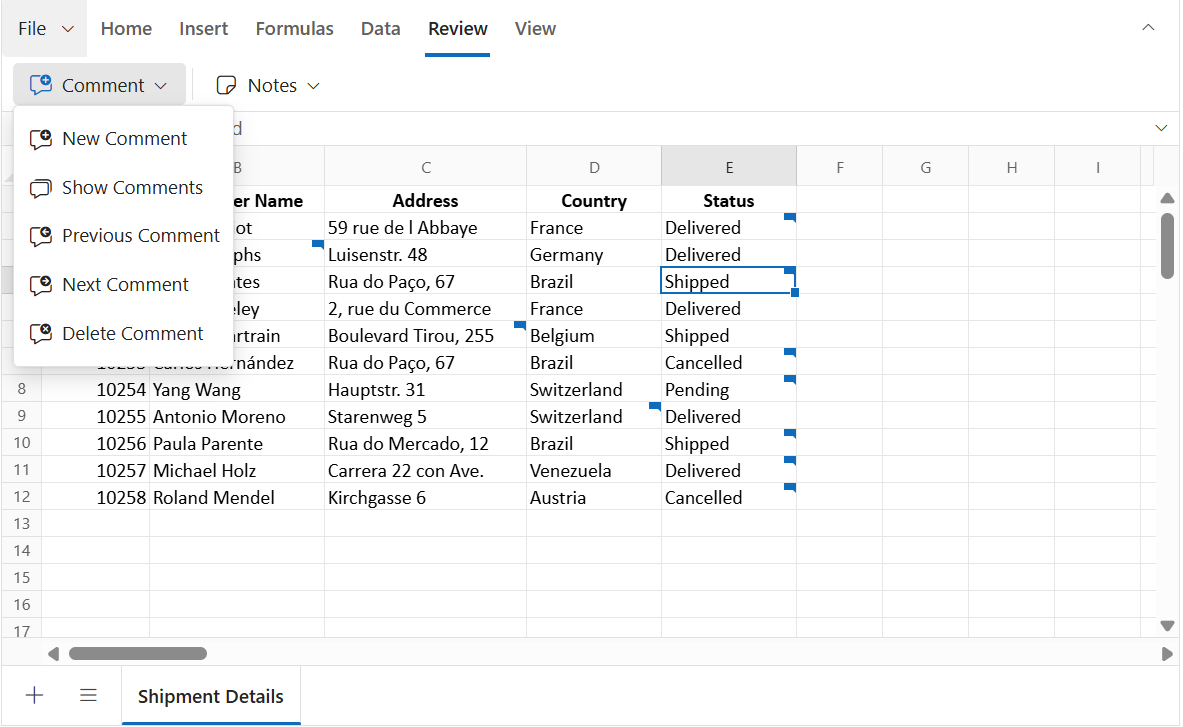
The Review > Comment > Next Comment and Previous Comment options in the ribbon allow you to move quickly between cells that contain comments:
- Next Comment: Jumps to the next cell with a comment.
- Previous Comment: Jumps to the previous cell with a comment.
Navigation starts in the active sheet. When all comments in that sheet have been visited (end or start reached), the navigation continues automatically to the next or previous sheet that has comments. This makes it easy to review all comments across the workbook without switching sheets manually.
Comments review pane
The Comments review pane gives a clear, central view of all comments in the active sheet, making it easier to manage discussions without moving through each cell one by one. It provides options for filtering, quick actions, and navigation, helping maintain an efficient review process across the workbook.
You can show or hide the Comments review pane in two ways:
- Ribbon: Go to Review > Comment > Show Comments.
-
Property: Set the
showCommentsPaneproperty to true when initializing the Spreadsheet. By default, this property is set to false.
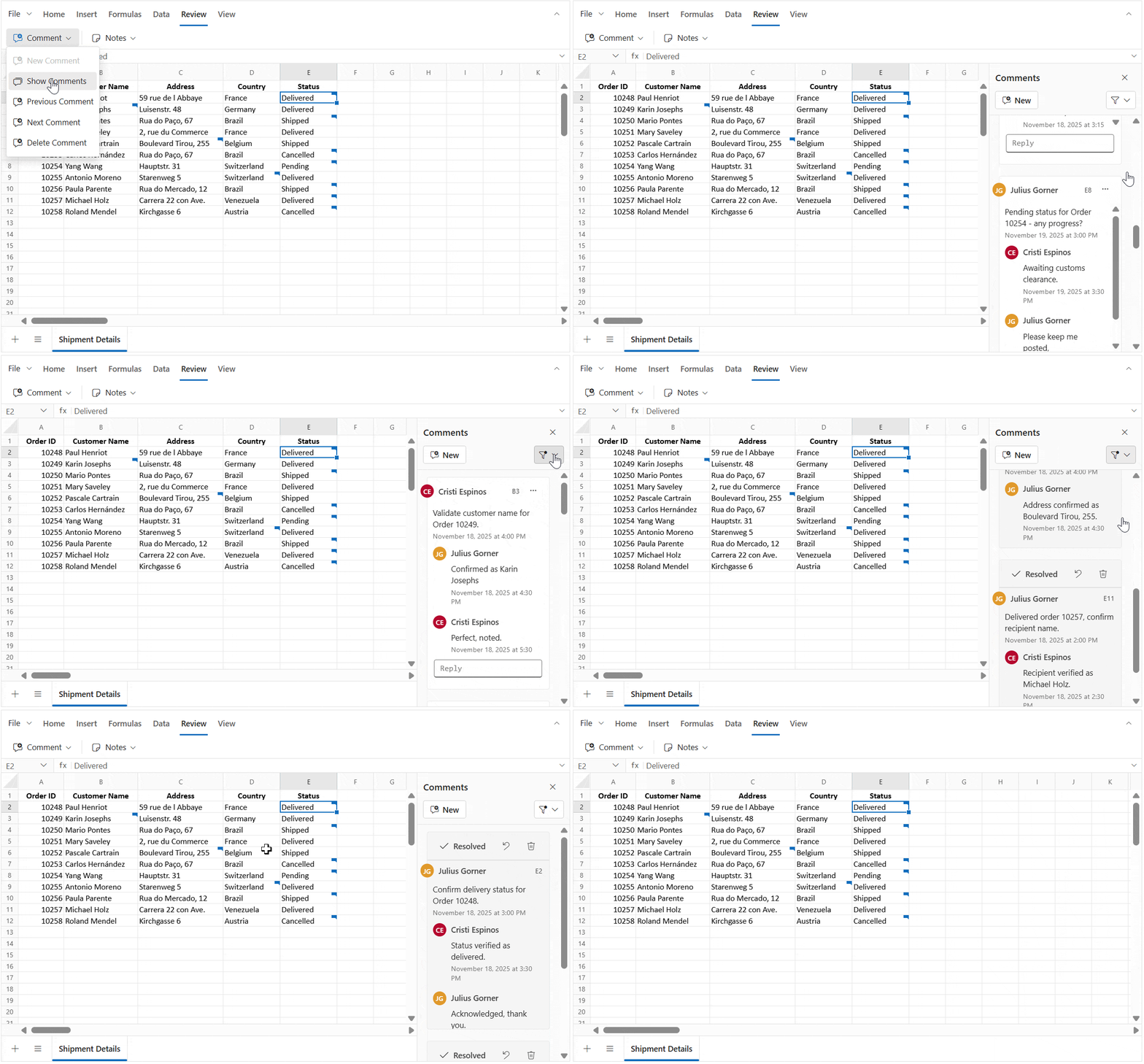
Features of the comments review pane
The “Comments” review pane appears inside the Spreadsheet to give a dedicated space for handling comments. It works as a central place where all comment threads can be viewed, managed, and organized without moving cell by cell.
The “Comments” review pane supports the following actions:
- Add a new comment using the New button.
- Filter comments by All, Active, or Resolved to show specific threads.
- Move between comments and link the selection with the related cells.
- Perform actions such as:
- Reply – Add a reply directly in the review pane.
- Edit – Change the text of a comment or reply.
- Delete – Remove a reply or the whole thread.
- Resolve/Reopen – Update the status of a comment.
When the review pane is open, any action done in the review pane or in the cell’s comment editor stays synchronized.
- Selecting a comment in the review pane highlights the matching cell in the worksheet.
- Selecting a cell that has a comment opens the related comment thread in the review pane.
- Actions such as Reply, Edit, Delete, and Resolve/Reopen update both the review pane and the cell comment editor at the same time, keeping them consistent.
- The review pane updates automatically when comments are added, removed, or resolved, so the latest state is always shown without needing to refresh.
Saving a Workbook with Comments
You can save spreadsheet data along with comments using File > Save As > Microsoft Excel(.xlsx).
- MS Excel (.xlsx) - Preserves all threaded comments (modern comments).
Comments are not included when exporting to .xls, .csv, and .pdf.
Why comments are not saved in .xls
Why comments are not saved in .xls
The .xls format is built on the older Excel binary structure (BIFF8). This structure does not support newer features such as threaded comments.
Threaded comments require the Open XML structure that is used in .xlsx files.
To retain threaded comments, always save the workbook in .xlsx format.
Bind Comments via code-behind
You can attach a comment thread to cells during initial load by adding a comment object in the cell model. Each cell supports one comment thread, which can include:
-
Comment: Contains
author,text,createdTime, andisResolved. -
Replies: A list of replies. Each reply has its own
author,text, andcreatedTime. Nested replies (replies to replies) are not supported.
In the example below, comments are added to a specific cell using cell data binding. The “Comments” review pane is shown at startup by enabling the showCommentsPane property, and comments are added with the updateCell method inside the created event.
import * as React from 'react';
import { createRoot } from 'react-dom/client';
import { SpreadsheetComponent, SheetsDirective, SheetDirective, RangesDirective, RowsDirective, RowDirective } from '@syncfusion/ej2-react-spreadsheet';
import { RangeDirective, ColumnsDirective, ColumnDirective, CellsDirective, CellDirective } from '@syncfusion/ej2-react-spreadsheet';
import { shipmentData } from './datasource';

function App() {
    const spreadsheetRef = React.useRef(null);
    function onCreated() {
        let spreadsheet = spreadsheetRef.current;
        if (spreadsheet) {
            spreadsheet.cellFormat({ fontWeight: 'bold', textAlign: 'center' }, 'Shipment Details!A1:F1');
            // Add comment using updateCell.
            spreadsheet.updateCell({
                comment: {
                    author: 'Cristi Espinos', text: 'Validate customer name for Order 10249.', createdTime: 'November 18, 2025 at 4:00 PM',
                    isResolved: false, replies: [{ author: 'Julius Gorner', text: 'Confirmed as Karin Josephs', createdTime: 'November 18, 2025 at 4:30 PM' },
                    { author: 'Cristi Espinos', text: 'Perfect, noted.', createdTime: 'November 18, 2025 at 5:30 PM' }]
                }
            }, 'Shipment Details!B3');
            spreadsheet.updateCell({
                comment: {
                    author: 'Cristi Espinos', text: 'Verify address details for delivery.', createdTime: 'November 18, 2025 at 4:00 PM',
                    isResolved: true, replies: [{ author: 'Julius Gorner', text: 'Address confirmed as Boulevard Tirou, 255.', createdTime: 'November 18, 2025 at 4:30 PM' }]
                }
            }, 'Shipment Details!C6');
            spreadsheet.updateCell({
                comment: {
                    author: 'Cristi Espinos', text: 'Confirm country for Order 10255 delivery.', createdTime: 'November 18, 2025 at 4:00 PM',
                    isResolved: false, replies: [{ author: 'Julius Gorner', text: 'Country verified as Switzerland.', createdTime: 'November 18, 2025 at 4:30 PM' },
                    { author: 'Cristi Espinos', text: 'Acknowledged.', createdTime: 'November 18, 2025 at 5:30 PM' }]
                }
            }, 'Shipment Details!D9');
        }
    }

    // prepare comments as an array and bind by index in the JSX below
    const cellComments = [
        {
            author: 'Julius Gorner', text: 'Confirm delivery status for Order 10248.', createdTime: 'November 18, 2025 at 3:00 PM',
            isResolved: true, replies: [{ author: 'Cristi Espinos', text: 'Status verified as delivered.', createdTime: 'November 18, 2025 at 3:30 PM' },
            { author: 'Julius Gorner', text: 'Acknowledged, thank you.', createdTime: 'November 18, 2025 at 3:45 PM' }]
        },
        {
            author: 'Julius Gorner', text: 'Order 10250 is marked as Shipped, any update on current status?', createdTime: 'November 16, 2025 at 9:00 PM',
            isResolved: false, replies: [{ author: 'Cristi Espinos', text: 'Shipment is in transit.', createdTime: 'November 17, 2025 at 3:30 PM' },
            { author: 'Julius Gorner', text: 'Thanks for the update.', createdTime: 'November 17, 2025 at 3:45 PM' }]
        },
        {
            author: 'Julius Gorner', text: 'Reason for cancellation of Order 10253?', createdTime: 'November 18, 2025 at 1:00 PM',
            isResolved: false, replies: [{ author: 'Cristi Espinos', text: 'Customer requested cancellation.', createdTime: 'November 18, 2025 at 1:30 PM' },
            { author: 'Julius Gorner', text: 'Understood, thanks.', createdTime: 'November 18, 2025 at 3:15 PM' }]
        },
        {
            author: 'Julius Gorner', text: 'Pending status for Order 10254 - any progress?', createdTime: 'November 19, 2025 at 3:00 PM',
            isResolved: false, replies: [{ author: 'Cristi Espinos', text: 'Awaiting customs clearance.', createdTime: 'November 19, 2025 at 3:30 PM' },
            { author: 'Julius Gorner', text: 'Please keep me posted,', createdTime: 'November 19, 2025 at 3:45 PM' }]
        },
        {
            author: 'Julius Gorner', text: 'Order 10256 shipped, tracking details shared?', createdTime: 'November 18, 2025 at 3:00 AM',
            isResolved: false, replies: [{ author: 'Cristi Espinos', text: 'Tracking sent via email,', createdTime: 'November 18, 2025 at 3:30 AM' },
            { author: 'Julius Gorner', text: 'Received, thank you,', createdTime: 'November 18, 2025 at 3:45 AM' }]
        },
        {
            author: 'Julius Gorner', text: 'Delivered order 10257, confirm recipient name.', createdTime: 'November 18, 2025 at 2:00 PM',
            isResolved: true, replies: [{ author: 'Cristi Espinos', text: 'Recipient verified as Michael Holz.', createdTime: 'November 18, 2025 at 2:30 PM' },
            { author: 'Julius Gorner', text: 'Great, noted.', createdTime: 'November 18, 2025 at 2:45 PM' }]
        },
        {
            author: 'Julius Gorner', text: 'Order 10258 cancelled, reason documented?', createdTime: 'November 18, 2025 at 12:00 PM',
            isResolved: false, replies: [{ author: 'Cristi Espinos', text: 'Customer changed requirements', createdTime: 'November 18, 2025 at 12:30 PM' },
            { author: 'Julius Gorner', text: 'Understood, thanks.', createdTime: 'November 18, 2025 at 12:45 PM' }]
        }
    ];

    return (
        <div>
            <SpreadsheetComponent ref={spreadsheetRef} showCommentsPane={true} openUrl='https://document.syncfusion.com/web-services/spreadsheet-editor/api/spreadsheet/open' saveUrl='https://document.syncfusion.com/web-services/spreadsheet-editor/api/spreadsheet/save' created={onCreated.bind(this)}>
                <SheetsDirective>
                    <SheetDirective name="Shipment Details">
                        <RangesDirective>
                            <RangeDirective dataSource={shipmentData}></RangeDirective>
                        </RangesDirective>
                        <RowsDirective>
                            <RowDirective index={1}>
                                <CellsDirective>
                                    <CellDirective index={4} comment={cellComments[0]}></CellDirective>
                                </CellsDirective>
                            </RowDirective>
                            <RowDirective index={3}>
                                <CellsDirective>
                                    <CellDirective index={4} comment={cellComments[1]}></CellDirective>
                                </CellsDirective>
                            </RowDirective>
                            <RowDirective index={6}>
                                <CellsDirective>
                                    <CellDirective index={4} comment={cellComments[2]}></CellDirective>
                                </CellsDirective>
                            </RowDirective>
                            <RowDirective index={7}>
                                <CellsDirective>
                                    <CellDirective index={4} comment={cellComments[3]}></CellDirective>
                                </CellsDirective>
                            </RowDirective>
                            <RowDirective index={9}>
                                <CellsDirective>
                                    <CellDirective index={4} comment={cellComments[4]}></CellDirective>
                                </CellsDirective>
                            </RowDirective>
                            <RowDirective index={10}>
                                <CellsDirective>
                                    <CellDirective index={4} comment={cellComments[5]}></CellDirective>
                                </CellsDirective>
                            </RowDirective>
                            <RowDirective index={11}>
                                <CellsDirective>
                                    <CellDirective index={4} comment={cellComments[6]}></CellDirective>
                                </CellsDirective>
                            </RowDirective>
                        </RowsDirective>
                        <ColumnsDirective>
                            <ColumnDirective width={80}></ColumnDirective>
                            <ColumnDirective width={130}></ColumnDirective>
                            <ColumnDirective width={150}></ColumnDirective>
                            <ColumnDirective width={100}></ColumnDirective>
                            <ColumnDirective width={100}></ColumnDirective>
                        </ColumnsDirective>
                    </SheetDirective>
                </SheetsDirective>
            </SpreadsheetComponent>
        </div>
    );
};
export default App;

const root = createRoot(document.getElementById('root'));
root.render(<App />);
import * as React from 'react';
import { createRoot } from 'react-dom/client';
import { SpreadsheetComponent, SheetsDirective, SheetDirective, RangesDirective, RowsDirective, RowDirective, CellsDirective, CellDirective, } from '@syncfusion/ej2-react-spreadsheet';
import { RangeDirective, ColumnsDirective, ColumnDirective } from '@syncfusion/ej2-react-spreadsheet';
import { shipmentData } from './datasource';
function App() {
const spreadsheetRef = React.useRef<SpreadsheetComponent>(null);
function onCreated() {
let spreadsheet = spreadsheetRef.current;
if (spreadsheet) {
spreadsheet.cellFormat({ fontWeight: 'bold', textAlign: 'center' }, 'Shipment Details!A1:F1');
// Add comment using updateCell.
spreadsheet.updateCell({
comment: {
author: 'Cristi Espinos', text: 'Validate customer name for Order 10249.', createdTime: 'November 18, 2025 at 4:00 PM',
isResolved: false, replies: [{ author: 'Julius Gorner', text: 'Confirmed as Karin Josephs', createdTime: 'November 18, 2025 at 4:30 PM' },
{ author: 'Cristi Espinos', text: 'Perfect, noted.', createdTime: 'November 18, 2025 at 5:30 PM' }]
}
}, 'Shipment Details!B3');
spreadsheet.updateCell({
comment: {
author: 'Cristi Espinos', text: 'Verify address details for delivery.', createdTime: 'November 18, 2025 at 4:00 PM',
isResolved: true, replies: [{ author: 'Julius Gorner', text: 'Address confirmed as Boulevard Tirou, 255.', createdTime: 'November 18, 2025 at 4:30 PM' }]
}
}, 'Shipment Details!C6');
spreadsheet.updateCell({
comment: {
author: 'Cristi Espinos', text: 'Confirm country for Order 10255 delivery.', createdTime: 'November 18, 2025 at 4:00 PM',
isResolved: false, replies: [{ author: 'Julius Gorner', text: 'Country verified as Switzerland.', createdTime: 'November 18, 2025 at 4:30 PM' },
{ author: 'Cristi Espinos', text: 'Acknowledged.', createdTime: 'November 18, 2025 at 5:30 PM' }]
}
}, 'Shipment Details!D9');
}
}
// prepare comments as an array and bind by index in the JSX below
const cellComments = [
{
author: 'Julius Gorner', text: 'Confirm delivery status for Order 10248.', createdTime: 'November 18, 2025 at 3:00 PM',
isResolved: true, replies: [{ author: 'Cristi Espinos', text: 'Status verified as delivered.', createdTime: 'November 18, 2025 at 3:30 PM' },
{ author: 'Julius Gorner', text: 'Acknowledged, thank you.', createdTime: 'November 18, 2025 at 3:45 PM' }]
},
{
author: 'Julius Gorner', text: 'Order 10250 is marked as Shipped, any update on current status?', createdTime: 'November 16, 2025 at 9:00 PM',
isResolved: false, replies: [{ author: 'Cristi Espinos', text: 'Shipment is in transit.', createdTime: 'November 17, 2025 at 3:30 PM' },
{ author: 'Julius Gorner', text: 'Thanks for the update.', createdTime: 'November 17, 2025 at 3:45 PM' }]
},
{
author: 'Julius Gorner', text: 'Reason for cancellation of Order 10253?', createdTime: 'November 18, 2025 at 1:00 PM',
isResolved: false, replies: [{ author: 'Cristi Espinos', text: 'Customer requested cancellation.', createdTime: 'November 18, 2025 at 1:30 PM' },
{ author: 'Julius Gorner', text: 'Understood, thanks.', createdTime: 'November 18, 2025 at 3:15 PM' }]
},
{
author: 'Julius Gorner', text: 'Pending status for Order 10254 - any progress?', createdTime: 'November 19, 2025 at 3:00 PM',
isResolved: false, replies: [{ author: 'Cristi Espinos', text: 'Awaiting customs clearance.', createdTime: 'November 19, 2025 at 3:30 PM' },
{ author: 'Julius Gorner', text: 'Please keep me posted,', createdTime: 'November 19, 2025 at 3:45 PM' }]
},
{
author: 'Julius Gorner', text: 'Order 10256 shipped, tracking details shared?', createdTime: 'November 18, 2025 at 3:00 AM',
isResolved: false, replies: [{ author: 'Cristi Espinos', text: 'Tracking sent via email,', createdTime: 'November 18, 2025 at 3:30 AM' },
{ author: 'Julius Gorner', text: 'Received, thank you,', createdTime: 'November 18, 2025 at 3:45 AM' }]
},
{
author: 'Julius Gorner', text: 'Delivered order 10257, confirm recipient name.', createdTime: 'November 18, 2025 at 2:00 PM',
isResolved: true, replies: [{ author: 'Cristi Espinos', text: 'Recipient verified as Michael Holz.', createdTime: 'November 18, 2025 at 2:30 PM' },
{ author: 'Julius Gorner', text: 'Great, noted.', createdTime: 'November 18, 2025 at 2:45 PM' }]
},
{
author: 'Julius Gorner', text: 'Order 10258 cancelled, reason documented?', createdTime: 'November 18, 2025 at 12:00 PM',
isResolved: false, replies: [{ author: 'Cristi Espinos', text: 'Customer changed requirements', createdTime: 'November 18, 2025 at 12:30 PM' },
{ author: 'Julius Gorner', text: 'Understood, thanks.', createdTime: 'November 18, 2025 at 12:45 PM' }]
}
];
return (
<div>
<SpreadsheetComponent ref={spreadsheetRef} showCommentsPane={true} openUrl='https://document.syncfusion.com/web-services/spreadsheet-editor/api/spreadsheet/open' saveUrl='https://document.syncfusion.com/web-services/spreadsheet-editor/api/spreadsheet/save' created={onCreated.bind(this)}>
<SheetsDirective>
<SheetDirective name="Shipment Details">
<RangesDirective>
<RangeDirective dataSource={shipmentData}></RangeDirective>
</RangesDirective>
<RowsDirective>
<RowDirective index={1}>
<CellsDirective>
<CellDirective index={4} comment={cellComments[0]}></CellDirective>
</CellsDirective>
</RowDirective>
<RowDirective index={3}>
<CellsDirective>
<CellDirective index={4} comment={cellComments[1]}></CellDirective>
</CellsDirective>
</RowDirective>
<RowDirective index={6}>
<CellsDirective>
<CellDirective index={4} comment={cellComments[2]}></CellDirective>
</CellsDirective>
</RowDirective>
<RowDirective index={7}>
<CellsDirective>
<CellDirective index={4} comment={cellComments[3]}></CellDirective>
</CellsDirective>
</RowDirective>
<RowDirective index={9}>
<CellsDirective>
<CellDirective index={4} comment={cellComments[4]}></CellDirective>
</CellsDirective>
</RowDirective>
<RowDirective index={10}>
<CellsDirective>
<CellDirective index={4} comment={cellComments[5]}></CellDirective>
</CellsDirective>
</RowDirective>
<RowDirective index={11}>
<CellsDirective>
<CellDirective index={4} comment={cellComments[6]}></CellDirective>
</CellsDirective>
</RowDirective>
</RowsDirective>
<ColumnsDirective>
<ColumnDirective width={80}></ColumnDirective>
<ColumnDirective width={130}></ColumnDirective>
<ColumnDirective width={150}></ColumnDirective>
<ColumnDirective width={100}></ColumnDirective>
<ColumnDirective width={100}></ColumnDirective>
</ColumnsDirective>
</SheetDirective>
</SheetsDirective>
</SpreadsheetComponent>
</div>
);
};
export default App;
const root = createRoot(document.getElementById('root')!);
root.render(<App />);Important Notes
-
One thread per cell: Attach a single
commentobject per cell. New remarks should be added as replies inside the existing thread. - Author Identity: The author name for each comment and reply is static once set. When exporting, the author information is preserved for all comments, even if multiple authors exist in the workbook.
- New comment: When the “Comments” review pane is enabled, adding a new comment renders the drafted comment editor directly in the “Comments” review pane.
Limitations
- Draft comments are not saved: Text typed in the comment editor is lost if the editor is closed without clicking Post. Only posted comments are stored and shown again when the editor is reopened.
- Comments and Notes cannot be used together: A cell can have either a comment or a note, but not both. If a cell already has a comment, a note cannot be added, and if it has a note, a comment cannot be added.
- Comments in print output: Comments are not included when printing the worksheet or workbook.
- No real-time collaboration: Multiple people cannot edit comments at the same time. However, when a workbook is exported and then imported again, the author details for each comment and reply remain available.