Layers in Windows Forms Diagram
Layers are transparent sheets that can be added to the model to organize diagram objects. Layers help arrange a set of nodes on the WinForms Diagram.

Sample Layers
A layer organizes graphical objects into groups that share common default properties and Z-order. Users can add any number of layers to the model and move objects between layers.
Layers are useful when you want to separate text and links from other nodes. The nodes created can be added to their respective layers. One node can be assigned to multiple layers. A node is visible only when all of its assigned layers are visible; if one assigned layer is hidden, the node is not drawn.
Programmatically, layers can be implemented as follows.
// Layer 1
PointF[] pts1 = { new PointF(50, 25), new PointF(75, 75), new PointF(100, 25), new PointF(125, 75), new PointF(150, 25), new PointF(175, 75), new PointF(200, 25) };
CurveNode cn = new CurveNode(pts1);
diagram1.Model.AppendChild(cn);
Layer layer1 = new Layer();
cn.Layers.Add(layer1);

// Layer 2
PointF[] pts = { new PointF(10, 100), new PointF(50, 25), new PointF(34, 78), new PointF(100, 78) };
ClosedCurveNode ccn = new ClosedCurveNode(pts);
diagram1.Model.AppendChild(ccn);
Layer layer2 = new Layer();
ccn.Layers.Add(layer2);

// Layer 3
PointF pt = new PointF(50F, 200F);
PointF pt1 = new PointF(200F, 100F);
BezierCurve bc = new BezierCurve(pt, pt1);
diagram1.Model.AppendChild(bc);
SplineNode sp = new SplineNode(new PointF(130, 200), new PointF(200, 200), new PointF(120, 40));
diagram1.Model.AppendChild(sp);
Layer layer3 = new Layer();
bc.Layers.Add(layer3);
sp.Layers.Add(layer3);
' Layer 1
Dim pts1 As PointF() = {New PointF(50, 25), New PointF(75, 75), New PointF(100, 25), New PointF(125, 75), New PointF(150, 25), New PointF(175, 75),
New PointF(200, 25)}
Dim cn As New CurveNode(pts1)
diagram1.Model.AppendChild(cn)
Dim layer1 As New Layer()
cn.Layers.Add(layer1)
' Layer 2
Dim pts As PointF() = {New PointF(10, 100), New PointF(50, 25), New PointF(34, 78), New PointF(100, 78)}
Dim ccn As New ClosedCurveNode(pts)
diagram1.Model.AppendChild(ccn)
Dim layer2 As New Layer()
ccn.Layers.Add(layer2)
' Layer 3
Dim pt As New PointF(50.0F, 200.0F)
Dim pt1 As New PointF(200.0F, 100.0F)
Dim bc As New BezierCurve(pt, pt1)
diagram1.Model.AppendChild(bc)
Dim sp As New SplineNode(New PointF(130, 200), New PointF(200, 200), New PointF(120, 40))
diagram1.Model.AppendChild(sp)
Dim layer3 As New Layer()
bc.Layers.Add(layer3)
sp.Layers.Add(layer3)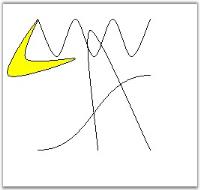
Adding Layers
Layers can be added to the model through the LayersCollectionEditor, which can be opened by selecting the Layers Collection property.
Layers
| Properties | Description |
|---|---|
| Enabled | Indicates whether the layer should be active or not. Default value is false. |
| Name | Indicates the name of the layer. |
| Visible | Indicates whether the objects on the layer should be visible. |
Adding Objects to a Layer
To add objects to a layer, that layer must be active. If an object is added to the model, it will be automatically added to that active layer. The layer can be made active only on setting the Enabled property of that layer.
For example, enable the layer before adding nodes to it:
Layer layer0 = new Layer();
diagram1.Model.Layers.Add(layer0);
layer0.Enabled = true;

CurveNode node = new CurveNode(new PointF[] { new PointF(10, 10), new PointF(40, 40) });
diagram1.Model.AppendChild(node);
node.Layers.Add(layer0);
Dim layer0 As New Layer()
diagram1.Model.Layers.Add(layer0)
layer0.Enabled = True
Dim node As New CurveNode(New PointF() {New PointF(10, 10), New PointF(40, 40)})
diagram1.Model.AppendChild(node)
node.Layers.Add(layer0)The objects can be added to more than one layer by setting the Enabled property of all the layers to which it is added.
To add an object only to a single layer, make sure that only a single layer is enabled at a time.
Object Visibility
The visibility of the layer can be handled to control the visibility of all the objects on that layer. Use Enabled to activate a layer and Visible to show or hide the layer contents.
Layer layer0 = new Layer();
this.diagram1.Model.Layers.Add(layer0);
layer0.Enabled = true;
layer0.Visible = true;
Dim layer0 As New Layer()
Me.diagram1.Model.Layers.Add(layer0)
layer0.Enabled = True
layer0.Visible = True