Dynamic Properties in Windows Forms Diagram
Overview
This feature lets users add additional properties or data to the nodes and connectors. Any type of data can be added as additional data or properties.
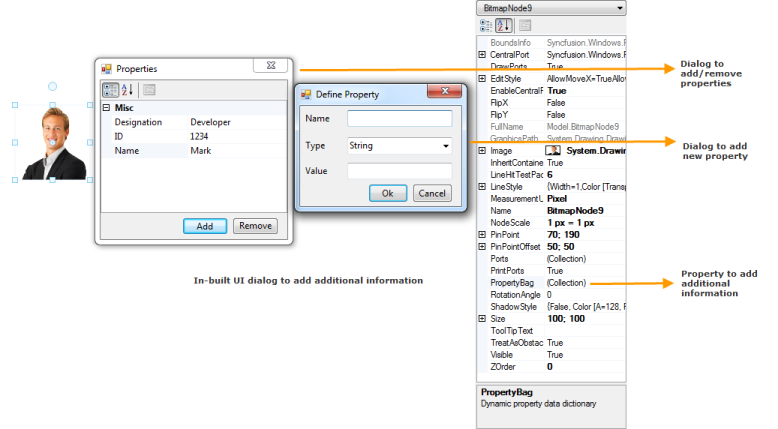
The node’s PropertyBag property, which is a key-value pair, is used to add, edit, and remove the additional properties or data, which can be serialized when saving the diagram.
The WinForms Diagram has built-in UI dialogs to add, edit, and remove the dynamic properties.
Use Case Scenario
It is used to store additional data to the nodes or connectors as needed.
Properties
| Property | Description | Data Type |
|---|---|---|
| PropertyBag | Gets or sets the dynamic property data dictionary. | Dictionary<string, object> |
Code Example
The following code shows how to add additional data to a node by using the PropertyBag property.
// Assumes a diagram node and an employee source object have been created beforehand.
Syncfusion.Windows.Forms.Diagram.Node node = new Syncfusion.Windows.Forms.Diagram.Node();
Employee employee = new Employee { EmployeeName = "John Doe", EmployeeID = 1001, Designation = "Developer" };

node.PropertyBag.Add("Name", employee.EmployeeName);
node.PropertyBag.Add("ID", employee.EmployeeID);
node.PropertyBag.Add("Designation", employee.Designation);
' Assumes a diagram node and an employee source object have been created beforehand.
Dim node As New Syncfusion.Windows.Forms.Diagram.Node()
Dim employee As New Employee() With { .EmployeeName = "John Doe", .EmployeeID = 1001, .Designation = "Developer" }
node.PropertyBag.Add("Name", employee.EmployeeName)
node.PropertyBag.Add("ID", employee.EmployeeID)
node.PropertyBag.Add("Designation", employee.Designation)