BPMN Expanded Sub Process in Blazor Diagram Component
A BpmnExpandedSubProcess is used to frame a part of the diagram, groups related elements visually without implying any additional process semantics. It is represented by a rounded rectangle.
How to Create an Expanded Sub-Process
To create an Expanded Sub-Process, define the Shape property of the node as BpmnExpandedSubProcess and enable AllowDrop constraint of the node.
The following code example explains how to create a BPMN Expanded Sub-Process.
@using Syncfusion.Blazor.Diagram

@* Initialize Diagram *@
<SfDiagramComponent Height="600px" Nodes="@_nodes" />

@code
{
    // Initialize node collection with Node.
    DiagramObjectCollection<Node> _nodes;

    protected override void OnInitialized()
    {
        _nodes = new DiagramObjectCollection<Node>();
        Node node = new Node()
        {
            // Position of the node.
            OffsetX = 500,
            OffsetY = 350,
            // Size of the node.
            Width = 300,
            Height = 300,
            // Unique Id of the node.
            ID = "node1",
            // Sets the shape to activity.
            Shape = new BpmnExpandedSubProcess()
        };
        _nodes.Add(node);
    }
}A complete working sample can be downloaded from GitHub

How to Add BPMN Nodes into a BPMN Expanded Sub-Process
To add a BPMN node into a BPMN Expanded Sub-Process, define the BPMN node object and add it to the Children collection of the BpmnExpandedSubProcess.
The following code example explains how to add a BPMN node to a BPMN Expanded Sub-Process using the Children property.
@using Syncfusion.Blazor.Diagram

@* Initialize Diagram *@
<SfDiagramComponent Height="600px" Nodes="@_nodes" />

@code
{
    // Initialize node collection with Node.
    DiagramObjectCollection<Node> _nodes;

    protected override void OnInitialized()
    {
        _nodes = new DiagramObjectCollection<Node>();
        Node node1 = new Node()
        {
            ID = "node1",
            OffsetX = 300,
            OffsetY = 300,
            Width = 70,
            Height = 70,
            Shape = new BpmnActivity() { ActivityType = BpmnActivityType.Task }
        };
        _nodes.Add(node1);
        Node node2 = new Node()
        {
            ID = "node2",
            Width = 300,
            OffsetX = 500,
            OffsetY = 300,
            Height = 300,
            Constraints = NodeConstraints.Default | NodeConstraints.AllowDrop,
            Shape = new BpmnExpandedSubProcess()
            {
                Children = new DiagramObjectCollection<string>() { "node1" }
            }
        };
        _nodes.Add(node2);
    }
}A complete working sample can be downloaded from GitHub

How to Add BPMN Nodes into BPMN Expanded Sub-Process at Runtime
- Drag and drop the BPMN nodes to the BPMN Expanded Sub-Process.
While resizing or dragging the child element, if the child element bounds are within the BPMN Expanded Sub-Process bounds, the BPMN Expanded Sub-Process size will be updated along with that.
The following image shows how to add a BPMN node into the BPMN Expanded Sub-Process at runtime.
How to Set Loop Type
The Loop property in the BpmnExpandedSubProcess component defines the type of loop behavior for a task that is internally repeated within a BPMN Expanded Sub-Process. By default, the Loop property is set to None.
The Loop property can be configured within the BpmnExpandedSubProcess component, as demonstrated in the following example.
@using Syncfusion.Blazor.Diagram

@* Initialize Diagram *@
<SfDiagramComponent Height="600px" Nodes="@_nodes"/>

@code
{
    // Initialize the node collection with node.
    DiagramObjectCollection<Node> _nodes;

    protected override void OnInitialized()
    {
        _nodes = new DiagramObjectCollection<Node>();
        Node node = new Node()
        {
            // Position of the node.
            OffsetX = 100,
            OffsetY = 100,
            // Size of the node.
            Width = 100,
            Height = 100,
            // Unique Id of the node.
            ID = "node1",
            // Defines the shape to a BPMN Expanded Sub-Process.
            Shape = new BpmnExpandedSubProcess()
            {
                Loop = BpmnLoopCharacteristic.Standard,
            }
        };
        _nodes.Add(node);
    }
}A complete working sample can be downloaded from GitHub
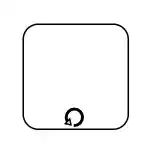
The following table describes the available loop types for a BPMN Expanded Sub-Process.
| LoopActivity | Task | Description |
|---|---|---|
| None |  |
None of the shape shows in the sub-process. |
| Standard | |
Loop marker indicates that the sub-process repeats itself in the sequence. |
| SequenceMultiInstance | 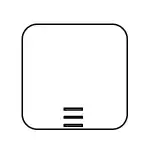 |
Multi-Instance marker indicates that the sub-process can run with other identical sub-processes simultaneously. The three horizontal lines indicate the sequential execution. |
| ParallelMultiInstance | 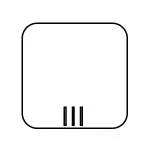 |
Multi-Instance marker indicates that the sub-process can run with other identical sub-processes simultaneously. The three vertical lines indicate that the instances will be executed in parallel. |
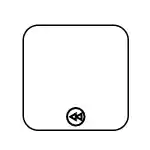
How to Enable Compensation
IsCompensation is triggered when the operation partially fails and can be enabled with the IsCompensation property of the BpmnExpandedSubProcess. By default, the IsCompensation is set to false.
@using Syncfusion.Blazor.Diagram

@* Initialize Diagram *@
<SfDiagramComponent Height="600px" Nodes="@_nodes" />

@code
{
    // Initialize the node collection with node.
    DiagramObjectCollection<Node> _nodes;

    protected override void OnInitialized()
    {
        _nodes = new DiagramObjectCollection<Node>();
        Node node = new Node()
        {
            // Position of the node.
            OffsetX = 100,
            OffsetY = 100,
            // Size of the node.
            Width = 100,
            Height = 100,
            // Unique id of the node.
            ID = "node1",
            // Defines the shape to a BPMN Expanded Sub-Process.
            Shape = new BpmnExpandedSubProcess()
            {
                IsCompensation = true,
            }
        };
        _nodes.Add(node);
    }
}A complete working sample can be downloaded from GitHub
How to Enable Ad-Hoc
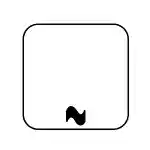
An Ad-Hoc Expanded Sub-Process is a group of tasks that are executed in any order or skipped in order to fulfill the end condition and can be set with the IsAdhoc property of BpmnExpandedSubProcess.
@using Syncfusion.Blazor.Diagram

@* Initialize Diagram *@
<SfDiagramComponent Height="600px" Nodes="@_nodes" />

@code
{
    // Initialize the node collection with node.
    DiagramObjectCollection<Node> _nodes;

    protected override void OnInitialized()
    {
        _nodes = new DiagramObjectCollection<Node>();
        Node node = new Node()
        {
            // Position of the node.
            OffsetX = 100,
            OffsetY = 100,
            // Size of the node.
            Width = 100,
            Height = 100,
            // Unique id of the node.
            ID = "node1",
            // Defines shape to a BPMN Expanded Sub-Process.
            Shape = new BpmnExpandedSubProcess()
            {
                IsAdhoc = true,
            }
        };
        _nodes.Add(node);
    }
}A complete working sample can be downloaded from GitHub
How to Set Sub-Process Type
The SubProcessType represents the type of task being processed within a BPMN Expanded Sub-Process. The SubProcessType property of the BpmnExpandedSubProcess component allows specification of the sub-process type. By default, it is set to Default.
@using Syncfusion.Blazor.Diagram

@* Initialize Diagram *@
<SfDiagramComponent Height="600px" Nodes="@_nodes" />

@code
{
    // Initialize the node collection with node.
    DiagramObjectCollection<Node> _nodes;

    protected override void OnInitialized()
    {
        _nodes = new DiagramObjectCollection<Node>();
        Node node = new Node()
        {
            // Position of the node.
            OffsetX = 100,
            OffsetY = 100,
            // Size of the node.
            Width = 100,
            Height = 100,
            // Unique Id of the node.
            ID = "node1",
            // Sets shape to a BPMN Expanded Sub-Process.
            Shape = new BpmnExpandedSubProcess()
            {
                SubProcessType = BpmnSubProcessType.Event
            }
        };
        _nodes.Add(node);
    }
}A complete working sample can be downloaded from GitHub

The following table describes the available sub-process types.
| SubProcessType | Image | Description |
|---|---|---|
| Call |  |
It is a global sub-process that is reused at various points in the business flow. |
| Event | |
The event sub-process is a sub-process that is triggered by an event. An event sub-process can be added at the process level or at any sub-process level. |
| Transaction |  |
A specialized sub-process where all activities must be completed successfully or compensated/canceled. |
| Default |  |
A standard expanded sub-process with no special semantics, represented by a rounded rectangle. |