IMPORTANT
Starting with version 4.1.0.x, Dashboard Platform SDK has been temporarily suspended from working with dashboards that are created using web-based Dashboard Designer integrated within Dashboard Server.
How to Configure the filter panel programmatically outside of the dashboard viewer
Syncfusion Dashboard Platform SDK provides the support to customize the dedicated filter panel (Refer here to create a filter panel in Dashboard Designer)
To Configure a filter panel outside of the Dashboard Viewer by using below APIs.
- filterPanelSettings,
- openFilterPanel,
- closeFilterPanel,
- beforeFilterPanelOpen,
- filterPanelOpen,
- beforeFilterPanelClose,
- filterPanelClose.
To create and bind the filter panel in outside of the Dashboard Viewer, Create a “div” element with “id” attribute to showcase the filter panel and apply styles to the filter panel for filter panel display, refer the below code example.
Example
<div id="filter" style="float: right; width:30%; height:99%; margin-right: -6px;"></div>1.filterPanelSettings()
filterPanelSettings has the below four inner level properties
- showIcon
- filterPanelId
- showHeader
- showCloseIcon
showIcon:
It returns the Boolean value. You can show or hide the filter panel icon in the filter panel.
filterPanelId:
It returns the string value. you should pass the filter panel element id as a value to this this filterPanelId API, (i.e.) filterPanelId: “filter”.
showHeader:
It returns the Boolean value. You can show or hide the header in filter panel
showCloseIcon:
It returns the Boolean value. You can show or hide the close icon in filter panel.
<script>
        $(document).ready(function () {
            $("#dashboard").ejDashboardViewer({
                filterPanelSettings: {
                   showIcon: false,
                   filterPanelId: "filter",
                   showHeader: true,
                   showCloseIcon: true
               },
           });
       });
    </script>
2.openFilterPanel ()
To open the filter panel, use this openFilterPanel method API, refer the below example,
<script type="text/JavaScript">
            var dashboardObject;
            $(document).ready(function () {
               $("#dashboard").ejDashboardViewer({});
               dashboardObject = $('#dashboard').data("ejDashboardViewer");
               dashboardObject.openFilterPanel();
            });
     </script>
3.closeFilterPanel ()
To close the filter panel, use this closeFilterPanel method API, refer the below example,
<script type="text/JavaScript">
            var dashboardObject;
            $(document).ready(function () {
               $("#dashboard").ejDashboardViewer({});
               dashboardObject = $('#dashboard').data("ejDashboardViewer");
               dashboardObject.closeFilterPanel();
            });
     </script>
4.beforeFilterPanelOpen
This event fires before the filter panel is open on Dashboard Viewer. Refer the below example,
<script type="text/JavaScript">

            $(document).ready(function () {
                 $("#dashboard").ejDashboardViewer({
                      beforeFilterPanelOpen: "beforeFilterPanelOpenEvent"
                 });
            });
            function beforeFilterPanelOpenEvent() {
                alert("beforeFilterPanelOpen event is invoked");
            }

     </script>
5.filterPanelOpen
This event fires after the Filter panel is opened. Refer the below example,
<script type="text/JavaScript">

            $(document).ready(function () {
                 $("#dashboard").ejDashboardViewer({
                      filterPanelOpen: "filterPanelOpenEvent"
                 });
            });
            function filterPanelOpenEvent() {
               alert("filterPanelOpen event is invoked");
            }

     </script>
6.beforeFilterPanelClose
This event fires before the filter panel is close on Dashboard Viewer. Refer the below example,
<script type="text/JavaScript">

            $(document).ready(function () {
                 $("#dashboard").ejDashboardViewer({
                     beforeFilterPanelClose: "beforeFilterPanelCloseEvent"
                 });
            });
            function beforeFilterPanelCloseEvent() {
               alert("beforeFilterPanelClose event is invoked");
            }

     </script>
7.filterPanelClose
This event fires after Filter panel is closed. Refer the below example,
<script type="text/JavaScript">

            $(document).ready(function () {
                 $("#dashboard").ejDashboardViewer({
                     filterPanelClose: "filterPanelCloseEvent"
                 });
            });
            function filterPanelCloseEvent() {
              alert("filterPanelClose event is invoked");
            }

     </script>
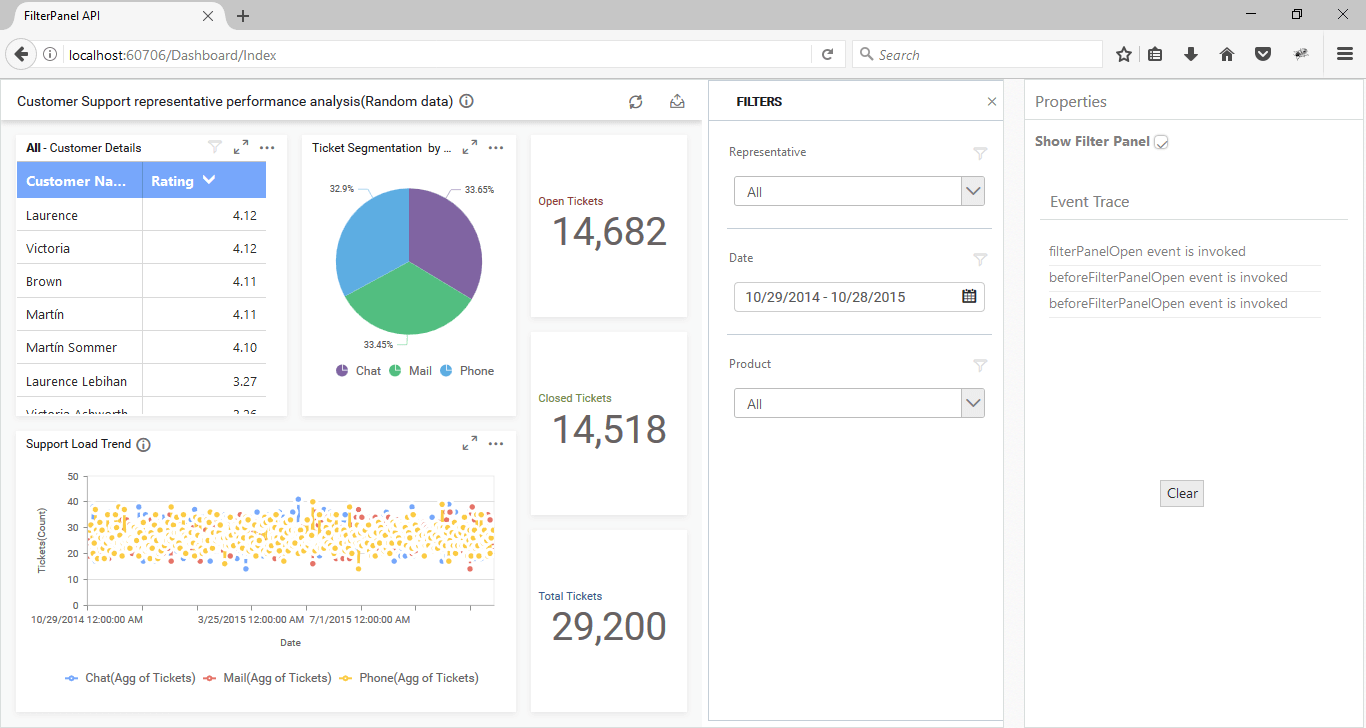
Finally, apply the below code example to configure the filter panel in outside of the Dashboard Viewer
<div class="content-container-fluid" style="height:100%;">
    <div class="row" style="height:100%;">
        <div class="cols-sample-area" style="height:100%;width:73.5%;overflow:hidden !important;">
            <div id="dashboard" style="float:left;height:100%;width:100%;"></div>
            <div id="filter" style="float:right;width:30%; height:99%;margin-right:-6px;"></div>
        </div>
        <div id="sampleProperties" style="margin-bottom:50px">
            <div class="prop-grid prop-grid content" style="overflow:hidden !important;">
                <table>
                    <tr>
                        <td class="chkrad">
                            <label for="Checkbox1">Show Filter Panel</label>
                            <input style="margin:6px;" type="checkbox" id="chkbox" value="showing dashboard" />
                        </td>
                    </tr>
                </table>
            </div>
         <div class="panel-body">
            <div id="property-window" class="box wide">
                    <div>
                        <div class="heading">
                            <span>Event Trace</span>
                        </div>
                        <div class="prop-grid content">
                            <div class="eventarea">
                                <div class="EventLog" id="EventLog">
                                </div>
                            </div>
                        </div>
                        <div class="evtbtn">
                            <div class="evtbtn">
                                <input type="button" style="margin-left:120px;" class="eventclear e-btn" value="Clear" onclick="onClear()" />
                            </div>
                        </div>
                     </div>
                </div>
              </div>
          </div>
      </div>
    </div>
    <script type="text/javascript">

    var dashboardObject,checkBoxObj;

            $(document).ready(function () {
                // declaration
                $("#dashboard").ejDashboardViewer({
                   serviceUrl: “http://dashboardsdkdemo.syncfusion.com/DashboardService/DashboardService.svc”,
                    dashboardPath: “http://dashboardsdkdemo.syncfusion.com//Dashboards//WorldWideCarSalesDashboard.sydx”,
                    beforeFilterPanelOpen: "beforeFilterPanelOpenEvent",
                    filterPanelOpen: "filterPanelOpenEvent",
                    beforeFilterPanelClose: "beforeFilterPanelCloseEvent",
                    filterPanelClose: "filterPanelCloseEvent",
                    filterPanelSettings: {
                        showIcon: false,
                        filterPanelId: "filter",
                        showHeader: true,
                        showCloseIcon: true
                    },
                });
                dashboardObject = $('#dashboard').data("ejDashboardViewer");
                checkBoxObj = $("#chkbox").ejCheckBox({
                    change: "checkBoxChange"
                });
            });
            $("#sampleProperties").ejPropertiesPanel();
            function beforeFilterPanelOpenEvent() {
                $("#dashboard").css('width', '70%');
                this.resizeDashboard();
                jQuery.addEventLog("beforeFilterPanelOpen event is invoked");
            }
            function filterPanelOpenEvent() {
                jQuery.addEventLog("filterPanelOpen event is invoked");
            }

            function beforeFilterPanelCloseEvent() {
                $("#dashboard").css('width', '100%');
                this.resizeDashboard();
                jQuery.addEventLog("beforeFilterPanelClose event is invoked");
            }
            function filterPanelCloseEvent() {
                $("#chkbox").ejCheckBox({checked: false});
                jQuery.addEventLog("filterPanelClose event is invoked");
            }
            function onClear() {
                jQuery.clearEventLog();
            }
            function checkBoxChange(e) {
                if (dashboardObject) {
                    if ($("#chkbox").is(":checked")) {
                        dashboardObject.openFilterPanel();
                        $("#filter").show();
                    }
                    else {
                        dashboardObject.closeFilterPanel();
                        $("#filter").hide();
                    }
                }
            }

    </script>
The above sample illustrates the below screenshot.