IMPORTANT
Starting with version 4.1.0.x, Dashboard Platform SDK has been temporarily suspended from working with dashboards that are created using web-based Dashboard Designer integrated within Dashboard Server.
Bind Dashboard or Widget to the Dashboard Viewer in a HTML page
HTML page creation
Create a new text document and save it as .html extension.(example: Filename.html)
Adding required files in HTML page
NOTE
Follow the link to install Dashboard Platform SDK.
After installing Dashboard Platform SDK setup, scripts, themes, font folders will be found in the below location.
%localappdata%\Syncfusion\Dashboard Platform SDK\Getting Started Samples\Common\Html
Include these scripts, themes, font folders in your application and refer the files of each folder in the HTML page as mentioned below:
<head>
<script src="scripts/jquery-1.10.2.min.js"></script>
<script src="scripts/jquery.easing.1.3.min.js"></script>
<script src="scripts/ej.dashboardViewer.all.min.js"></script>
<link href="themes/ej.widgets.core.min.css" rel="stylesheet" />
<link href="themes/default-theme/ej.theme.min.css" rel="stylesheet" />
<link href="themes/default-theme/ej.dashboardViewer.all.min.css" rel="stylesheet" />
</head>
Hosting Dashboard Service
After installing the Dashboard Platform SDK setup you will find Service and DashboardServiceInstaller folder in the following location and these folders are required to start the Dashboard Service.
%localappdata%\Syncfusion\Dashboard\Samples\Common
To host the Dashboard Service in IIS, Please run the SyncfusionDashboardServiceInstaller-IIS.exe from the following location and enter the port number in which dashboard service to be hosted.
%localappdata%\Syncfusion\Dashboard Platform SDK\DashboardServiceInstaller
For Example:
If you are hosting Dashboard Service at port #3000 in localhost, then Dashboard Service URL will be framed as below:
http://localhost:3000/DashboardService.svc
Open this URL in any of the browser and make sure Dashboard Service is running.
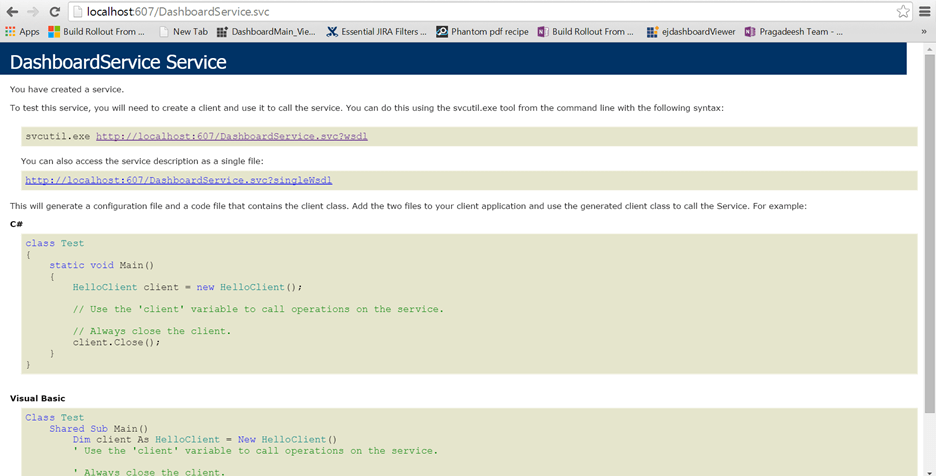
Configuring Dashboard/Widget to Dashboard Viewer
Add the hosted Dashboard Service URL and the Dashboard/Dashboard Widget file (*.SYDX/.SYDW) location to the Dashboard Viewer like below.
For Dashboard:
<div id="dashboard" style="width: 100%; height: 100%;" ></div>
    <script type="text/javascript">
      $(document).ready(function () {
      $('#dashboard').ejDashboardViewer({
      serviceUrl: "http://localhost:3000/DashboardService.svc",
      dashboardPath: "D:\\Syncfusion\\Dashboard\\Dashboards\\WorldWideCarSalesDashboard.sydx",
     });
    });
  </script>
For Dashboard Widget:
<div id="dashboard_widget" style="width: 100%; height: 100%;" ></div>
    <script type="text/javascript">
      $(document).ready(function () {
      $('#dashboard_widget').ejDashboardViewer({
      serviceUrl: "http://localhost:3000/DashboardService.svc",
      dashboardPath: "D:\\Syncfusion\\Dashboard\\Widget\\WorldWideCarSalesWidget.sydw",
     });
    });
  </script>
NOTE
The Dashboard/Dashboard Widget file path should be accessible from the provided Dashboard Service path (or link).
To initiate the dashboard service instance you can follow anyone of the below methods
Finally you get the complete Dashboard Viewer Sample structure like below.
<html>
<style>
body, html {
height: 100%;
overflow: auto !important;}
</style>
<head>
<script src="scripts/jquery-1.10.2.min.js"></script>
<script src="scripts/jquery.easing.1.3.min.js"></script>
<script src="scripts/ej.dashboardViewer.all.min.js"></script>
<link href="themes/ej.widgets.core.min.css" rel="stylesheet" />
<link href="themes/default-theme/ej.theme.min.css" rel="stylesheet" />
<link href="themes/default-theme/ej.dashboardViewer.all.min.css" rel="stylesheet" />
</head>
<body>
  <div id="dashboard" style="width: 100%; height: 100%;" ></div>
   <script type="text/javascript">
    $(document).ready(function () {
    $('#dashboard').ejDashboardViewer({
    serviceUrl: "http://localhost:3000/DashboardService.svc",
    dashboardPath: "D:\\Syncfusion\\Dashboard\\Dashboards\\WorldWideCarSalesDashboard.sydx", // Replace the file path for Dashboard Widget in Dashboard Viewer like, D:\\Syncfusion\\Dashboard\\Widgets\\WorldWideCarSalesWidget.sydw
    });
   });
  </script>
</body>
</html>
IMPORTANT
Hosting dashboard service at IIS is recommended for the production environment for object management and other memory management features.