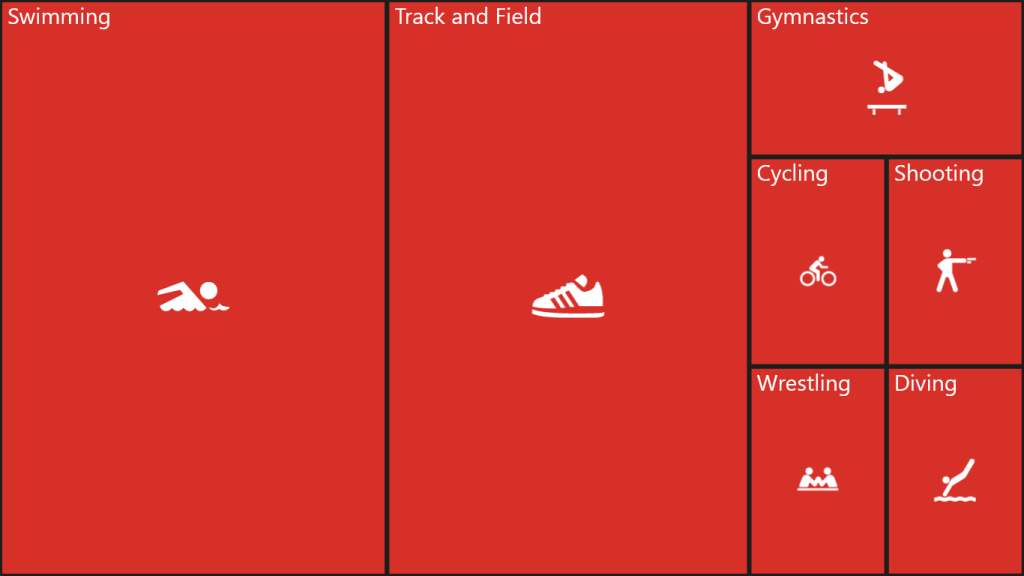
Leaf Nodes Customization in WPF TreeMap
You can customize the leaf nodes by assigning a data template to the LeafTemplate of WPF TreeMap.
<Grid Background="Black">
    <Grid.DataContext>
        <local:OlymicMedalsViewModel />
    </Grid.DataContext>

    <syncfusion:SfTreeMap ItemsSource="{Binding OlympicMedalsDetails}"
                          Margin="50"
                          WeightValuePath="TotalMedals"
                          ColorValuePath="GoldMedals">
        <syncfusion:SfTreeMap.LeafTemplate>
            <DataTemplate>
                <Border Background="#D73028"
                        BorderBrush="Transparent"
                        BorderThickness="3">
                    <Image Source="{Binding Data.GameImgSource}"
                           Margin="0,25,0,0"
                           HorizontalAlignment="Center"
                           VerticalAlignment="Center"
                           Stretch="None" />
                </Border>
            </DataTemplate>
        </syncfusion:SfTreeMap.LeafTemplate>

        <syncfusion:SfTreeMap.Levels>
            <syncfusion:TreeMapFlatLevel GroupPath="GameName"
                                         ShowLabels="True">
                <syncfusion:TreeMapFlatLevel.LabelTemplate>
                    <DataTemplate>
                        <TextBlock Text="{Binding Label}"
                                   Padding="10,5,0,0"
                                   FontSize="20"
                                   HorizontalAlignment="Left"
                                   VerticalAlignment="Top" />
                    </DataTemplate>
                </syncfusion:TreeMapFlatLevel.LabelTemplate>
            </syncfusion:TreeMapFlatLevel>
        </syncfusion:SfTreeMap.Levels>
    </syncfusion:SfTreeMap>
</Grid>
public class OlymicMedalsViewModel
{
public ObservableCollection<OlympicMedals> OlympicMedalsDetails { get; set; }
public OlymicMedalsViewModel()
{
this.OlympicMedalsDetails = new ObservableCollection<OlympicMedals>();
this.OlympicMedalsDetails.Add(
new OlympicMedals
{
Country = "US",
GameName = "Swimming",
GoldMedals = 16,
SilverMedals = 9,
BronzeMedals = 6,
TotalMedals = 31,
GameImgSource = new BitmapImage(
new Uri("ms-appx:/Assets/Swimming.png"))
});
this.OlympicMedalsDetails.Add(
new OlympicMedals
{
Country = "US",
GameName = "Track and Field",
GoldMedals = 9,
SilverMedals = 13,
BronzeMedals = 7,
TotalMedals = 29,
GameImgSource = new BitmapImage(
new Uri("ms-appx:/Assets/TrackAndField.png"))
});
this.OlympicMedalsDetails.Add(
new OlympicMedals
{
Country = "US",
GameName = "Gymnastics",
GoldMedals = 3,
SilverMedals = 1,
BronzeMedals = 2,
TotalMedals = 6,
GameImgSource = new BitmapImage(
new Uri("ms-appx:/Assets/Gymnastics.png"))
});
this.OlympicMedalsDetails.Add(
new OlympicMedals
{
Country = "US",
GameName = "Cycling",
GoldMedals = 1,
SilverMedals = 2,
BronzeMedals = 1,
TotalMedals = 4,
GameImgSource = new BitmapImage(
new Uri("ms-appx:/Assets/Cycling.png"))
});
this.OlympicMedalsDetails.Add(
new OlympicMedals
{
Country = "US",
GameName = "Shooting",
GoldMedals = 3,
SilverMedals = 0,
BronzeMedals = 1,
TotalMedals = 4,
GameImgSource = new BitmapImage(
new Uri("ms-appx:/Assets/Shooting.png"))
});
this.OlympicMedalsDetails.Add(
new OlympicMedals
{
Country = "US",
GameName = "Wrestling",
GoldMedals = 2,
SilverMedals = 0,
BronzeMedals = 2,
TotalMedals = 4,
GameImgSource = new BitmapImage(
new Uri("ms-appx:/Assets/Wrestling.png"))
});
this.OlympicMedalsDetails.Add(
new OlympicMedals
{
Country = "US",
GameName = "Diving",
GoldMedals = 1,
SilverMedals = 1,
BronzeMedals = 2,
TotalMedals = 4,
GameImgSource = new BitmapImage(
new Uri("ms-appx:/Assets/Diving.png"))
});
}
}
public class OlympicMedals
{
public string Country { get; set; }
public string GameName { get; set; }
public double GoldMedals { get; set; }
public double SilverMedals { get; set; }
public double BronzeMedals { get; set; }
public double TotalMedals { get; set; }
public ImageSource GameImgSource { get; set; }
}