Label Customization in WPF Bullet Graph
A quantitative scale label specifies the numeric value according to the major ticks in the range of the scale.
Customizing Labels
The labels can be positioned far away from the quantitative scale by using the LabelOffset property, and the default value is 0. The foreground of the label is customized by setting the LabelStroke property. By setting the LabelSize property, the font size of the labels is modified. The label content can be formatted by using the LabelFormat property.
<syncfusion:SfBulletGraph  LabelSize="20" Minimum="0" Maximum="10"
                              LabelOffset="5"  Interval="2"
                              LabelStroke="Red"
                              LabelFormat="C" >
        </syncfusion:SfBulletGraph>
SfBulletGraph bulletgraph = new SfBulletGraph();
bulletgraph.LabelOffset = 5;
bulletgraph.LabelSize = 20;
bulletgraph.LabelFormat = "C";
bulletgraph.Minimum = 0;
bulletgraph.Maximum = 10;
bulletgraph.Interval = 2;
bulletgraph.LabelStroke = new SolidColorBrush(Colors.Red);
grid.Children.Add(bulletgraph);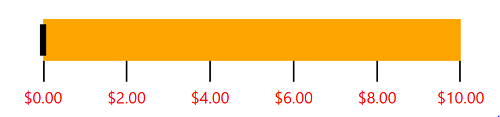
Label Position
The labels in the scale can be placed above or below the qualitative ranges using the LabelPosition property, which supports the following options:
- Below (Default)
-
Above
<syncfusion:SfBulletGraph LabelPosition="Above" TickPosition="Cross">
        </syncfusion:SfBulletGraph>
SfBulletGraph bulletgraph = new SfBulletGraph(); bulletgraph.LabelPosition = BulletGraphLabelsPosition.Above; this.Grid.Children.Add(bulletgraph);
