Rendering Mode in WinUI Funnel Chart
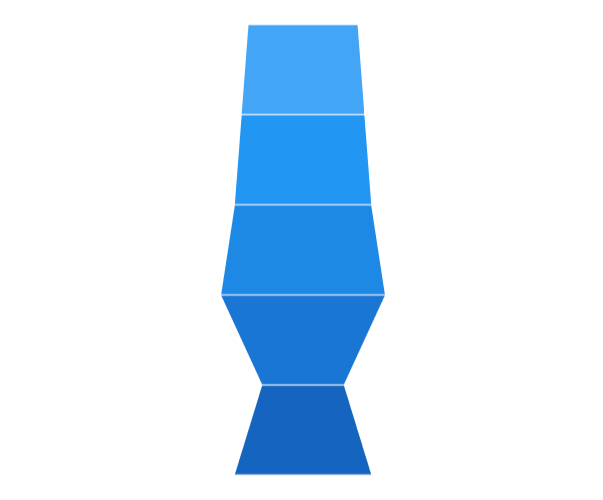
The Mode property defines the rendering mode of the funnel chart, which defines where to bind your values (to height or width). The default value of the Mode property is ValueIsHeight. The following example demonstrates ValueIsHeight and ValueIsWidth of funnel mode.
Rendering with Height
ValueIsHeight is used to render the funnel chart segments based on the height for data point values.
<chart:SfFunnelChart
    x:Name="chart"
    ItemsSource="{Binding Data}"
    XBindingPath="Category"
    YBindingPath="Value"
    Mode="ValueIsHeight">
</chart:SfFunnelChart>
SfFunnelChart chart = new SfFunnelChart();
chart.SetBinding(SfFunnelChart.ItemsSourceProperty,new Binding()
{
Path = new PropertyPath("Data")
});
chart.XBindingPath = "Category";
chart.YBindingPath = "Value";
chart.Mode = ChartFunnelMode.ValueIsHeight;
// Configure additional chart elements
this.Content = chart;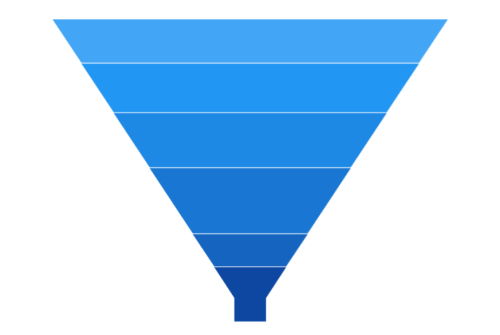
Rendering with Width
ValueIsWidth is used to render the funnel chart segments based on the width for data point values.
<chart:SfFunnelChart
    x:Name="chart"
    ItemsSource="{Binding Data}"
    XBindingPath="Category"
    YBindingPath="Value"
    Mode="ValueIsWidth">
</chart:SfFunnelChart>
SfFunnelChart chart = new SfFunnelChart();
chart.SetBinding(SfFunnelChart.ItemsSourceProperty, new Binding()
{
Path = new PropertyPath("Data")
});
chart.XBindingPath = "Category";
chart.YBindingPath = "Value";
chart.Mode = ChartFunnelMode.ValueIsWidth;
// Configure additional chart elements
this.Content = chart;