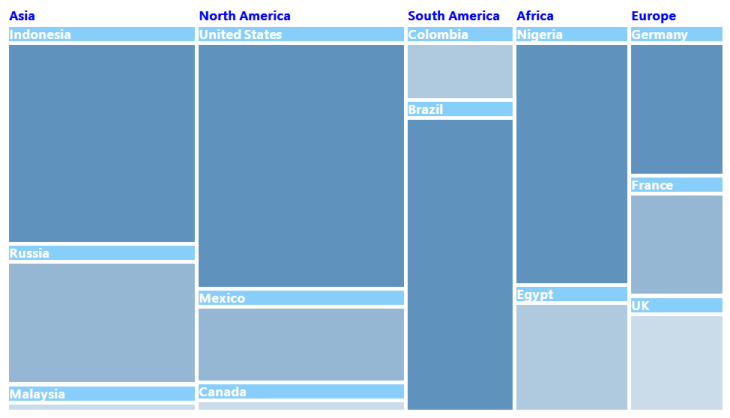
Headers and Labels in WinForms TreeMap
Labels and headers in a tree map can be customized using the following properties available in the tree map control:
Code sample
TreeMap TreeMap1 = new TreeMap();

PopulationViewModel data = new PopulationViewModel();

TreeMap1.ItemsSource = data.PopulationDetails;
TreeMap1.WeightValuePath = "Population";
TreeMap1.ColorValuePath = "Growth";
TreeMap1.ItemsLayoutMode = Syncfusion.Windows.Forms.TreeMap.ItemsLayoutModes.SliceAndDiceAuto;

TreeMapFlatLevel treeMapFlatLevel1 = new TreeMapFlatLevel();
treeMapFlatLevel1.GroupPath = "Continent";
treeMapFlatLevel1.ShowLabels = true;
TreeMap1.Levels.Add(treeMapFlatLevel1);

TreeMapFlatLevel treeMapFlatLevel2 = new TreeMapFlatLevel();
treeMapFlatLevel2.GroupPath = "Country";
treeMapFlatLevel2.ShowLabels = true;
treeMapFlatLevel2.HeaderHeight = 25;
TreeMap1.Levels.Add(treeMapFlatLevel2);

TreeMap1.HeaderBrush = new SolidBrush(Color.Blue);
TreeMap1.LabelBorderBrush = new SolidBrush(Color.White);
TreeMap1.LabelBorderThickness = 5;
TreeMap1.LabelBackgroundBrush = new SolidBrush(Color.LightSkyBlue);
TreeMap1.LabelBrush = new SolidBrush(Color.White);
TreeMap1.LabelFont = new System.Drawing.Font("Segoe UI Semibold", 13F, System.Drawing.FontStyle.Bold, System.Drawing.GraphicsUnit.Point, ((byte)(0)));

DesaturationColorMapping desaturationColorMapping = new DesaturationColorMapping();
desaturationColorMapping.Color = Color.OrangeRed;
desaturationColorMapping.From = 220;
desaturationColorMapping.To = 0;
desaturationColorMapping.RangeMinimum = 0;
desaturationColorMapping.RangeMaximum = 80000;
this.TreeMap1.LeafColorMapping = desaturationColorMapping;
Dim TreeMap1 As New TreeMap()
Dim data As New PopulationViewModel()
TreeMap1.ItemsSource = data.PopulationDetails
TreeMap1.WeightValuePath = "Population"
TreeMap1.ColorValuePath = "Growth"
TreeMap1.ItemsLayoutMode = Syncfusion.Windows.Forms.TreeMap.ItemsLayoutModes.SliceAndDiceAuto
Dim treeMapFlatLevel1 As New TreeMapFlatLevel()
treeMapFlatLevel1.GroupPath = "Continent"
treeMapFlatLevel1.ShowLabels = True
TreeMap1.Levels.Add(treeMapFlatLevel1)
Dim treeMapFlatLevel2 As New TreeMapFlatLevel()
treeMapFlatLevel2.GroupPath = "Country"
treeMapFlatLevel2.ShowLabels = True
treeMapFlatLevel2.HeaderHeight = 25
TreeMap1.Levels.Add(treeMapFlatLevel2)
TreeMap1.HeaderBrush = New SolidBrush(Color.Blue)
TreeMap1.LabelBorderBrush = New SolidBrush(Color.White)
TreeMap1.LabelBorderThickness = 5
TreeMap1.LabelBackgroundBrush = New SolidBrush(Color.LightSkyBlue)
TreeMap1.LabelBrush = New SolidBrush(Color.White)
TreeMap1.LabelFont = New System.Drawing.Font("Segoe UI Semibold", 13.0F, System.Drawing.FontStyle.Bold, System.Drawing.GraphicsUnit.Point, CByte(0))
Dim desaturationColorMapping As New DesaturationColorMapping()
desaturationColorMapping.Color = Color.OrangeRed
desaturationColorMapping.From = 220
desaturationColorMapping.To = 0
desaturationColorMapping.RangeMinimum = 0
desaturationColorMapping.RangeMaximum = 80000
Me.TreeMap1.LeafColorMapping = desaturationColorMapping