Range Settings in WinForms Bullet Graph
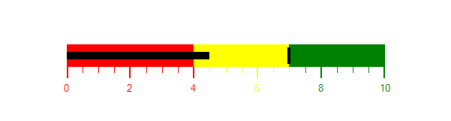
Ranges for a WinForms Bullet Graph are a collection of qualitative ranges. A qualitative range is a visual element that ends at a specified RangeEnd at the start of the previous range’s RangeEnd. The qualitative ranges are arranged according to each RangeEnd value.
Customizing Range:
The width of the ranges is customized by setting the QualitativeRangesSize property. By changing the RangeStroke of the qualitative range, the stroke of the range is customized. By setting the RangeOpacity of the qualitative range, the opacity of the range is modified.
BulletGraph bullet = new BulletGraph();
bullet.Dock = DockStyle.Fill;
bullet.FeaturedMeasure = 4.5;
bullet.ComparativeMeasure = 7;
bullet.MinorTicksPerInterval = 3;
bullet.QualitativeRanges.Add(new QualitativeRange() { RangeEnd = 4, RangeCaption = "Bad", RangeStroke = Color.Red });
bullet.QualitativeRanges.Add(new QualitativeRange() { RangeEnd = 7, RangeCaption = "Satisfactory", RangeStroke = Color.Yellow });
bullet.QualitativeRanges.Add(new QualitativeRange() { RangeEnd = 10, RangeCaption = "Good", RangeStroke = Color.Green });
this.Controls.Add(bullet);
Dim bullet As New BulletGraph()
bullet.Dock = DockStyle.Fill
bullet.FeaturedMeasure = 4.5
bullet.ComparativeMeasure = 7
bullet.MinorTicksPerInterval = 3
bullet.QualitativeRanges.Add(New QualitativeRange() With {.RangeEnd = 4, .RangeCaption = "Bad", .RangeStroke = Color.Red})
bullet.QualitativeRanges.Add(New QualitativeRange() With {.RangeEnd = 7, .RangeCaption = "Satisfactory", .RangeStroke = Color.Yellow})
bullet.QualitativeRanges.Add(New QualitativeRange() With {.RangeEnd = 10, .RangeCaption = "Good", .RangeStroke = Color.Green})
Me.Controls.Add(bullet)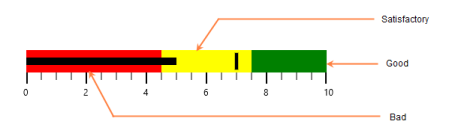
Binding RangeStroke to Ticks and Labels:
By setting BindRangeStrokeToLabels, the stroke of the labels is set related to the stroke of the specified ranges. Similarly, by setting BindRangeStrokeToTicks, the stroke of the ticks is set related to the stroke of the specified ranges.
BulletGraph bullet = new BulletGraph();
bullet.Dock = DockStyle.Fill;
bullet.FeaturedMeasure = 4.5;
bullet.ComparativeMeasure = 7;
bullet.MajorTickStroke = Color.Black;
bullet.MinorTicksPerInterval = 3;
bullet.QualitativeRanges.Add(new QualitativeRange() { RangeEnd = 4, RangeCaption = "Bad", RangeStroke = Color.Red });
bullet.QualitativeRanges.Add(new QualitativeRange() { RangeEnd = 7, RangeCaption = "Satisfactory", RangeStroke = Color.Yellow });
bullet.QualitativeRanges.Add(new QualitativeRange() { RangeEnd = 10, RangeCaption = "Good", RangeStroke = Color.Green });
bullet.BindRangeStrokeToTicks = true;
bullet.BindRangeStrokeToLabels = true;
this.Controls.Add(bullet);
Dim bullet As New BulletGraph()
bullet.Dock = DockStyle.Fill
bullet.FeaturedMeasure = 4.5
bullet.ComparativeMeasure = 7
bullet.MajorTickStroke = Color.Black
bullet.MinorTicksPerInterval = 3
bullet.QualitativeRanges.Add(New QualitativeRange() With {.RangeEnd = 4, .RangeCaption = "Bad", .RangeStroke = Color.Red})
bullet.QualitativeRanges.Add(New QualitativeRange() With {.RangeEnd = 7, .RangeCaption = "Satisfactory", .RangeStroke = Color.Yellow})
bullet.QualitativeRanges.Add(New QualitativeRange() With {.RangeEnd = 10, .RangeCaption = "Good", .RangeStroke = Color.Green})
bullet.BindRangeStrokeToTicks = True
bullet.BindRangeStrokeToLabels = True
Me.Controls.Add(bullet)