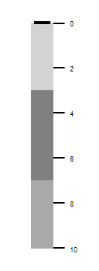
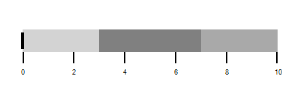
Orientation in WinForms Bullet Graph
The view of the WinForms Bullet Graph is changed by setting the Orientation property. The quantitative scale contains two major components: ticks and labels. The length of the quantitative scale is customized by using the QuantitativeScaleLength property. The direction of the quantitative scale is customized by using the FlowDirection property. It is either Forward or Backward.
BulletGraph bullet = new BulletGraph();
bullet.Dock = DockStyle.Fill;
bullet.FlowDirection = BulletGraphFlowDirection.Forward;
bullet.Orientation = Orientation.Horizontal;
bullet.QualitativeRanges.Add(new QualitativeRange() { RangeEnd = 3, RangeStroke = Color.LightGray });
bullet.QualitativeRanges.Add(new QualitativeRange() { RangeEnd = 7, RangeStroke = Color.Gray });
bullet.QualitativeRanges.Add(new QualitativeRange() { RangeEnd = 10, RangeStroke = Color.DarkGray });
this.Controls.Add(bullet);
Dim bullet As New BulletGraph()
bullet.Dock = DockStyle.Fill
bullet.FlowDirection = BulletGraphFlowDirection.Forward
bullet.Orientation = Orientation.Horizontal
bullet.QualitativeRanges.Add(New QualitativeRange() With {.RangeEnd = 3, .RangeStroke = Color.LightGray})
bullet.QualitativeRanges.Add(New QualitativeRange() With {.RangeEnd = 7, .RangeStroke = Color.Gray})
bullet.QualitativeRanges.Add(New QualitativeRange() With {.RangeEnd = 10, .RangeStroke = Color.DarkGray})
Me.Controls.Add(bullet)|
|
|