Tooltip in UWP Bullet Graph
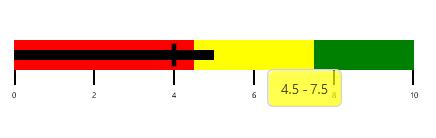
Tooltip in UWP Bullet Graph is used to view the values of FeaturedMeasure, ComparativeMeasure, and QualitativeRange in a required design.
This tooltip is displayed when the mouse is over the FeaturedMeasure, ComparativeMeasure, or QualitativeRange. On touch devices, it is displayed on holding over the FeaturedMeasure, ComparativeMeasure, and QualitativeRange of UWP Bullet Graph.
The UWP Bullet Graph tooltip is displayed only when the ShowToolTip property is set to true.
<syncfusion:SfBulletGraph ShowToolTip="True"/>SfBulletGraph bullet = new SfBulletGraph();
bullet.ShowToolTip = true;
this.Grid.Children.Add(bullet);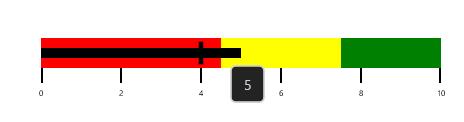
Customizing featured measure tooltip
You can display the value of FeaturedMeasure of UWP Bullet Graph in a tooltip that is used to view the FeaturedMeasure value. The FeaturedMeasureToolTipTemplate is of DataTemplate type by using this property, the default appearance of the FeaturedMeasure tooltip can be customized.
<syncfusion:SfBulletGraph>
    <syncfusion:SfBulletGraph.FeaturedMeasureToolTipTemplate>
        <DataTemplate>
            <Border BorderBrush="#D3D3D3" BorderThickness="1.5" Background="#232323" CornerRadius="5">
                <TextBlock Text="{Binding}" FontSize="14" Foreground="#D3D3D3" Margin="12 8"/>
            </Border>
        </DataTemplate>
    </syncfusion:SfBulletGraph.FeaturedMeasureToolTipTemplate>
</syncfusion:SfBulletGraph>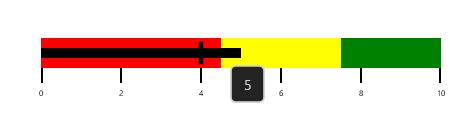
Customizing comparative measure tooltip
You can display the value of ComparativeMeasure of UWP Bullet Graph in a tooltip that is used to view the ComparativeMeasure value. The ComparativeMeasureToolTipTemplate is of DataTemplate type; by using this property, the default appearance of the ComparativeMeasure tooltip can be customized.
<syncfusion:SfBulletGraph>
    <syncfusion:SfBulletGraph.ComparativeMeasureToolTipTemplate>
        <DataTemplate>
            <Border BorderBrush="#D3D3D3" BorderThickness="1.5" Background="#232323" CornerRadius="5">
                <TextBlock Text="{Binding}" FontSize="14" Foreground="#D3D3D3" Margin="12 8"/>
            </Border>
        </DataTemplate>
    </syncfusion:SfBulletGraph.ComparativeMeasureToolTipTemplate>
</syncfusion:SfBulletGraph>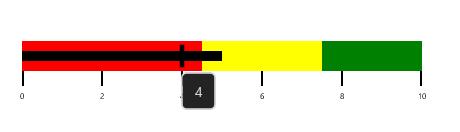
Customizing qualitative range tooltip
You can display the value of QualitativeRange of UWP Bullet Graph in a tooltip that is used to view the Start and End value of QualitativeRange. The QualitativeRangeToolTipTemplate is of DataTemplate type; by using this property, the default appearance of the QualitativeRange tooltip can be customized.
<syncfusion:SfBulletGraph >
    <syncfusion:SfBulletGraph.QualitativeRangeToolTipTemplate>
        <DataTemplate>
            <Border BorderBrush="#D3D3D3" BorderThickness="1.5" CornerRadius="5">
                <Border Background="{Binding RangeStroke}" Opacity="0.7" CornerRadius="5">
                    <StackPanel Orientation="Horizontal" Margin="12 8" >
                        <TextBlock Text="{Binding RangeStart}" FontSize="14" Foreground="Black"/>
                        <TextBlock Text="-" FontSize="14" Foreground="Black" Width="10" TextAlignment="Center"/>
                        <TextBlock Text="{Binding RangeEnd}" FontSize="14" Foreground="Black"/>
                    </StackPanel>
                </Border>
            </Border>
        </DataTemplate>
    </syncfusion:SfBulletGraph.QualitativeRangeToolTipTemplate>
</syncfusion:SfBulletGraph>