Getting started with React Sparkline component
This section describes the steps to create a simple Sparkline and demonstrates the basic usage of the Sparkline component.
Prerequisites
Before getting started, ensure that your development environment meets the system requirements for Syncfusion® React UI components. That page documents the supported React, Node.js, and npm versions, and includes the React-version compatibility table for Syncfusion React components.
- Basic knowledge of React and TypeScript (recommended)
- A code editor like Visual Studio Code
Dependencies
Below is the list of minimum dependencies required to use the Sparkline component.
|-- @syncfusion/ej2-react-charts
    |-- @syncfusion/ej2-data
    |-- @syncfusion/ej2-svg-base
    |-- @syncfusion/ej2-react-base
    |-- @syncfusion/ej2-pdf-export
    |-- @syncfusion/ej2-file-utils
    |-- @syncfusion/ej2-compression
Once you install @syncfusion/ej2-react-charts, the other required dependencies will be installed automatically along with the main package.
Installation and configuration
Create a React application
To easily set up a React application, use the Vite CLI (npm create vite), which provides a faster development environment, smaller bundle sizes, and optimized builds compared to traditional tools like create-react-app. For detailed steps, refer to the Vite installation instructions. Vite sets up your environment using JavaScript and optimizes your application for production.
Note: To create a React application using
create-react-appinstead, refer to this documentation for more details.
To create a new React application, run the following command.
npm create vite@latest my-appThis command will prompt you for a few settings for the new project, such as selecting a framework and a variant.
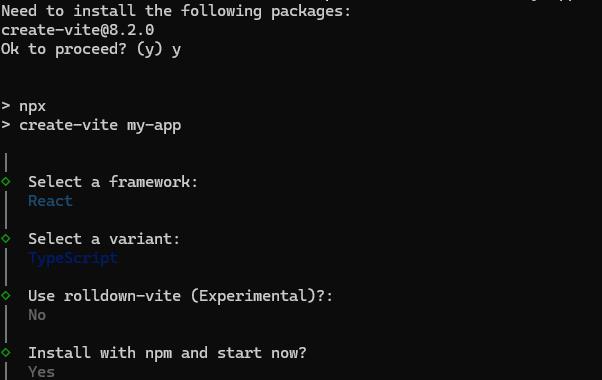
To set up a React application in a TypeScript environment, run the following commands.
npm create vite@latest my-app -- --template react-ts
cd my-app
npm install
npm run dev
To set up a React application in a JavaScript environment, run the following commands.
npm create vite@latest my-app -- --template react
cd my-app
npm install
npm run dev
Install Syncfusion® Sparkline package
All the available Essential® JS 2 packages are published in the npmjs.com public registry.
To install the Syncfusion® Sparkline package, use the following command
npm install @syncfusion/ej2-react-chartsAdd Sparkline to the project
Add the Sparkline component to src/App.tsx using the following code.
import { SparklineComponent } from '@syncfusion/ej2-react-charts';
import * as React from 'react';
function App() {
  return (<SparklineComponent></SparklineComponent>);
}
export default App;
import { SparklineComponent } from '@syncfusion/ej2-react-charts';
import * as React from 'react';
function App() {
return (<SparklineComponent></SparklineComponent>);
}
export default App;Now run the npm run dev command in the console to start the development server. This command compiles your code and serves the application locally, opening it in the browser.
npm run devSince the data source has not been specified to the Sparkline, no shapes will be rendered. Only an empty SVG element is appended to the Sparkline container.
Module injection
Sparkline components are segregated into individual feature-wise modules. To use a particular feature, you must inject its feature service into the services section of the Sparkline component.
The following feature services are available:
-
SparklineTooltip– Inject this module intoservicesto use the tooltip feature. -
SparklineRangeBand– Inject this module intoservicesto render range bands.
Import the required module from the chart package and inject it into the services section of the Sparkline component as follows.
import { SparklineComponent, Inject, SparklineTooltip } from '@syncfusion/ej2-react-charts';
import * as React from "react";

function App() {
  return (<SparklineComponent>
            <Inject services={[SparklineTooltip]} />
          </SparklineComponent>);
}
export default App;
import { SparklineComponent, Inject, SparklineTooltip } from '@syncfusion/ej2-react-charts';
import * as React from "react";
function App() {
return (<SparklineComponent>
<Inject services={[SparklineTooltip]} />
</SparklineComponent>);
}
export default App;Bind data source to Sparkline
The dataSource property enables data binding for the Sparkline. It accepts a collection of values as input, such as a list of objects. Use xName and yName to map the data field names to the horizontal and vertical axes.
import * as React from 'react';
import { createRoot } from 'react-dom/client';
import { SparklineComponent } from '@syncfusion/ej2-react-charts';

function App() {
    return (<SparklineComponent id='sparkline' height='100px' width='70%' dataSource={[
        { xval: '2005', yval: 20090440 },
        { xval: '2006', yval: 20264080 },
        { xval: '2007', yval: 20434180 },
        { xval: '2008', yval: 21007310 },
        { xval: '2009', yval: 21262640 },
        { xval: '2010', yval: 21515750 },
        { xval: '2011', yval: 21766710 },
        { xval: '2012', yval: 22015580 },
        { xval: '2013', yval: 22262500 },
        { xval: '2014', yval: 22507620 }
    ]} xName='xval' yName='yval' type='Line'>
    </SparklineComponent>);
}
export default App;
createRoot(document.getElementById('sparkline')).render(<App />);
import * as React from 'react';
import { createRoot } from 'react-dom/client';
import { SparklineComponent } from '@syncfusion/ej2-react-charts';
function App() {
return (<SparklineComponent id='sparkline' height='100px' width='70%' dataSource={[
{ xval: '2005', yval: 20090440 },
{ xval: '2006', yval: 20264080 },
{ xval: '2007', yval: 20434180 },
{ xval: '2008', yval: 21007310 },
{ xval: '2009', yval: 21262640 },
{ xval: '2010', yval: 21515750 },
{ xval: '2011', yval: 21766710 },
{ xval: '2012', yval: 22015580 },
{ xval: '2013', yval: 22262500 },
{ xval: '2014', yval: 22507620 }
]} xName='xval' yName='yval' type='Line'>
</SparklineComponent>);
}
export default App;
createRoot(document.getElementById('sparkline')).render(<App />);Troubleshooting
If the Sparkline does not render or build errors appear, verify the following common causes before raising an issue.
-
Empty container or no shapes rendered – Ensure
dataSourceis set and the field names referenced inxNameandyNameexist on each data object. Without a data source, the component renders only an empty SVG element. -
SparklineTooltip is not a functionor tooltip does not appear – Confirm theSparklineTooltipmodule is imported from@syncfusion/ej2-react-chartsand injected inside<SparklineComponent>using<Inject services={[SparklineTooltip]} />. Also settooltipSettings.visibletotrue. -
Module not found / package not installed – Run
npm install @syncfusion/ej2-react-charts --savefrom the project root and restart the dev server. -
TypeScript errors for props such as
xName,yName, ortooltipSettings– Verify the installed package version supports your React version (see the system requirements) and that@types/reactmatches your React major version.