Getting Started with Syncfusion® JavaScript (ES5) Sankey Control
Build your first Syncfusion JavaScript (ES5) application with a simple Sankey diagram in just a few minutes. This quickstart guides you through creating a minimal, runnable HTML page that loads the Syncfusion EJ2 (ES5) Sankey control from the CDN, initializes it with sample data, and renders an interactive diagram.
Prerequisites
- Visual Studio Code (or any text editor)
- A web browser to view the result
- A local web server such as the VS Code Live Server extension
Dependencies
The Sankey control ships as part of the @syncfusion/ej2-charts package. Below is the list of minimum dependencies required.
|-- @syncfusion/ej2-charts
    |-- @syncfusion/ej2-base
    |-- @syncfusion/ej2-data
    |-- @syncfusion/ej2-pdf-export
    |-- @syncfusion/ej2-file-utils
    |-- @syncfusion/ej2-compression
    |-- @syncfusion/ej2-svg-base
Note: @syncfusion/ej2-pdf-export, @syncfusion/ej2-file-utils, and @syncfusion/ej2-compression are optional—required only for PDF export features.
Quick Setup
Step 1: Create Folder and HTML file
- Create a folder named
quickstartin your desired directory. - Inside the
quickstartfolder, create two new files:index.htmlandindex.js.
Step 2: Add Syncfusion® CDN Resources
Include the following JavaScript links in the <head> section.
Scripts (JavaScript):
<script src="https://cdn.syncfusion.com/ej2/34.1.29/ej2-base/dist/global/ej2-base.min.js" type="text/javascript"></script>
<script src="https://cdn.syncfusion.com/ej2/34.1.29/ej2-data/dist/global/ej2-data.min.js" type="text/javascript"></script>
<script src="https://cdn.syncfusion.com/ej2/34.1.29/ej2-svg-base/dist/global/ej2-svg-base.min.js" type="text/javascript"></script>
<script src="https://cdn.syncfusion.com/ej2/34.1.29/ej2-charts/dist/global/ej2-charts.min.js" type="text/javascript"></script>Or, to load all Syncfusion components in a single combined bundle:
<script src="https://cdn.syncfusion.com/ej2/34.1.29/dist/ej2.min.js" type="text/javascript"></script>Step 3: Add the Syncfusion® Sankey Control to the Application
The index.html file references a separate index.js file that contains the Sankey component initialization. This keeps your markup and script logic cleanly separated, which is the recommended pattern for Syncfusion® JavaScript (ES5) apps.
index.js imports nothing manually — the global scripts added in Step 2 register the ej.charts.Sankey class on the ej namespace. The script then builds the Sankey component with sample node/link data and renders the control into the #element container declared in index.html.
const nodes = [
  { id: 'Energy Input', label: { text: 'Energy Input' } },
  { id: 'Generation', label: { text: 'Generation' } },
  { id: 'Distribution', label: { text: 'Distribution' } },
  { id: 'Consumption', label: { text: 'Consumption' } }
];

const links = [
  { sourceId: 'Energy Input', targetId: 'Generation', value: 500 },
  { sourceId: 'Generation', targetId: 'Distribution', value: 450 },
  { sourceId: 'Distribution', targetId: 'Consumption', value: 400 }
];

const sankey = new ej.charts.Sankey(
  {
     width:  '90%',
    height: '420px',
    title: 'Energy Flow Diagram',
    nodes: nodes,
    links: links
  },
  '#sankey-container'
);
<!DOCTYPE html>
<html lang="en">
<head>
<title>Syncfusion Sankey - Quick Start</title>
<meta charset="utf-8">
<meta name="viewport" content="width=device-width, initial-scale=1.0">
<meta name="description" content="Syncfusion EJ2 Sankey control in JavaScript (ES5)">
<meta name="author" content="Syncfusion">
<script src="https://cdn.syncfusion.com/ej2/34.2.2/ej2-base/dist/global/ej2-base.min.js" type="text/javascript"></script>
<script src="https://cdn.syncfusion.com/ej2/34.2.2/ej2-data/dist/global/ej2-data.min.js" type="text/javascript"></script>
<script src="https://cdn.syncfusion.com/ej2/34.2.2/ej2-svg-base/dist/global/ej2-svg-base.min.js" type="text/javascript"></script>
<script src="https://cdn.syncfusion.com/ej2/34.2.2/ej2-charts/dist/global/ej2-charts.min.js" type="text/javascript"></script>
</head>
<body>
<h1>Syncfusion Sankey</h1>
<div id="element">
<div id="sankey-container"></div>
</div>
<script src="index.js" type="text/javascript"></script>
</body>
</html>The new ej.charts.Sankey({...}) call creates the Sankey component. The configuration object accepts the following key options:
-
nodes— Array of node objects. Each node needs a uniqueid; the optionallabel.textproperty controls the displayed label. -
links— Array of link objects. Each link needs asourceIdandtargetIdmatching a nodeid, plus a numericvaluethat controls the link thickness. -
title— Text shown above the diagram.
Finally, sankey.appendTo('#element') renders the control into the <div id="element"> element declared in index.html.
Step 4: Open in Browser
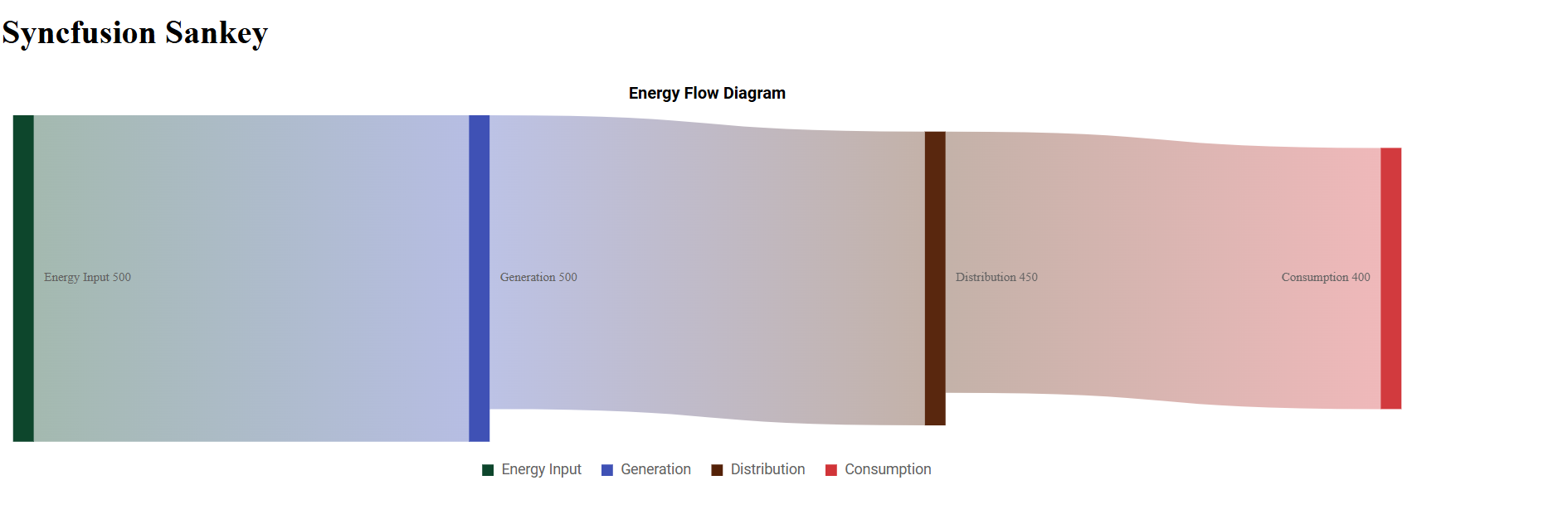
Open quickstart/index.html through a local web server. With the VS Code Live Server extension installed, right-click index.html in the Explorer and choose Open with Live Server, then visit the URL it prints (for example, http://127.0.0.1:5500/). You should see the Syncfusion Sankey control displaying the energy-flow sample data.
Output
The following screenshot shows the output of the Syncfusion Sankey quick start application:
Troubleshooting
-
The page is blank. Open the page through a local web server (for example, the VS Code Live Server extension) instead of double-clicking the file. Syncfusion charts require an
http://orhttps://origin. -
ej is not defined. Confirm thatej2-charts.min.jsis loaded before your script. Place the<script>tag inside the<head>or just before your own<script src="index.js">tag. -
The container is empty. Make sure the
idin your markup (#element) matches the selector passed toappendTo('#element'). -
Links render in the wrong direction. Verify that every
sourceIdandtargetIdmatches an existingnode.id; unmatched ids are silently dropped.