Adding and removing panels dynamically
In real-time cases, the data being presented within the dashboard should be updated frequently which includes adding or removing the data dynamically within the dashboard. This can be easily achieved by using the addPanel and removePanel public methods of the control.
Add or remove panels dynamically
Panels can be added dynamically by using the addPanel public method by passing the panel property as parameter. Also, they can be removed dynamically by using the removePanel public method by passing the panel id value as a parameter.
It is also possible to remove all the panels in a Dashboard Layout by calling removeAll method.
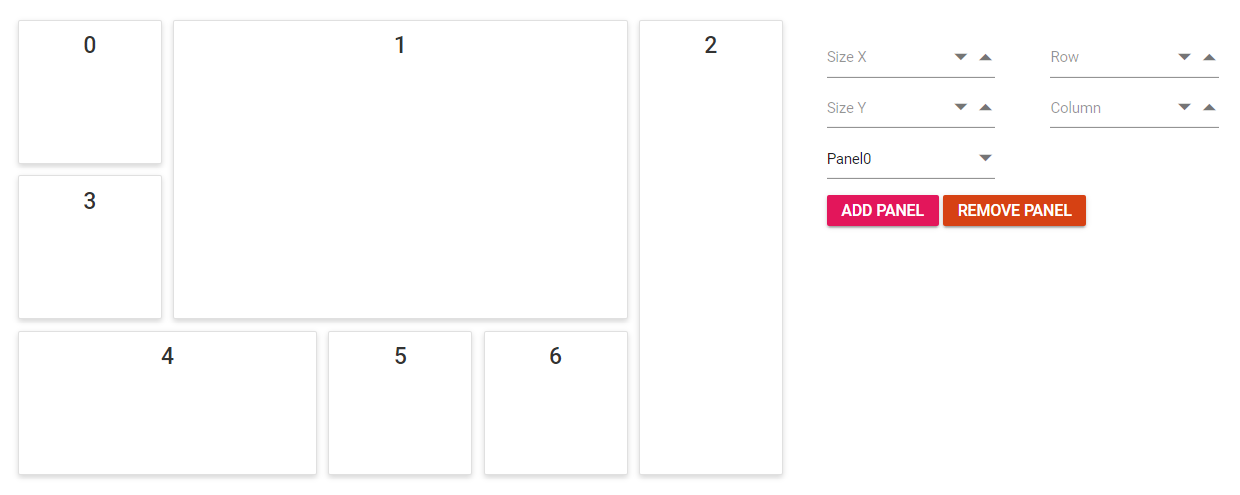
dashboard.removeAll();The following sample demonstrates how to add and remove the panels dynamically in the Dashboard Layout control. Here, panels can be added in any desired position of required size by selecting them in the numeric boxes and clicking add button and remove them by selecting the ID of the panel.
@{
    ...
    var data = new string[] { "Panel0", "Panel1", "Panel2", "Panel3", "Panel4", "Panel5", "Panel6" };
    panelCellSpacingModel modelValue = new panelCellSpacingModel();
    modelValue.cellSpacing = new double[] { 10, 10 };
}

<div id="api_property">
    <div style="display:inline-block">
        <div style="padding:5px;padding-right: 40px;">
            <!--  NumericTextBox element declaration -->
            <ejs-numerictextbox id="sizex" floatLabelType="Never" placeholder="Size X" width="150px" min="1" max="5"></ejs-numerictextbox>
        </div>
        <div style="padding:5px;">
            <!--  NumericTextBox element declaration -->
            <ejs-numerictextbox id="sizey" floatLabelType="Never" placeholder="Size Y" width="150px" min="1" max="5"></ejs-numerictextbox>
        </div>
    </div>
    <div style="display:inline-block">
        <div style="padding:5px;padding-right: 40px;">
            <!--  NumericTextBox element declaration -->
            <ejs-numerictextbox id="row" floatLabelType="Never" placeholder="Row" width="150px" min="0" max="5"></ejs-numerictextbox>
        </div>
        <div style="padding:5px;">
            <!--  NumericTextBox element declaration -->
            <ejs-numerictextbox id="column" floatLabelType="Never" placeholder="Column" width="150px" min="0" max="4"></ejs-numerictextbox>
        </div>
    </div>
    <div style="padding:5px; width: 240px;">
        <!--  Dropdownlist element declaration -->
        <ejs-dropdownlist id="dropdown" placeholder="Select a id value" dataSource="data" width="150px" index="0"></ejs-dropdownlist>
    </div>
    <div style="padding:5px;">
        <div style="width:100%">
            <!--  Button element declaration -->
            <ejs-button id="add" cssClass="e-primary" content="Add Panel"></ejs-button>
            <ejs-button id="remove" cssClass="e-danger" content="Remove Panel"></ejs-button>
        </div>
    </div>
</div>
<div style="padding-top: 15px;" id="control_dash">
    <!--  Dashboardlayout element declaration -->
    <ejs-dashboardlayout id="dashboard_layout" columns="5" cellSpacing="@modelValue.cellSpacing">
        <e-dashboardlayout-panels>
            <e-dashboardlayout-panel id="Panel0" sizeX="1" sizeY="1" row="0" col="0" content="<div class='content'>0</div>">
            </e-dashboardlayout-panel>
            <e-dashboardlayout-panel id="Panel1" sizeX="3" sizeY="2" row="0" col="1" content="<div class='content'>1</div>">
            </e-dashboardlayout-panel>
            <e-dashboardlayout-panel id="Panel2" sizeX="1" sizeY="3" row="0" col="4" content="<div class='content'>2</div>">
            </e-dashboardlayout-panel>
            <e-dashboardlayout-panel id="Panel3" sizeX="1" sizeY="1" row="1" col="0" content="<div class='content'>3</div>">
            </e-dashboardlayout-panel>
            <e-dashboardlayout-panel id="Panel4" sizeX="2" sizeY="1" row="2" col="0" content="<div class='content'>4</div>">
            </e-dashboardlayout-panel>
            <e-dashboardlayout-panel id="Panel5" sizeX="1" sizeY="1" row="2" col="2" content="<div class='content'>5</div>">
            </e-dashboardlayout-panel>
            <e-dashboardlayout-panel id="Panel6" sizeX="1" sizeY="1" row="2" col="3" content="<div class='content'>6</div>">
            </e-dashboardlayout-panel>
        </e-dashboardlayout-panels>
    </ejs-dashboardlayout>
</div>
<!-- end of dashboardlayout element -->

<script>
    document.addEventListener('DOMContentLoaded', function () {
        // Create instances for dashboard layout
        var dashboardObject = document.getElementById('dashboard_layout').ej2_instances[0];
        // Remove panel for dashboard layout
        document.getElementById('remove').onclick = function (e) {
            var dropdownObject = document.getElementById('dropdown').ej2_instances[0];
            dashboardObject.removePanel(dropdownObject.value);
            dropdownObject.dataSource.splice(dropdownObject.dataSource.indexOf(dropdownObject.value), 1);
            dropdownObject.value = null;
            dropdownObject.refresh();
        };
        var count = 7;
        // Add panel for dashboard layout
        document.getElementById('add').onclick = function (e) {
            var sizeX = document.getElementById('sizex').ej2_instances[0];
            var sizeY = document.getElementById('sizey').ej2_instances[0];
            var row = document.getElementById('row').ej2_instances[0];
            var column = document.getElementById('column').ej2_instances[0];
            var dropdownObject = document.getElementById('dropdown').ej2_instances[0];
            var panel = [{
                id: count.toString() + "Panel", sizeX: parseInt(sizeX.value, 10), sizeY: parseInt(sizeY.value, 10), row: parseInt(row.value, 10), col: parseInt(column.value, 10),
                content: "<div class='content'>" + count + "</div>"
            }];
            dropdownObject.dataSource.push("Panel" + count.toString());
            dropdownObject.refresh();
            count = count + 1;
            dashboardObject.addPanel(panel[0]);
        };
    });
</script>

<style>
    /* DashboardLayout element styles  */
    #dashboard_layout .e-panel .e-panel-container .content {
        vertical-align: middle;
        font-weight: 500;
        font-size: 20px;
        text-align: center;
        line-height: 45px;
    }
    /* sample level styles */
    td {
        padding: 5px;
    }

    #control_dash {
        display: block;
        width: 60%;
        float: left;
    }

    #api_property {
        display: inline-block;
        margin: 30px;
    }
</style>
using System;
using System.Collections.Generic;
using System.Linq;
using System.Web;
using Microsoft.AspNetCore.Mvc;
namespace WebApplication.Controllers
{
public class HomeController : Controller
{
public class spacingModel
{
public double[] cellSpacing { get; set; }
}
public ActionResult Index()
{
ViewBag.data = new string[] { "Panel0", "Panel1", "Panel2", "Panel3", "Panel4", "Panel5", "Panel6" };
spacingModel modelValue = new spacingModel();
modelValue.cellSpacing = new double[] { 10, 10 };
return View(modelValue);
}
}
}
NOTE
You can refer to our ASP.NET Core Dashboard Layout feature tour page for its groundbreaking feature representations. You can also explore our ASP.NET Core Dashboard Layout example to know how to present and manipulate data.