Moving of panels in ASP.NET Core Dashboard Layout Control
Other than drag and drop, it is possible to move the panels in Dashboard Layout programmatically. This can be achieved using movePanel method. The method is invoked as follows,
movePanel(id, row, col)Where,
- id - ID of the panel which needs to be moved.
- row - New row position for moving the panel.
- col - New column position for moving the panel.
Each time a panel’s position is changed (Programmatically or through UI interaction), the Dashboard Layout’s change event will be triggered.
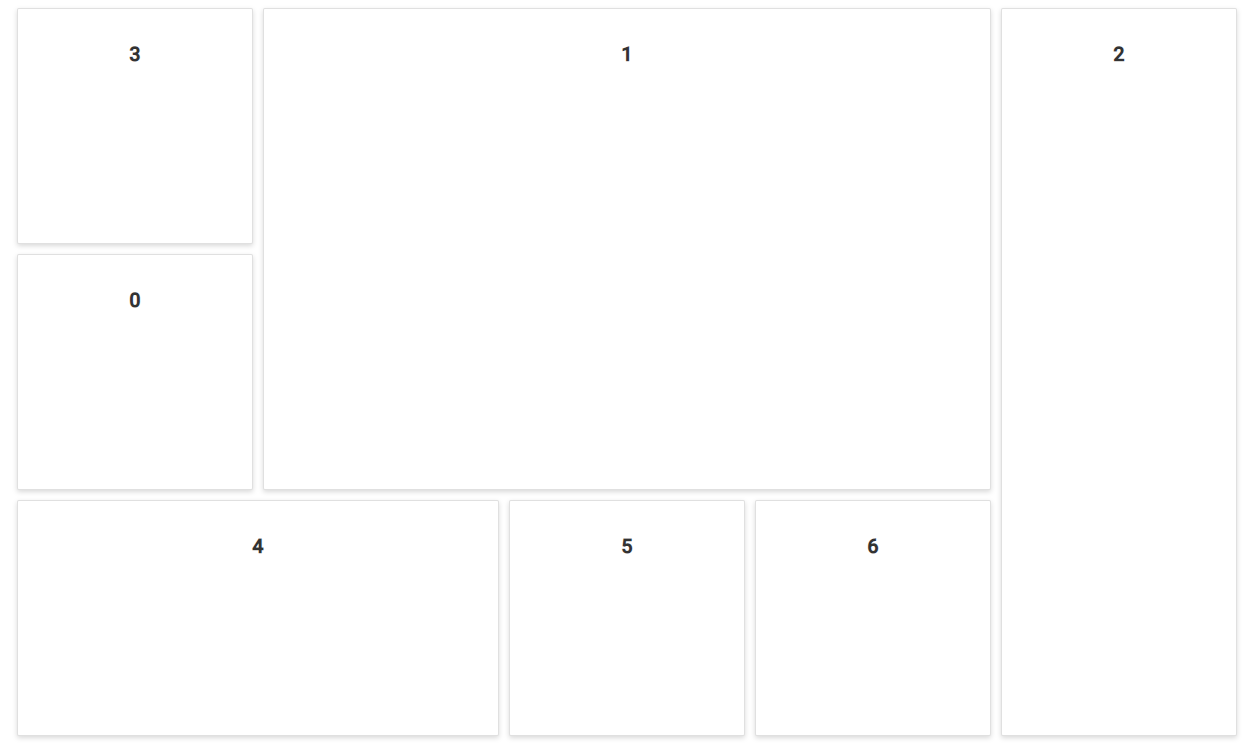
The following sample demonstrates moving a panel programmatically to a new position in the Dashboard Layout’s created event.
@{
    ...
    ddCellSpacingModel modelValue = new ddCellSpacingModel();
    modelValue.cellSpacing = new double[] { 10, 10 };
}

<div>
    <ejs-dashboardlayout id="dashboard_default" columns="5" allowResizing="true" created="onCreated" change="onChange" cellSpacing="@modelValue.cellSpacing">
        <e-dashboardlayout-panels>
            <e-dashboardlayout-panel sizeX="1" sizeY="1" row="0" col="0" content="<div class='content'>0</div>">
            </e-dashboardlayout-panel>
            <e-dashboardlayout-panel sizeX="3" sizeY="2" row="0" col="1" content="<div class='content'>1</div>">
            </e-dashboardlayout-panel>
            <e-dashboardlayout-panel sizeX="1" sizeY="3" row="0" col="4" content="<div class='content'>2</div>">
            </e-dashboardlayout-panel>
            <e-dashboardlayout-panel sizeX="1" sizeY="1" row="1" col="0" content="<div class='content'>3</div>">
            </e-dashboardlayout-panel>
            <e-dashboardlayout-panel sizeX="2" sizeY="1" row="2" col="0" content="<div class='content'>4</div>">
            </e-dashboardlayout-panel>
            <e-dashboardlayout-panel sizeX="1" sizeY="1" row="2" col="2" content="<div class='content'>5</div>">
            </e-dashboardlayout-panel>
            <e-dashboardlayout-panel sizeX="1" sizeY="1" row="2" col="3" content="<div class='content'>6</div>">
            </e-dashboardlayout-panel>
        </e-dashboardlayout-panels>
    </ejs-dashboardlayout>
</div>
<script>
    function onCreated(args) {
        // movePanel("id", row, col)
        this.movePanel("layout_0", 1, 0);
    }
    //Dashboard Layout's change event function
    function onChange(args) {
        console.log("Change event triggered");
    }

</script>
<style>
    #dashboard_default .e-panel .e-panel-container .content {
        vertical-align: middle;
        font-weight: 600;
        font-size: 20px;
        text-align: center;
        line-height: 90px;
    }
</style>
public class ddCellSpacingModel
{
public double[]? cellSpacing { get; set; }
}
You can refer to our ASP.NET Core Dashboard Layout feature tour page for its groundbreaking feature representations. You can also explore our ASP.NET Core Dashboard Layout example to know how to present and manipulate data.