How can I help you?
User Interface
FileExplorer UI combined of several sections like header, body and footer. Each section having the corresponding components to perform the FileExplorer related operations.
- The header section contains the toolbar which having the list of tools to perform the file and navigation related operations.
- The body section is the main area which explores the filesystem contents. It separated into
- Navigation pane which contains the tree view to showcase the folder hierarchy
-
Content pane which show cases the files from the file system. The files in the content pane can be viewable in the following modes
- Grid
- Tile
- Large Icons
- The footer section contains the status bar which showcases the file details.
The following screenshot shows the diagrammatic detail of FileExplorer UI:
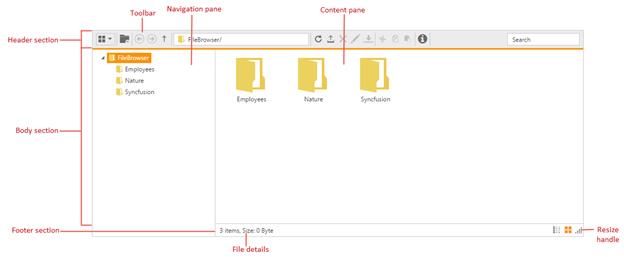
From above screenshot, you can see FileExplorer has several subcomponents for different functionalities. The upcoming sections explains the brief details of each components and their customizations.