Getting Started with Windows Forms Rating Control
18 Nov 20186 minutes to read
This section explains how to get started with the Windows Forms Rating control and display ratings using different shapes.
Assembly Deployment
Refer to the Control Dependencies section for the list of assemblies and NuGet packages required to use the RatingControl.
Refer to NuGet Packages to learn how to install NuGet packages in a Windows Forms application.
To install the required NuGet package using the NuGet Package Manager Console, run the following command:
Install-Package Syncfusion.Tools.WindowsAdding Rating control via Designer
-
Create a new Windows Forms project in Visual Studio to display the Rating control.
-
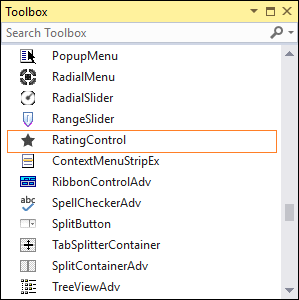
Drag the Rating control from the Toolbox and drop it onto the Windows Form designer. The following dependent assemblies are added automatically:
- Syncfusion.Grid.Base
- Syncfusion.Grid.Windows
- Syncfusion.Shared.Base
- Syncfusion.Shared.Windows
- Syncfusion.Tools.Base
- Syncfusion.Tools.Windows
Adding Rating control via Code
To add the Rating control programmatically, follow these steps:
-
Create a C# or VB.NET Windows Forms application in Visual Studio.
-
Add the following assembly references to the project:
- Syncfusion.Grid.Base
- Syncfusion.Grid.Windows
- Syncfusion.Shared.Base
- Syncfusion.Shared.Windows
- Syncfusion.Tools.Base
- Syncfusion.Tools.Windows
-
Include the required namespaces.
using Syncfusion.Windows.Forms.Tools;Imports Syncfusion.Windows.Forms.Tools -
Create an instance of the Rating control and add it to the form.
RatingControl ratingControl1 = new RatingControl ();
this.Controls.Add(ratingControl1);
Dim ratingControl1 As RatingControl = New RatingControl Me.Controls.Add(ratingControl1)

-
Set the rating value using the Value property.
ratingControl1.Value = 3;ratingControl1.Value = 3

Built-in Shapes for Rating
The Rating control provides the following predefined shapes:
StarCircleTriangleHeartDiamondKite
Use the Shape property to customize the appearance of the rating items.
//Setting shape
this.ratingControl1.Shape = Syncfusion.Windows.Forms.Tools.Shapes.Heart;
' Setting shape
Me.ratingControl1.Shape = Syncfusion.Windows.Forms.Tools.Shapes.Heart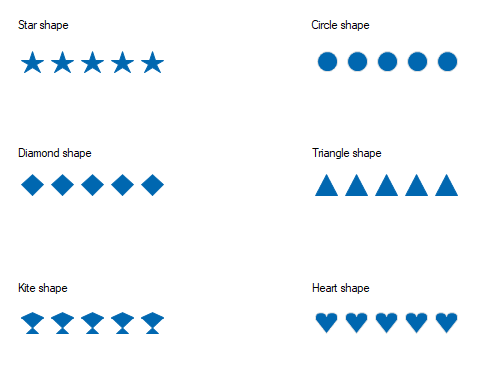
Complete code example
The following example demonstrates how to add a Rating control to a Windows Forms application, set its rating value, and apply a built-in shape.
using System.Drawing;
using System.Windows.Forms;
using Syncfusion.Windows.Forms.Tools;

namespace RatingControlGettingStarted
{
    public partial class Form1 : Form
    {
        private Syncfusion.Windows.Forms.Tools.RatingControl ratingControl1;

        public Form1()
        {
            InitializeComponent();
            this.ClientSize = new Size(400, 200);
            ratingControl1 = new RatingControl();
            ratingControl1.Location = new Point(20, 20);
            ratingControl1.Size = new Size(200, 40);
            ratingControl1.Value = 3;            // Set the rating value.
            ratingControl1.Shape = Shapes.Heart; // Apply the Heart shape.
            ratingControl1.ItemsCount = 5;        // Number of items (default is 5).
            this.Controls.Add(ratingControl1);
        }
    }
}
Imports System.Drawing
Imports System.Windows.Forms
Imports Syncfusion.Windows.Forms.Tools
Public Class Form1
Private ratingControl1 As RatingControl
Public Sub New()
InitializeComponent()
Me.ClientSize = New Size(400, 200)
ratingControl1 = New RatingControl()
ratingControl1.Location = New Point(20, 20)
ratingControl1.Size = New Size(200, 40)
ratingControl1.Value = 3 ' Set the rating value.
ratingControl1.Shape = Shapes.Heart ' Apply the Heart shape.
ratingControl1.ItemsCount = 5 ' Number of items (default is 5).
Me.Controls.Add(ratingControl1)
End Sub
End Class