About Syncfusion® WinForms Numeric TextBox Control
18 Nov 20182 minutes to read
The WinForms Numeric TextBox control is an advanced text box control that allows you to enter numeric values in a specific format such as numeric, currency, and percent. It also provides support to display value with custom units.
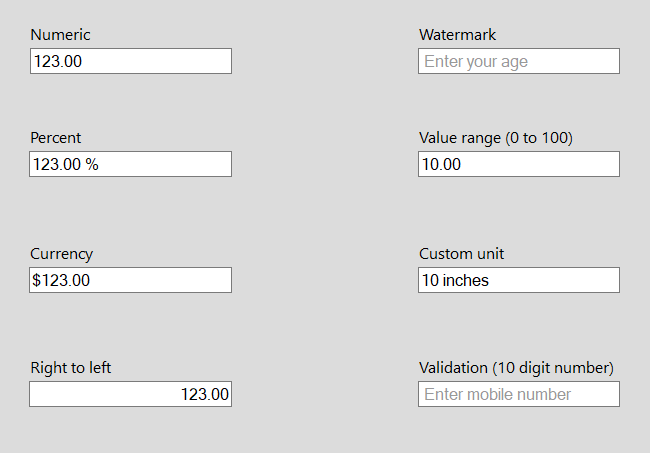
Key Features
-
Different modes - Supports specific modes such as numeric, currency, and percent.
-
Value range support - Allows you to define and validate the value based on minimum and maximum values.
-
Formatting - Supports formatting the value as needed.
-
Hide trailing zeros - Supports hiding trailing zeros.
-
Watermark - Supports displaying watermark text when the value is null.
-
Custom units - Supports displaying values with custom units that can be appended as prefix or suffix.
Choose between different textbox controls
Syncfusion WinForms suite comes up with the following different textboxes:
WinForms Numeric TextBox
The WinForms Numeric TextBox control is an advanced textbox that allows you to enter numeric values in a specific format. The currency or percent value can also be displayed with custom units. It supports hiding trailing zeros and displaying values with custom units.
CurrencyTextBox
CurrencyTextBox is a textbox-derived control that implements all functionalities to format currency input and validation. It provides support for clipboard operations that are compatible with currency data.
PercentTextBox
PercentTextBox is a textbox-derived control that can display double data type values as percentages. It supports display and collection of percentage values.
IntegerTextBox
IntegerTextBox is derived from the Windows Forms Framework TextBox control. It displays integer data type values alone.
WinForms Numeric TextBox vs existing numeric textbox controls
Both SfNumericTextBox and the existing numeric textbox controls (IntegerTextBox, PercentTextBox, and CurrencyTextBox) are used for the same purpose. However, the SfNumericTextBox control offers a rich set of features over the existing numeric textbox controls (IntegerTextBox, PercentTextBox, and CurrencyTextBox). To hide trailing zeros, add a prefix or suffix, or display watermark text, use this control.
The list of specific API differences between the WinForms Numeric TextBox and the existing numeric textbox controls (IntegerTextBox, PercentTextBox, and CurrencyTextBox) is as follows.
|
WinForms Numeric TextBox |
IntegerTextBox, PercentTextBox and CurrencyTextBox |
Description |
| Value | Text | Displays the values in textbox. |
| WatermarkText | AllowNull | Sets the null value in textbox. |
| MaxValue | MaxValue | Sets the maximum value in textbox. |
| MinValue | MinValue | Sets the minimum value in textbox. |
| Style.BorderColor | BorderColor | Applies the color of textbox border. |
| ThemeName | Style | Applies the visual styles. |
| PositiveForeColor | PositiveColor | sets the color only in positive values. |
| NegativeForeColor | NegativeColor | sets the color only in negative values. |
| ZeroForeColor | ZeroColor | sets the color only in zero values. |
The list of features in WinForms Numeric TextBox over the existing numeric textbox controls (IntegerTextBox, PercentTextBox, and CurrencyTextBox) is as follows.
|
Feature |
Description |
| Different modes | Supports specific modes like numeric, currency, and percent. To learn more about different modes in WinForms Numeric TextBox, refer to . |
| Formatting | Formats the value based on the user needs. To learn more about format modes in WinForms Numeric TextBox, refer to . |
| Hide trailing zeros | Hides trailing zeros. To learn more about hiding zeros in WinForms Numeric TextBox, refer to . |
| Custom units | Displays the values with custom units which can be appended prefix or suffix. To learn more about custom units in WinForms Numeric TextBox, refer to . |