Getting Started with WinForms CheckBox
18 Nov 20183 minutes to read
This section gives a detailed description of getting started with the WinForms CheckBox control.
Assembly Deployment
Refer to the Control Dependencies section to get the list of assemblies or details of the NuGet package that needs to be added as a reference to use the control in any application.
Refer to NuGet Packages to learn how to install NuGet packages in a Windows Forms application.
Adding WinForms CheckBox control via designer
The following steps explain how to create the WinForms CheckBox control via the designer.
-
Create a new Windows Forms project in Visual Studio.
-
Drag and drop the WinForms CheckBox from the toolbox to the Form designer window.
-
The dependent assemblies will be added automatically.
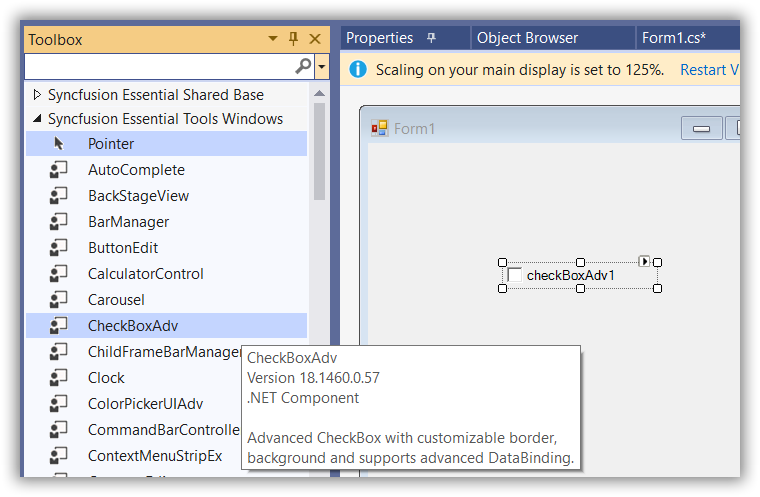
Adding WinForms CheckBox control via code
In order to add the WinForms CheckBox control manually, follow the steps below.
-
Add the required assembly references to the project.
-
Include the required namespace
Syncfusion.Windows.Forms.Tools. -
Create the WinForms CheckBox control instance and add it to the form.
using Syncfusion.Windows.Forms.Tools;Imports Syncfusion.Windows.Forms.ToolsCheckBoxAdv checkBoxAdv = new CheckBoxAdv() {Text="CheckBoxAdv", Height = 25, Width = 200 }; this.Controls.Add(checkBoxAdv);Dim checkBoxAdv As CheckBoxAdv = New CheckBoxAdv() With {.Text="CheckBoxAdv", .Height = 25, .Width = 200} Me.Controls.Add(checkBoxAdv)
WinForms CheckBox State
You can get or set the current checked status of the WinForms CheckBox using the Checked or CheckState property. The default value of the Checked property is false and the CheckState property is Unchecked.
this.checkBoxAdv1.Checked = true;
this.checkBoxAdv1.CheckState = System.Windows.Forms.CheckState.Checked;Me.checkBoxAdv1.Checked = True
Me.checkBoxAdv1.CheckState = System.Windows.Forms.CheckState.Checked
NOTE: To learn more about the WinForms CheckBox states, refer to CheckBoxAdv Settings.