Flat and Hierarchical Levels in Flutter Treemap (SfTreemap)
18 Nov 201822 minutes to read
The levels of the Flutter Treemap can be categorized into the following two types:
- Flat level.
- Hierarchical level.
Flat level
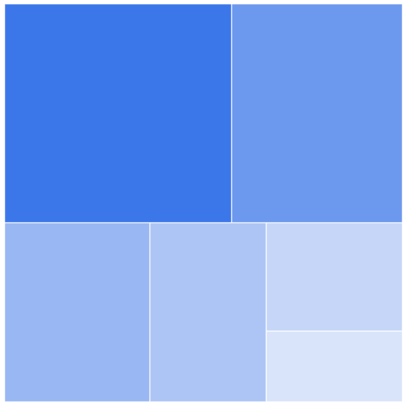
There will be a tile for each unique value returned in the TreemapLevel.groupMapper callback which is added to the levels collection property of SfTreemap.
Squarified flat level example
import 'package:flutter/material.dart';
import 'package:syncfusion_flutter_treemap/treemap.dart';

class TreemapFlatLevelExample extends StatefulWidget {
  const TreemapFlatLevelExample({super.key});

  @override
  State<TreemapFlatLevelExample> createState() =>
      _TreemapFlatLevelExampleState();
}

class _TreemapFlatLevelExampleState extends State<TreemapFlatLevelExample> {
  late List<PopulationModel> _source;

  @override
  void initState() {
    _source = <PopulationModel>[
      const PopulationModel('Asia', 25.4),
      const PopulationModel('South America', 19.11),
      const PopulationModel('North America', 13.3),
      const PopulationModel('Europe', 10.65),
      const PopulationModel('Africa', 7.54),
      const PopulationModel('Australia', 4.93),
    ];
    super.initState();
  }

  @override
  Widget build(BuildContext context) {
    return Scaffold(
      body: Center(
        child: Container(
          height: 400,
          width: 400,
          child: SfTreemap(
            dataCount: _source.length,
            weightValueMapper: (int index) {
              return _source[index].populationInMillions;
            },
            levels: [
              TreemapLevel(
                groupMapper: (int index) {
                  return _source[index].continent;
                },
              ),
            ],
          ),
        ),
      ),
    );
  }
}

class PopulationModel {
  const PopulationModel(this.continent, this.populationInMillions);

  final String continent;
  final double populationInMillions;
}
- Refer the
TreemapLevel.colorValueMapper, for customizing the tile color.- Refer the
TreemapLevel.tooltipBuilder, for adding and customizing the tooltip on the Flutter Treemap.- Refer the
TreemapLevel.labelBuilder, for adding and customizing the label on the tile.- Refer the
TreemapLevel.itemBuilder, for adding and customizing the custom widget on the treemap.
Hierarchical level
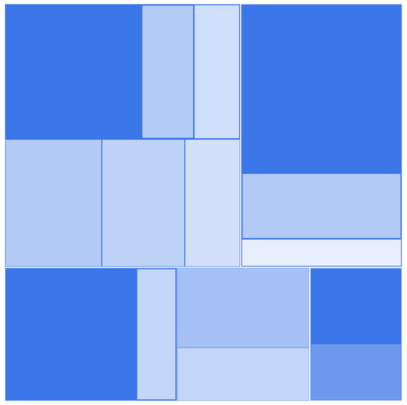
Hierarchical levels arrange the tiles in the form of nested rectangles. Each tile of the Flutter Treemap is a rectangle which is filled with smaller rectangles representing sub-data. You can have more than one TreemapLevel in the levels collection to form a hierarchical treemap.
The first level will work similarly to the flat level. From the next level in the levels collection, the items returned from the TreemapLevel.groupMapper for the indices, will be placed inside the rectangle for the same indices returned from the TreemapLevel.groupMapper in the previous level. This will go on until the last level in the levels collection.
Squarified hierarchical level example
import 'package:flutter/material.dart';
import 'package:syncfusion_flutter_treemap/treemap.dart';

class TreemapHierarchicalLevelExample extends StatefulWidget {
  const TreemapHierarchicalLevelExample({super.key});

  @override
  State<TreemapHierarchicalLevelExample> createState() =>
      _TreemapHierarchicalLevelExampleState();
}

class _TreemapHierarchicalLevelExampleState
    extends State<TreemapHierarchicalLevelExample> {
  late List<JobVacancyModel> _source;

  @override
  void initState() {
    _source = <JobVacancyModel>[
      const JobVacancyModel(country: 'America', job: 'Sales', vacancy: 70),
      const JobVacancyModel(
          country: 'America', job: 'Technical', group: 'Testers', vacancy: 35),
      const JobVacancyModel(
          country: 'America',
          job: 'Technical',
          group: 'Developers',
          role: 'Windows',
          vacancy: 105),
      const JobVacancyModel(
          country: 'America',
          job: 'Technical',
          group: 'Developers',
          role: 'Web',
          vacancy: 40),
      const JobVacancyModel(country: 'America', job: 'Management', vacancy: 40),
      const JobVacancyModel(country: 'America', job: 'Accounts', vacancy: 60),
      const JobVacancyModel(
          country: 'India', job: 'Technical', group: 'Testers', vacancy: 25),
      const JobVacancyModel(
          country: 'India',
          job: 'Technical',
          group: 'Developers',
          role: 'Windows',
          vacancy: 155),
      const JobVacancyModel(
          country: 'India',
          job: 'Technical',
          group: 'Developers',
          role: 'Web',
          vacancy: 60),
      const JobVacancyModel(
          country: 'Germany', job: 'Sales', group: 'Executive', vacancy: 30),
      const JobVacancyModel(
          country: 'Germany', job: 'Sales', group: 'Analyst', vacancy: 40),
      const JobVacancyModel(
          country: 'UK',
          job: 'Technical',
          group: 'Developers',
          role: 'Windows',
          vacancy: 100),
      const JobVacancyModel(
          country: 'UK',
          job: 'Technical',
          group: 'Developers',
          role: 'Web',
          vacancy: 30),
      const JobVacancyModel(country: 'UK', job: 'HR Executives', vacancy: 60),
      const JobVacancyModel(country: 'UK', job: 'Marketing', vacancy: 40),
    ];
    super.initState();
  }

  @override
  Widget build(BuildContext context) {
    return Scaffold(
      body: Center(
        child: Container(
          height: 400,
          width: 400,
          child: SfTreemap(
            dataCount: _source.length,
            weightValueMapper: (int index) {
              return _source[index].vacancy;
            },
            levels: [
              TreemapLevel(groupMapper: (int index) => _source[index].country),
              TreemapLevel(groupMapper: (int index) => _source[index].job),
              TreemapLevel(groupMapper: (int index) => _source[index].group),
              TreemapLevel(groupMapper: (int index) => _source[index].role),
            ],
          ),
        ),
      ),
    );
  }
}

class JobVacancyModel {
  const JobVacancyModel({
    required this.country,
    required this.job,
    this.group,
    this.role,
    required this.vacancy,
  });

  final String country;
  final String job;
  final String? group;
  final String? role;
  final double vacancy;
}
- Refer the
TreemapLevel.colorValueMapper, for customizing the tile color.- Refer the
TreemapLevel.tooltipBuilder, for adding and customizing the tooltip on the treemap.- Refer the
TreemapLevel.labelBuilder, for adding and customizing the label on the tile.- Refer the
TreemapLevel.itemBuilder, for adding and customizing the custom widget on the treemap.
Appearance customization
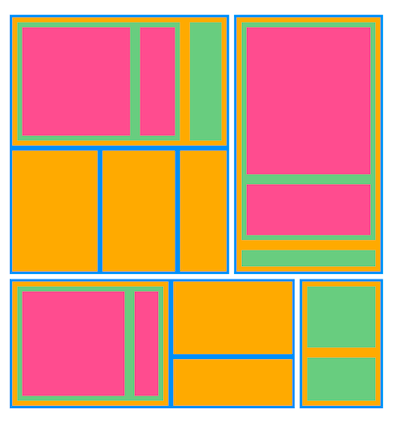
You can customize the levels using the following properties:
-
Padding - Specifies the gap between the groups. The default value of the
TreemapLevel.paddingproperty isEdgeInsets.all(0.5). -
Color - Specifies the background color for the group using the
TreemapLevel.colorproperty. -
Border - Specifies the border color, border width and border radius for the group using the
TreemapLevel.borderproperty.
Squarified appearance example
import 'package:flutter/material.dart';
import 'package:syncfusion_flutter_treemap/treemap.dart';

class TreemapAppearanceExample extends StatefulWidget {
  const TreemapAppearanceExample({super.key});

  @override
  State<TreemapAppearanceExample> createState() =>
      _TreemapAppearanceExampleState();
}

class _TreemapAppearanceExampleState extends State<TreemapAppearanceExample> {
  late List<JobVacancyModel> _source;

  @override
  void initState() {
    _source = <JobVacancyModel>[
      const JobVacancyModel(country: 'America', job: 'Sales', vacancy: 70),
      const JobVacancyModel(
          country: 'America', job: 'Technical', group: 'Testers', vacancy: 35),
      const JobVacancyModel(
          country: 'America',
          job: 'Technical',
          group: 'Developers',
          role: 'Windows',
          vacancy: 105),
      const JobVacancyModel(
          country: 'America',
          job: 'Technical',
          group: 'Developers',
          role: 'Web',
          vacancy: 40),
      const JobVacancyModel(country: 'America', job: 'Management', vacancy: 40),
      const JobVacancyModel(country: 'America', job: 'Accounts', vacancy: 60),
      const JobVacancyModel(
          country: 'India', job: 'Technical', group: 'Testers', vacancy: 25),
      const JobVacancyModel(
          country: 'India',
          job: 'Technical',
          group: 'Developers',
          role: 'Windows',
          vacancy: 155),
      const JobVacancyModel(
          country: 'India',
          job: 'Technical',
          group: 'Developers',
          role: 'Web',
          vacancy: 60),
      const JobVacancyModel(
          country: 'Germany', job: 'Sales', group: 'Executive', vacancy: 30),
      const JobVacancyModel(
          country: 'Germany', job: 'Sales', group: 'Analyst', vacancy: 40),
      const JobVacancyModel(
          country: 'UK',
          job: 'Technical',
          group: 'Developers',
          role: 'Windows',
          vacancy: 100),
      const JobVacancyModel(
          country: 'UK',
          job: 'Technical',
          group: 'Developers',
          role: 'Web',
          vacancy: 30),
      const JobVacancyModel(country: 'UK', job: 'HR Executives', vacancy: 60),
      const JobVacancyModel(country: 'UK', job: 'Marketing', vacancy: 40),
    ];
    super.initState();
  }

  @override
  Widget build(BuildContext context) {
    return Scaffold(
      body: Center(
        child: Container(
          height: 400,
          width: 400,
          child: SfTreemap(
            dataCount: _source.length,
            weightValueMapper: (int index) {
              return _source[index].vacancy;
            },
            levels: [
              TreemapLevel(
                groupMapper: (int index) => _source[index].country,
                color: Colors.blue,
                border: RoundedRectangleBorder(
                  side: BorderSide(
                    color: Colors.blue,
                    width: 1,
                  ),
                ),
                padding: const EdgeInsets.all(2.5),
              ),
              TreemapLevel(
                groupMapper: (int index) => _source[index].job,
                color: Colors.orangeAccent,
                border: RoundedRectangleBorder(
                  side: BorderSide(
                    color: Colors.orangeAccent,
                    width: 1,
                  ),
                ),
                padding: const EdgeInsets.all(2.5),
              ),
              TreemapLevel(
                groupMapper: (int index) => _source[index].group,
                color: Colors.green[300],
                border: RoundedRectangleBorder(
                  side: BorderSide(
                    color: Colors.green,
                    width: 1,
                  ),
                ),
                padding: const EdgeInsets.all(5),
              ),
              TreemapLevel(
                groupMapper: (int index) => _source[index].role,
                color: Colors.pink[300],
                border: RoundedRectangleBorder(
                  side: BorderSide(
                    color: Colors.pink,
                    width: 1,
                  ),
                ),
                padding: const EdgeInsets.all(5),
              ),
            ],
          ),
        ),
      ),
    );
  }
}

class JobVacancyModel {
  const JobVacancyModel({
    required this.country,
    required this.job,
    this.group,
    this.role,
    required this.vacancy,
  });

  final String country;
  final String job;
  final String? group;
  final String? role;
  final double vacancy;
}
- Refer the
TreemapLevel.colorValueMapper, for customizing the tile color.- Refer the
TreemapLevel.tooltipBuilder, for adding and customizing the tooltip on the treemap.- Refer the
TreemapLevel.labelBuilder, for adding and customizing the label on the tile.- Refer the
TreemapLevel.itemBuilder, for adding and customizing the custom widget on the Flutter Treemap.