Right to Left (RTL) support in Flutter Funnel Chart
18 Nov 20187 minutes to read
The funnel chart supports right-to-left rendering. However, series and other chart elements render the same for both LTR and RTL, except for the legend and tooltip.
RTL rendering ways
Right to left rendering can be switched in the following ways:
Wrapping the Flutter Funnel Chart with the Directionality widget
To change the rendering direction from right to left, you can wrap the SfFunnelChart widget inside the Directionality widget and set the textDirection property to TextDirection.rtl.
@override
    Widget build(BuildContext context) {
      return Scaffold(
        body: Directionality(
          textDirection: TextDirection.rtl,
          child: SfFunnelChart(
              //...
          ),
        ),
      );
    }
Changing the locale to RTL languages
To change the chart rendering direction from right to left, you can change the locale to any RTL language such as Arabic, Persian, Hebrew, Pashto, or Urdu.
/// Package import
    import 'package:flutter_localizations/flutter_localizations.dart';
    import 'package:syncfusion_localizations/syncfusion_localizations.dart';

    // ...

    @override
    Widget build(BuildContext context) {
      return MaterialApp(
        localizationsDelegates: [
          GlobalMaterialLocalizations.delegate,
          GlobalWidgetsLocalizations.delegate,
        ],
        supportedLocales: <Locale>[
          Locale('en'),
          Locale('ar'),
          // ... other locales the app supports
        ],
        locale: Locale('ar'),
        home: Scaffold(
          body: SfFunnelChart(
            //...
          ),
        )
      );
    }
RTL-supported chart elements
Legend
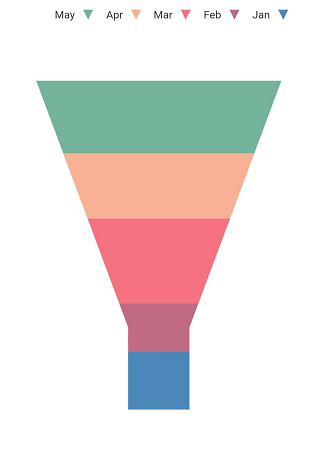
Right-to-left rendering affects the legend in the chart. Legend items are rendered from right to left; that is, the legend text appears on the left first, followed by the legend icon on the right.
@override
    Widget build(BuildContext context) {
      final List<ChartData> chartData = <ChartData>[
        ChartData('Jan', 24),
        ChartData('Feb', 20),
        ChartData('Mar', 35),
        ChartData('Apr', 27),
        ChartData('May', 30),
      ];
      return Scaffold(
        body: Directionality(
          textDirection: TextDirection.rtl,
          child: SfFunnelChart(
            legend: Legend(isVisible: true),
            series: FunnelSeries<ChartData, String>(
                dataSource: chartData,
                xValueMapper: (ChartData data, _) => data.x,
                yValueMapper: (ChartData data, _) => data.y,
            )
          )
        )
      );
    }

    class ChartData {
      ChartData(this.x, this.y);
        final String x;
        final int y;
    }
Tooltip
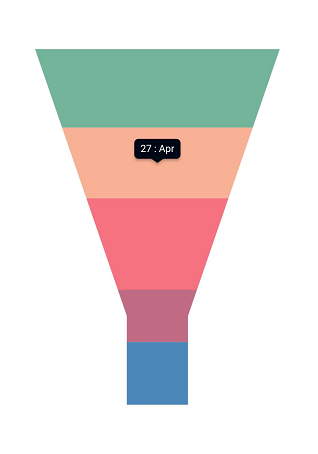
Right-to-left rendering is applicable to tooltip elements. By default, the tooltip content is point.x : point.y; in RTL rendering, the tooltip content becomes point.y : point.x. If you want the format to remain unchanged despite RTL rendering, you can use the onTooltipRender callback.
late TooltipBehavior _tooltipBehavior;

    @override
    void initState(){
      _tooltipBehavior = TooltipBehavior(enable: true);
      super.initState();
    }

    @override
    Widget build(BuildContext context) {
      final List<ChartData> chartData = <ChartData>[
        ChartData('Jan', 24),
        ChartData('Feb', 20),
        ChartData('Mar', 35),
        ChartData('Apr', 27),
        ChartData('May', 30),
      ];
      return Scaffold(
        body: Directionality(
          textDirection: TextDirection.rtl,
          child: SfFunnelChart(
            tooltipBehavior: _tooltipBehavior,
            series: FunnelSeries<ChartData, String>(
                dataSource: chartData,
                xValueMapper: (ChartData data, _) => data.x,
                yValueMapper: (ChartData data, _) => data.y,
            )
          )
        )
      );
    }

    class ChartData {
      ChartData(this.x, this.y);
        final String x;
        final int y;
    }