Customization in WPF Smart Data Grid
18 Nov 20184 minutes to read
The WPF Smart Data Grid provides options to customize its behavior and appearance, including predefined suggestions, initial prompts, enabling or disabling smart actions.
CurrentUser
Bind the CurrentUser property to differentiate outgoing requests (from the user) and incoming responses (from AI) in the AssistView layout. If CurrentUser is not set, the control cannot distinguish between outgoing and incoming messages, and all messages will appear with the same alignment and style.
The CurrentUser property provides the current author or user context. This can be used by the AssistView and smart actions for personalization, audit information, or to tailor suggestions based on the active user.
// Set the current user in code-behind
SmartGrid.CurrentUser = new Author { Name = "John Doe" };
Suggestions
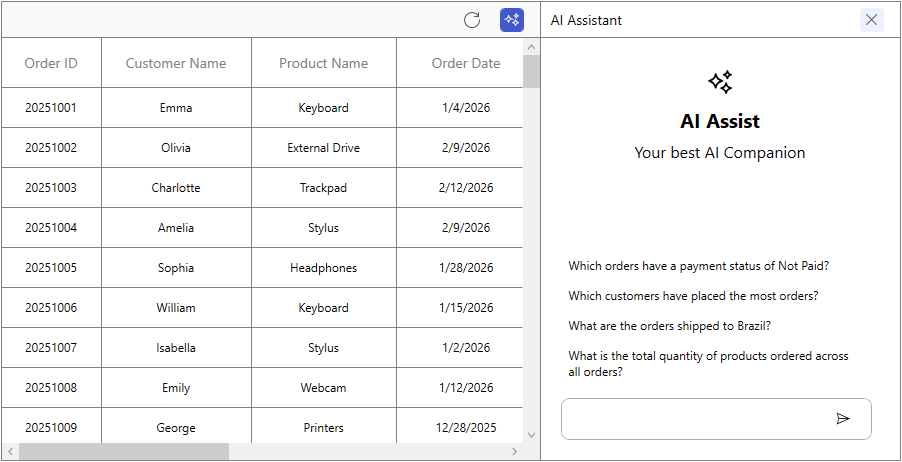
The Suggestions property is used to provide a predefined list of suggestions that appear in the AssistView. These suggestions help users quickly select common actions without typing commands manually.
<syncfusion:SfSmartDataGrid x:Name="SmartGrid"
                                Suggestions="{Binding AiSuggestions}"/>
public class ViewModel
{
public ObservableCollection<string> AiSuggestions { get; } = new ObservableCollection<string>
{
"Which orders have a payment status of Not Paid?",
"Which customers have placed the most orders?",
"What are the orders shipped to Brazil?",
"What is the total quantity of products ordered across all orders?",
};
}
Prompt
The Prompt property in SfSmartDataGrid defines an initial prompt that is automatically executed when the AssistView opens for the first time.
<syncfusion:SfSmartDataGrid x:Name="SmartGrid"
Prompt="Sort the Quantity column"/>SmartGrid.Prompt = "Sort the Quantity column";;EnableSmartActions
The EnableSmartActions property determines whether AI actions can be applied to the Smart Data Grid. By default, this property is set to false, meaning actions such as sorting, grouping, filtering, and highlighting are not applied automatically.
When the property is set to true, these actions are enabled and can be applied to the grid.
<syncfusion:SfSmartDataGrid x:Name="SmartGrid"
                                ItemsSource="{Binding OrderInfoCollection}"
EnableSmartActions="True"/>SmartGrid.EnableSmartActions = true;HighlightBrush
The HighlightBrush property is type of SolidColorBrush and controls the brush used when smart actions apply visual highlights to rows or cells (for example, when the AI highlights matching records). You can set this in XAML or code-behind.
<syncfusion:SfSmartDataGrid x:Name="SmartGrid"
                                HighlightBrush="Orange"/>
// Set the highlight brush in code-behind
SmartGrid.HighlightBrush = new SolidColorBrush(Colors.Orange);Apply Smart Actions Programmatically
The ExecutePrompt method in SfSmartDataGrid is used to fetch a response programmatically without opening the AssistView. By passing a prompt to this method, the required action is applied directly to the grid.
SmartGrid.ExecutePrompt("Sort the OrderID by Descending");Events
AssistViewRequest
The SfSmartDataGrid.AssistViewRequest event is triggered whenever a user request is sent. This event provides the Prompt as an argument through AssistViewRequestEventArgs and includes a Cancel property. Setting Cancel to true prevents the request from being processed.
<syncfusion:SfSmartDataGrid ItemsSource="{Binding OrderInfoCollection}"
                                AssistViewRequest="OnAssistRequest">
    </syncfusion:SfSmartDataGrid>
private void OnAssistRequest(object sender, AssistViewRequestEventArgs e)
{
var prompt = e.Prompt;
e.Cancel = True;
}