Sorting in WPF Kanban Board
18 Nov 201824 minutes to read
The control supports customizable card sorting within columns based on specific data fields such as Priority, DueDate, or Status. Sorting can be configured programmatically and updated dynamically at runtime using the following properties:
-
SortingMappingPath- Used to map the sorting field to a property name in theKanbanModelorCustomModel. The default value isstring.Empty, in which case the cards will not be sorted. -
SortingOrder- Used to define the direction of card sorting within each column.-
Ascending- Cards with lower values appear first. -
Descending- Cards with higher values appear first.
-
The
SortingOrderproperty is applicable only when a valid value is assigned toSortingMappingPath.
Customize Card Order with Sorting Configuration
Sorting can be implemented using the following approaches:
Show more lines
- Custom Field Sorting
- Index-Based Sorting
Custom Field Sorting
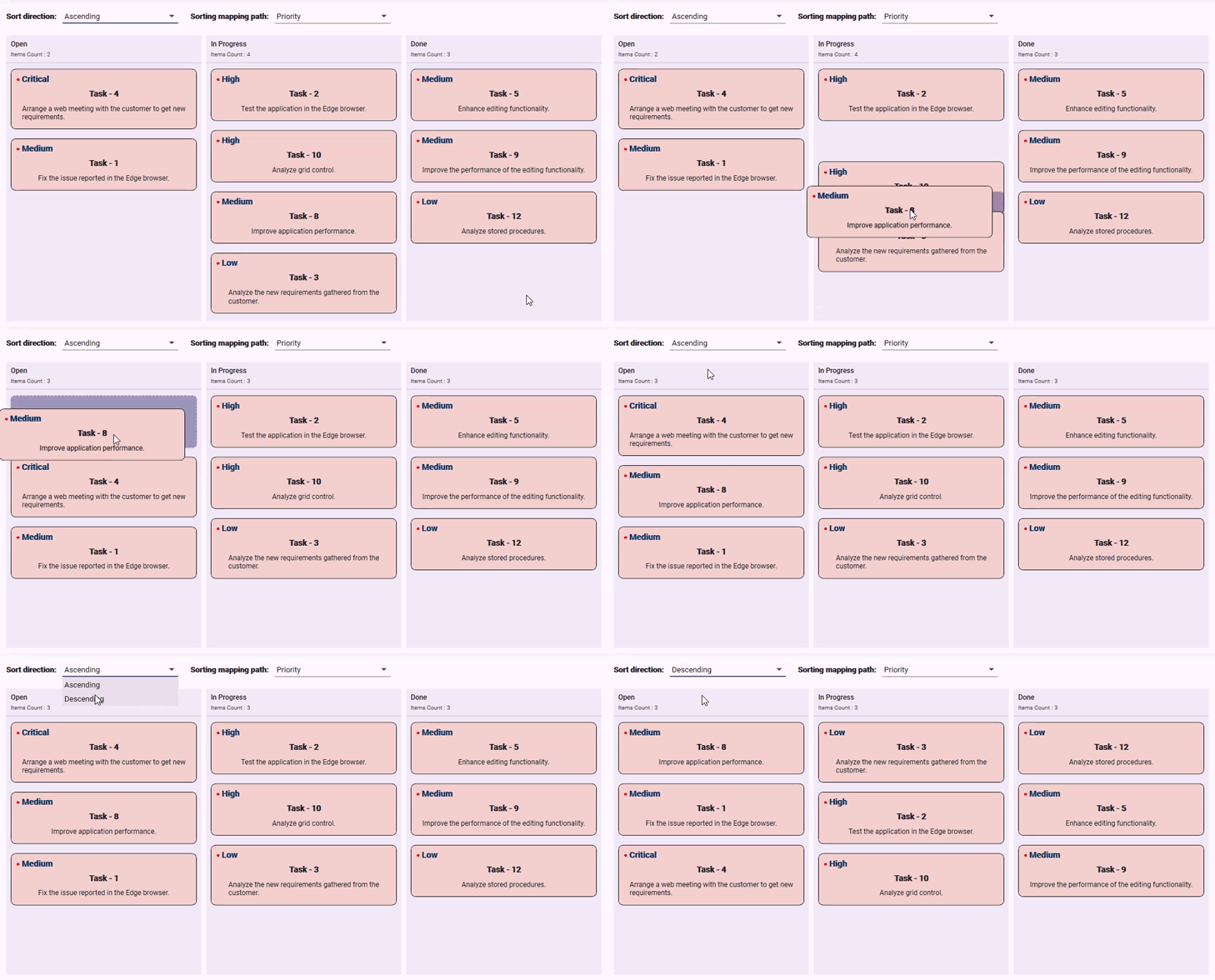
To enable custom sorting behavior, a valid property name from the ItemsSource must be mapped using the SortingMappingPath property. This mapping ensures that cards are loaded and repositioned based on the corresponding property value, allowing consistent sorting during both initialization and drag-and-drop operations.
The following example demonstrates how card positions are updated based on sorting configurations and property mappings.
<kanban:SfKanban x:Name="kanban"
                 SortingMappingPath="Priority"
                 SortingOrder="Ascending"
                 ItemsSource="{Binding Cards}"
                 ColumnMappingPath="Category">
    <kanban:SfKanban.CardTemplate>
        <DataTemplate>
            <Border Background="#F3CFCE"
                    BorderBrush="Black"
                    BorderThickness="1"
                    CornerRadius="8"
                    Padding="8">
                <Grid>
                    <Grid.RowDefinitions>
                        <RowDefinition Height="Auto"/>
                        <RowDefinition Height="Auto"/>
                        <RowDefinition Height="Auto"/>
                    </Grid.RowDefinitions>
                    <Grid.ColumnDefinitions>
                        <ColumnDefinition Width="Auto"/>
                        <ColumnDefinition Width="*"/>
                    </Grid.ColumnDefinitions>
                    <StackPanel Grid.Row="0"
                                Grid.ColumnSpan="2"
                                Orientation="Horizontal"
                                VerticalAlignment="Center"
                                Height="20">
                        <TextBlock Text="•"
                                   FontSize="14"
                                   FontWeight="Bold"
                                   Foreground="#FF0000"
                                   VerticalAlignment="Center"
                                   HorizontalAlignment="Center" />
                        <TextBlock Text="{Binding Priority}"
                                   FontSize="14"
                                   FontWeight="Bold"
                                   Foreground="#003366"
                                   VerticalAlignment="Center"
                                   HorizontalAlignment="Left"
                                   Height="20" />
                    </StackPanel>
                    <TextBlock Grid.Row="1"
                               Grid.ColumnSpan="2"
                               Text="{Binding Title}"
                               FontWeight="Bold"
                               FontSize="14"
                               HorizontalAlignment="Center"
                               VerticalAlignment="Center"
                               Margin="5" />
                    <TextBlock  Grid.Row="2"
                                Grid.ColumnSpan="2"
                                Text="{Binding Description}"
                                FontSize="12"
                                TextWrapping="Wrap"
                                HorizontalAlignment="Center"
                                VerticalAlignment="Center"
                                Margin="5" />
                </Grid>
            </Border>
        </DataTemplate>
    </kanban:SfKanban.CardTemplate>
    <kanban:KanbanColumn Title="Open"
                         Categories="Open"/>
    <kanban:KanbanColumn Title="In Progress"
                         Categories="In Progress"/>
    <kanban:KanbanColumn Title="Done"
                         AllowDrag="False"
                         Categories="Done"/>
    <kanban:SfKanban.DataContext>
        <local:SortingViewModel/>
    </kanban:SfKanban.DataContext>
</kanban:SfKanban>this.kanban.ItemsSource = new SortingViewModel().Cards;
this.kanban.CardDragEnd += this.OnKanbanCardDragEnd;
using Syncfusion.UI.Xaml.Kanban;

private void OnKanbanCardDragEnd(object sender, KanbanDragEndEventArgs e)
{
    this.kanban.RefreshKanbanColumn(e.TargetKey.ToString());
}
public class CardDetails
{
public string Title { get; set; }
public string Description { get; set; }
public string Priority { get; set; }
public string Category { get; set; }
}using System.Collections.ObjectModel;
public class SortingViewModel
{
public SortingViewModel()
{
this.Cards = new ObservableCollection<CardDetails>()
{
new CardDetails() { Title = "Task - 1", Priority = "Medium", Category = "Open", Description = "Fix the issue reported in the Edge browser." },
new CardDetails() { Title = "Task - 3", Priority = "Low", Category = "In Progress", Description = "Analyze the new requirements gathered from the customer." },
new CardDetails() { Title = "Task - 4", Priority = "Critical", Category = "Open", Description = "Arrange a web meeting with the customer to get new requirements." },
new CardDetails() { Title = "Task - 2", Priority = "High", Category = "In Progress", Description = "Test the application in the Edge browser." },
new CardDetails() { Title = "Task - 5", Priority = "Medium", Category = "Done", Description = "Enhance editing functionality." },
new CardDetails() { Title = "Task - 8", Priority = "Medium", Category = "In Progress", Description = "Improve application performance." },
new CardDetails() { Title = "Task - 9", Priority = "Medium", Category = "Done", Description = "Improve the performance of the editing functionality." },
new CardDetails() { Title = "Task - 10", Priority = "High", Category = "Open", Description = "Analyze grid control." },
new CardDetails() { Title = "Task - 12", Priority = "Low", Category = "Done", Description = "Analyze stored procedures." }
};
}
public ObservableCollection<CardDetails> Cards { get; set; }
}
View the complete sample on GitHub.
- To apply sorting after a drop operation, handle the
CardDragEndevent and explicitly call theRefreshKanbanColumnmethod. This ensures the column updates to reflect the new card order based on the defined sorting logic.- When using a custom data model, the default card UI is not applicable. To render the card content, you must define a custom
DataTemplateusing theCardTemplateproperty.
Index-Based Sorting
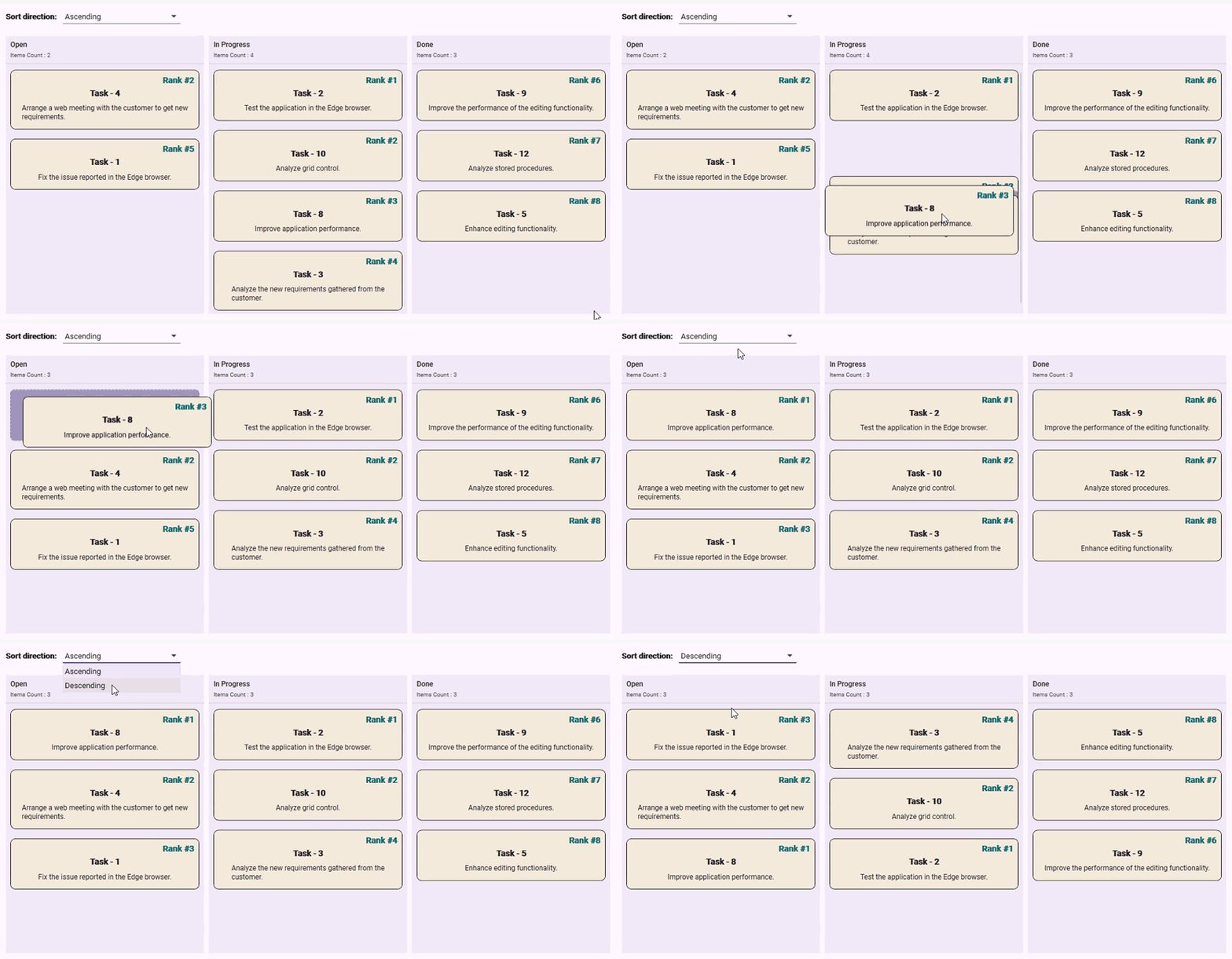
The index-based approach allows cards to be dropped at precise positions within a column. When a card is dropped, its index is updated based on the index of the previous card. The index of the next card is also updated relative to the drop position to maintain continuous ordering.
The
SortingMappingPathproperty must be mapped to a valid numeric property name from theItemsSourceto enable index-based sorting updates.
The following code example illustrates how a card’s numeric property is updated using the index-based sorting approach.
<kanban:SfKanban x:Name="kanban"
                 SortingMappingPath="Index"
                 SortingOrder="Ascending"
                 ItemsSource="{Binding Cards}"
                 ColumnMappingPath="Category">
    <kanban:SfKanban.CardTemplate>
        <DataTemplate>
            <Border Background="#F3EADC"
                    BorderBrush="Black"
                    BorderThickness="1"
                    CornerRadius="8"
                    Padding="8">
                <Grid>
                    <Grid.RowDefinitions>
                        <RowDefinition Height="Auto" />
                        <RowDefinition Height="Auto" />
                        <RowDefinition Height="Auto" />
                    </Grid.RowDefinitions>
                    <Grid.ColumnDefinitions>
                        <ColumnDefinition Width="Auto" />
                        <ColumnDefinition Width="*" />
                    </Grid.ColumnDefinitions>
                    <StackPanel Grid.Row="0"
                                Grid.ColumnSpan="2"
                                Orientation="Horizontal"
                                VerticalAlignment="Center"
                                HorizontalAlignment="Right" >
                        <TextBlock Text="Rank #"
                                   FontSize="14"
                                   FontWeight="Bold"
                                   Foreground="#026B6E"
                                   VerticalAlignment="Center"
                                   HorizontalAlignment="Center" />
                        <TextBlock Text="{Binding Index}"
                                   FontSize="14"
                                   FontWeight="Bold"
                                   Foreground="#026B6E"
                                   VerticalAlignment="Center"
                                   HorizontalAlignment="Center"  />
                    </StackPanel>
                    <TextBlock Grid.Row="1"
                               Grid.ColumnSpan="2"
                               Text="{Binding Title}"
                               FontWeight="Bold"
                               FontSize="14"
                               HorizontalAlignment="Center"
                               VerticalAlignment="Center"
                               Margin="5" />
                    <TextBlock  Grid.Row="2"
                                Grid.ColumnSpan="2"
                                Text="{Binding Description}"
                                FontSize="12"
                                TextWrapping="Wrap"
                                HorizontalAlignment="Center"
                                VerticalAlignment="Center"
                                Margin="5" />
                </Grid>
            </Border>
        </DataTemplate>
    </kanban:SfKanban.CardTemplate>
    <kanban:KanbanColumn Title="Open" Categories="Open"/>
    <kanban:KanbanColumn Title="In Progress" Categories="In Progress"/>
    <kanban:KanbanColumn Title="Done" AllowDrag="False" Categories="Done"/>
    <kanban:SfKanban.DataContext>
        <local:SortingViewModel/>
    </kanban:SfKanban.DataContext>
</kanban:SfKanban>
private KanbanCardItem selectedCard;
private KanbanColumn targetColumn;
// Add the following lines in constructor
this.kanban.ItemsSource = new SortingViewModel().Cards;
this.kanban.CardDragStart += this.OnKanbanCardDragStart;
this.kanban.CardDragEnd += this.OnKanbanCardDragEnd;
using System;
using System.Collections.Generic;
using System.Linq;
using System.Reflection;
using Syncfusion.UI.Xaml.Kanban;

private void OnKanbanCardDragStart(object sender, KanbanDragStartEventArgs e)
{
    this.selectedCard = e.SelectedCard;
}

private void OnKanbanCardDragEnd(object sender, KanbanDragEndEventArgs e)
{
    if (this.kanban == null || this.selectedCard == null || e.TargetColumn == null)
    {
        return;
    }

    this.ApplySortingWithoutPositionChange(e);
    this.kanban.RefreshKanbanColumn(e.TargetKey.ToString());
}

private void ApplySortingWithoutPositionChange(KanbanDragEndEventArgs e)
{
    var cardItems = e.TargetColumn.Items.Cast<KanbanCardItem>().ToList();
    if (this.kanban == null || this.selectedCard == null || this.selectedCard.Content == null || e.TargetColumn == null || e.TargetKey == null || cardItems == null || !cardItems.Any()
        || e.SelectedColumn == null || (e.SelectedColumn == e.TargetColumn && e.SelectedColumnIndex == e.TargetCardIndex))
    {
        return;
    }

    // Retrieve sorting configuration
    var sortMappingPath = this.kanban.SortingMappingPath;
    var sortingOrder = this.kanban.SortingOrder;
    CardDetails cardDetails = this.selectedCard.Content as CardDetails;

    // Proceed only if sorting path is defined
    if (cardDetails == null || string.IsNullOrEmpty(sortMappingPath))
    {
        return;
    }

    // Extract items from the target column
    var targetColumnItems = cardItems.Where(card => card != null && card.Content is CardDetails).ToList();

    // Sort items based on the sorting order
    if (targetColumnItems.Count > 0)
    {
        Func<KanbanCardItem, object> keySelector = item => this.GetPropertyInfo(item.GetType(), sortMappingPath);
        targetColumnItems = sortingOrder == KanbanSortingOrder.Ascending
            ? targetColumnItems.OrderBy(item => keySelector(item) ?? 0).ToList()
            : targetColumnItems.OrderByDescending(item => keySelector(item) ?? 0).ToList();
    }

    // Determine the index to insert the dragged card
    int currentCardIndex = e.TargetCardIndex;

    if (e.SelectedColumn != e.TargetColumn)
    {
        cardDetails.Category = e.TargetKey.ToString();
    }

    if (currentCardIndex >= 0 && currentCardIndex <= targetColumnItems.Count)
    {
        targetColumnItems.Insert(currentCardIndex, this.selectedCard);
    }
    else
    {
        targetColumnItems.Add(this.selectedCard);
        currentCardIndex = targetColumnItems.Count - 1;
    }

    // Update index property of all items using smart positioning logic
    this.ApplySmartIndexUpdate(targetColumnItems, currentCardIndex);
}

private void ApplySmartIndexUpdate(List<KanbanCardItem> items, int droppedIndex)
{
    if (this.kanban == null || items == null || items.Count == 0)
    {
        return;
    }

    if (this.kanban.SortingOrder == KanbanSortingOrder.Ascending)
    {
        this.HandleAscendingIndexSorting(items, droppedIndex);
        return;
    }

    this.HandleDescendingIndexSorting(items, droppedIndex);
}

private void HandleAscendingIndexSorting(List<KanbanCardItem> items, int currentCardIndex)
{
    int afterCardIndex = -1;
    int lastItemIndex = -1;

    // Get the index of the card after the insertion point
    if (currentCardIndex < items.Count - 1)
    {
        var afterCard = items[currentCardIndex + 1];
        afterCardIndex = GetCardIndex(afterCard?.Content) ?? -1;
    }

    for (int i = 0; i < items.Count; i++)
    {
        var item = items[i].Content;
        if (item == null)
        {
            continue;
        }

        PropertyInfo propertyInfo = this.GetPropertyInfo(item.GetType(), "Index");
        if (propertyInfo == null)
        {
            continue;
        }

        int itemIndex = Convert.ToInt32(propertyInfo.GetValue(item) ?? 0);
        bool isFirstItem = i == 0;
        if (isFirstItem)
        {
            // If the inserted card is at the beginning, assign a smart index
            if (currentCardIndex == 0)
            {
                lastItemIndex = afterCardIndex > 1 ? afterCardIndex - 1 : 1;
                propertyInfo.SetValue(item, lastItemIndex);
            }
            else
            {
                lastItemIndex = itemIndex;
            }
        }
        else
        {
            // Increment index for subsequent items
            lastItemIndex++;
            propertyInfo.SetValue(item, lastItemIndex);
        }
    }
}

private void HandleDescendingIndexSorting(List<KanbanCardItem> items, int currentCardIndex)
{
    int beforeCardIndex = -1;
    int lastItemIndex = -1;

    // Get the index of the card before the insertion point
    if (currentCardIndex > 0 && currentCardIndex < items.Count)
    {
        var cardBefore = items[currentCardIndex - 1];
        beforeCardIndex = GetCardIndex(cardBefore?.Content) ?? -1;
    }

    for (int i = items.Count - 1; i >= 0; i--)
    {
        var item = items[i].Content;
        if (item == null)
        {
            continue;
        }

        PropertyInfo propertyInfo = this.GetPropertyInfo(item.GetType(), "Index");
        if (propertyInfo == null)
        {
            continue;
        }

        int itemIndex = Convert.ToInt32(propertyInfo.GetValue(item) ?? 0);
        bool isLastItem = i == items.Count - 1;
        if (isLastItem)
        {
            // If the inserted card is at the end, assign a smart index
            if (currentCardIndex == items.Count - 1)
            {
                lastItemIndex = beforeCardIndex > 1 ? beforeCardIndex - 1 : 1;
                propertyInfo.SetValue(item, lastItemIndex);
            }
            else
            {
                lastItemIndex = itemIndex;
            }
        }
        else
        {
            lastItemIndex++;
            propertyInfo.SetValue(item, lastItemIndex);
        }
    }
}

private int? GetCardIndex(object cardDetails)
{
    if (cardDetails == null)
    {
        return null;
    }

    PropertyInfo propertyInfo = this.GetPropertyInfo(cardDetails.GetType(), "Index");
    if (propertyInfo == null)
    {
        return null;
    }

    var indexValue = propertyInfo.GetValue(cardDetails);
    if (indexValue != null)
    {
        return Convert.ToInt32(indexValue);
    }

    return null;
}

private PropertyInfo GetPropertyInfo(Type type, string key)
{
    return this.GetPropertyInfoCustomType(type, key);
}

private PropertyInfo GetPropertyInfoCustomType(Type type, string key)
{
    return type.GetProperty(key);
}
public class CardDetails
{
public string Title { get; set; }
public string Description { get; set; }
public int Index { get; set; }
public string Category { get; set; }
}using System.Collections.ObjectModel;
public class SortingViewModel
{
public SortingViewModel()
{
this.Cards = new ObservableCollection<CardDetails>()
{
new CardDetails() { Title = "Task - 1", Index = 5, Category = "Open", Description = "Fix the issue reported in the Edge browser." },
new CardDetails() { Title = "Task - 3", Index = 9, Category = "In Progress", Description = "Analyze the new requirements gathered from the customer." },
new CardDetails() { Title = "Task - 4", Index = 2, Category = "Open", Description = "Arrange a web meeting with the customer to get new requirements." },
new CardDetails() { Title = "Task - 2", Index = 1, Category = "In Progress", Description = "Test the application in the Edge browser." },
new CardDetails() { Title = "Task - 5", Index = 8, Category = "Done", Description = "Enhance editing functionality." },
new CardDetails() { Title = "Task - 8", Index = 3, Category = "In Progress", Description = "Improve application performance." },
new CardDetails() { Title = "Task - 9", Index = 6, Category = "Done", Description = "Improve the performance of the editing functionality." },
new CardDetails() { Title = "Task - 10", Index = 4, Category = "Open", Description = "Analyze grid control." },
new CardDetails() { Title = "Task - 12", Index = 7, Category = "Done", Description = "Analyze stored procedures." }
};
}
public ObservableCollection<CardDetails> Cards { get; set; }
}
View the complete sample on GitHub.
- The index-based sorting can be achieved at the sample level after a drag-and-drop action. To implement this, handle the
CardDragEndevent, access the items in the target column usinge.TargetColumn.Items, and update the numeric field used for sorting to maintain a continuous order. Finally, call theRefreshKanbanColumnmethod to update the UI with the new order.- To disable sorting logic, avoid assigning a value to the
SortingMappingPathproperty. This ensures that card positions remain static and reflect the order of theItemsSourcecollection, making it suitable for scenarios where sorting is not required or is managed externally.