Customization in WinUI Markdown Viewer
18 Nov 20188 minutes to read
The Markdown Viewer control in WinUI provides a flexible styling system through its Settings property. This allows developers to customize the appearance of Markdown elements such as headings, paragraphs, lists, and more to match application themes and branding.
Style settings for Markdown Viewer
The MarkdownStyleSettings class provides style customization for different Markdown elements through the following properties:
-
ParagraphStyle– Defines the style for paragraph text. -
H1StyletoH6Style– Defines styles for heading levels. -
ListStyle– Applies to ordered and unordered lists. -
TableStyle– Applies to tables, including headers and rows. -
BlockQuoteStyle– Used for block-level quotes. -
InlineQuoteStyle– Used for inline quoted text. -
ThematicStyle– Used for horizontal rules. -
LinkStyle– Defines hyperlink appearance. -
CodeBlockStyle– Applies to code blocks. -
MermaidStyle– Applies to Mermaid diagram rendering.
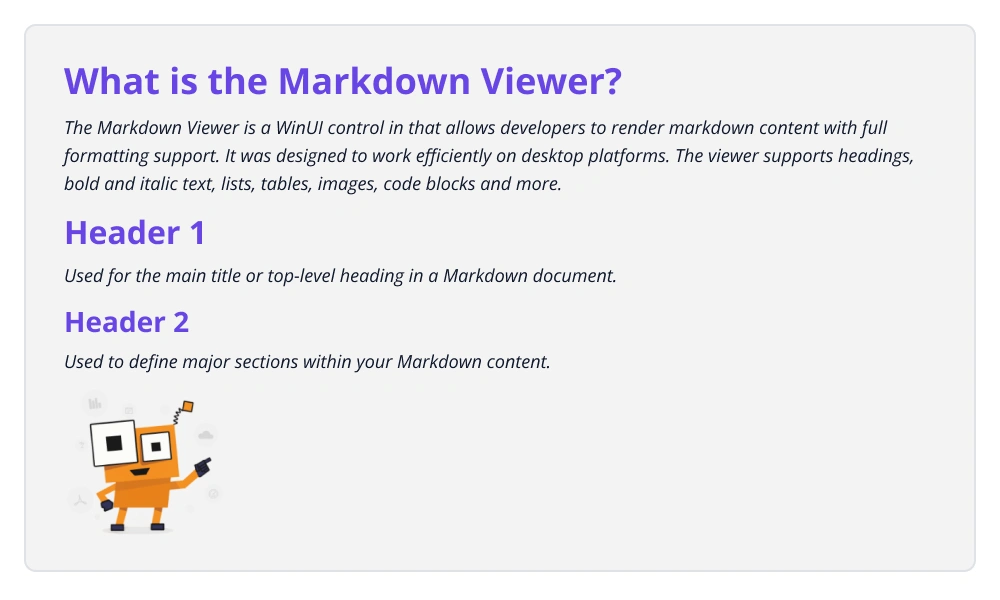
You can apply these custom styles by assigning a MarkdownStyleSettings instance to the Settings property of Markdown Viewer control, as shown in the following code example.
<Grid>
<syncfusion:SfMarkdownViewer x:Name="markdownviewer">
<syncfusion:SfMarkdownViewer.Source>
<x:String xml:space="preserve">
<
]]>
</x:String>
</syncfusion:SfMarkdownViewer.Source>
<syncfusion:SfMarkdownViewer.Settings>
<syncfusion:MarkdownStyleSettings>
<syncfusion:MarkdownStyleSettings.H1Style>
<syncfusion:HeaderSettings FontStyle="Normal" FontSize="50" Foreground="MediumPurple" />
</syncfusion:MarkdownStyleSettings.H1Style>
<syncfusion:MarkdownStyleSettings.H2Style>
<syncfusion:HeaderSettings FontStyle="Normal" FontSize="50" Foreground="MediumPurple" />
</syncfusion:MarkdownStyleSettings.H2Style>
<syncfusion:MarkdownStyleSettings.ParagraphStyle>
<syncfusion:ParagraphSettings FontStyle="Italic" FontSize="15" />
</syncfusion:MarkdownStyleSettings.ParagraphStyle>
</syncfusion:MarkdownStyleSettings>
</syncfusion:SfMarkdownViewer.Settings>
</syncfusion:SfMarkdownViewer>
</Grid>public sealed partial class MainWindow : Window
{
public MainWindow()
{
InitializeComponent();
SfMarkdownViewer markdownViewer = new SfMarkdownViewer();
markdownViewer.Source =
@"
# What is the Markdown Viewer ?
The Markdown Viewer is a UI control in WinUI that allows developers to render Markdown content with full formatting support. It was designed to
work efficiently on both mobile and desktop platforms. The viewer supports headings, bold and italic text, lists, tables, images, code blocks and more.
# Header 1
Used for the Main title or top-level heading in a Markdown document.
## Header 2
Used to define major sections within your Markdown content.

";
markdownViewer.Settings = new MarkdownStyleSettings
{
H1Style = new HeaderSettings
{
FontSize = 50,
Foreground = new SolidColorBrush(Microsoft.UI.Colors.MediumPurple),
FontStyle = FontStyle.Normal,
},
H2Style = new HeaderSettings
{
FontSize = 50,
Foreground = new SolidColorBrush(Microsoft.UI.Colors.MediumPurple),
FontStyle = FontStyle.Normal,
},
ParagraphStyle = new ParagraphSettings
{
FontStyle = FontStyle.Italic,
FontSize = 15,
},
};
Content = markdownViewer;
}
}The following image shows the rendered output with customized heading and paragraph styles:
