Header in UWP Radial Gauge
18 Nov 201811 minutes to read
The header allows you to show text or any UI content inside the gauge control using the GaugeHeader property. This provides information about the data that is being plotted in the circular gauge.
Header
The GaugeHeader is an object that can be used to set a unique header for the circular gauge. You can add text and images as a header in the circular gauge. Only one header can be added in a circular gauge.
<gauge:SfCircularGauge HeaderAlignment="Center">
    <gauge:SfCircularGauge.GaugeHeader>
        <TextBlock Text="Temperature (K)"
                   Height="40" Width="100"
                   FontSize="13" Foreground="Black"/>
    </gauge:SfCircularGauge.GaugeHeader>
    <gauge:SfCircularGauge.Scales>
        <gauge:CircularScale Radius="150" RimStroke="#39B2C6" RimStrokeThickness="8"
                             TickStroke="#BEBEBE" LabelStroke="#9E9E9E" SmallTickStroke="#BEBEBE">
            <gauge:CircularScale.Pointers>
                <gauge:CircularPointer NeedlePointerVisibility="Collapsed"/>
            </gauge:CircularScale.Pointers>
        </gauge:CircularScale>
    </gauge:SfCircularGauge.Scales>
</gauge:SfCircularGauge>
SfCircularGauge sfCircularGauge = new SfCircularGauge();
sfCircularGauge.HeaderAlignment = HeaderAlignment.Center;
TextBlock textBlock = new TextBlock();
textBlock.Text = "Temperature (K)";
textBlock.Height = 40;
textBlock.Width = 100;
textBlock.FontSize = 13;
textBlock.Foreground = new SolidColorBrush(Colors.Black);
sfCircularGauge.GaugeHeader = textBlock;
CircularScale circularScale = new CircularScale();
circularScale.Radius = 150;
circularScale.RimStroke = new SolidColorBrush(Color.FromArgb(0xff, 0x57, 0xb2, 0xc6));
circularScale.TickStroke = new SolidColorBrush(Color.FromArgb(0xff, 0xc1, 0xc1, 0xc1));
circularScale.SmallTickStroke = new SolidColorBrush(Color.FromArgb(0xff, 0xc1, 0xc1, 0xc1));
circularScale.RimStrokeThickness = 8;
circularScale.LabelStroke = new SolidColorBrush(Color.FromArgb(0xff, 0x99, 0x99, 0x99));
CircularPointer circularPointer = new CircularPointer();
circularPointer.NeedlePointerVisibility = Windows.UI.Xaml.Visibility.Collapsed;
circularScale.Pointers.Add(circularPointer);
sfCircularGauge.Scales.Add(circularScale);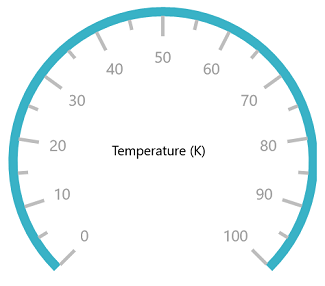
Setting alignment for header
The gauge header can be positioned by using the HeaderAlignment property. The default value of this property is Left.
It includes the following options:
- Left
- Right
- Top
- Bottom
- Center
- TopLeft
- TopRight
- BottomLeft
- BottomRight
- Custom
<gauge:SfCircularGauge HeaderAlignment="Top">
    <gauge:SfCircularGauge.GaugeHeader>
        <TextBlock Text="Temperature (K)"
                   Height="40" Width="100"
                   FontSize="13" Foreground="Black"/>
    </gauge:SfCircularGauge.GaugeHeader>
    <gauge:SfCircularGauge.Scales>
        <gauge:CircularScale Radius="150" RimStroke="#39B2C6" RimStrokeThickness="8"
                             TickStroke="#BEBEBE" LabelStroke="#9E9E9E" SmallTickStroke="#BEBEBE">
            <gauge:CircularScale.Pointers>
                <gauge:CircularPointer NeedlePointerVisibility="Collapsed"/>
            </gauge:CircularScale.Pointers>
        </gauge:CircularScale>
    </gauge:SfCircularGauge.Scales>
</gauge:SfCircularGauge>
SfCircularGauge sfCircularGauge = new SfCircularGauge();
sfCircularGauge.HeaderAlignment = HeaderAlignment.Top;
TextBlock textBlock = new TextBlock();
textBlock.Text = "Temperature (K)";
textBlock.Height = 40;
textBlock.Width = 100;
textBlock.FontSize = 13;
textBlock.Foreground = new SolidColorBrush(Colors.Black);
sfCircularGauge.GaugeHeader = textBlock;
CircularScale circularScale = new CircularScale();
circularScale.Radius = 150;
circularScale.RimStroke = new SolidColorBrush(Color.FromArgb(0xff, 0x57, 0xb2, 0xc6));
circularScale.TickStroke = new SolidColorBrush(Color.FromArgb(0xff, 0xc1, 0xc1, 0xc1));
circularScale.SmallTickStroke = new SolidColorBrush(Color.FromArgb(0xff, 0xc1, 0xc1, 0xc1));
circularScale.RimStrokeThickness = 8;
circularScale.LabelStroke = new SolidColorBrush(Color.FromArgb(0xff, 0x99, 0x99, 0x99));
CircularPointer circularPointer = new CircularPointer();
circularPointer.NeedlePointerVisibility = Windows.UI.Xaml.Visibility.Collapsed;
circularScale.Pointers.Add(circularPointer);
sfCircularGauge.Scales.Add(circularScale);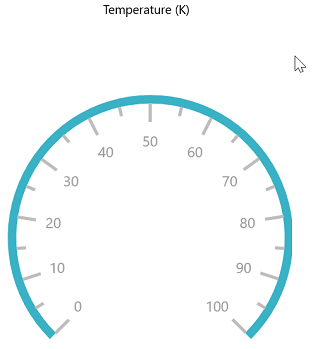
Setting position for header
The GaugeHeaderPosition property is used to place the header in the circular gauge. The value for the GaugeHeaderPosition should be specified in an offset value. In the point value that has been given for the GaugeHeaderPosition, the first value represents the x-coordinate and the second value represents the y-coordinate. First, set the HeaderAlignment to Custom, then set the position of the header.
<gauge:SfCircularGauge HeaderAlignment="Custom" GaugeHeaderPosition="0.42,0.6">
    <gauge:SfCircularGauge.GaugeHeader>
        <TextBlock Text="Temperature (K)"
                   Height="40" Width="100"
                   FontSize="13" Foreground="Black"/>
    </gauge:SfCircularGauge.GaugeHeader>
    <gauge:SfCircularGauge.Scales>
        <gauge:CircularScale Radius="150" RimStroke="#39B2C6" RimStrokeThickness="8"
                             TickStroke="#BEBEBE" LabelStroke="#9E9E9E" SmallTickStroke="#BEBEBE">
            <gauge:CircularScale.Pointers>
                <gauge:CircularPointer NeedlePointerVisibility="Collapsed"/>
            </gauge:CircularScale.Pointers>
        </gauge:CircularScale>
    </gauge:SfCircularGauge.Scales>
</gauge:SfCircularGauge>
SfCircularGauge sfCircularGauge = new SfCircularGauge();
sfCircularGauge.HeaderAlignment = HeaderAlignment.Custom;
sfCircularGauge.GaugeHeaderPosition = new Point(0.42, 0.6);
TextBlock textBlock = new TextBlock();
textBlock.Text = "Temperature (K)";
textBlock.Height = 40;
textBlock.Width = 100;
textBlock.FontSize = 13;
textBlock.Foreground = new SolidColorBrush(Colors.Black);
sfCircularGauge.GaugeHeader = textBlock;
CircularScale circularScale = new CircularScale();
circularScale.Radius = 150;
circularScale.RimStroke = new SolidColorBrush(Color.FromArgb(0xff, 0x57, 0xb2, 0xc6));
circularScale.TickStroke = new SolidColorBrush(Color.FromArgb(0xff, 0xc1, 0xc1, 0xc1));
circularScale.SmallTickStroke = new SolidColorBrush(Color.FromArgb(0xff, 0xc1, 0xc1, 0xc1));
circularScale.RimStrokeThickness = 8;
circularScale.LabelStroke = new SolidColorBrush(Color.FromArgb(0xff, 0x99, 0x99, 0x99));
CircularPointer circularPointer = new CircularPointer();
circularPointer.NeedlePointerVisibility = Windows.UI.Xaml.Visibility.Collapsed;
circularScale.Pointers.Add(circularPointer);
sfCircularGauge.Scales.Add(circularScale);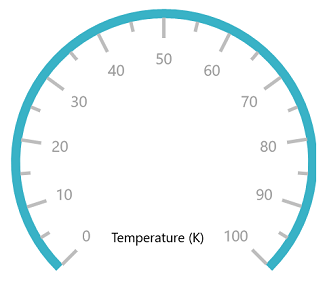
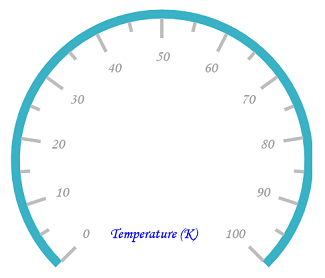
Customization of header font
You can customize the header’s text by using the FontFamily, FontStyle, FontSize, and Foreground properties.
<gauge:SfCircularGauge HeaderAlignment="Custom" GaugeHeaderPosition="0.42,0.6"
                       FontFamily="Monotype Corsiva" FontSize="15"
                       FontStyle="Italic" Foreground="Blue">
    <gauge:SfCircularGauge.GaugeHeader>
        <TextBlock Text="Temperature (K)"
                   Height="40" Width="100"/>
    </gauge:SfCircularGauge.GaugeHeader>
    <gauge:SfCircularGauge.Scales>
        <gauge:CircularScale Radius="150" RimStroke="#39B2C6" RimStrokeThickness="8"
                             TickStroke="#BEBEBE" LabelStroke="#9E9E9E" SmallTickStroke="#BEBEBE">
            <gauge:CircularScale.Pointers>
                <gauge:CircularPointer NeedlePointerVisibility="Collapsed"/>
            </gauge:CircularScale.Pointers>
        </gauge:CircularScale>
    </gauge:SfCircularGauge.Scales>
</gauge:SfCircularGauge>
SfCircularGauge sfCircularGauge = new SfCircularGauge();
sfCircularGauge.HeaderAlignment = HeaderAlignment.Custom;
sfCircularGauge.GaugeHeaderPosition = new Point(0.42, 0.6);
TextBlock textBlock = new TextBlock();
textBlock.Text = "Temperature (K)";
textBlock.Height = 40;
textBlock.Width = 100;
textBlock.FontSize = 13;
textBlock.Foreground = new SolidColorBrush(Colors.Black);
sfCircularGauge.GaugeHeader = textBlock;
sfCircularGauge.FontSize = 15;
sfCircularGauge.FontFamily = new FontFamily("Monotype Corsiva");
sfCircularGauge.FontStyle = Windows.UI.Text.FontStyle.Italic;
sfCircularGauge.Foreground = new SolidColorBrush(Colors.Blue);
CircularScale circularScale = new CircularScale();
circularScale.Radius = 150;
circularScale.RimStroke = new SolidColorBrush(Color.FromArgb(0xff, 0x57, 0xb2, 0xc6));
circularScale.TickStroke = new SolidColorBrush(Color.FromArgb(0xff, 0xc1, 0xc1, 0xc1));
circularScale.SmallTickStroke = new SolidColorBrush(Color.FromArgb(0xff, 0xc1, 0xc1, 0xc1));
circularScale.RimStrokeThickness = 8;
circularScale.LabelStroke = new SolidColorBrush(Color.FromArgb(0xff, 0x99, 0x99, 0x99));
CircularPointer circularPointer = new CircularPointer();
circularPointer.NeedlePointerVisibility = Windows.UI.Xaml.Visibility.Collapsed;
circularScale.Pointers.Add(circularPointer);
sfCircularGauge.Scales.Add(circularScale);