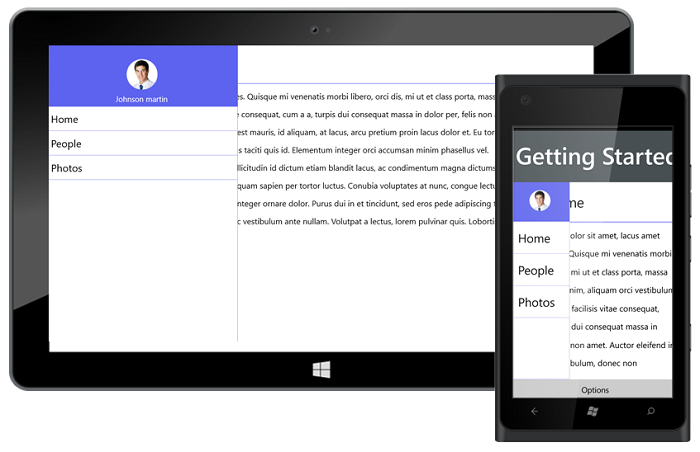
Getting Started with UWP Navigation Drawer (SfNavigationDrawer)
18 Nov 20183 minutes to read
The following section helps you to build your application with UWP Navigation Drawer.
Steps
- Create a new Universal Windows Platform project using Visual Studio. For more details.
- Add the SfNavigationDrawer assembly to your application.
- Initialize the UWP NavigationDrawer control.
- Adding content view to the UWP NavigationDrawer control.
- Adding drawer view to the UWP NavigationDrawer control.
These steps are explained below for XAML.
Create a simple UWP Navigation Drawer from XAML
Adding assembly reference
- Open the Add Reference window from your project.
- Choose Windows > Extensions > SyncfusionControls for UWP XAML.
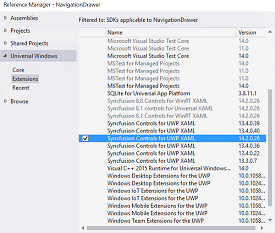
Add the following namespace in your XAML window.
xmlns:syncfusion="using:Syncfusion.UI.Xaml.NavigationDrawer"Add UWP Navigation Drawer from Toolbox
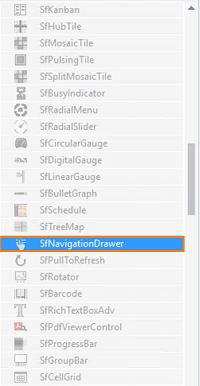
Drag and drop the UWP Navigation Drawer control from the Toolbox to your application.
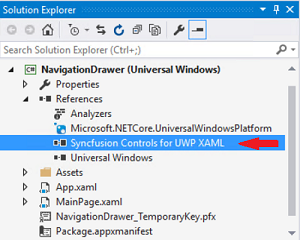
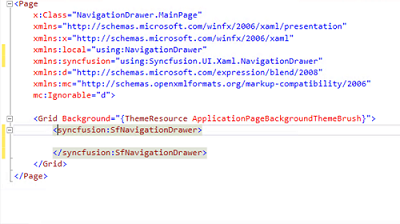
Now the SyncfusionControls for UWP XAML reference is added to the application references and the xmlns namespace code is generated in MainWindow.xaml as below.
Initialize the UWP Navigation Drawer
You need to initialize the UWP Navigation Drawer represented by the following class Syncfusion.UI.Xaml.NavigationDrawer.
<syncfusion:SfNavigationDrawer>

			</syncfusion:SfNavigationDrawer>
Adding ContentView to the UWP Navigation Drawer
<syncfusion:SfNavigationDrawer x:Name="drawer">
			<syncfusion:SfNavigationDrawer.ContentView>
				<Grid>
			<StackPanel Orientation="Horizontal">
				<Button x:Name="button"  Canvas.ZIndex="5" Grid.Column="0" BorderBrush="Transparent" Height="45" Width="50" Background="Transparent"   Click="ButtonBase_OnClick">
						<Path Data="M3.507019,20.166L28.493011,20.166C30.429993,20.166 32,21.734998 32,23.672008 32,25.609994 30.429993,27.180001 28.493011,27.180001L3.507019,27.180001C1.5710144,27.180001 0,25.609994 0,23.672008 0,21.734998 1.5710144,20.166 3.507019,20.166z M3.507019,10.082999L28.493011,10.082999C30.429993,10.082999 32,11.653006 32,13.590992 32,15.528002 30.429993,17.098985 28.493011,17.098985L3.507019,17.098985C1.5710144,17.098985 0,15.528002 0,13.590992 0,11.653006 1.5710144,10.082999 3.507019,10.082999z M3.507019,0L28.493011,0C30.429993,-8.7618901E-08 32,1.5710131 32,3.5080233 32,5.4460097 30.429993,7.0140015 28.493011,7.0140015L3.507019,7.0140015C1.5710144,7.0140015 0,5.4460097 0,3.5080233 0,1.5710131 1.5710144,-8.7618901E-08 3.507019,0z" Stretch="Uniform" Fill="#FF262626" Width="26" Height="26" Margin="0,0,0,0" RenderTransformOrigin="0.5,0.5"/>
					</Button>
				<TextBlock Text="Home" FontSize="27" Margin="10,0,0,0"  Foreground="Black" Grid.Column="1" HorizontalAlignment="Left" VerticalAlignment="Center" />
			</StackPanel>
			<Border BorderBrush="#FF5D63EE" Grid.Row="1" BorderThickness="1" VerticalAlignment="Top" Background="#FF5D63EE"/>
			<StackPanel Grid.Row="2" Orientation="Vertical"  Background="white" Margin="10" VerticalAlignment="Top">
				<TextBlock TextWrapping="Wrap" Foreground="black" LineHeight="35" FontSize="16" HorizontalAlignment="Left">
					<TextBlock.Text>
						Home Page ContentView
					</TextBlock.Text>
				</TextBlock>
			</StackPanel>
			</Grid>
		</syncfusion:SfNavigationDrawer.ContentView>
    	</syncfusion:SfNavigationDrawer>
Adding drawer view to the UWP Navigation Drawer
The DrawerView is a panel that is the hidden content, brought to the view by manipulations like panning or swiping through the edges. The DrawerView has three sections namely:
-
DrawerHeaderView
-
DrawerContentView
-
DrawerFooterView
<syncfusion:SfNavigationDrawer x:Name="drawer">
			<syncfusion:SfNavigationDrawer.DrawerHeaderView>
				<StackPanel Orientation="Vertical" VerticalAlignment="Center" HorizontalAlignment="Center">
							<Image Source="/Assets/NavigationDrawer/User.png" Height="80" Width="100"/>
							<TextBlock HorizontalAlignment="Center" Margin="0 10 0 0" Text="James Pollock"/>
						</StackPanel>
			</syncfusion:SfNavigationDrawer.DrawerHeaderView>
			<syncfusion:SfNavigationDrawer.DrawerContentView>
				<Grid Background="Black">
					<ListBox x:Name="list" ItemsSource="{Binding Contents}">
						<ListBox.ItemTemplate>
							<DataTemplate>
								<TextBlock  Text="{Binding Name}" Padding="15" TextAlignment="Center" FontSize="23" Foreground="White"/>
							</DataTemplate>
						</ListBox.ItemTemplate>
					</ListBox>
				</Grid>
			</syncfusion:SfNavigationDrawer.DrawerContentView>
			<syncfusion:SfNavigationDrawer.DrawerFooterView>
			<StackPanel Orientation="Vertical" VerticalAlignment="Center" HorizontalAlignment="Center">
							<Image Source="/Assets/NavigationDrawer/User.png" Height="80" Width="100"/>
							<TextBlock HorizontalAlignment="Center" Margin="0 10 0 0" Text="James Pollock"/>
						</StackPanel>
			</syncfusion:SfNavigationDrawer.DrawerFooterView>
			</syncfusion:SfNavigationDrawer>