Legend in UWP HeatMap
18 Nov 20181 minute to read
Legend is a control used to summarize the color ranges in a HeatMap, providing a visual guide for mapping values to their corresponding colors.
Create legend
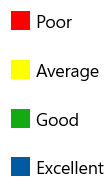
Legend can be created with color mapping as shown below.
<syncfusion:ColorMappingCollection x:Key="colorMapping">
    <syncfusion:ColorMapping Value="0" Color="#fe0002" Label="Poor"/>
    <syncfusion:ColorMapping Value="3" Color="#ffff01" Label="Average"/>
    <syncfusion:ColorMapping Value="6" Color="#13ab11" Label="Good"/>
    <syncfusion:ColorMapping Value="10" Color="#005ba2 " Label="Excellent"/>
</syncfusion:ColorMappingCollection>

<syncfusion:SfHeatMapLegend ColorMappingCollection="{StaticResource colorMapping}"/>
The resulting legend will appear as shown in the following image.

Legend mode
There are two modes available for the legend:
- Gradient
- List
Gradient
<syncfusion:SfHeatMapLegend
	LegendMode="Gradient"
	ColorMappingCollection="{StaticResource colorMapping}" />
List
<syncfusion:SfHeatMapLegend
	LegendMode="List"
	ColorMappingCollection="{StaticResource colorMapping}" />
Orientation
There are two types of orientation available for both Gradient and List modes:
- Horizontal
- Vertical
Horizontal
<syncfusion:SfHeatMapLegend
	LegendMode="List"
	Orientation="Horizontal"
	ColorMappingCollection="{StaticResource colorMapping}" />
Vertical
<syncfusion:SfHeatMapLegend
	LegendMode="List"
	Orientation="Vertical"
	ColorMappingCollection="{StaticResource colorMapping}"/>