Items Mapping in UWP HeatMap 18 Nov 2018
External data can be mapped to a HeatMap using the ItemsMapping property, which supports two types of data sources:
In TableMapping each row represents an object in the collection, while the columns represent its numerical properties.
In CellMapping each cell represents an object in the collection, and the data is grouped by specific properties to form rows and columns.
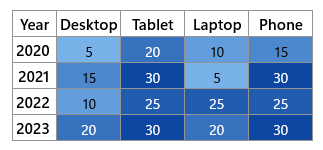
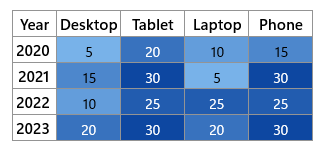
Let’s examine the differences between these two mapping types. The following table illustrates two distinct data structures that represent the same HeatMap.
CellMapping
TableMapping
public class ProductInfo
{
public string ProductName { get ; set ; }
public int Year { get ; set ; }
public double Value { get ; set ; }
}
public class ProductInfo
{
public string ProductName { get ; set ; }
public double Y2020 { get ; set ; }
public double Y2021 { get ; set ; }
public double Y2022 { get ; set ; }
public double Y2023 { get ; set ; }
}
Here, a single ProductInfo object represent a value for a particular product in a particular year
Here, a single ProductInfo object represents value for a particular product from year 2020 to 2023.
<local:Products x:Key= "productsData" >
<local:ProductInfo ProductName= "Desktop" Year= "2020" Value= "5" />
<local:ProductInfo ProductName= "Desktop" Year= "2021" Value= "15" />
<local:ProductInfo ProductName= "Desktop" Year= "2022" Value= "10" />
<local:ProductInfo ProductName= "Desktop" Year= "2023" Value= "20" />
<local:ProductInfo ProductName= "Tablet" Year= "2020" Value= "20" />
<local:ProductInfo ProductName= "Tablet" Year= "2021" Value= "30" />
<local:ProductInfo ProductName= "Tablet" Year= "2022" Value= "25" />
<local:ProductInfo ProductName= "Tablet" Year= "2023" Value= "30" />
<local:ProductInfo ProductName= "Laptop" Year= "2020" Value= "10" />
<local:ProductInfo ProductName= "Laptop" Year= "2021" Value= "5" />
<local:ProductInfo ProductName= "Laptop" Year= "2022" Value= "25" />
<local:ProductInfo ProductName= "Laptop" Year= "2023" Value= "20" />
<local:ProductInfo ProductName= "Phone" Year= "2020" Value= "15" />
<local:ProductInfo ProductName= "Phone" Year= "2021" Value= "30" />
<local:ProductInfo ProductName= "Phone" Year= "2022" Value= "25" />
<local:ProductInfo ProductName= "Phone" Year= "2023" Value= "30" />
</local:Products>
<syncfusion:CellMapping x:Key= "CellMapping" >
<syncfusion:CellMapping.Column>
<syncfusion:ColumnMapping
PropertyName= "ProductName"
DisplayName= "Product Name" />
</syncfusion:CellMapping.Column>
<syncfusion:CellMapping.Row>
<syncfusion:ColumnMapping
PropertyName= "Year"
DisplayName= "Year" />
</syncfusion:CellMapping.Row>
<syncfusion:CellMapping.Value>
<syncfusion:ColumnMapping
PropertyName= "Value" />
</syncfusion:CellMapping.Value>
</syncfusion:CellMapping>
<local:Products x:Key= "productsData" >
<local:ProductInfo ProductName= "Desktop"
Y2020= "5" Y2021= "15" Y2022= "10" Y2023= "20" />
<local:ProductInfo ProductName= "Tablet"
Y2020= "20" Y2021= "30" Y2022= "25" Y2023= "30" />
<local:ProductInfo ProductName= "Laptop"
Y2020= "10" Y2021= "5" Y2022= "25" Y2023= "20" />
<local:ProductInfo ProductName= "Phone"
Y2020= "15" Y2021= "30" Y2022= "25" Y2023= "30" />
</local:Products>
<syncfusion:TableMapping x:Key= "TableMapping" >
<syncfusion:TableMapping.HeaderMapping>
<syncfusion:ColumnMapping
PropertyName= "ProductName"
DisplayName= "Product Name" />
</syncfusion:TableMapping.HeaderMapping>
<syncfusion:TableMapping.ColumnMapping>
<syncfusion:ColumnMapping
PropertyName= "Y2020"
DisplayName= "2020" />
<syncfusion:ColumnMapping
PropertyName= "Y2021"
DisplayName= "2021" />
<syncfusion:ColumnMapping
PropertyName= "Y2022"
DisplayName= "2022" />
<syncfusion:ColumnMapping
PropertyName= "Y2023"
DisplayName= "2023" />
</syncfusion:TableMapping.ColumnMapping>
</syncfusion:TableMapping>