Getting Started with UWP HeatMap
18 Nov 201818 minutes to read
Creating heatmap for windows store app
HeatMap is available in the following assembly and namespace.
Assembly: Syncfusion.SfHeatMap.UWP
Namespace: Syncfusion.UI.Xaml.HeatMap
Adding assembly reference
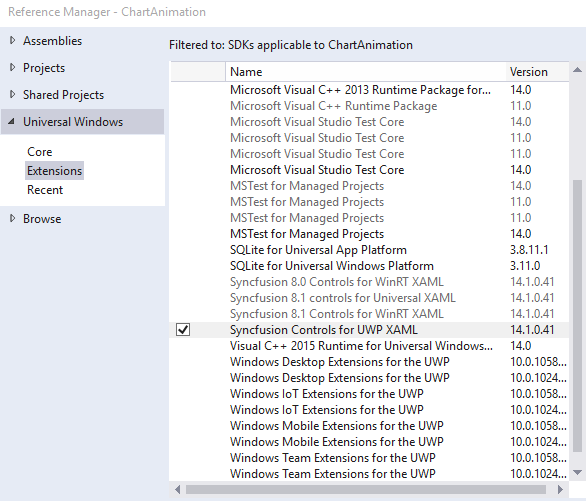
- Open the Add Reference window from your project.
- Choose Windows > Extensions > SyncfusionControls for UWP XAML.
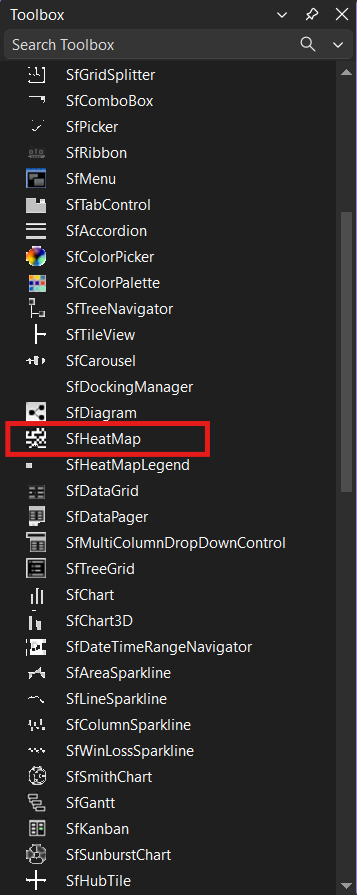
Add UWP HeatMap Chart from toolbox
Drag and drop the SfHeatMap control from the Toolbox to your application.
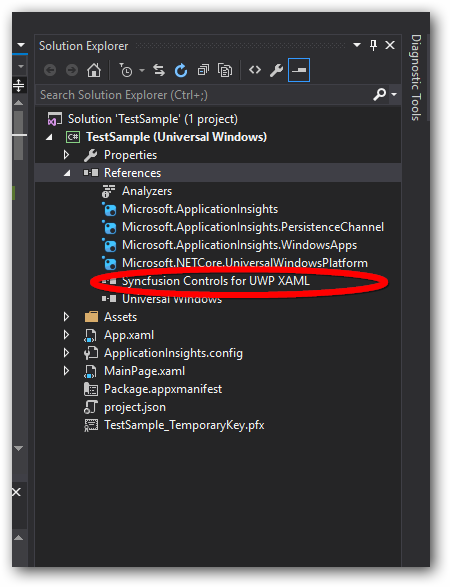
Now the SyncfusionControls for UWP XAML reference is added to the application references and the xmlns namespace code is generated in MainWindow.xaml .
Refer to the following code to add a HeatMap in an application:
<Page
    xmlns="http://schemas.microsoft.com/winfx/2006/xaml/presentation"
    xmlns:x="http://schemas.microsoft.com/winfx/2006/xaml"
    xmlns:local="using:TestSample"
    xmlns:d="http://schemas.microsoft.com/expression/blend/2008"
    xmlns:mc="http://schemas.openxmlformats.org/markup-compatibility/2006"
    xmlns:syncfusion="using:Syncfusion.UI.Xaml.HeatMap"
    x:Class="TestSample.MainPage"
    mc:Ignorable="d">

    <Grid Background="{ThemeResource ApplicationPageBackgroundThemeBrush}">
        <syncfusion:SfHeatMap />
    </Grid>
</Page>
Prepare data
Create a class to store Product information to be visualized using SfHeatMap.
public class Product
{
    public string ProductName { get; set; }
    public double Y2007 { get; set; }
    public double Y2008 { get; set; }
    public double Y2009 { get; set; }
    public double Y2010 { get; set; }
    public double Y2011 { get; set; }
    public double Y2012 { get; set; }
    public double Y2013 { get; set; }
    public double Y2014 { get; set; }
    public double Y2015 { get; set; }
    public double Y2016 { get; set; }

    public Product()
    {

    }
}

public class Products : ObservableCollection<Product>
{

}
Populate data
Populate product information within a collection.
<local:Products x:Key="productsData">
    <local:Product ProductName="Alice Mutton" Y2007="3" Y2008="4" Y2009="3" Y2010="4" Y2011="10"
                Y2012="6" Y2013="7" Y2014="6" Y2015="8" Y2016="5"/>
    <local:Product ProductName="Boston Crab Meat" Y2007="10" Y2008="11" Y2009="10" Y2010="12"
                Y2011="15" Y2012="13" Y2013="11" Y2014="10" Y2015="12" Y2016="11"/>
    <local:Product ProductName="Raclette Courdavault" Y2007="12" Y2008="12" Y2009="15" Y2010="18"
                Y2011="19" Y2012="20" Y2013="22" Y2014="21" Y2015="22" Y2016="25"/>
    <local:Product ProductName="Gorgonzola Telino" Y2007="1" Y2008="1" Y2009="2" Y2010="3"
                Y2011="2" Y2012="2" Y2013="3" Y2014="2" Y2015="3" Y2016="3"/>
    <local:Product ProductName="Chartreuse verte" Y2007="15" Y2008="14" Y2009="14" Y2010="13"
                Y2011="10" Y2012="8" Y2013="9" Y2014="9" Y2015="8" Y2016="8"/>
    <local:Product ProductName="Fløtemysost" Y2007="3" Y2008="3" Y2009="4" Y2010="5" Y2011="4"
                Y2012="6" Y2013="8" Y2014="2" Y2015="5" Y2016="7"/>
    <local:Product ProductName="Carnarvon Tigers" Y2007="20" Y2008="21" Y2009="20" Y2010="20"
                Y2011="20" Y2012="21" Y2013="20" Y2014="20" Y2015="21" Y2016="22"/>
    <local:Product ProductName="Vegie-spread" Y2007="18" Y2008="19" Y2009="20" Y2010="21"
                Y2011="22" Y2012="23" Y2013="24" Y2014="25" Y2015="25" Y2016="25"/>
    <local:Product ProductName="Tarte au sucre" Y2007="1" Y2008="2" Y2009="3" Y2010="3" Y2011="4"
                Y2012="4" Y2013="7" Y2014="10" Y2015="12" Y2016="16"/>
    <local:Product ProductName="Konbu" Y2007="10" Y2008="8" Y2009="8" Y2010="7" Y2011="8"
                Y2012="10" Y2013="11" Y2014="12" Y2015="11" Y2016="13"/>
    <local:Product ProductName="Valkoinen suklaa" Y2007="20" Y2008="20" Y2009="19" Y2010="20"
                Y2011="15" Y2012="12" Y2013="6" Y2014="3" Y2015="3" Y2016="3"/>
    <local:Product ProductName="Perth Pasties" Y2007="12" Y2008="13" Y2009="13" Y2010="15"
                Y2011="15" Y2012="18" Y2013="19" Y2014="19" Y2015="22" Y2016="22"/>
</local:Products>
Map data into UWP HeatMap Chart
Now the data is ready, the next step is to configure the data source and map rows and columns for visualization.
-
Prepare the ItemsMapping and add it to the resources, as shown in the following code:
<syncfusion:TableMapping x:Key="ItemsMapping"> <syncfusion:TableMapping.HeaderMapping> <syncfusion:ColumnMapping PropertyName="ProductName" DisplayName="Product Name"/> </syncfusion:TableMapping.HeaderMapping> <syncfusion:TableMapping.ColumnMapping> <syncfusion:ColumnMapping PropertyName="Y2007" DisplayName="Y2007"/> <syncfusion:ColumnMapping PropertyName="Y2008" DisplayName="Y2008"/> <syncfusion:ColumnMapping PropertyName="Y2009" DisplayName="Y2009"/> <syncfusion:ColumnMapping PropertyName="Y2010" DisplayName="Y2010"/> <syncfusion:ColumnMapping PropertyName="Y2011" DisplayName="Y2011"/> <syncfusion:ColumnMapping PropertyName="Y2012" DisplayName="Y2012"/> <syncfusion:ColumnMapping PropertyName="Y2013" DisplayName="Y2013"/> <syncfusion:ColumnMapping PropertyName="Y2014" DisplayName="Y2014"/> <syncfusion:ColumnMapping PropertyName="Y2015" DisplayName="Y2015"/> <syncfusion:ColumnMapping PropertyName="Y2016" DisplayName="Y2016"/> </syncfusion:TableMapping.ColumnMapping> </syncfusion:TableMapping> -
Set items source and mapping.
<syncfusion:SfHeatMap ItemsSource="{StaticResource productsData}" ItemsMapping="{StaticResource ItemsMapping}"> </syncfusion:SfHeatMap> -
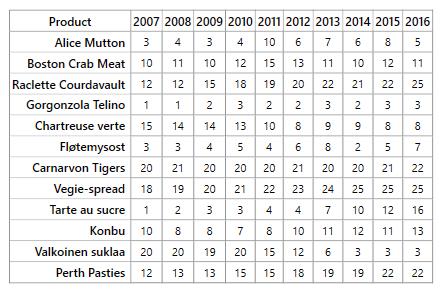
This will show a grid with data as in following image.
Color mapping
Next, we can configure a color range for these values using ColorMapping.
-
Configure the items mapping according to the items source.
<syncfusion:ColorMappingCollection x:Key="colorMapping"> <syncfusion:ColorMapping Value="0" Color="#8ec8f8"/> <syncfusion:ColorMapping Value="30" Color="#0d47a1"/> </syncfusion:ColorMappingCollection> -
Set ColorMapping to ColorMappingCollection.
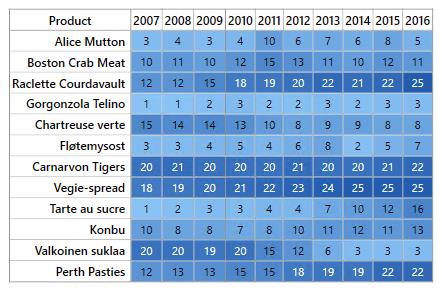
<syncfusion:SfHeatMap ItemsSource="{StaticResource productsData}" ItemsMapping="{StaticResource itemsMapping}" ColorMappingCollection="{StaticResource colorMapping}"> -
This will show the grid data with color based on the range given.
Legend
A legend control is used to represent value ranges in a gradient. Create a legend using the same color mapping as shown below.
<syncfusion:SfHeatMapLegend ColorMappingCollection="{StaticResource colorMapping}"/>The final MainPage.cs file looks like the following:
namespace GettingStarted
{
    /// <summary>
    /// Interaction logic for MainWindow.xaml
    /// </summary>
    public partial class MainWindow : Window
    {
        public MainWindow()
        {
            InitializeComponent();
        }
    }

    public class Product
    {
        public string ProductName { get; set; }
        public double Y2007 { get; set; }
        public double Y2008 { get; set; }
        public double Y2009 { get; set; }
        public double Y2010 { get; set; }
        public double Y2011 { get; set; }
        public double Y2012 { get; set; }
        public double Y2013 { get; set; }
        public double Y2014 { get; set; }
        public double Y2015 { get; set; }
        public double Y2016 { get; set; }

        public Product()
        {

        }
    }

    public class Products : ObservableCollection<Product>
    {

    }
}
The final MainPage.xaml file looks like the following:
<Window x:Class="GettingStarted.MainWindow"
        xmlns="http://schemas.microsoft.com/winfx/2006/xaml/presentation"
        xmlns:x="http://schemas.microsoft.com/winfx/2006/xaml"
        xmlns:d="http://schemas.microsoft.com/expression/blend/2008"
        xmlns:mc="http://schemas.openxmlformats.org/markup-compatibility/2006"
        xmlns:local="clr-namespace:GettingStarted"
        mc:Ignorable="d"
        xmlns:syncfusion="http://schemas.syncfusion.com/uwp"
        Title="MainWindow" Height="350" Width="525">
    <Window.Resources>
        <local:Products x:Key="productsData">
            <local:Product ProductName="Alice Mutton" Y2007="3" Y2008="4" Y2009="3" Y2010="4" Y2011="10" Y2012="6" Y2013="7" Y2014="6" Y2015="8" Y2016="5"/>
            <local:Product ProductName="Boston Crab Meat" Y2007="10" Y2008="11" Y2009="10" Y2010="12" Y2011="15" Y2012="13" Y2013="11" Y2014="10" Y2015="12" Y2016="11"/>
            <local:Product ProductName="Raclette Courdavault" Y2007="12" Y2008="12" Y2009="15" Y2010="18" Y2011="19" Y2012="20" Y2013="22" Y2014="21" Y2015="22" Y2016="25"/>
            <local:Product ProductName="Gorgonzola Telino" Y2007="1" Y2008="1" Y2009="2" Y2010="3" Y2011="2" Y2012="2" Y2013="3" Y2014="2" Y2015="3" Y2016="3"/>
            <local:Product ProductName="Chartreuse verte" Y2007="15" Y2008="14" Y2009="14" Y2010="13" Y2011="10" Y2012="8" Y2013="9" Y2014="9" Y2015="8" Y2016="8"/>
            <local:Product ProductName="Fløtemysost" Y2007="3" Y2008="3" Y2009="4" Y2010="5" Y2011="4" Y2012="6" Y2013="8" Y2014="2" Y2015="5" Y2016="7"/>
            <local:Product ProductName="Carnarvon Tigers" Y2007="20" Y2008="21" Y2009="20" Y2010="20" Y2011="20" Y2012="21" Y2013="20" Y2014="20" Y2015="21" Y2016="22"/>
            <local:Product ProductName="Vegie-spread" Y2007="18" Y2008="19" Y2009="20" Y2010="21" Y2011="22" Y2012="23" Y2013="24" Y2014="25" Y2015="25" Y2016="25"/>
            <local:Product ProductName="Tarte au sucre" Y2007="1" Y2008="2" Y2009="3" Y2010="3" Y2011="4" Y2012="4" Y2013="7" Y2014="10" Y2015="12" Y2016="16"/>
            <local:Product ProductName="Konbu" Y2007="10" Y2008="8" Y2009="8" Y2010="7" Y2011="8" Y2012="10" Y2013="11" Y2014="12" Y2015="11" Y2016="13"/>
            <local:Product ProductName="Valkoinen suklaa" Y2007="20" Y2008="20" Y2009="19" Y2010="20" Y2011="15" Y2012="12" Y2013="6" Y2014="3" Y2015="3" Y2016="3"/>
            <local:Product ProductName="Perth Pasties" Y2007="12" Y2008="13" Y2009="13" Y2010="15" Y2011="15" Y2012="18" Y2013="19" Y2014="19" Y2015="22" Y2016="22"/>
        </local:Products>

        <syncfusion:TableMapping x:Key="itemsMapping">

            <syncfusion:TableMapping.HeaderMapping>
                <syncfusion:ColumnMapping PropertyName="ProductName" DisplayName="Product"/>
            </syncfusion:TableMapping.HeaderMapping>

            <syncfusion:TableMapping.ColumnMapping>
                <syncfusion:ColumnMapping PropertyName="Y2007" DisplayName="2007"/>
                <syncfusion:ColumnMapping PropertyName="Y2008" DisplayName="2008"/>
                <syncfusion:ColumnMapping PropertyName="Y2009" DisplayName="2009"/>
                <syncfusion:ColumnMapping PropertyName="Y2010" DisplayName="2010"/>
                <syncfusion:ColumnMapping PropertyName="Y2011" DisplayName="2011"/>
                <syncfusion:ColumnMapping PropertyName="Y2012" DisplayName="2012"/>
                <syncfusion:ColumnMapping PropertyName="Y2013" DisplayName="2013"/>
                <syncfusion:ColumnMapping PropertyName="Y2014" DisplayName="2014"/>
                <syncfusion:ColumnMapping PropertyName="Y2015" DisplayName="2015"/>
                <syncfusion:ColumnMapping PropertyName="Y2016" DisplayName="2016"/>
            </syncfusion:TableMapping.ColumnMapping>

        </syncfusion:TableMapping>

        <syncfusion:ColorMappingCollection x:Key="colorMapping">
            <syncfusion:ColorMapping Value="0" Color="#8ec8f8"/>
            <syncfusion:ColorMapping Value="30" Color="#0d47a1"/>
        </syncfusion:ColorMappingCollection>

    </Window.Resources>

    <Grid HorizontalAlignment="Center" VerticalAlignment="Center">

        <Grid.RowDefinitions>
            <RowDefinition Height="*"/>
            <RowDefinition Height="Auto"/>
        </Grid.RowDefinitions>

        <syncfusion:SfHeatMap ItemsSource="{StaticResource productsData}"
                              ItemsMapping="{StaticResource ItemsMapping}"
                              ColorMappingCollection="{StaticResource colorMapping}">
        </syncfusion:SfHeatMap>

        <syncfusion:SfHeatMapLegend Grid.Row="1" Margin="20" MaxWidth="300"
                                    ColorMappingCollection="{StaticResource colorMapping}"/>
    </Grid>
</Window>