---
layout: post
title: Calendar Types in WPF Scheduler control | Syncfusion
description: Learn here all about how to change the calendar types in the scheduler (SfScheduler) control, its elements, and more.
platform: scheduler-sdk
control: SfScheduler
documentation: ug
---
# Calendar Types in WPF Scheduler (SfScheduler)
This section describes how to change the calendar types of the scheduler control using the [CalendarIdentifier.](https://help.syncfusion.com/cr/wpf/Syncfusion.UI.Xaml.Scheduler.SfScheduler.html#Syncfusion_UI_Xaml_Scheduler_SfScheduler_CalendarIdentifier)
## Types of Calendar
The scheduler control supports the different types of calendars such as Gregorian, Korean, Hebrew, and more. You can change the calendar types by using the [CalendarIdentifier](https://help.syncfusion.com/cr/wpf/Syncfusion.UI.Xaml.Scheduler.SfScheduler.html#Syncfusion_UI_Xaml_Scheduler_SfScheduler_CalendarIdentifier) property in [Scheduler.](https://help.syncfusion.com/cr/wpf/Syncfusion.UI.Xaml.Scheduler.SfScheduler.html) The default value of the `CalendarIdentifier` property is [GregorianCalendar.](https://docs.microsoft.com/en-us/dotnet/api/system.globalization.gregoriancalendar?view=net-5.0)
* JulianCalendar
* JapaneseCalendar
* Lunar type calendars
N>
* When the [CalendarIdentifier](https://help.syncfusion.com/cr/wpf/Syncfusion.UI.Xaml.Scheduler.SfScheduler.html#Syncfusion_UI_Xaml_Scheduler_SfScheduler_CalendarIdentifier) and [FlowDirection](https://docs.microsoft.com/en-us/dotnet/api/system.windows.frameworkelement.flowdirection?view=net-5.0) properties are set, the `FlowDirection` property is given higher precedence. If you want to override this behavior set `FlowDirection` after `CalendarIdentifier.`
* The scheduler uses the `CalendarIdentifier` property to determine which calendar to use to localize and format the header date, view header day, and date, time ruler, and DatePicker, and TimePicker in the appointment editor.
* By default, the scheduler uses the [GregorianCalendar](https://docs.microsoft.com/en-us/dotnet/api/system.globalization.gregoriancalendar?view=net-5.0) for the app’s preferred language.
* The Scheduler Time mode (12 hour or 24 hour) does not change depending on the calendar type; however, the time format can be changed depending on the calendar type by using [Day view time text formatting](https://help.syncfusion.com/wpf/scheduler/daysview#time-text-formatting) and [Timeline view time text formatting.](https://help.syncfusion.com/wpf/scheduler/timelineview#time-text-formatting)
{% tabs %}
{% highlight xaml %}
{% endhighlight %}
{% highlight c# %}
using Syncfusion.UI.Xaml.Scheduler;
this.Schedule.CalendarIdentifier = "HijriCalendar";
{% endhighlight %}
{% endtabs %}
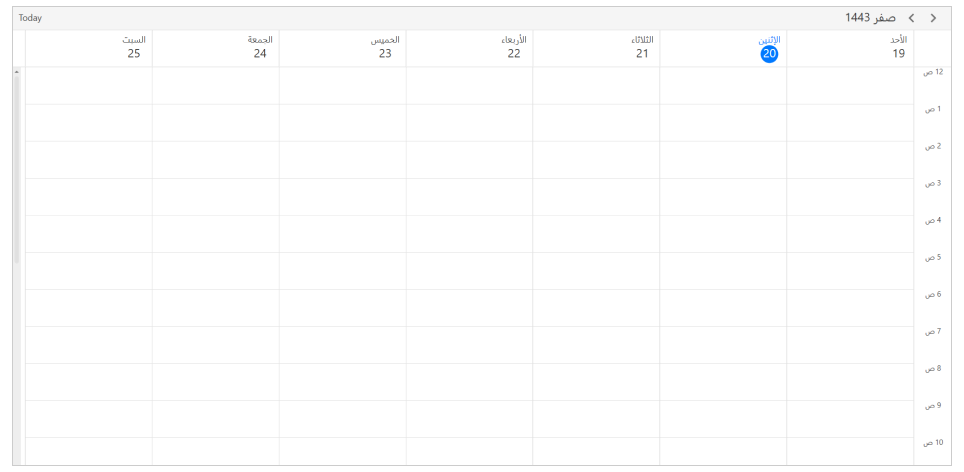
## DateTime values in Calendar types
All the DateTime values can be given such as [DisplayDate,](https://help.syncfusion.com/cr/wpf/Syncfusion.UI.Xaml.Scheduler.SfScheduler.html#Syncfusion_UI_Xaml_Scheduler_SfScheduler_DisplayDate) [SelectedDate,](https://help.syncfusion.com/cr/wpf/Syncfusion.UI.Xaml.Scheduler.SfScheduler.html#Syncfusion_UI_Xaml_Scheduler_SfScheduler_SelectedDate) [BlackoutDates,](https://help.syncfusion.com/cr/wpf/Syncfusion.UI.Xaml.Scheduler.SfScheduler.html#Syncfusion_UI_Xaml_Scheduler_SfScheduler_BlackoutDates) Appointment [StartTime,](https://help.syncfusion.com/cr/wpf/Syncfusion.UI.Xaml.Scheduler.ScheduleAppointment.html#Syncfusion_UI_Xaml_Scheduler_ScheduleAppointment_StartTime) and [EndTime,](https://help.syncfusion.com/cr/wpf/Syncfusion.UI.Xaml.Scheduler.ScheduleAppointment.html#Syncfusion_UI_Xaml_Scheduler_ScheduleAppointment_EndTime) SpecialTimeRegion [StartTime](https://help.syncfusion.com/cr/wpf/Syncfusion.UI.Xaml.Scheduler.SpecialTimeRegion.html#Syncfusion_UI_Xaml_Scheduler_SpecialTimeRegion_StartTime) and [EndTime](https://help.syncfusion.com/cr/wpf/Syncfusion.UI.Xaml.Scheduler.SpecialTimeRegion.html#Syncfusion_UI_Xaml_Scheduler_SpecialTimeRegion_EndTime) values in two ways when calendar identifier is specified other than [GregorianCalendar.](https://docs.microsoft.com/en-us/dotnet/api/system.globalization.gregoriancalendar?view=net-5.0)
* Create an appointment with a start and end time value by declaring the calendar type and relevant calendar type date.
{% capture codesnippet1 %}
{% tabs %}
{% highlight c# %}
using Syncfusion.UI.Xaml.Scheduler;
// Creating an instance for the schedule appointment collection.
var appointments = new ScheduleAppointmentCollection();
// Adding schedule appointment in the schedule appointment collection.
appointments.Add(new ScheduleAppointment()
{
Subject = "Meeting",
// StartTime and EndTime value specified with calendar type and respective calendar date.
StartTime = new DateTime (1443, 02, 22, 10, 0, 0, new HijriCalendar()),
EndTime = new DateTime(1443, 02, 22, 11, 0, 0, new HijriCalendar()),
});
// Adding the schedule appointment collection to the ItemsSource.
this.scheduler.ItemsSource = appointments;
{% endhighlight %}
{% endtabs %}
{% endcapture %}
{{ codesnippet1 | UnOrderList_Indent_Level_1 }}
* Create an appointment with a start and end time by declaring the local system date; in that case, the system date will be converted to the relevant calendar type date.
{% capture codesnippet2 %}
{% tabs %}
{% highlight c# %}
using Syncfusion.UI.Xaml.Scheduler;
// Creating an instance for the schedule appointment collection.
var appointments = new ScheduleAppointmentCollection();
// Adding schedule appointment in the schedule appointment collection.
appointments.Add(new ScheduleAppointment()
{
Subject = "Meeting",
// StartTime and EndTime values specified with local system date will be converted to the Hijri calendar mentioned.
StartTime = new DateTime(2021, 09, 29, 10, 0, 0, 0),
EndTime = new DateTime(2021, 09, 29, 11, 0, 0, 0),
});
// Adding the schedule appointment collection to the ItemsSource.
this.scheduler.ItemsSource = appointments;
{% endhighlight %}
{% endtabs %}
{% endcapture %}
{{ codesnippet2 | UnOrderList_Indent_Level_1 }}
N> [View sample in GitHub](https://github.com/SyncfusionExamples/WPF-Scheduler-Examples/tree/main/CalendarTypes). For more information on appointments, see [Appointments](appointments.md).