Getting Started with Vue Headless Editor
This section explains how to create a simple Headless Editor and configure its available functionalities in a Vue 2 environment. It requires the @syncfusion/ej2-headless-editor package and Vue 2.6 or higher.For Vue 3, see the Getting Started with Vue 3 page.
Prerequisites
- System requirements for Syncfusion® Vue UI components
- Node.js and npm (or Yarn) installed on your machine.
Create a Vue Application
To generate a Vue 2 project using Vue-CLI, use the vue create command. If Vue CLI is not installed yet, run the first command below.
npm install -g @vue/cli
vue create quickstart
or
yarn global add @vue/cli
vue create quickstart
When creating a new project, choose the option Default ([Vue 2] babel, eslint) from the menu.
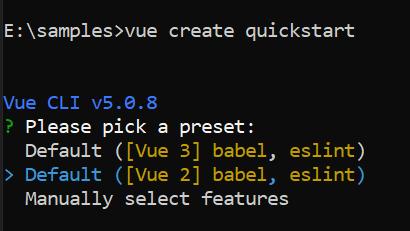
Navigate to the project directory:
cd quickstartAdding Syncfusion® Vue Headless Editor package
All Syncfusion® Vue packages are published on npmjs.com. Install the Vue Headless Editor package by running the following command:
npm install @syncfusion/ej2-headless-editor --saveor
yarn add @syncfusion/ej2-headless-editorAdding CSS reference
Syncfusion provides multiple themes for the Headless Editor. For a complete list of available themes, refer to the themes topic.
To apply the Tailwind 3 theme, install the corresponding theme package by using the following command:
npm install @syncfusion/ej2-tailwind3-theme --saveThen add the following CSS reference to the src/App.vue file:
<style>
@import "../node_modules/@syncfusion/ej2-tailwind3-theme/styles/headless-editor/index.css";
</style>
Adding Headless Editor library
The Headless Editor code should be added in the src/App.vue file.
The Headless Editor can be initialized and mounted to a target element as shown below:
<template>
    <div id="container">
        <div id="toolbar">
            <button id="undo" class="e-icons e-undo" title="Undo (Ctrl+Z)" @click="execute('undo')"></button>
            <button id="redo" class="e-icons e-redo" title="Redo (Ctrl+Y)" @click="execute('redo')"></button>
            <button id="bold" class="e-icons e-bold" title="Bold (Ctrl+B)" @click="execute('toggleBold')"></button>
            <button id="italic" class="e-icons e-italic" title="Italic (Ctrl+I)" @click="execute('toggleItalic')"></button>
            <button id="underline" class="e-icons e-underline" title="Underline (Ctrl+U)" @click="execute('toggleUnderline')"></button>
            <button id="strikethrough" class="e-icons e-strikethrough" title="Strike Through" @click="execute('toggleStrikethrough')"></button>
            <button id="inlineCode" class="e-icons e-insert-code" title="Inline Code (Ctrl+`)" @click="execute('toggleCodeMark')"></button>
            <button id="blockquote" class="e-icons e-blockquote" title="Blockquote (Ctrl+Alt+Q)" @click="execute('toggleBlockQuote')"></button>
            <button id="bulletList" class="e-icons e-list-unordered" title="Bulleted List" @click="execute('toggleBulletList')"></button>
            <button id="orderedList" class="e-icons e-list-ordered" title="Numbered List" @click="execute('toggleOrderedList')"></button>
        </div>

        <div ref="editorContainer" id="headless-editor"></div>
    </div>
</template>

<script>
import { ref, onMounted, onBeforeUnmount } from 'vue';

import {
    HeadlessEditor,
    basicExtensions,
    placeholderExtension
} from '@syncfusion/ej2-headless-editor';

export default {
    name: 'AppComposition',

    setup() {
        const editorContainer = ref(null);
        let editor = null;

        const execute = function (command) {
            if (editor && editor.commands[command]) {
                editor.commands[command]();
            }
        };

        onMounted(function () {
            editor = HeadlessEditor.create({
                extensions: [basicExtensions, placeholderExtension]
            });

            editor.mount(editorContainer.value);
        });

        onBeforeUnmount(function () {
            if (editor && typeof editor.destroy === 'function') {
                editor.destroy();
            }
        });

        return {
            editorContainer,
            execute
        };
    }
};
</script><template>
<div id="container">
<div id="toolbar">
<button id="undo" class="e-icons e-undo" title="Undo (Ctrl+Z)" @click="execute('undo')"></button>
<button id="redo" class="e-icons e-redo" title="Redo (Ctrl+Y)" @click="execute('redo')"></button>
<button id="bold" class="e-icons e-bold" title="Bold (Ctrl+B)" @click="execute('toggleBold')"></button>
<button id="italic" class="e-icons e-italic" title="Italic (Ctrl+I)" @click="execute('toggleItalic')"></button>
<button id="underline" class="e-icons e-underline" title="Underline (Ctrl+U)" @click="execute('toggleUnderline')"></button>
<button id="strikethrough" class="e-icons e-strikethrough" title="Strike Through" @click="execute('toggleStrikethrough')"></button>
<button id="inlineCode" class="e-icons e-insert-code" title="Inline Code (Ctrl+`)" @click="execute('toggleCodeMark')"></button>
<button id="blockquote" class="e-icons e-blockquote" title="Blockquote (Ctrl+Alt+Q)" @click="execute('toggleBlockQuote')"></button>
<button id="bulletList" class="e-icons e-list-unordered" title="Bulleted List" @click="execute('toggleBulletList')"></button>
<button id="orderedList" class="e-icons e-list-ordered" title="Numbered List" @click="execute('toggleOrderedList')"></button>
</div>
<div ref="editorContainer" id="headless-editor"></div>
</div>
</template>
<script>
import { ref, onMounted, onBeforeUnmount } from 'vue';
import {
HeadlessEditor,
basicExtensions,
placeholderExtension
} from '@syncfusion/ej2-headless-editor';
export default {
name: 'AppComposition',
setup() {
const editorContainer = ref(null);
let editor = null;
const execute = function (command) {
if (editor && editor.commands[command]) {
editor.commands[command]();
}
};
onMounted(function () {
editor = HeadlessEditor.create({
extensions: [basicExtensions, placeholderExtension]
});
editor.mount(editorContainer.value);
});
onBeforeUnmount(function () {
if (editor && typeof editor.destroy === 'function') {
editor.destroy();
}
});
return {
editorContainer,
execute
};
}
};
</script>Run the application
Use the following command to run the application in the browser.
npm run serveor
yarn run serveSee also
For additional Vue examples and related topics, see the Vue documentation.
You can also explore the Vue Headless Editor example that shows how to render the Headless Editor.