# Getting Started with Flutter Treemap (SfTreemap)
This section explains the steps required to add the treemap widget and enable its features such as labels, tooltip, assigning colors based on region, and legends. This section covers only the basic features needed to get started with Syncfusion® treemap.
To get started quickly with our Flutter Treemap widget, you can refer to this video.
## Add Flutter treemap to an application
Create a simple project using the instructions given in the [Getting Started with your first Flutter app](https://docs.flutter.dev/get-started/test-drive#choose-your-ide) documentation.
**Add dependency**
Add the Syncfusion® Flutter Treemap dependency to your pubspec.yaml file.
{% tabs %}
{% highlight dart %}
dependencies:
syncfusion_flutter_treemap: ^xx.x.xx
{% endhighlight %}
{% endtabs %}
N> Here **xx.x.xx** denotes the current version of [`Syncfusion Flutter Treemap`](https://pub.dev/packages/syncfusion_flutter_treemap/versions) package. It is recommended to use the latest available version from pub.dev.
**Get packages**
Run the following command to get the required packages.
{% tabs %}
{% highlight dart %}
$ flutter pub get
{% endhighlight %}
{% endtabs %}
**Import package**
Import the following package in your Dart code.
{% tabs %}
{% highlight dart %}
import 'package:syncfusion_flutter_treemap/treemap.dart';
{% endhighlight %}
{% endtabs %}
## Initialize treemap and populate data source
After importing the package, initialize the treemap widget as a child of any widget.
To populate the data source, set its count to the [`dataCount`](https://pub.dev/documentation/syncfusion_flutter_treemap/latest/treemap/SfTreemap/dataCount.html) property of the treemap. The data will be grouped based on the values returned from the [`TreemapLevel.groupMapper`](https://pub.dev/documentation/syncfusion_flutter_treemap/latest/treemap/TreemapLevel/groupMapper.html) callback. You can have more than one TreemapLevel in the [`levels`](https://pub.dev/documentation/syncfusion_flutter_treemap/latest/treemap/SfTreemap/levels.html) collection to form a hierarchical treemap. The quantitative value of the underlying data has to be returned from the [`weightValueMapper`](https://pub.dev/documentation/syncfusion_flutter_treemap/latest/treemap/SfTreemap/weightValueMapper.html) callback. Based on this value, every tile (rectangle) will have its size.
{% tabs %}
{% highlight dart %}
import 'package:flutter/material.dart';
import 'package:syncfusion_flutter_treemap/treemap.dart';
class TreemapExample extends StatefulWidget {
const TreemapExample({super.key});
@override
State createState() => _TreemapExampleState();
}
class _TreemapExampleState extends State {
late List _source;
@override
void initState() {
_source = [
const SocialMediaUsers(
country: 'India',
socialMedia: 'Facebook',
usersInMillions: 25.4,
),
const SocialMediaUsers(
country: 'USA',
socialMedia: 'Instagram',
usersInMillions: 19.11,
),
const SocialMediaUsers(
country: 'Japan',
socialMedia: 'Facebook',
usersInMillions: 13.3,
),
const SocialMediaUsers(
country: 'Germany',
socialMedia: 'Instagram',
usersInMillions: 10.65,
),
const SocialMediaUsers(
country: 'France',
socialMedia: 'Twitter',
usersInMillions: 7.54,
),
const SocialMediaUsers(
country: 'UK',
socialMedia: 'Instagram',
usersInMillions: 4.93,
),
];
super.initState();
}
@override
Widget build(BuildContext context) {
return Scaffold(
body: Center(
child: Container(
height: 400,
width: 400,
child: SfTreemap(
dataCount: _source.length,
weightValueMapper: (int index) {
return _source[index].usersInMillions;
},
levels: [
TreemapLevel(
groupMapper: (int index) {
return _source[index].country;
},
),
],
),
),
),
);
}
}
class SocialMediaUsers {
const SocialMediaUsers({
required this.country,
required this.socialMedia,
required this.usersInMillions,
});
final String country;
final String socialMedia;
final double usersInMillions;
}
{% endhighlight %}
{% endtabs %}

N>
* Refer the [`SfTreemap.levels`](https://pub.dev/documentation/syncfusion_flutter_treemap/latest/treemap/SfTreemap/levels.html), for adding flat or hierarchical structured treemap.
* Refer the [`SfTreemap.colorMappers`](https://pub.dev/documentation/syncfusion_flutter_treemap/latest/treemap/SfTreemap/colorMappers.html), for customizing the tiles color.
## Add labels
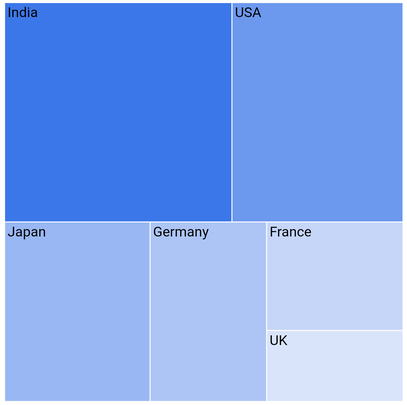
You can add any type of custom widgets to the tiles as labels based on the index using the [`TreemapLevel.labelBuilder`](https://pub.dev/documentation/syncfusion_flutter_treemap/latest/treemap/TreemapLevel/labelBuilder.html) property. The following example extends the initial sample by adding a label builder.
{% tabs %}
{% highlight dart %}
import 'package:flutter/material.dart';
import 'package:syncfusion_flutter_treemap/treemap.dart';
class TreemapExample extends StatefulWidget {
const TreemapExample({super.key});
@override
State createState() => _TreemapExampleState();
}
class _TreemapExampleState extends State {
late List _source;
@override
void initState() {
_source = [
const SocialMediaUsers(
country: 'India',
socialMedia: 'Facebook',
usersInMillions: 25.4,
),
const SocialMediaUsers(
country: 'USA',
socialMedia: 'Instagram',
usersInMillions: 19.11,
),
const SocialMediaUsers(
country: 'Japan',
socialMedia: 'Facebook',
usersInMillions: 13.3,
),
const SocialMediaUsers(
country: 'Germany',
socialMedia: 'Instagram',
usersInMillions: 10.65,
),
const SocialMediaUsers(
country: 'France',
socialMedia: 'Twitter',
usersInMillions: 7.54,
),
const SocialMediaUsers(
country: 'UK',
socialMedia: 'Instagram',
usersInMillions: 4.93,
),
];
super.initState();
}
@override
Widget build(BuildContext context) {
return Scaffold(
body: Center(
child: Container(
height: 400,
width: 400,
child: SfTreemap(
dataCount: _source.length,
weightValueMapper: (int index) {
return _source[index].usersInMillions;
},
levels: [
TreemapLevel(
groupMapper: (int index) {
return _source[index].country;
},
labelBuilder: (BuildContext context, TreemapTile tile) {
return Padding(
padding: const EdgeInsets.only(left: 2.5, right: 2.4, top: 1),
child: Text(
tile.group,
style: const TextStyle(color: Colors.black),
),
);
},
),
],
),
),
),
);
}
}
class SocialMediaUsers {
const SocialMediaUsers({
required this.country,
required this.socialMedia,
required this.usersInMillions,
});
final String country;
final String socialMedia;
final double usersInMillions;
}
{% endhighlight %}
{% endtabs %}
## Add tooltip
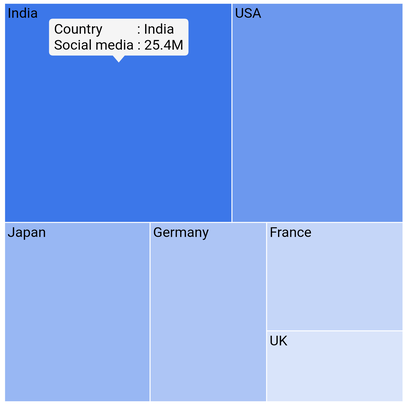
You can enable tooltip for any tile in the treemap and return a fully customized widget using the [`tooltipBuilder`](https://pub.dev/documentation/syncfusion_flutter_treemap/latest/treemap/TreemapLevel/tooltipBuilder.html) property. The following example extends the initial sample by adding a tooltip builder.
{% tabs %}
{% highlight dart %}
import 'package:flutter/material.dart';
import 'package:syncfusion_flutter_treemap/treemap.dart';
class TreemapExample extends StatefulWidget {
const TreemapExample({super.key});
@override
State createState() => _TreemapExampleState();
}
class _TreemapExampleState extends State {
late List _source;
@override
void initState() {
_source = [
const SocialMediaUsers(
country: 'India',
socialMedia: 'Facebook',
usersInMillions: 25.4,
),
const SocialMediaUsers(
country: 'USA',
socialMedia: 'Instagram',
usersInMillions: 19.11,
),
const SocialMediaUsers(
country: 'Japan',
socialMedia: 'Facebook',
usersInMillions: 13.3,
),
const SocialMediaUsers(
country: 'Germany',
socialMedia: 'Instagram',
usersInMillions: 10.65,
),
const SocialMediaUsers(
country: 'France',
socialMedia: 'Twitter',
usersInMillions: 7.54,
),
const SocialMediaUsers(
country: 'UK',
socialMedia: 'Instagram',
usersInMillions: 4.93,
),
];
super.initState();
}
@override
Widget build(BuildContext context) {
return Scaffold(
body: Center(
child: Container(
height: 400,
width: 400,
child: SfTreemap(
dataCount: _source.length,
weightValueMapper: (int index) {
return _source[index].usersInMillions;
},
levels: [
TreemapLevel(
groupMapper: (int index) {
return _source[index].country;
},
labelBuilder: (BuildContext context, TreemapTile tile) {
return Padding(
padding: const EdgeInsets.only(left: 2.5, right: 2.4, top: 1),
child: Text(
tile.group,
style: const TextStyle(color: Colors.black),
),
);
},
tooltipBuilder: (BuildContext context, TreemapTile tile) {
return Padding(
padding: const EdgeInsets.only(left: 5, right: 5, top: 2, bottom: 3),
child: Text(
'Country : ${tile.group}\nSocial media : ${tile.weight}M',
style: const TextStyle(color: Colors.black),
),
);
},
),
],
),
),
),
);
}
}
class SocialMediaUsers {
const SocialMediaUsers({
required this.country,
required this.socialMedia,
required this.usersInMillions,
});
final String country;
final String socialMedia;
final double usersInMillions;
}
{% endhighlight %}
{% endtabs %}
## Add legend
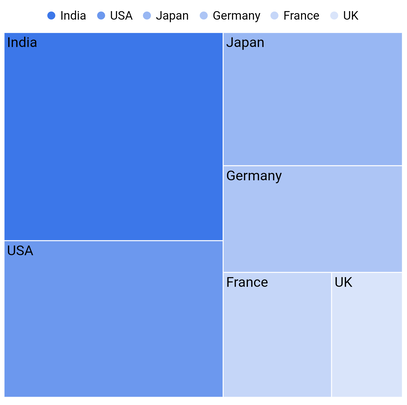
You can show legend by initializing the [`legend`](https://pub.dev/documentation/syncfusion_flutter_treemap/latest/treemap/SfTreemap/legend.html) property in the [`SfTreemap`](https://pub.dev/documentation/syncfusion_flutter_treemap/latest/treemap/SfTreemap-class.html). It is possible to customize the legend item's color and text using the [`SfTreemap.colorMappers`](https://pub.dev/documentation/syncfusion_flutter_treemap/latest/treemap/SfTreemap/colorMappers.html) property. The following example extends the initial sample by adding legend support.
{% tabs %}
{% highlight dart %}
import 'package:flutter/material.dart';
import 'package:syncfusion_flutter_treemap/treemap.dart';
class TreemapExample extends StatefulWidget {
const TreemapExample({super.key});
@override
State createState() => _TreemapExampleState();
}
class _TreemapExampleState extends State {
late List _source;
@override
void initState() {
_source = [
const SocialMediaUsers(
country: 'India',
socialMedia: 'Facebook',
usersInMillions: 25.4,
),
const SocialMediaUsers(
country: 'USA',
socialMedia: 'Instagram',
usersInMillions: 19.11,
),
const SocialMediaUsers(
country: 'Japan',
socialMedia: 'Facebook',
usersInMillions: 13.3,
),
const SocialMediaUsers(
country: 'Germany',
socialMedia: 'Instagram',
usersInMillions: 10.65,
),
const SocialMediaUsers(
country: 'France',
socialMedia: 'Twitter',
usersInMillions: 7.54,
),
const SocialMediaUsers(
country: 'UK',
socialMedia: 'Instagram',
usersInMillions: 4.93,
),
];
super.initState();
}
@override
Widget build(BuildContext context) {
return Scaffold(
body: Center(
child: Container(
height: 400,
width: 400,
child: SfTreemap(
dataCount: _source.length,
weightValueMapper: (int index) {
return _source[index].usersInMillions;
},
levels: [
TreemapLevel(
groupMapper: (int index) {
return _source[index].country;
},
labelBuilder: (BuildContext context, TreemapTile tile) {
return Padding(
padding: const EdgeInsets.only(left: 2.5, right: 2.4, top: 1),
child: Text(
tile.group,
style: const TextStyle(color: Colors.black),
),
);
},
tooltipBuilder: (BuildContext context, TreemapTile tile) {
return Padding(
padding: const EdgeInsets.only(left: 5, right: 5, top: 2, bottom: 3),
child: Text(
'Country : ${tile.group}\nSocial media : ${tile.weight}M',
style: const TextStyle(color: Colors.black),
),
);
},
),
],
legend: TreemapLegend(),
),
),
),
);
}
}
class SocialMediaUsers {
const SocialMediaUsers({
required this.country,
required this.socialMedia,
required this.usersInMillions,
});
final String country;
final String socialMedia;
final double usersInMillions;
}
{% endhighlight %}
{% endtabs %}