# Getting Started with Flutter Range Slider (SfRangeSlider)
This section explains the steps required to add the Flutter Range Slider widget and its elements such as numeric and date values, ticks, labels and tooltips, covering only the basic features needed to get started with the Syncfusion® Flutter Range Slider.
To get started quickly with our Flutter Range Slider widget, check out this video.
## Add Flutter Range Slider to an application
Create a simple project using the instructions given in the [Getting Started with your first Flutter app](https://docs.flutter.dev/get-started/test-drive#choose-your-ide) documentation.
**Add dependency**
Add the Syncfusion® Flutter Sliders dependency to your pubspec.yaml file.
{% tabs %}
{% highlight dart %}
dependencies:
syncfusion_flutter_sliders: ^xx.x.xx
{% endhighlight %}
{% endtabs %}
N> Here **xx.x.xx** denotes the current version of [`Flutter Range Slider`](https://pub.dev/packages/syncfusion_flutter_sliders/versions) package.
**Get packages**
Run the following command to get the required packages.
{% tabs %}
{% highlight dart %}
flutter pub get
{% endhighlight %}
{% endtabs %}
**Import package**
Import the following package in your Dart code.
{% tabs %}
{% highlight dart %}
import 'package:syncfusion_flutter_sliders/sliders.dart';
{% endhighlight %}
{% endtabs %}
## Initialize Flutter Range Slider
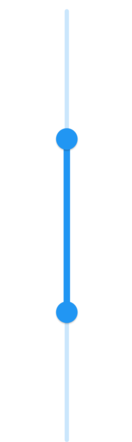
After importing the package, initialize the Flutter Range Slider widget as a child of any widget. Here, the Range Slider widget is added as a child of the Container widget. The default values of the [`min`](https://pub.dev/documentation/syncfusion_flutter_sliders/latest/sliders/SfRangeSlider/min.html) and [`max`](https://pub.dev/documentation/syncfusion_flutter_sliders/latest/sliders/SfRangeSlider/max.html) properties of the [`SfRangeSlider`](https://pub.dev/documentation/syncfusion_flutter_sliders/latest/sliders/SfRangeSlider-class.html) are 0.0 and 1.0 respectively. So, the [`values`](https://pub.dev/documentation/syncfusion_flutter_sliders/latest/sliders/SfRangeSlider/values.html) property must be given within the range.
N> The Flutter Range Slider passes the new values to the [`onChanged`](https://pub.dev/documentation/syncfusion_flutter_sliders/latest/sliders/SfRangeSlider/onChanged.html) callback but does not change its state until the parent widget rebuilds the Range Slider with the new values.
### Horizontal
{% tabs %}
{% highlight Dart %}
import 'package:flutter/material.dart';
import 'package:syncfusion_flutter_sliders/sliders.dart';
class HomePage extends StatefulWidget {
@override
_HomePageState createState() => _HomePageState();
}
class _HomePageState extends State {
SfRangeValues _values = const SfRangeValues(0.3, 0.7);
@override
Widget build(BuildContext context) {
return MaterialApp(
home: Scaffold(
body: Center(
child: Container(
child: SfRangeSlider(
values: _values,
onChanged: (SfRangeValues newValues) {
setState(() {
_values = newValues;
});
},
)))));
}
}
{% endhighlight %}
{% endtabs %}

### Vertical
{% tabs %}
{% highlight Dart %}
import 'package:flutter/material.dart';
import 'package:syncfusion_flutter_sliders/sliders.dart';
class HomePage extends StatefulWidget {
@override
_HomePageState createState() => _HomePageState();
}
class _HomePageState extends State {
SfRangeValues _values = const SfRangeValues(0.3, 0.7);
@override
Widget build(BuildContext context) {
return MaterialApp(
home: Scaffold(
body: Center(
child: Container(
child: SfRangeSlider.vertical(
values: _values,
onChanged: (SfRangeValues newValues) {
setState(() {
_values = newValues;
});
},
)))));
}
}
{% endhighlight %}
{% endtabs %}
## Handle range change
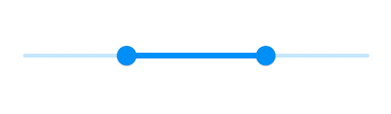
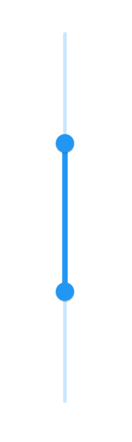
The [`onChanged`](https://pub.dev/documentation/syncfusion_flutter_sliders/latest/sliders/SfRangeSlider/onChanged.html) callback is used to get the current values of the Flutter Range Slider when the user selects a value through interaction.
N> The Flutter Range Slider passes the new values to the callback but does not change its state until the parent widget rebuilds the Range Slider with the new values.
### Horizontal
{% tabs %}
{% highlight Dart %}
import 'package:flutter/material.dart';
import 'package:syncfusion_flutter_sliders/sliders.dart';
class HomePage extends StatefulWidget {
@override
_HomePageState createState() => _HomePageState();
}
class _HomePageState extends State {
SfRangeValues _values = const SfRangeValues(3.0, 7.0);
@override
Widget build(BuildContext context) {
return MaterialApp(
home: Scaffold(
body: Center(
child: SfRangeSlider(
min: 0.0,
max: 10.0,
values: _values,
onChanged: (SfRangeValues newValues) {
setState(() {
_values = newValues;
});
},
))));
}
}
{% endhighlight %}
{% endtabs %}
### Vertical
{% tabs %}
{% highlight Dart %}
import 'package:flutter/material.dart';
import 'package:syncfusion_flutter_sliders/sliders.dart';
class HomePage extends StatefulWidget {
@override
_HomePageState createState() => _HomePageState();
}
class _HomePageState extends State {
SfRangeValues _values = const SfRangeValues(3.0, 7.0);
@override
Widget build(BuildContext context) {
return MaterialApp(
home: Scaffold(
body: Center(
child: SfRangeSlider.vertical(
min: 0.0,
max: 10.0,
values: _values,
onChanged: (SfRangeValues newValues) {
setState(() {
_values = newValues;
});
},
))));
}
}
{% endhighlight %}
{% endtabs %}
## Set numeric range
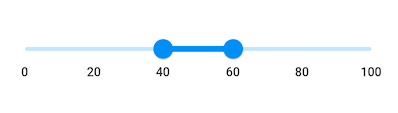
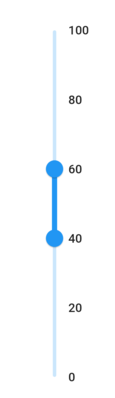
You can show numeric values in the Flutter Range Slider by setting `double` values to the [`min`](https://pub.dev/documentation/syncfusion_flutter_sliders/latest/sliders/SfRangeSlider/min.html), [`max`](https://pub.dev/documentation/syncfusion_flutter_sliders/latest/sliders/SfRangeSlider/max.html) and [`values`](https://pub.dev/documentation/syncfusion_flutter_sliders/latest/sliders/SfRangeSlider/values.html) properties.
### Horizontal
{% tabs %}
{% highlight Dart %}
import 'package:flutter/material.dart';
import 'package:syncfusion_flutter_sliders/sliders.dart';
class HomePage extends StatefulWidget {
@override
_HomePageState createState() => _HomePageState();
}
class _HomePageState extends State {
final double _min = 0;
final double _max = 100;
SfRangeValues _values = const SfRangeValues(40.0, 60.0);
@override
Widget build(BuildContext context) {
return Scaffold(
body: Center(
child: Container(
child: SfRangeSlider(
min: _min,
max: _max,
values: _values,
interval: 20,
showLabels: true,
onChanged: (SfRangeValues value) {
setState(() {
_values = value;
});
},
),
),
),
);
}
}
{% endhighlight %}
{% endtabs %}
### Vertical
{% tabs %}
{% highlight Dart %}
import 'package:flutter/material.dart';
import 'package:syncfusion_flutter_sliders/sliders.dart';
class HomePage extends StatefulWidget {
@override
_HomePageState createState() => _HomePageState();
}
class _HomePageState extends State {
final double _min = 0;
final double _max = 100;
SfRangeValues _values = const SfRangeValues(40.0, 60.0);
@override
Widget build(BuildContext context) {
return Scaffold(
body: Center(
child: Container(
child: SfRangeSlider.vertical(
min: _min,
max: _max,
values: _values,
interval: 20,
showLabels: true,
onChanged: (SfRangeValues value) {
setState(() {
_values = value;
});
},
),
),
),
);
}
}
{% endhighlight %}
{% endtabs %}
## Set date range
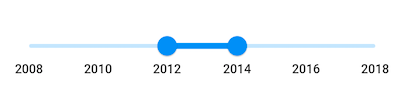
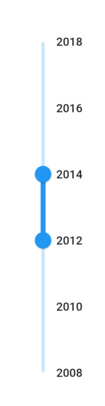
You can show date values in the Flutter Range Slider by setting `DateTime` values to the [`min`](https://pub.dev/documentation/syncfusion_flutter_sliders/latest/sliders/SfRangeSlider/min.html), [`max`](https://pub.dev/documentation/syncfusion_flutter_sliders/latest/sliders/SfRangeSlider/max.html) and [`values`](https://pub.dev/documentation/syncfusion_flutter_sliders/latest/sliders/SfRangeSlider/values.html) properties.
N> You must import [`intl`](https://pub.dev/packages/intl) package for formatting date range slider using the [`DateFormat`](https://pub.dev/documentation/intl/latest/intl/DateFormat-class.html) class.
### Horizontal
{% tabs %}
{% highlight Dart %}
import 'package:flutter/material.dart';
import 'package:intl/intl.dart';
import 'package:syncfusion_flutter_sliders/sliders.dart';
class HomePage extends StatefulWidget {
@override
_HomePageState createState() => _HomePageState();
}
class _HomePageState extends State {
DateTime _min = DateTime(2008, 01, 01);
DateTime _max = DateTime(2018, 01, 01);
SfRangeValues _values =
SfRangeValues(DateTime(2012, 01, 01), DateTime(2014, 01, 01));
@override
Widget build(BuildContext context) {
return Scaffold(
body: Center(
child: Container(
child: SfRangeSlider(
min: _min,
max: _max,
values: _values,
interval: 2,
showLabels: true,
dateIntervalType: DateIntervalType.years,
dateFormat: DateFormat.y(),
onChanged: (SfRangeValues value) {
setState(() {
_values = value;
});
},
),
),
),
);
}
}
{% endhighlight %}
{% endtabs %}
### Vertical
{% tabs %}
{% highlight Dart %}
import 'package:flutter/material.dart';
import 'package:intl/intl.dart';
import 'package:syncfusion_flutter_sliders/sliders.dart';
class HomePage extends StatefulWidget {
@override
_HomePageState createState() => _HomePageState();
}
class _HomePageState extends State {
DateTime _min = DateTime(2008, 01, 01);
DateTime _max = DateTime(2018, 01, 01);
SfRangeValues _values =
SfRangeValues(DateTime(2012, 01, 01), DateTime(2014, 01, 01));
@override
Widget build(BuildContext context) {
return Scaffold(
body: Center(
child: Container(
child: SfRangeSlider.vertical(
min: _min,
max: _max,
values: _values,
interval: 2,
showLabels: true,
dateIntervalType: DateIntervalType.years,
dateFormat: DateFormat.y(),
onChanged: (SfRangeValues value) {
setState(() {
_values = value;
});
},
),
),
),
);
}
}
{% endhighlight %}
{% endtabs %}
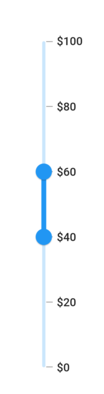
## Enable ticks
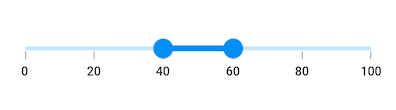
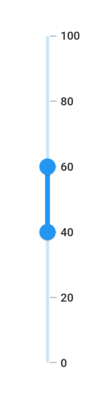
You can enable ticks in the Flutter Range Slider using the [`showTicks`](https://pub.dev/documentation/syncfusion_flutter_sliders/latest/sliders/SfRangeSlider/showTicks.html) property.
### Horizontal
{% tabs %}
{% highlight Dart %}
import 'package:flutter/material.dart';
import 'package:syncfusion_flutter_sliders/sliders.dart';
class HomePage extends StatefulWidget {
@override
_HomePageState createState() => _HomePageState();
}
class _HomePageState extends State {
final double _min = 0;
final double _max = 100;
SfRangeValues _values = const SfRangeValues(40.0, 60.0);
@override
Widget build(BuildContext context) {
return Scaffold(
body: Center(
child: Container(
child: SfRangeSlider(
min: _min,
max: _max,
values: _values,
interval: 20,
showTicks: true,
showLabels: true,
onChanged: (SfRangeValues value) {
setState(() {
_values = value;
});
},
),
),
),
);
}
}
{% endhighlight %}
{% endtabs %}
### Vertical
{% tabs %}
{% highlight Dart %}
import 'package:flutter/material.dart';
import 'package:syncfusion_flutter_sliders/sliders.dart';
class HomePage extends StatefulWidget {
@override
_HomePageState createState() => _HomePageState();
}
class _HomePageState extends State {
final double _min = 0;
final double _max = 100;
SfRangeValues _values = const SfRangeValues(40.0, 60.0);
@override
Widget build(BuildContext context) {
return Scaffold(
body: Center(
child: Container(
child: SfRangeSlider.vertical(
min: _min,
max: _max,
values: _values,
interval: 20,
showTicks: true,
showLabels: true,
onChanged: (SfRangeValues value) {
setState(() {
_values = value;
});
},
),
),
),
);
}
}
{% endhighlight %}
{% endtabs %}
## Inverse the horizontal Range Slider
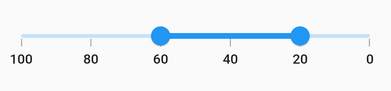
You can invert the horizontal range slider by wrapping the Flutter Range Slider in the [`Directionality`](https://api.flutter.dev/flutter/widgets/Directionality-class.html) widget and setting the [`textDirection`](https://api.flutter.dev/flutter/widgets/Directionality/textDirection.html) property to `TextDirection.rtl`. The [`Directionality`](https://api.flutter.dev/flutter/widgets/Directionality-class.html) widget only affects horizontal sliders; to invert a vertical range slider, use the [`isInversed`](https://pub.dev/documentation/syncfusion_flutter_sliders/latest/sliders/SfRangeSlider/isInversed.html) property described in the [Inverse the vertical range slider](#inverse-the-vertical-range-slider) section.
{% tabs %}
{% highlight Dart %}
import 'package:flutter/material.dart';
import 'package:syncfusion_flutter_sliders/sliders.dart';
class HomePage extends StatefulWidget {
@override
_HomePageState createState() => _HomePageState();
}
class _HomePageState extends State {
SfRangeValues _values = const SfRangeValues(20.0, 60.0);
@override
Widget build(BuildContext context) {
return Scaffold(
body: Directionality(
textDirection: TextDirection.rtl,
child: SfRangeSlider(
min: 0,
max: 100,
values: _values,
interval: 20,
showTicks: true,
showLabels: true,
onChanged: (SfRangeValues newValues) {
setState(() {
_values = newValues;
});
},
),
),
);
}
}
{% endhighlight %}
{% endtabs %}
## Inverse the vertical Flutter Range Slider
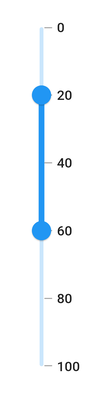
You can invert the vertical range slider using the [`isInversed`](https://pub.dev/documentation/syncfusion_flutter_sliders/latest/sliders/SfRangeSlider/isInversed.html) property. The default value of the [`isInversed`](https://pub.dev/documentation/syncfusion_flutter_sliders/latest/sliders/SfRangeSlider/isInversed.html) property is `false`.
{% tabs %}
{% highlight Dart %}
import 'package:flutter/material.dart';
import 'package:syncfusion_flutter_sliders/sliders.dart';
class HomePage extends StatefulWidget {
@override
_HomePageState createState() => _HomePageState();
}
class _HomePageState extends State {
SfRangeValues _values = const SfRangeValues(20.0, 60.0);
@override
Widget build(BuildContext context) {
return Scaffold(
body: SfRangeSlider.vertical(
min: 0,
max: 100,
values: _values,
interval: 20,
isInversed: true,
showTicks: true,
showLabels: true,
onChanged: (SfRangeValues newValues) {
setState(() {
_values = newValues;
});
},
),
);
}
}
{% endhighlight %}
{% endtabs %}
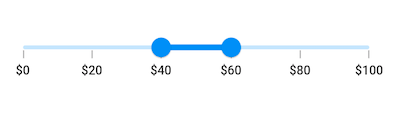
## Add prefix/suffix to labels
You can add prefix or suffix to the labels using the [`numberFormat`](https://pub.dev/documentation/syncfusion_flutter_sliders/latest/sliders/SfRangeSlider/numberFormat.html) or [`dateFormat`](https://pub.dev/documentation/syncfusion_flutter_sliders/latest/sliders/SfRangeSlider/dateFormat.html) properties.
N> The format type (numeric or date) of the Flutter Range Slider is determined based on the values specified in [`min`](https://pub.dev/documentation/syncfusion_flutter_sliders/latest/sliders/SfRangeSlider/min.html), [`max`](https://pub.dev/documentation/syncfusion_flutter_sliders/latest/sliders/SfRangeSlider/max.html) and [`values`](https://pub.dev/documentation/syncfusion_flutter_sliders/latest/sliders/SfRangeSlider/values.html) properties.
I> You must import [`intl`](https://pub.dev/packages/intl) package for formatting date range slider using the [`DateFormat`](https://pub.dev/documentation/intl/latest/intl/DateFormat-class.html) class and for formatting numeric range slider using the [`NumberFormat`](https://pub.dev/documentation/intl/latest/intl/NumberFormat-class.html) class.
### Horizontal
{% tabs %}
{% highlight Dart %}
import 'package:flutter/material.dart';
import 'package:intl/intl.dart';
import 'package:syncfusion_flutter_sliders/sliders.dart';
class HomePage extends StatefulWidget {
@override
_HomePageState createState() => _HomePageState();
}
class _HomePageState extends State {
final double _min = 0;
final double _max = 100;
SfRangeValues _values = const SfRangeValues(40.0, 60.0);
@override
Widget build(BuildContext context) {
return Scaffold(
body: Center(
child: Container(
child: SfRangeSlider(
min: _min,
max: _max,
values: _values,
interval: 20,
showTicks: true,
showLabels: true,
numberFormat: NumberFormat("\$"),
onChanged: (SfRangeValues value) {
setState(() {
_values = value;
});
},
),
),
),
);
}
}
{% endhighlight %}
{% endtabs %}
### Vertical
{% tabs %}
{% highlight Dart %}
import 'package:flutter/material.dart';
import 'package:intl/intl.dart';
import 'package:syncfusion_flutter_sliders/sliders.dart';
class HomePage extends StatefulWidget {
@override
_HomePageState createState() => _HomePageState();
}
class _HomePageState extends State {
final double _min = 0;
final double _max = 100;
SfRangeValues _values = const SfRangeValues(40.0, 60.0);
@override
Widget build(BuildContext context) {
return Scaffold(
body: Center(
child: Container(
child: SfRangeSlider.vertical(
min: _min,
max: _max,
values: _values,
interval: 20,
showTicks: true,
showLabels: true,
numberFormat: NumberFormat("\$"),
onChanged: (SfRangeValues value) {
setState(() {
_values = value;
});
},
),
),
),
);
}
}
{% endhighlight %}
{% endtabs %}