How to Use WPF DOCX Editor as a Standard Editor
29 Aug 20269 minutes to read
Use the following code to configure the SfRichTextBoxAdv control as a standard RichTextBox with rich text formatting options.
<Window x:Class="Standard_RichTextBox.MainWindow"
        xmlns="http://schemas.microsoft.com/winfx/2006/xaml/presentation"
        xmlns:x="http://schemas.microsoft.com/winfx/2006/xaml"
        xmlns:d="http://schemas.microsoft.com/expression/blend/2008"
        xmlns:mc="http://schemas.openxmlformats.org/markup-compatibility/2006"
        xmlns:local="clr-namespace:Standard_RichTextBox"
        mc:Ignorable="d"
        xmlns:RichTextBoxAdv="clr-namespace:Syncfusion.Windows.Controls.RichTextBoxAdv;assembly=Syncfusion.SfRichTextBoxAdv.Wpf"
        Title="SfRichTextBoxAdv" Height="450" Width="800">

    <Window.Resources>
        <RichTextBoxAdv:UnderlineToggleConverter x:Key="UnderlineToggleConverter"/>
        <RichTextBoxAdv:LeftAlignmentToggleConverter x:Key="LeftAlignmentToggleConverter"/>
        <RichTextBoxAdv:CenterAlignmentToggleConverter x:Key="CenterAlignmentToggleConverter"/>
        <RichTextBoxAdv:RightAlignmentToggleConverter x:Key="RightAlignmentToggleConverter"/>
        <RichTextBoxAdv:JustifyAlignmentToggleConverter x:Key="JustifyAlignmentToggleConverter"/>
        <Style TargetType="Button">
            <Setter Property="Background" Value="Transparent" />
            <Setter Property="Margin" Value="12 4"/>
        </Style>
        <Style TargetType="ToggleButton">
            <Setter Property="Background" Value="Transparent" />
            <Setter Property="Margin" Value="12 4"/>
        </Style>
    </Window.Resources>


    <Grid Background="#F1F1F1">
        <Grid.RowDefinitions>
            <RowDefinition Height="Auto"/>
            <RowDefinition Height="*"/>
        </Grid.RowDefinitions>
        <Grid>
            <!-- Defines the data context as RichTextBoxAdv -->
            <StackPanel Orientation="Horizontal" DataContext="{Binding ElementName=richTextBoxAdv}">
                <!-- UI option to perform Undo/Redo using command binding -->
                <StackPanel Orientation="Horizontal">
                    <Button Command="RichTextBoxAdv:SfRichTextBoxAdv.UndoCommand" CommandTarget="{Binding ElementName=richTextBoxAdv}" Focusable="False">
                        <Image Source="\Images\Undo.png" Height="40" Width="40" />
                    </Button>
                    <Button Command="RichTextBoxAdv:SfRichTextBoxAdv.RedoCommand" CommandTarget="{Binding ElementName=richTextBoxAdv}" Focusable="False">
                        <Image Source="\Images\Redo.png" Height="40" Width="40" />
                    </Button>
                </StackPanel>
                <!-- UI option to perform Clipboard operations using command binding -->
                <Border Width="2" Height="46" Background="#1F1F1F"/>
                <StackPanel Orientation="Horizontal">
                    <Button Command="RichTextBoxAdv:SfRichTextBoxAdv.CutCommand" CommandTarget="{Binding ElementName=richTextBoxAdv}" Focusable="False">
                        <Image Source="\Images\Cut.png" Height="40" Width="40" />
                    </Button>
                    <Button Command="RichTextBoxAdv:SfRichTextBoxAdv.CopyCommand" CommandTarget="{Binding ElementName=richTextBoxAdv}" Focusable="False">
                        <Image Source="\Images\Copy.png" Height="40" Width="40" />
                    </Button>
                    <Button Command="RichTextBoxAdv:SfRichTextBoxAdv.PasteCommand" CommandTarget="{Binding ElementName=richTextBoxAdv}" Focusable="False">
                        <Image Source="\Images\Paste.png" Height="40" Width="40" />
                    </Button>
                </StackPanel>
                <!-- UI option to apply character formatting using property binding -->
                <Border Width="2" Height="46" Background="#1F1F1F"/>
                <StackPanel Orientation="Horizontal">
                    <ToggleButton IsChecked="{Binding Selection.CharacterFormat.Bold}" Focusable="False">
                        <Image Source="\Images\Bold.png" Height="40" Width="40" />
                    </ToggleButton>
                    <ToggleButton IsChecked="{Binding Selection.CharacterFormat.Italic}" Focusable="False">
                        <Image Source="\Images\Italic.png" Height="40" Width="40" />
                    </ToggleButton>
                    <ToggleButton IsChecked="{Binding Selection.CharacterFormat.Underline, Converter={StaticResource UnderlineToggleConverter}}" Focusable="False">
                        <Image Source="\Images\Underline.png" Height="40" Width="40" />
                    </ToggleButton>
                </StackPanel>
                <Border Width="2" Height="46" Background="#1F1F1F"/>
                <!-- UI option to apply paragraph formatting using property binding -->
                <StackPanel Orientation="Horizontal">
                    <ToggleButton IsChecked="{Binding Selection.ParagraphFormat.TextAlignment, Converter={StaticResource LeftAlignmentToggleConverter}}" Focusable="False">
                        <Image Source="\Images\Left.png" Height="40" Width="40" />
                    </ToggleButton>
                    <ToggleButton IsChecked="{Binding Selection.ParagraphFormat.TextAlignment, Converter={StaticResource CenterAlignmentToggleConverter}}" Focusable="False">
                        <Image Source="\Images\Center.png" Height="40" Width="40" />
                    </ToggleButton>
                    <ToggleButton IsChecked="{Binding Selection.ParagraphFormat.TextAlignment, Converter={StaticResource RightAlignmentToggleConverter}}" Focusable="False">
                        <Image Source="\Images\Right.png" Height="40" Width="40" />
                    </ToggleButton>
                    <ToggleButton IsChecked="{Binding Selection.ParagraphFormat.TextAlignment, Converter={StaticResource JustifyAlignmentToggleConverter}}" Focusable="False">
                        <Image Source="\Images\Justify.png" Height="40" Width="40" />
                    </ToggleButton>
                </StackPanel>
            </StackPanel>
        </Grid>
        <RichTextBoxAdv:SfRichTextBoxAdv x:Name="richTextBoxAdv" Grid.Row="1" LayoutType="Continuous"  />
    </Grid>
</Window>
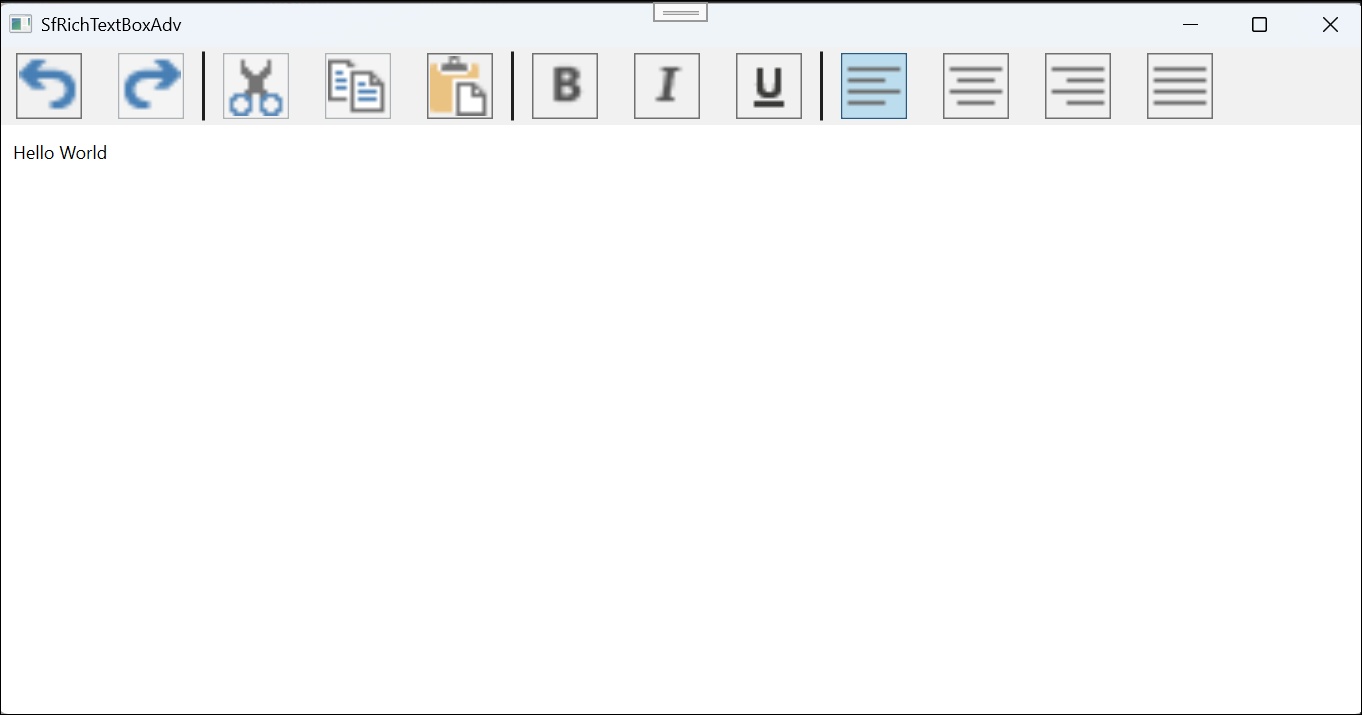
When the application is executed, the standard RichTextBox control is displayed as illustrated below.