Tables in Vue DOCX Editor
12 Sep 202620 minutes to read
Tables are an efficient way to present information. The Vue DOCX Editor (Document Editor) can display and edit the tables. You can select and edit tables through keyboard, mouse, or touch interactions. The DOCX Editor exposes a rich set of APIs to perform these operations programmatically.
Create a table
You can create and insert a table at the cursor position by specifying the required number of rows and columns.
Refer to the following sample code.
this.$refs.documenteditor.ej2Instances.editor.insertTable(3,3);Set the maximum number of Rows when inserting a table
You can use the maximumRows property to set the maximum number of rows allowed while inserting a table in the DOCX Editor component.
<template>
    <ejs-documenteditorcontainer :documentEditorSettings="settings"></ejs-documenteditorcontainer>
</template>
<script setup>
import { DocumentEditorContainerComponent as EjsDocumenteditorcontainer } from '@syncfusion/ej2-vue-documenteditor';

const settings = {maximumRows: 4};
</script>
When the maximum row limit is reached, an alert will appear, as follows.
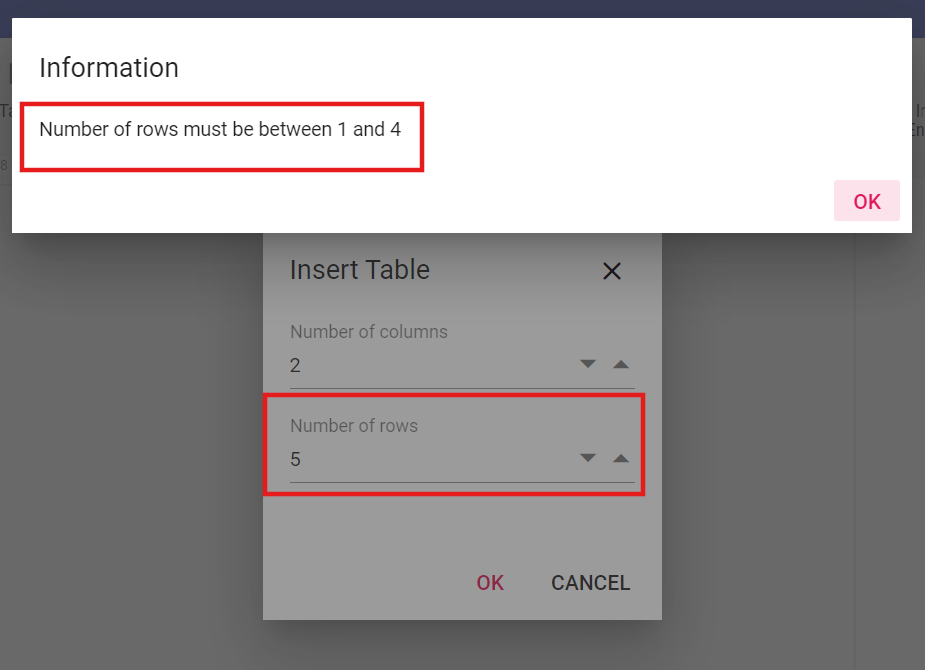
The maximum value of Row is 32767, as per Microsoft Word application and you can set any value less than or equal to 32767 to this property.
Set the maximum number of Columns when inserting a table
You can use the maximumColumns property to set the maximum number of columns allowed while inserting a table in the DOCX Editor component.
Refer to the following sample code.
<template>
    <ejs-documenteditorcontainer :documentEditorSettings="settings"></ejs-documenteditorcontainer>
</template>
<script setup>
import { DocumentEditorContainerComponent as EjsDocumenteditorcontainer } from '@syncfusion/ej2-vue-documenteditor';

const settings = {maximumColumns: 4};
</script>
When the maximum column limit is reached, an alert will appear, as follows.
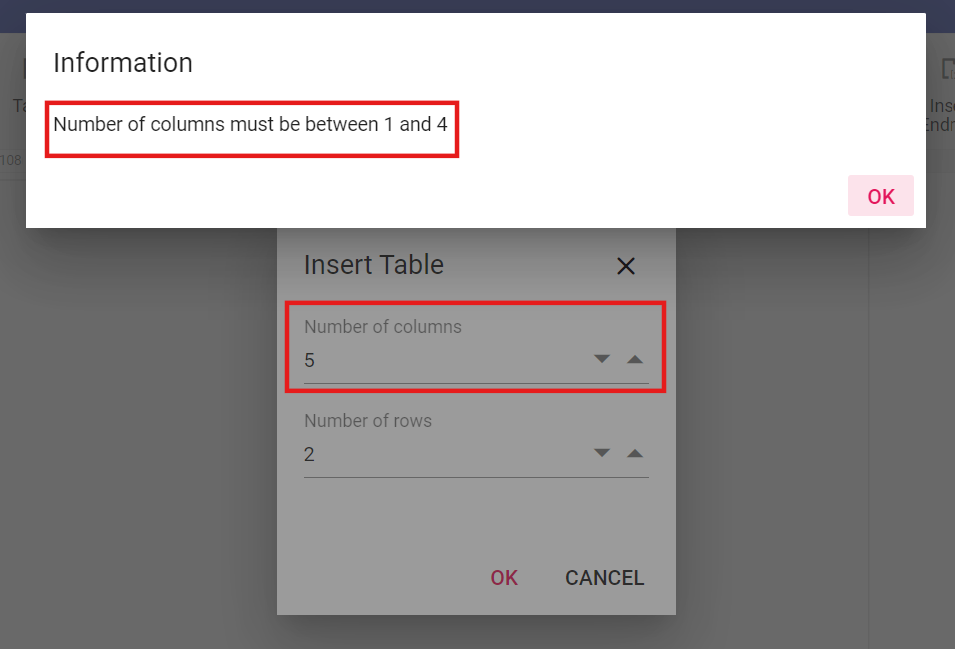
The maximum value of Column is 63, as per Microsoft Word application and you can set any value less than or equal to 63 to this property.
Insert rows
You can add a row (or several rows) above or below the row at the cursor position by using the insertRow method. This method accepts the following parameters:
| Parameter | Type | Description |
|---|---|---|
| above(optional) | boolean | This is optional and if omitted, it takes the value as false and inserts below the row at the cursor position. |
| count(optional) | number | This is optional and if omitted, it takes the value as 1. |
Refer to the following sample code.
//Inserts a row below the row at the cursor position
this.$refs.documenteditor.ej2Instances.editor.insertRow();
//Inserts a row above the row at the cursor position
this.$refs.documenteditor.ej2Instances.editor.insertRow(true);
//Inserts three rows below the row at the cursor position
this.$refs.documenteditor.ej2Instances.editor.insertRow(false, 3);
Insert columns
You can add a column (or several columns) to the left or right of the column at cursor position by using the insertColumn method. This method accepts the following parameters:
| Parameter | Type | Description |
|---|---|---|
| left(optional) | boolean | This is optional and if omitted, it takes the value as false and inserts to the right of column at the cursor position. |
| count(optional) | number | This is optional and if omitted, it takes the value as 1. |
Refer to the following sample code.
//Insert a column to the right of the column at the cursor position.
this.$refs.documenteditor.ej2Instances.editor.insertColumn();
//Insert a column to the left of the column at the cursor position.
this.$refs.documenteditor.ej2Instances.editor.insertColumn(true);
//Insert two columns to the left of the column at the cursor position.
this.$refs.documenteditor.ej2Instances.editor.insertColumn(true, 2);
Select an entire table
If the cursor position is inside a table, you can select the entire table by using the following sample code.
this.$refs.documenteditor.ej2Instances.selection.selectTable();Select row
You can select the entire row at the cursor position by using the following sample code.
this.$refs.documenteditor.ej2Instances.selection.selectRow();If the current selection spans across cells of different rows, all these rows will be selected.
Select column
You can select the entire column at the cursor position by using the following sample code.
this.$refs.documenteditor.ej2Instances.selection.selectColumn();If the current selection spans across cells of different columns, all these columns will be selected.
Select cell
You can select the cell at cursor position by using the following sample code.
this.$refs.documenteditor.ej2Instances.selection.selectCell();Delete table
DOCX Editor allows you to delete the entire table. You can use the deleteTable() method of editor instance, if selection is in table. Refer to the following sample code.
this.$refs.documenteditor.ej2Instances.editor.deleteTable();Delete row
DOCX Editor allows you to delete the selected number of rows. You can use the deleteRow() method of editor instance to delete the selected number of rows, if selection is in table. Refer to the following sample code.
this.$refs.documenteditor.ej2Instances.editor.deleteRow();Delete column
DOCX Editor allows you to delete the selected number of columns. You can use the deleteColumn() method of editor instance to delete the selected number of columns, if selection is in table. Refer to the following sample code.
this.$refs.documenteditor.ej2Instances.editor.deleteColumn();Merge cells
You can merge cells vertically, horizontally, or a combination of both, into a single cell. To vertically merge the cells, the columns within selection should be even in left and right directions. To horizontally merge the cells, the rows within selection should be even in top and bottom direction.
Refer to the following sample code.
this.$refs.documenteditor.ej2Instances.editor.mergeCells()Positioning the table
DOCX Editor preserves the position properties of the table and displays the table based on position properties. It does not support modifying the position properties. Whereas the table will be automatically moved along with text edited if it is positioned relative to the paragraph.
How to work with tables
The following sample demonstrates how to delete the table row or columns, merge cells and how to bind the API with button.
<template>
  <div id="app">
    <div>
      <ejs-toolbar v-bind:clicked='toolbarClickHandler'>
        <e-items>
          <e-item prefixIcon="e-de-icon-Table" tooltipText="Insert Table" id="table"></e-item>
          <e-item type="Separator"></e-item>
          <e-item prefixIcon="e-de-icon-InsertAbove" tooltipText="Insert new row above" id="insert_above"></e-item>
          <e-item prefixIcon="e-de-icon-InsertBelow" tooltipText="Insert new row below" id="insert_below"></e-item>
          <e-item type="Separator"></e-item>
          <e-item prefixIcon="e-de-icon-InsertLeft" tooltipText="Insert new column to the left"
            id="insert_left"></e-item>
          <e-item prefixIcon="e-de-icon-InsertRight" tooltipText="Insert new column to the right"
            id="insert_right"></e-item>
          <e-item type="Separator"></e-item>
          <e-item prefixIcon="e-de-icon-DeleteTable" tooltipText="Delete Entire table" id="delete_table"></e-item>
          <e-item prefixIcon="e-de-icon-DeleteRows" tooltipText="Delete the selected row" id="delete_row"></e-item>
          <e-item prefixIcon="e-de-icon-DeleteColumns" tooltipText="Delete the selected column"
            id="delete_column"></e-item>
          <e-item type="Separator"></e-item>
          <e-item prefixIcon="e-de-icon-Cell" tooltipText="Merge the selected cells" id="merge_cell"></e-item>
          <e-item type="Separator"></e-item>
          <e-item text="Dialog" tooltipText="Open insert table dialog" id="table_dialog"></e-item>
        </e-items>
      </ejs-toolbar>
    </div>
    <ejs-documenteditor ref="documenteditor" :isReadOnly='false' :enableEditor='true' :enableEditorHistory='true'
      :enableTableDialog='true' :enableSfdtExport='true' :enableContextMenu='true' height="370px"
      style="width: 100%;"></ejs-documenteditor>
  </div>
</template>
<script setup>
import { DocumentEditorComponent as EjsDocumenteditor, Editor, Selection, EditorHistory, TableDialog, ContextMenu, SfdtExport } from '@syncfusion/ej2-vue-documenteditor';
import { ToolbarComponent as EjsToolbar, ItemDirective as EItem, ItemsDirective as EItems } from "@syncfusion/ej2-vue-navigations";
import { onMounted, provide, ref } from 'vue';

const documenteditor = ref(null);
provide('DocumentEditor', [Editor, Selection, EditorHistory, TableDialog, ContextMenu, SfdtExport])

const toolbarClickHandler = function (args) {
  switch (args.item.id) {
    case 'table':
      //Insert table API to add table
      documenteditor.value.ej2Instances.editor.insertTable(3, 2);
      break;
    case 'insert_above':
      //Insert the specified number of rows to the table above to the row at cursor position
      documenteditor.value.ej2Instances.editor.insertRow(true, 2);
      break;
    case 'insert_below':
      //Insert the specified number of rows to the table below the row at the cursor position
      documenteditor.value.ej2Instances.editor.insertRow();
      break;
    case 'insert_left':
      //Insert the specified number of columns to the table left to the column at cursor position
      documenteditor.value.ej2Instances.editor.insertColumn(true, 2);
      break;
    case 'insert_right':
      //Insert the specified number of columns to the table right to the column at cursor position
      documenteditor.value.ej2Instances.editor.insertColumn();
      break;
    case 'delete_table':
      //Delete the entire table
      documenteditor.value.ej2Instances.editor.deleteTable();
      break;
    case 'delete_row':
      //Delete the selected number of rows
      documenteditor.value.ej2Instances.editor.deleteRow();
      break;
    case 'delete_column':
      //Delete the selected number of columns
      documenteditor.value.ej2Instances.editor.deleteColumn();
      break;
    case 'merge_cell':
      //Merge the selected cells into one (both vertically and horizontally)
      documenteditor.value.ej2Instances.editor.mergeCells();
      break;
    case 'table_dialog':
      //Opens insert table dialog
      documenteditor.value.showDialog('Table');
      break;
  }
}

onMounted(function () {
  documenteditor.value.ej2Instances.editor.insertTable(2, 2);
})
</script>
<style>
@import "../node_modules/@syncfusion/ej2-vue-documenteditor/styles/material.css";
</style><template>
<div id="app">
<div>
<ejs-toolbar v-bind:clicked='toolbarClickHandler'>
<e-items>
<e-item prefixIcon="e-de-icon-Table" tooltipText="Insert Table" id="table"></e-item>
<e-item type="Separator"></e-item>
<e-item prefixIcon="e-de-icon-InsertAbove" tooltipText="Insert new row above" id="insert_above"></e-item>
<e-item prefixIcon="e-de-icon-InsertBelow" tooltipText="Insert new row below" id="insert_below"></e-item>
<e-item type="Separator"></e-item>
<e-item prefixIcon="e-de-icon-InsertLeft" tooltipText="Insert new column to the left"
id="insert_left"></e-item>
<e-item prefixIcon="e-de-icon-InsertRight" tooltipText="Insert new column to the right"
id="insert_right"></e-item>
<e-item type="Separator"></e-item>
<e-item prefixIcon="e-de-icon-DeleteTable" tooltipText="Delete Entire table" id="delete_table"></e-item>
<e-item prefixIcon="e-de-icon-DeleteRows" tooltipText="Delete the selected row" id="delete_row"></e-item>
<e-item prefixIcon="e-de-icon-DeleteColumns" tooltipText="Delete the selected column"
id="delete_column"></e-item>
<e-item type="Separator"></e-item>
<e-item prefixIcon="e-de-icon-Cell" tooltipText="Merge the selected cells" id="merge_cell"></e-item>
<e-item type="Separator"></e-item>
<e-item text="Dialog" tooltipText="Open insert table dialog" id="table_dialog"></e-item>
</e-items>
</ejs-toolbar>
</div>
<ejs-documenteditor ref="documenteditor" :isReadOnly='false' :enableEditor='true' :enableEditorHistory='true'
:enableTableDialog='true' :enableSfdtExport='true' :enableContextMenu='true' height="370px"
style="width: 100%;"></ejs-documenteditor>
</div>
</template>
<script>
import { DocumentEditorComponent, Editor, Selection, EditorHistory, TableDialog, ContextMenu, SfdtExport } from '@syncfusion/ej2-vue-documenteditor';
import { ToolbarComponent, ItemDirective, ItemsDirective } from "@syncfusion/ej2-vue-navigations";
export default {
components: {
'ejs-documenteditor': DocumentEditorComponent,
'ejs-toolbar': ToolbarComponent,
'e-items': ItemsDirective,
'e-item': ItemDirective
},
data: function () {
return {
};
},
provide: {
DocumentEditor: [Editor, Selection, EditorHistory, TableDialog, ContextMenu, SfdtExport]
},
methods: {
toolbarClickHandler: function (args) {
switch (arg.item.id) {
case 'table':
//Insert table API to add table
this.$refs.documenteditor.ej2Instances.editor.insertTable(3, 2);
break;
case 'insert_above':
//Insert the specified number of rows above the row at the cursor position
this.$refs.documenteditor.ej2Instances.editor.insertRow(true, 2);
break;
case 'insert_below':
//Insert the specified number of rows below the row at the cursor position
this.$refs.documenteditor.ej2Instances.editor.insertRow();
break;
case 'insert_left':
//Insert the specified number of columns to the left of the column at the cursor position
this.$refs.documenteditor.ej2Instances.editor.insertColumn(true, 2);
break;
case 'insert_right':
//Insert the specified number of columns to the right of the column at the cursor position
this.$refs.documenteditor.ej2Instances.editor.insertColumn();
break;
case 'delete_table':
//Delete the entire table
this.$refs.documenteditor.ej2Instances.editor.deleteTable();
break;
case 'delete_row':
//Delete the selected number of rows
this.$refs.documenteditor.ej2Instances.editor.deleteRow();
break;
case 'delete_column':
//Delete the selected number of columns
this.$refs.documenteditor.ej2Instances.editor.deleteColumn();
break;
case 'merge_cell':
//Merge the selected cells into one (both vertically and horizontally)
this.$refs.documenteditor.ej2Instances.editor.mergeCells();
break;
case 'table_dialog':
//Opens insert table dialog
this.$refs.documenteditor.showDialog('Table');
break;
}
}
},
mounted() {
this.$refs.documenteditor.ej2Instances.editor.insertTable(2, 2);
}
}
</script>
<style>
@import "../node_modules/@syncfusion/ej2-vue-documenteditor/styles/material.css";
</style>