Radial Menu in UWP DOCX Editor
30 Aug 20266 minutes to read
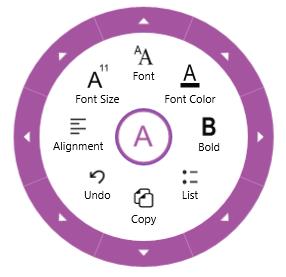
SfRichTextBoxAdv supports a built-in radial menu that provides rich-text formatting options such as bold, italic, and more. The radial menu appears automatically when the user makes a text selection or interacts with the control.
The following screenshot shows the built-in radial menu for the SfRichTextBoxAdv control.
On Windows Phone devices, the built-in radial menu is not supported.
Enable or disable the radial menu
In SfRichTextBoxAdv, the built-in radial menu is enabled by default. You can enable or disable the built-in radial menu by setting the EnableRadialMenu property.
The following code example demonstrates how to disable the built-in radial menu in the SfRichTextBoxAdv control.
<RichTextBoxAdv:SfRichTextBoxAdv x:Name="richTextBoxAdv" ManipulationMode="All" EnableRadialMenu="False" />// Initializes a new instance of SfRichTextBoxAdv.
SfRichTextBoxAdv richTextBoxAdv = new SfRichTextBoxAdv();
richTextBoxAdv.ManipulationMode = ManipulationModes.All;
// Disables the built-in radial menu in the SfRichTextBoxAdv control.
richTextBoxAdv.EnableRadialMenu = false;' Initializes a new instance of SfRichTextBoxAdv.
Dim richTextBoxAdv As New SfRichTextBoxAdv()
richTextBoxAdv.ManipulationMode = ManipulationModes.All
' Disables the built-in radial menu in the SfRichTextBoxAdv control.
richTextBoxAdv.EnableRadialMenu = FalseCustomizing the radial menu appearance
You can customize the appearance of the built-in radial menu to suit your needs. This is done by defining custom styles for the radial menu under the Resources of SfRichTextBoxAdv, which override the default style.
The following code example demonstrates how to customize the appearance of the navigation button, rim, radial slider, and radial pointer in the built-in radial menu.
<RichTextBoxAdv:SfRichTextBoxAdv x:Name="richTextBox" ManipulationMode="All" AcceptsTab="True" xmlns:RichTextBoxAdv="using:Syncfusion.UI.Xaml.RichTextBoxAdv">
  <!-- Specify resources for this instance -->
  <RichTextBoxAdv:SfRichTextBoxAdv.Resources>

    <!-- Custom style for Radial Menu -->
    <Style TargetType="radialMenu:SfRadialMenu">
      <Setter Property="RimBackground" Value="#EFEFEF"/>
      <Setter Property="RimActiveBrush" Value="#0071BC"/>
      <Setter Property="NavigationButtonStyle" Value="{StaticResource RTERadialMenuNavigationButtonStyle}"/>
    </Style>

    <!-- Custom Style for Radial Pointer -->
    <Style TargetType="radialMenu:RadialPointer" x:Key="RadialPointerStyle">
      <Setter Property="Height" Value="2"/>
      <Setter Property="IsTabStop" Value="False"/>
      <Setter Property="Template">
        <Setter.Value>
          <ControlTemplate TargetType="radialMenu:RadialPointer">
            <Border  Background="#0071BC"/>
          </ControlTemplate>
        </Setter.Value>
      </Setter>
    </Style>

    <!-- Custom Style for Radial Slider -->
    <Style TargetType="radialMenu:SfRadialSlider">
      <Setter Property="Foreground" Value="#0071BC"/>
      <Setter Property="InnerRimFill" Value="#0071BC"/>
      <Setter Property="OuterRimStroke" Value="#0071BC"/>
      <Setter Property="PointerStyle" Value="{StaticResource RadialPointerStyle}"/>
    </Style>

    <!-- Custom Style for Navigation Button -->
    <Style x:Key="RTERadialMenuNavigationButtonStyle" TargetType="Button">
      <Setter Property="FontFamily" Value="Segoe UI Symbol"/>
      <Setter Property="BorderBrush" Value="#0071BC"/>
      <Setter Property="Template">
        <Setter.Value>
          <ControlTemplate TargetType="Button">
            <Grid Background="Transparent" Margin="-5">
              <VisualStateManager.VisualStateGroups>
                <VisualStateGroup x:Name="CommonStates">
                  <VisualState x:Name="Normal"/>
                  <VisualState x:Name="PointerOver">
                    <Storyboard>
                      <ObjectAnimationUsingKeyFrames Storyboard.TargetProperty="Fill" Storyboard.TargetName="BackgroundEllipse">
                        <DiscreteObjectKeyFrame KeyTime="0" Value="LightGray"/>
                      </ObjectAnimationUsingKeyFrames>
                    </Storyboard>
                  </VisualState>
                </VisualStateGroup>
              </VisualStateManager.VisualStateGroups>
              <Ellipse Fill="White" x:Name="BackgroundEllipse" />
              <Ellipse Stroke="{TemplateBinding BorderBrush}" StrokeThickness="2"  Fill="Transparent"/>
              <ContentPresenter HorizontalAlignment="Center" VerticalAlignment="Center"/>
            </Grid>
          </ControlTemplate>
        </Setter.Value>
      </Setter>
    </Style>
  </RichTextBoxAdv:SfRichTextBoxAdv.Resources>
</RichTextBoxAdv:SfRichTextBoxAdv>
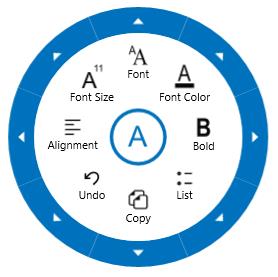
The following screenshot shows the radial menu with customized style.
The sample to demonstrate customizing the style of the built-in radial menu can be downloaded from the link here.