Background in UWP DOCX Editor
30 Aug 20264 minutes to read
The UWP DOCX Editor control allows you to change background color of the control. A background of a control is represented by Background property of SfRichTextBoxAdv class. The default value of this property is black.
The following code illustrates how to apply color as background to the document.
<RichTextBoxAdv:SfRichTextBoxAdv x:Name="richTextBoxAdv" Background="#6699cc" />// Initializes a new instance of RichTextBoxAdv.
SfRichTextBoxAdv richTextBoxAdv = new SfRichTextBoxAdv();
// Sets the control background color
richTextBoxAdv.Background = new SolidColorBrush(Color.FromArgb(255, 102, 153, 204));' Initializes a new instance of RichTextBoxAdv.
Dim richTextBoxAdv As New SfRichTextBoxAdv()
' Sets the control background color.
richTextBoxAdv.Background = New SolidColorBrush(Color.FromArgb(255, 102, 153, 204))Pages layout

Continuous layout

Block layout
The block layout always inherits the control background color.

Setting background for document pages
The UWP DOCX Editor control allows you to change the background color of the document pages. A background of a document is represented by the Background property of DocumentAdv class. The default value of this property is white.
The following code illustrates how to apply color as background to the document pages.
// Initializes a new instance of RichTextBoxAdv.
SfRichTextBoxAdv richTextBoxAdv = new SfRichTextBoxAdv();
// Sets the document background color
richTextBoxAdv.Document.Background.Color = Color.FromArgb(255, 102, 153, 204);
' Initializes a new instance of RichTextBoxAdv.
Dim richTextBoxAdv As New SfRichTextBoxAdv()
' Sets the document background color.
richTextBoxAdv.Document.Background.Color = Color.FromArgb(255, 102, 153, 204)Maintain the same background for all documents
The document background property is independent for each document, so the background changes whenever the document changes. To keep the same background across all documents, subscribe to the DocumentChanged event and reset the background in the handler.
// Initializes a new instance of RichTextBoxAdv.
SfRichTextBoxAdv richTextBoxAdv = new SfRichTextBoxAdv();

// Subscribes to the DocumentChanged event to keep the same background for all documents.
richTextBoxAdv.DocumentChanged += (s, e) =>
{
    richTextBoxAdv.Document.Background.Color = Color.FromArgb(255, 102, 153, 204);
};
' Initializes a new instance of RichTextBoxAdv.
Dim richTextBoxAdv As New SfRichTextBoxAdv()
' Subscribes to the DocumentChanged event to keep the same background for all documents.
AddHandler richTextBoxAdv.DocumentChanged, Sub(s, e)
richTextBoxAdv.Document.Background.Color = Color.FromArgb(255, 102, 153, 204)
End SubPages layout:
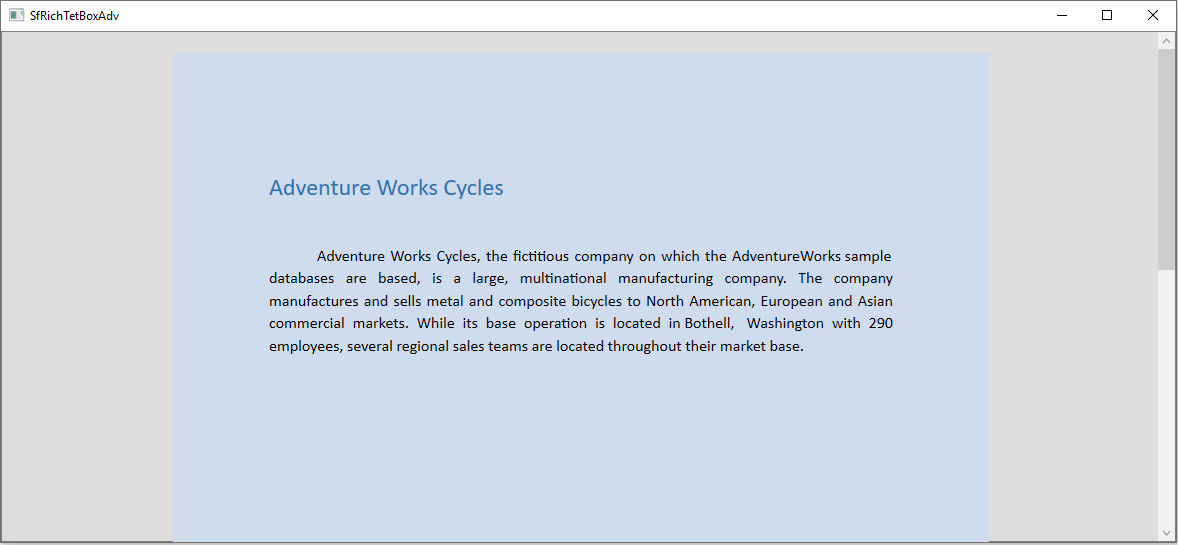
Continuous layout:

How to override the document background in Continuous layout type?
By default, the document background property is applied when the LayoutType is continuous. You can suppress the document background and apply the control background by setting OverridesDocumentBackground property to true. The default value of this property is false.
This property is valid only when the
LayoutTypeis continuous.
The following code illustrates how to override the document background color.
<RichTextBoxAdv:SfRichTextBoxAdv x:Name="richTextBoxAdv" LayoutType="Continuous" Background="#6699cc" OverridesDocumentBackground="True" />// Initializes a new instance of RichTextBoxAdv.
SfRichTextBoxAdv richTextBoxAdv = new SfRichTextBoxAdv();
// Sets the control background color
richTextBoxAdv.Background = new SolidColorBrush(Colors.LightGreen);
// Sets the layout type as continuous
richTextBoxAdv.LayoutType = LayoutType.Continuous;
// Enable the OverridesDocumentBackground property.
richTextBoxAdv.OverridesDocumentBackground = true;' Initializes a new instance of RichTextBoxAdv.
Dim richTextBoxAdv As New SfRichTextBoxAdv()
' Sets the control background color.
richTextBoxAdv.Background = New SolidColorBrush(Color.FromArgb(255, 102, 153, 204))
' Sets the layout type as continous
richTextBoxAdv.LayoutType = LayoutType.Continuous
' Enable the OverridesDocumentBackground property
richTextBoxAdv.OverridesDocumentBackground = TrueContinuous layout (with OverridesDocumentBackground="True"):
This API is supported starting from release version v17.4.0.X.