Shapes in Blazor DOCX Editor
28 Aug 20261 minute to read
Shapes are drawing objects that include a text box, rectangles, lines, curves, circles, etc. It can be preset or custom geometry. At present, Blazor DOCX Editor (Document Editor) does not support inserting shapes. However, if the document contains a shape while importing, it will be preserved properly.
Supported shapes
The DOCX Editor has preservation support for Lines, Rectangles, Basic Shapes, Block Arrows, Equation Shapes, Flowchart, and Stars and Banners.
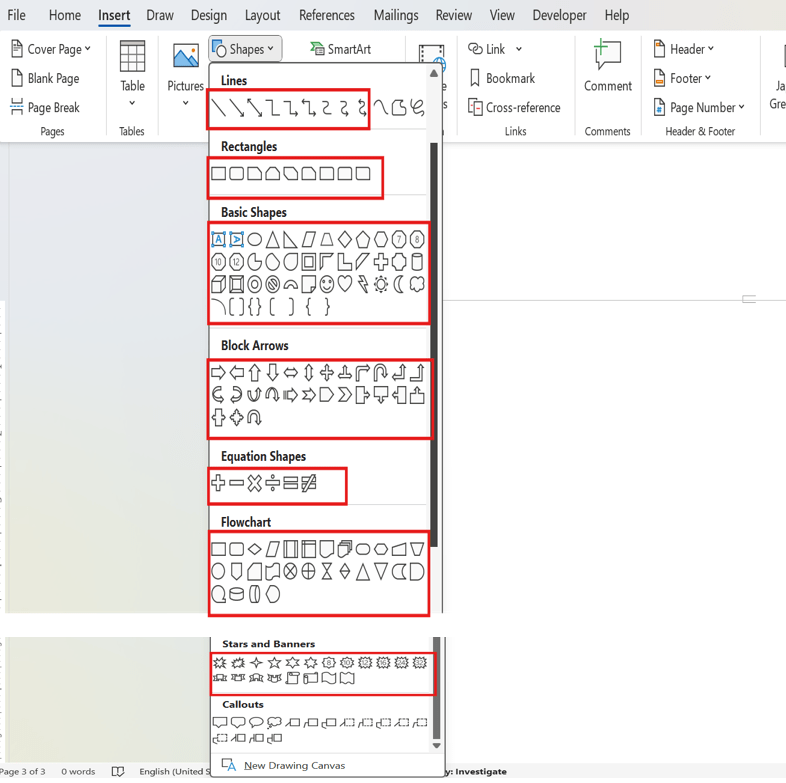
When using ASP.NET MVC service, the unsupported shapes will be converted as image and preserved as image.
Text box shape
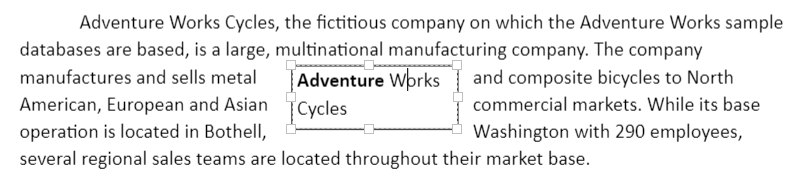
A text box is a rectangular area on the document where you can enter text. Clicking in a text box displays a flashing cursor, indicating that text can be entered. It allows you to enter multiple lines of text with all text formatting.
Shape resizer
The DOCX Editor also supports a built-in shape resizer to resize the shapes present in the document. The shape resizer accepts both touch and mouse interactions.

Text wrapping style
Text wrapping refers to how shapes fit with surrounding text in a document. Refer to this page for more information about text wrapping styles available in Word documents.
Positioning the shape
The DOCX Editor preserves the position properties of the shape and displays the shape based on the position properties. It does not support modifying the position properties. However, the shape will be automatically moved along with the text edited if it is positioned relative to the line or paragraph.
Online demo
Explore how to preserve AutoShapes in Word documents using the Blazor DOCX Editor in this live demo here.