Images in ASP.NET MVC DOCX Editor
27 Aug 20265 minutes to read
ASP.NET MVC DOCX Editor (Document Editor) supports common raster format images like PNG, BMP, JPEG, SVG, and GIF. You can insert an image file or an online image in the document using the insertImage() method.
<input type="file" id="insertImageButton" style="position:fixed; left:-110em" accept=".jpg,.jpeg,.png,.bmp" /> @Html.EJS().Button("insert_picture").Content("Image").Render()
<div id="documenteditor" style="width:100%;height:100%">
    @Html.EJS().DocumentEditor("container").IsReadOnly(false).EnableEditor(true).EnableSelection(true).EnableImageResizer(true).EnableEditorHistory(true).Render()
</div>

<script>
    var documenteditor;
    document.addEventListener('DOMContentLoaded', function () {
        documenteditor = document.getElementById("container").ej2_instances[0];
        document.getElementById('insert-picture').addEventListener('click', function () {
            var pictureUpload = document.getElementById("insertImageButton");
            pictureUpload.value = '';
            pictureUpload.click();
        });
        document.getElementById('insertImageButton').addEventListener('change', onInsertImage);
        function onInsertImage(args) {
            if (navigator.userAgent.match('Chrome') || navigator.userAgent.match('Firefox') || navigator.userAgent.match('Edge') || navigator.userAgent.match('MSIE') || navigator.userAgent.match('.NET')) {
                if (args.target.files[0]) {
                    var path = args.target.files[0];
                    var reader = new FileReader();
                    reader.onload = function (frEvent) {
                        var base64String = frEvent.target.result;
                        var image = document.createElement('img');
                        image.addEventListener('load', function () {
                            documenteditor.editor.insertImage(base64String, this.width, this.height);
                        })
                        image.src = base64String;
                    };
                    reader.readAsDataURL(path);
                }
                //Safari does not Support FileReader Class
            } else {
                var image = document.createElement('img');
                image.addEventListener('load', function () {
                    documenteditor.editor.insertImage(args.target.value);
                })
                image.src = args.target.value;
            }
        }

    });
</script>
Image files will be internally converted to a base64 string. Whereas, online images are preserved as URLs.
Image resizing
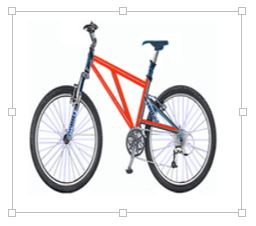
DOCX Editor provides a built-in image resizer that can be injected into your application based on the requirements. This allows you to resize the image by dragging the resizing points using mouse or touch interactions. This resizer appears as follows.
Changing size
DOCX Editor exposes an API to get or set the size of the selected image.
documenteditor.selection.imageFormat.width = 800;
documenteditor.selection.imageFormat.height = 800;
Images are stored and processed (read/write) as a base64 string in DocumentEditor. The online image URL is preserved as a URL in DocumentEditor upon saving.
Text wrapping style
Text wrapping refers to how images fit with surrounding text in a document. Refer to this page for more information about text wrapping styles available in Word documents.
Positioning the image
DOCX Editor preserves the position properties of the image and displays the image based on position properties. It does not support modifying the position properties. Whereas, the image will be automatically moved when the text is edited if it is positioned relative to the line or paragraph.