Form Fields in ASP.NET MVC DOCX Editor
27 Aug 20263 minutes to read
ASP.NET MVC DOCX Editor (Document Editor) provides support for inserting Text, CheckBox, and DropDown form fields through the built-in toolbar.
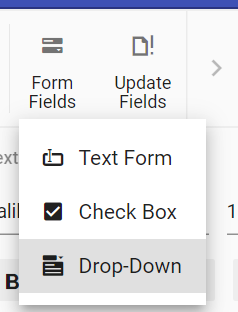
Insert form field
Form fields can be inserted using the insertFormField method in the editor module.
//Insert Text form field
documentEditor.editor.insertFormField('Text');
//Insert Checkbox form field
documentEditor.editor.insertFormField('CheckBox');
//Insert Drop down form field
documentEditor.editor.insertFormField('Dropdown');
Get form field names
All the form field names from the current document can be retrieved using getFormFieldNames().
var formFieldsNames = documentEditor.getFormFieldNames();Get form field properties
Form field properties can be retrieved using getFormFieldInfo().
//Text form field
var textfieldInfo = documentEditor.getFormFieldInfo('Text1');
//Checkbox form field
var checkboxfieldInfo = documentEditor.getFormFieldInfo('Check1');
//Dropdown form field
var dropdownfieldInfo = documentEditor.getFormFieldInfo('Drop1');
Set form field properties
Form field properties can be modified using setFormFieldInfo.
// Set text form field properties
var textfieldInfo = documentEditor.getFormFieldInfo('Text1');
textfieldInfo.defaultValue = "Hello";
textfieldInfo.format = "Uppercase";
textfieldInfo.type = "Text";
documentEditor.setFormFieldInfo('Text1',textfieldInfo);

// Set checkbox form field properties
var checkboxfieldInfo = documentEditor.getFormFieldInfo('Check1');
checkboxfieldInfo.defaultValue = true;
documentEditor.setFormFieldInfo('Check1',checkboxfieldInfo);

// Set dropdown form field properties
var dropdownfieldInfo = documentEditor.getFormFieldInfo('Drop1');
dropdownfieldInfo.dropDownItems = ['One','Two', 'Three'];
documentEditor.setFormFieldInfo('Drop1',dropdownfieldInfo);
Export form field data
Data of all the form fields in the document can be exported using exportFormData.
var formFieldData = documentEditor.exportFormData();Import form field data
Form fields can be prefilled with data using importFormData.
var textformField = {fieldName: 'Text1', value: 'Hello World'};
var checkformField = {fieldName: 'Check1', value: true};
var dropdownformField = {fieldName: 'Drop1', value: 1};
//Import form field data
documentEditor.importFormData([textformField,checkformField,dropdownformField]);
Reset form fields
Reset all the form fields in the current document to their default values using resetFormFields.
documentEditor.resetFormFields();Protect the document in form filling mode
DOCX Editor provides support for protecting the document with FormFieldsOnly protection. In this protection, the user can only fill form fields in the document.
DOCX Editor provides an option to protect and unprotect the document using enforceProtection and stopProtection API.
@Html.EJS().DocumentEditorContainer("container").Created("onCreated").EnableToolbar(true).Render()

<script>
    var documenteditor;
    var container;
    function onCreated() {
        var documenteditorElement = document.getElementById('container');
        container = documenteditorElement.ej2_instances[0];
        documenteditor = container.documentEditor;
        container.documentEditor.editor.enforceProtection('123', 'FormFieldsOnly');
        //stop the document protection
        container.documentEditor.editor.stopProtection('123');
    }
</script>
In the enforceProtection method, the first parameter denotes the password and the second parameter denotes the protection type. Possible values of protection type are
NoProtection |ReadOnly |FormFieldsOnly |CommentsOnly. In the stopProtection method, the parameter denotes the password.
Online Demo
Explore how to insert and manage form fields in Word documents using the ASP.NET MVC DOCX Editor in this live demo here.