Content Controls in ASP.NET MVC DOCX Editor
21 Oct 20264 minutes to read
ASP.NET MVC DOCX Editor (Document Editor) provides support for inserting and editing content controls.
Content controls can be categorized based on their occurrence in a document as follows:
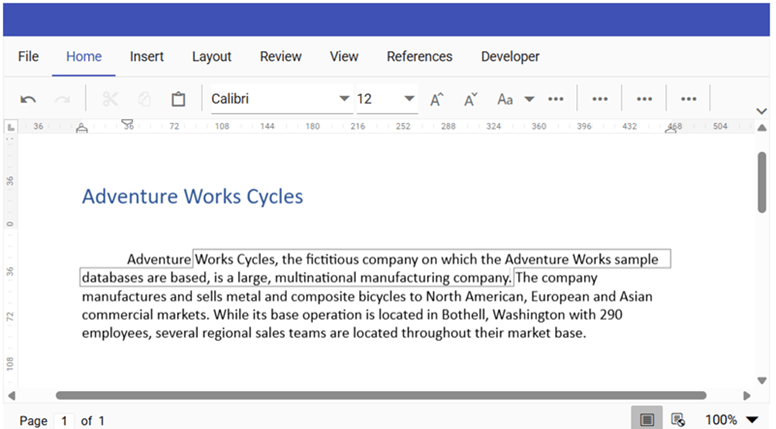
Inline Content Control: Inserted within the text of a paragraph and flows together with the surrounding text as shown in below example.
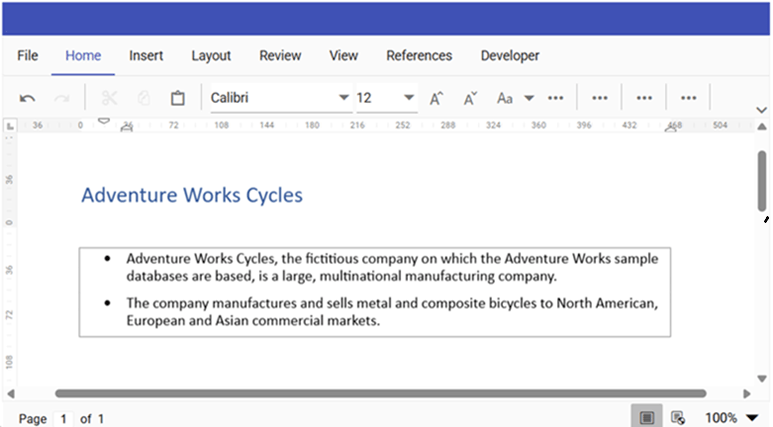
Block Content Control: Inserted as a standalone element at the block level and can contain one or more paragraphs, tables, images, or other content as shown in below example.
Types of Content Controls
- Rich Text
- Plain Text
- Check Box
- Date picker
- Drop-Down List and Combo Box
- Picture
Insert content control
A content control can be inserted using the insertContentControl method in the editor module.
//Insert Rich Text Content Control
container.documentEditor.editor.insertContentControl('RichText');
//Insert Rich Text Content Control with default sfdt string
var sfdt = {"sections":[{"blocks":[{"inlines":[{"text": "Hello"}]}]}]};
container.documentEditor.editor.insertContentControl('RichText', sfdt);

//Insert Plain Text Content Control
container.documentEditor.editor.insertContentControl('Text');
//Insert Plain Text Content Control with default string
container.documentEditor.editor.insertContentControl('Text', 'Hello World');

//Insert CheckBox Content Control
container.documentEditor.editor.insertContentControl('CheckBox');
//Insert CheckBox Content Control with checked state
container.documentEditor.editor.insertContentControl('CheckBox', true);

//Insert ComboBox Content Control
container.documentEditor.editor.insertContentControl('ComboBox');
//Insert ComboBox Content Control with items
container.documentEditor.editor.insertContentControl('ComboBox', 'One', ['One', 'Two', 'Three']);

//Insert Date Content Control
container.documentEditor.editor.insertContentControl('Date');
//Insert Date Content Control with default date
container.documentEditor.editor.insertContentControl('Date', '01/01/2024');

//Insert DropDownList Content Control
container.documentEditor.editor.insertContentControl('DropDownList');
//Insert DropDownList Content Control with items
container.documentEditor.editor.insertContentControl('DropDownList', 'One', ['One', 'Two', 'Three']);

//Insert Picture Content Control
container.documentEditor.editor.insertContentControl('Picture');
//Insert Picture Content Control with default image
container.documentEditor.editor.insertContentControl('Picture', 'data:image/png;base64,iVBORw0KGgoAAAANSUhEUgAAABYAAAAWCAYAAADEtGw7AAAAAXNSR0IArs4c6QAAAARnQU1BAACxjwv8YQUAAAAJcEhZcwAADsMAAA7DAcdvqGQAAADgSURBVEhLY3jx4sV/WuDBafCluXH/D6ydhlWObIMPLmn8/32KPBiD2OjyKAY7+zbDsX945/91azehiBWU9IPVgVwJMxSX4SgG65jXwrGVa+v/6TOXoojBDEZ2LQh/m676/+D+/XBzQJgsg0EY5GqQgSCDsYUz2QaDMCiosIUvCKMYDFKIjK9dvYrCB3kXJIaMkfUjY5JdDEpioCCAYZCFyGbAMFkGI0fcMDUYpAgZY4s8EEYWwxWBJLsYhJHFQIYjmwHDQ9xgkGEwDCp0QAYji8EMRhYjymBq4lGDofjFfwCV5AGEIf9DQQAAAABJRU5ErkJggg==');
Import content control properties
Replace an existing content control value with a new value using the importContentControlData method. Pass one or more ContentControlInfo objects and specify the content control title and content control type to identify the content control and update them with new values.
The following code snippet illustrates how to import the content control properties.
var data = [];
var contentControlData = { title: placeHolderPrefix + 'Name', tag: '', value: 'John', canDelete: false, canEdit: false, type: 'RichText' };
data.push(contentControlData);
container.documentEditor.importContentControlData(data);
Export content control properties
Retrieve the content controls properties present in a document using exportContentControlData method. This method returns a collection of ContentControlInfo objects, allowing you to access properties such as the content control title, type, tag, and value.
The following code snippet illustrates how to export the content control properties.
var contentControlInfos = container.documentEditor.exportContentControlData();Reset content control
Restore a content control to its default placeholder text (for example, “Click here or tap to insert text”) using the resetContentControlData method. Pass one or more ContentControlInfo objects and specify the content control title to identify the content controls to reset.
The following code snippet illustrates how to reset the content control properties:
var data = [];
var contentControlData = { title: placeHolderPrefix + 'Name', tag: '', value: 'John', canDelete: false, canEdit: false, type: 'RichText' };
data.push(contentControlData);
container.documentEditor.resetContentControlData(data);
Content control with custom XML mapping of file type WordML is converted as normal Rich Text Content Control to provide lossless round-tripping upon saving.