Create Word document in Windows Forms
13 Aug 202624 minutes to read
Syncfusion® Essential® DocIO is a .NET Word library used to create, read, and edit Word documents programmatically without Microsoft Word or interop dependencies. Using this library, you can create a Word document in Windows Forms.
Steps to create a Word document programmatically
Prerequisites:
- Visual Studio 2022.
- Install .NET desktop development workload with necessary .NET Framework SDK.
- .NET Framework 4.6.2 or later (4.8 recommended). This sample targets .NET Framework (not .NET / .NET Core).
Step 1: Create a new Windows Forms application project.
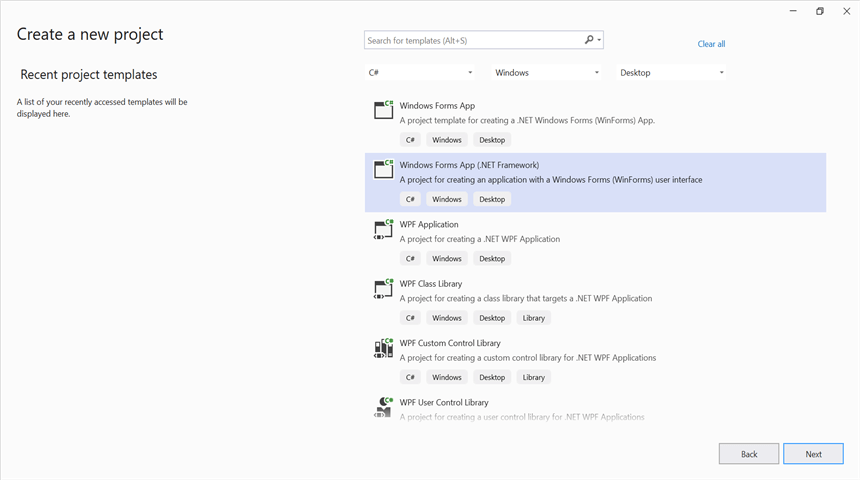
Step 2: Install Syncfusion.DocIO.WinForms NuGet package as a reference to your Windows Forms application from the NuGet.org.
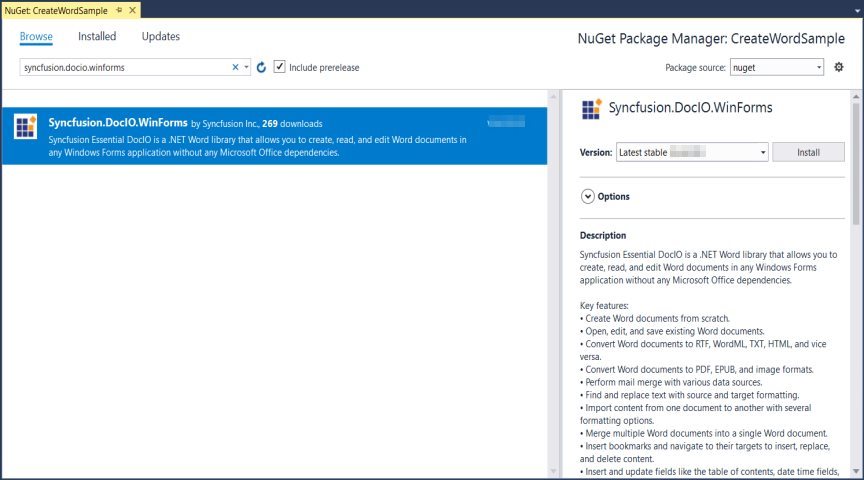
Starting with v16.2.0.x, if you reference Syncfusion® assemblies from the trial setup or from the NuGet feed, you must add a reference to the Syncfusion.Licensing assembly and include a valid license key in your application.
Install the Syncfusion.Licensing NuGet package and register the license key during application startup.
Syncfusion.Licensing.SyncfusionLicenseProvider.RegisterLicense("YOUR_LICENSE_KEY");For more information about generating and registering a license key, refer to the Syncfusion® licensing documentation.
Step 3: Add the following using directives to the top of Form1.cs (the Syncfusion namespaces are used by the click handler added in Step 5).
using Syncfusion.DocIO;
using Syncfusion.DocIO.DLS;
using System;
using System.Drawing;
using System.Windows.Forms;
Step 4: Add a new button in Form1.Designer.cs to create Word file as follows. The btnCreate_Click handler referenced below is added in Form1.cs in Step 5.
private Button btnCreate;
private Label label;

private void InitializeComponent()
{
    label = new Label();
    btnCreate = new Button();
    //Label
    label.Location = new System.Drawing.Point(0, 40);
    label.Size = new System.Drawing.Size(426, 35);
    label.Text = "Click the button to view a Word document generated by Essential DocIO. Please note that Microsoft Word Viewer or Microsoft Word is required to view the resultant Word document";
    label.TextAlign = System.Drawing.ContentAlignment.MiddleCenter;

    //Button
    btnCreate.Location = new System.Drawing.Point(180, 110);
    btnCreate.Size = new System.Drawing.Size(85, 36);
    btnCreate.Text = "Create Document";
    btnCreate.Click += new EventHandler(btnCreate_Click);

    //Form settings
    ClientSize = new System.Drawing.Size(450, 150);
    Controls.Add(label);
    Controls.Add(btnCreate);
    Text = "Create Word";
}
Step 5: Add the following code in the btnCreate_Click event handler in Form1.cs to create a Word document with simple text.
// Creating a new document.
WordDocument document = new WordDocument();
//Adding a new section to the document.
WSection section = document.AddSection() as WSection;
//Set Margin of the section
section.PageSetup.Margins.All = 72;
//Set page size of the section
section.PageSetup.PageSize = new SizeF(612, 792);

//Create Paragraph styles
WParagraphStyle style = document.AddParagraphStyle("Normal") as WParagraphStyle;
style.CharacterFormat.FontName = "Calibri";
style.CharacterFormat.FontSize = 11f;
style.ParagraphFormat.BeforeSpacing = 0;
style.ParagraphFormat.AfterSpacing = 8;
style.ParagraphFormat.LineSpacing = 13.8f;

style = document.AddParagraphStyle("Heading 1") as WParagraphStyle;
style.ApplyBaseStyle("Normal");
style.CharacterFormat.FontName = "Calibri Light";
style.CharacterFormat.FontSize = 16f;
style.CharacterFormat.TextColor = Color.FromArgb(46, 116, 181);
style.ParagraphFormat.BeforeSpacing = 12;
style.ParagraphFormat.AfterSpacing = 0;
style.ParagraphFormat.Keep = true;
style.ParagraphFormat.KeepFollow = true;
style.ParagraphFormat.OutlineLevel = OutlineLevel.Level1;

IWParagraph paragraph = section.HeadersFooters.Header.AddParagraph();
// Gets the image stream.
IWPicture picture = paragraph.AppendPicture(new Bitmap("AdventureCycle.jpg")) as WPicture;
picture.TextWrappingStyle = TextWrappingStyle.InFrontOfText;
picture.VerticalOrigin = VerticalOrigin.Margin;
picture.VerticalPosition = -45;
picture.HorizontalOrigin = HorizontalOrigin.Column;
picture.HorizontalPosition = 263.5f;
picture.WidthScale = 20;
picture.HeightScale = 15;

paragraph.ApplyStyle("Normal");
paragraph.ParagraphFormat.HorizontalAlignment = Syncfusion.DocIO.DLS.HorizontalAlignment.Left;
WTextRange textRange = paragraph.AppendText("Adventure Works Cycles") as WTextRange;
textRange.CharacterFormat.FontSize = 12f;
textRange.CharacterFormat.FontName = "Calibri";
textRange.CharacterFormat.TextColor = Color.Red;

//Appends paragraph.
paragraph = section.AddParagraph();
paragraph.ApplyStyle("Heading 1");
paragraph.ParagraphFormat.HorizontalAlignment = Syncfusion.DocIO.DLS.HorizontalAlignment.Center;
textRange = paragraph.AppendText("Adventure Works Cycles") as WTextRange;
textRange.CharacterFormat.FontSize = 18f;
textRange.CharacterFormat.FontName = "Calibri";

//Appends paragraph.
paragraph = section.AddParagraph();
paragraph.ParagraphFormat.FirstLineIndent = 36;
paragraph.BreakCharacterFormat.FontSize = 12f;
textRange = paragraph.AppendText("Adventure Works Cycles, the fictitious company on which the AdventureWorks sample databases are based, is a large, multinational manufacturing company. The company manufactures and sells metal and composite bicycles to North American, European and Asian commercial markets. While its base operation is in Bothell, Washington with 290 employees, several regional sales teams are located throughout their market base.") as WTextRange;
textRange.CharacterFormat.FontSize = 12f;

//Appends paragraph.
paragraph = section.AddParagraph();
paragraph.ParagraphFormat.FirstLineIndent = 36;
paragraph.BreakCharacterFormat.FontSize = 12f;
textRange = paragraph.AppendText("In 2000, AdventureWorks Cycles bought a small manufacturing plant, Importadores Neptuno, located in Mexico. Importadores Neptuno manufactures several critical subcomponents for the AdventureWorks Cycles product line. These subcomponents are shipped to the Bothell location for final product assembly. In 2001, Importadores Neptuno, became the sole manufacturer and distributor of the touring bicycle product group.") as WTextRange;
textRange.CharacterFormat.FontSize = 12f;

paragraph = section.AddParagraph();
paragraph.ApplyStyle("Heading 1");
paragraph.ParagraphFormat.HorizontalAlignment = Syncfusion.DocIO.DLS.HorizontalAlignment.Left;
textRange = paragraph.AppendText("Product Overview") as WTextRange;
textRange.CharacterFormat.FontSize = 16f;
textRange.CharacterFormat.FontName = "Calibri";

//Appends table.
IWTable table = section.AddTable();
table.ResetCells(3, 2);
table.TableFormat.Borders.BorderType = Syncfusion.DocIO.DLS.BorderStyle.None;
table.TableFormat.IsAutoResized = true;
//Appends paragraph.
paragraph = table[0, 0].AddParagraph();
paragraph.ParagraphFormat.AfterSpacing = 0;
paragraph.BreakCharacterFormat.FontSize = 12f;
//Appends picture to the paragraph.
picture = paragraph.AppendPicture(new Bitmap("Mountain-200.jpg")) as WPicture;
picture.TextWrappingStyle = TextWrappingStyle.TopAndBottom;
picture.VerticalOrigin = VerticalOrigin.Paragraph;
picture.VerticalPosition = 4.5f;
picture.HorizontalOrigin = HorizontalOrigin.Column;
picture.HorizontalPosition = -2.15f;
picture.WidthScale = 79;
picture.HeightScale = 79;

//Appends paragraph.
paragraph = table[0, 1].AddParagraph();
paragraph.ApplyStyle("Heading 1");
paragraph.ParagraphFormat.AfterSpacing = 0;
paragraph.ParagraphFormat.LineSpacing = 12f;
paragraph.AppendText("Mountain-200");
//Appends paragraph.
paragraph = table[0, 1].AddParagraph();
paragraph.ParagraphFormat.AfterSpacing = 0;
paragraph.ParagraphFormat.LineSpacing = 12f;
paragraph.BreakCharacterFormat.FontSize = 12f;
paragraph.BreakCharacterFormat.FontName = "Times New Roman";
textRange = paragraph.AppendText("Product No: BK-M68B-38\r") as WTextRange;
textRange.CharacterFormat.FontSize = 12f;
textRange.CharacterFormat.FontName = "Times New Roman";
textRange = paragraph.AppendText("Size: 38\r") as WTextRange;
textRange.CharacterFormat.FontSize = 12f;
textRange.CharacterFormat.FontName = "Times New Roman";
textRange = paragraph.AppendText("Weight: 25\r") as WTextRange;
textRange.CharacterFormat.FontSize = 12f;
textRange.CharacterFormat.FontName = "Times New Roman";
textRange = paragraph.AppendText("Price: $2,294.99\r") as WTextRange;
textRange.CharacterFormat.FontSize = 12f;
textRange.CharacterFormat.FontName = "Times New Roman";
//Appends paragraph.
paragraph = table[0, 1].AddParagraph();
paragraph.ParagraphFormat.AfterSpacing = 0;
paragraph.ParagraphFormat.LineSpacing = 12f;
paragraph.BreakCharacterFormat.FontSize = 12f;

//Appends paragraph.
paragraph = table[1, 0].AddParagraph();
paragraph.ApplyStyle("Heading 1");
paragraph.ParagraphFormat.AfterSpacing = 0;
paragraph.ParagraphFormat.LineSpacing = 12f;
paragraph.AppendText("Mountain-300 ");
//Appends paragraph.
paragraph = table[1, 0].AddParagraph();
paragraph.ParagraphFormat.AfterSpacing = 0;
paragraph.ParagraphFormat.LineSpacing = 12f;
paragraph.BreakCharacterFormat.FontSize = 12f;
paragraph.BreakCharacterFormat.FontName = "Times New Roman";
textRange = paragraph.AppendText("Product No: BK-M47B-38\r") as WTextRange;
textRange.CharacterFormat.FontSize = 12f;
textRange.CharacterFormat.FontName = "Times New Roman";
textRange = paragraph.AppendText("Size: 35\r") as WTextRange;
textRange.CharacterFormat.FontSize = 12f;
textRange.CharacterFormat.FontName = "Times New Roman";
textRange = paragraph.AppendText("Weight: 22\r") as WTextRange;
textRange.CharacterFormat.FontSize = 12f;
textRange.CharacterFormat.FontName = "Times New Roman";
textRange = paragraph.AppendText("Price: $1,079.99\r") as WTextRange;
textRange.CharacterFormat.FontSize = 12f;
textRange.CharacterFormat.FontName = "Times New Roman";
//Appends paragraph.
paragraph = table[1, 0].AddParagraph();
paragraph.ParagraphFormat.AfterSpacing = 0;
paragraph.ParagraphFormat.LineSpacing = 12f;
paragraph.BreakCharacterFormat.FontSize = 12f;

//Appends paragraph.
paragraph = table[1, 1].AddParagraph();
paragraph.ApplyStyle("Heading 1");
paragraph.ParagraphFormat.LineSpacing = 12f;
//Appends picture to the paragraph.
picture = paragraph.AppendPicture(new Bitmap("Mountain-300.jpg")) as WPicture;
picture.TextWrappingStyle = TextWrappingStyle.TopAndBottom;
picture.VerticalOrigin = VerticalOrigin.Paragraph;
picture.VerticalPosition = 8.2f;
picture.HorizontalOrigin = HorizontalOrigin.Column;
picture.HorizontalPosition = -14.95f;
picture.WidthScale = 75;
picture.HeightScale = 75;

//Appends paragraph.
paragraph = table[2, 0].AddParagraph();
paragraph.ApplyStyle("Heading 1");
paragraph.ParagraphFormat.LineSpacing = 12f;
//Appends picture to the paragraph.
picture = paragraph.AppendPicture(new Bitmap("Road-550-W.jpg")) as WPicture;
picture.TextWrappingStyle = TextWrappingStyle.TopAndBottom;
picture.VerticalOrigin = VerticalOrigin.Paragraph;
picture.VerticalPosition = 3.75f;
picture.HorizontalOrigin = HorizontalOrigin.Column;
picture.HorizontalPosition = -5f;
picture.WidthScale = 92;
picture.HeightScale = 92;

//Appends paragraph.
paragraph = table[2, 1].AddParagraph();
paragraph.ApplyStyle("Heading 1");
paragraph.ParagraphFormat.AfterSpacing = 0;
paragraph.ParagraphFormat.LineSpacing = 12f;
paragraph.AppendText("Road-150 ");
//Appends paragraph.
paragraph = table[2, 1].AddParagraph();
paragraph.ParagraphFormat.AfterSpacing = 0;
paragraph.ParagraphFormat.LineSpacing = 12f;
paragraph.BreakCharacterFormat.FontSize = 12f;
paragraph.BreakCharacterFormat.FontName = "Times New Roman";
textRange = paragraph.AppendText("Product No: BK-R93R-44\r") as WTextRange;
textRange.CharacterFormat.FontSize = 12f;
textRange.CharacterFormat.FontName = "Times New Roman";
textRange = paragraph.AppendText("Size: 44\r") as WTextRange;
textRange.CharacterFormat.FontSize = 12f;
textRange.CharacterFormat.FontName = "Times New Roman";
textRange = paragraph.AppendText("Weight: 14\r") as WTextRange;
textRange.CharacterFormat.FontSize = 12f;
textRange.CharacterFormat.FontName = "Times New Roman";
textRange = paragraph.AppendText("Price: $3,578.27\r") as WTextRange;
textRange.CharacterFormat.FontSize = 12f;
textRange.CharacterFormat.FontName = "Times New Roman";
//Appends paragraph.
section.AddParagraph();

//Saves the Word document
document.Save("Sample.docx");
The code sample references image files (
AdventureCycle.jpg,Mountain-200.jpg,Mountain-300.jpg,Road-550-W.jpg). Download these assets from the GitHub sample Data folder and ensure they are present in the application’s working directory (next to the.csprojfile). The image bitmaps are loaded from the working directory at runtime. Copy these images to the application’s output (bin\Debug/bin\Release) directory, or use absolute paths based onApplication.StartupPathto avoid file-not-found exceptions.
Step 6: Build the project.
Click on Build → Build Solution or press Ctrl+Shift+B to build the project.
Step 7: Run the project.
Click the Start button (green arrow) or press F5 to run the app.
You can download a complete working sample from GitHub.
By executing the program, you will get the Word document as follows.
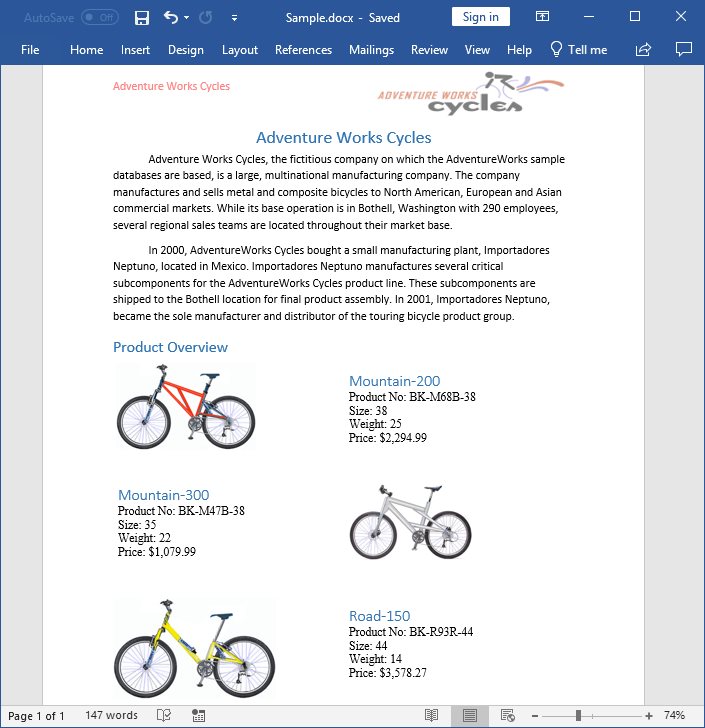
Prerequisites:
- JetBrains Rider.
- Install the .NET Framework Developer Pack matching the target framework (e.g., .NET Framework 4.8 Developer Pack for a 4.8 target). This sample targets .NET Framework (not .NET / .NET Core).
Step 1: Open JetBrains Rider and create a new Windows Forms Application project.
- Launch JetBrains Rider.
- Click New Solution on the welcome screen.

- In the New Solution dialog, select Project Type as Desktop.
- Enter a project name and specify the location.
- Select the target framework as .NET Framework and choose the desired version (4.6.2 or later; 4.8 recommended).
- Select Template as Windows Forms App.
- Click Create.

Step 2: Install the NuGet package from NuGet.org.
- Click the NuGet icon in the Rider toolbar and type Syncfusion.DocIO.WinForms in the search bar.
- Ensure that nuget.org is selected as the package source.
- Select the latest Syncfusion.DocIO.WinForms NuGet package from the list.
- Click the + (Add) button to add the package.

- Click the Install button to complete the installation.

Starting with v16.2.0.x, if you reference Syncfusion® assemblies from the trial setup or from the NuGet feed, you must add a reference to the Syncfusion.Licensing assembly and include a valid license key in your application.
Install the Syncfusion.Licensing NuGet package and register the license key during application startup.
Syncfusion.Licensing.SyncfusionLicenseProvider.RegisterLicense("YOUR_LICENSE_KEY");For more information about generating and registering a license key, refer to the Syncfusion® licensing documentation.
Step 3: Add the following using directives to the top of Form1.cs (the Syncfusion namespaces are used by the click handler added in Step 5).
using Syncfusion.DocIO;
using Syncfusion.DocIO.DLS;
using System;
using System.Drawing;
using System.Windows.Forms;
Step 4: Add a new button in Form1.Designer.cs to create Word file as follows. The btnCreate_Click handler referenced below is added in Form1.cs in Step 5.
private Button btnCreate;
private Label label;

private void InitializeComponent()
{
    label = new Label();
    btnCreate = new Button();
    //Label
    label.Location = new System.Drawing.Point(0, 40);
    label.Size = new System.Drawing.Size(426, 35);
    label.Text = "Click the button to view a Word document generated by Essential DocIO. Please note that Microsoft Word Viewer or Microsoft Word is required to view the resultant Word document";
    label.TextAlign = System.Drawing.ContentAlignment.MiddleCenter;

    //Button
    btnCreate.Location = new System.Drawing.Point(180, 110);
    btnCreate.Size = new System.Drawing.Size(85, 36);
    btnCreate.Text = "Create Document";
    btnCreate.Click += new EventHandler(btnCreate_Click);

    //Form settings
    ClientSize = new System.Drawing.Size(450, 150);
    Controls.Add(label);
    Controls.Add(btnCreate);
    Text = "Create Word";
}
Step 5: Add the following code in the btnCreate_Click event handler in Form1.cs to create a Word document with simple text.
// Creating a new document.
WordDocument document = new WordDocument();
//Adding a new section to the document.
WSection section = document.AddSection() as WSection;
//Set Margin of the section
section.PageSetup.Margins.All = 72;
//Set page size of the section
section.PageSetup.PageSize = new SizeF(612, 792);

//Create Paragraph styles
WParagraphStyle style = document.AddParagraphStyle("Normal") as WParagraphStyle;
style.CharacterFormat.FontName = "Calibri";
style.CharacterFormat.FontSize = 11f;
style.ParagraphFormat.BeforeSpacing = 0;
style.ParagraphFormat.AfterSpacing = 8;
style.ParagraphFormat.LineSpacing = 13.8f;

style = document.AddParagraphStyle("Heading 1") as WParagraphStyle;
style.ApplyBaseStyle("Normal");
style.CharacterFormat.FontName = "Calibri Light";
style.CharacterFormat.FontSize = 16f;
style.CharacterFormat.TextColor = Color.FromArgb(46, 116, 181);
style.ParagraphFormat.BeforeSpacing = 12;
style.ParagraphFormat.AfterSpacing = 0;
style.ParagraphFormat.Keep = true;
style.ParagraphFormat.KeepFollow = true;
style.ParagraphFormat.OutlineLevel = OutlineLevel.Level1;

IWParagraph paragraph = section.HeadersFooters.Header.AddParagraph();
// Gets the image stream.
IWPicture picture = paragraph.AppendPicture(new Bitmap("AdventureCycle.jpg")) as WPicture;
picture.TextWrappingStyle = TextWrappingStyle.InFrontOfText;
picture.VerticalOrigin = VerticalOrigin.Margin;
picture.VerticalPosition = -45;
picture.HorizontalOrigin = HorizontalOrigin.Column;
picture.HorizontalPosition = 263.5f;
picture.WidthScale = 20;
picture.HeightScale = 15;

paragraph.ApplyStyle("Normal");
paragraph.ParagraphFormat.HorizontalAlignment = Syncfusion.DocIO.DLS.HorizontalAlignment.Left;
WTextRange textRange = paragraph.AppendText("Adventure Works Cycles") as WTextRange;
textRange.CharacterFormat.FontSize = 12f;
textRange.CharacterFormat.FontName = "Calibri";
textRange.CharacterFormat.TextColor = Color.Red;

//Appends paragraph.
paragraph = section.AddParagraph();
paragraph.ApplyStyle("Heading 1");
paragraph.ParagraphFormat.HorizontalAlignment = Syncfusion.DocIO.DLS.HorizontalAlignment.Center;
textRange = paragraph.AppendText("Adventure Works Cycles") as WTextRange;
textRange.CharacterFormat.FontSize = 18f;
textRange.CharacterFormat.FontName = "Calibri";

//Appends paragraph.
paragraph = section.AddParagraph();
paragraph.ParagraphFormat.FirstLineIndent = 36;
paragraph.BreakCharacterFormat.FontSize = 12f;
textRange = paragraph.AppendText("Adventure Works Cycles, the fictitious company on which the AdventureWorks sample databases are based, is a large, multinational manufacturing company. The company manufactures and sells metal and composite bicycles to North American, European and Asian commercial markets. While its base operation is in Bothell, Washington with 290 employees, several regional sales teams are located throughout their market base.") as WTextRange;
textRange.CharacterFormat.FontSize = 12f;

//Appends paragraph.
paragraph = section.AddParagraph();
paragraph.ParagraphFormat.FirstLineIndent = 36;
paragraph.BreakCharacterFormat.FontSize = 12f;
textRange = paragraph.AppendText("In 2000, AdventureWorks Cycles bought a small manufacturing plant, Importadores Neptuno, located in Mexico. Importadores Neptuno manufactures several critical subcomponents for the AdventureWorks Cycles product line. These subcomponents are shipped to the Bothell location for final product assembly. In 2001, Importadores Neptuno, became the sole manufacturer and distributor of the touring bicycle product group.") as WTextRange;
textRange.CharacterFormat.FontSize = 12f;

paragraph = section.AddParagraph();
paragraph.ApplyStyle("Heading 1");
paragraph.ParagraphFormat.HorizontalAlignment = Syncfusion.DocIO.DLS.HorizontalAlignment.Left;
textRange = paragraph.AppendText("Product Overview") as WTextRange;
textRange.CharacterFormat.FontSize = 16f;
textRange.CharacterFormat.FontName = "Calibri";

//Appends table.
IWTable table = section.AddTable();
table.ResetCells(3, 2);
table.TableFormat.Borders.BorderType = Syncfusion.DocIO.DLS.BorderStyle.None;
table.TableFormat.IsAutoResized = true;
//Appends paragraph.
paragraph = table[0, 0].AddParagraph();
paragraph.ParagraphFormat.AfterSpacing = 0;
paragraph.BreakCharacterFormat.FontSize = 12f;
//Appends picture to the paragraph.
picture = paragraph.AppendPicture(new Bitmap("Mountain-200.jpg")) as WPicture;
picture.TextWrappingStyle = TextWrappingStyle.TopAndBottom;
picture.VerticalOrigin = VerticalOrigin.Paragraph;
picture.VerticalPosition = 4.5f;
picture.HorizontalOrigin = HorizontalOrigin.Column;
picture.HorizontalPosition = -2.15f;
picture.WidthScale = 79;
picture.HeightScale = 79;

//Appends paragraph.
paragraph = table[0, 1].AddParagraph();
paragraph.ApplyStyle("Heading 1");
paragraph.ParagraphFormat.AfterSpacing = 0;
paragraph.ParagraphFormat.LineSpacing = 12f;
paragraph.AppendText("Mountain-200");
//Appends paragraph.
paragraph = table[0, 1].AddParagraph();
paragraph.ParagraphFormat.AfterSpacing = 0;
paragraph.ParagraphFormat.LineSpacing = 12f;
paragraph.BreakCharacterFormat.FontSize = 12f;
paragraph.BreakCharacterFormat.FontName = "Times New Roman";
textRange = paragraph.AppendText("Product No: BK-M68B-38\r") as WTextRange;
textRange.CharacterFormat.FontSize = 12f;
textRange.CharacterFormat.FontName = "Times New Roman";
textRange = paragraph.AppendText("Size: 38\r") as WTextRange;
textRange.CharacterFormat.FontSize = 12f;
textRange.CharacterFormat.FontName = "Times New Roman";
textRange = paragraph.AppendText("Weight: 25\r") as WTextRange;
textRange.CharacterFormat.FontSize = 12f;
textRange.CharacterFormat.FontName = "Times New Roman";
textRange = paragraph.AppendText("Price: $2,294.99\r") as WTextRange;
textRange.CharacterFormat.FontSize = 12f;
textRange.CharacterFormat.FontName = "Times New Roman";
//Appends paragraph.
paragraph = table[0, 1].AddParagraph();
paragraph.ParagraphFormat.AfterSpacing = 0;
paragraph.ParagraphFormat.LineSpacing = 12f;
paragraph.BreakCharacterFormat.FontSize = 12f;

//Appends paragraph.
paragraph = table[1, 0].AddParagraph();
paragraph.ApplyStyle("Heading 1");
paragraph.ParagraphFormat.AfterSpacing = 0;
paragraph.ParagraphFormat.LineSpacing = 12f;
paragraph.AppendText("Mountain-300 ");
//Appends paragraph.
paragraph = table[1, 0].AddParagraph();
paragraph.ParagraphFormat.AfterSpacing = 0;
paragraph.ParagraphFormat.LineSpacing = 12f;
paragraph.BreakCharacterFormat.FontSize = 12f;
paragraph.BreakCharacterFormat.FontName = "Times New Roman";
textRange = paragraph.AppendText("Product No: BK-M47B-38\r") as WTextRange;
textRange.CharacterFormat.FontSize = 12f;
textRange.CharacterFormat.FontName = "Times New Roman";
textRange = paragraph.AppendText("Size: 35\r") as WTextRange;
textRange.CharacterFormat.FontSize = 12f;
textRange.CharacterFormat.FontName = "Times New Roman";
textRange = paragraph.AppendText("Weight: 22\r") as WTextRange;
textRange.CharacterFormat.FontSize = 12f;
textRange.CharacterFormat.FontName = "Times New Roman";
textRange = paragraph.AppendText("Price: $1,079.99\r") as WTextRange;
textRange.CharacterFormat.FontSize = 12f;
textRange.CharacterFormat.FontName = "Times New Roman";
//Appends paragraph.
paragraph = table[1, 0].AddParagraph();
paragraph.ParagraphFormat.AfterSpacing = 0;
paragraph.ParagraphFormat.LineSpacing = 12f;
paragraph.BreakCharacterFormat.FontSize = 12f;

//Appends paragraph.
paragraph = table[1, 1].AddParagraph();
paragraph.ApplyStyle("Heading 1");
paragraph.ParagraphFormat.LineSpacing = 12f;
//Appends picture to the paragraph.
picture = paragraph.AppendPicture(new Bitmap("Mountain-300.jpg")) as WPicture;
picture.TextWrappingStyle = TextWrappingStyle.TopAndBottom;
picture.VerticalOrigin = VerticalOrigin.Paragraph;
picture.VerticalPosition = 8.2f;
picture.HorizontalOrigin = HorizontalOrigin.Column;
picture.HorizontalPosition = -14.95f;
picture.WidthScale = 75;
picture.HeightScale = 75;

//Appends paragraph.
paragraph = table[2, 0].AddParagraph();
paragraph.ApplyStyle("Heading 1");
paragraph.ParagraphFormat.LineSpacing = 12f;
//Appends picture to the paragraph.
picture = paragraph.AppendPicture(new Bitmap("Road-550-W.jpg")) as WPicture;
picture.TextWrappingStyle = TextWrappingStyle.TopAndBottom;
picture.VerticalOrigin = VerticalOrigin.Paragraph;
picture.VerticalPosition = 3.75f;
picture.HorizontalOrigin = HorizontalOrigin.Column;
picture.HorizontalPosition = -5f;
picture.WidthScale = 92;
picture.HeightScale = 92;

//Appends paragraph.
paragraph = table[2, 1].AddParagraph();
paragraph.ApplyStyle("Heading 1");
paragraph.ParagraphFormat.AfterSpacing = 0;
paragraph.ParagraphFormat.LineSpacing = 12f;
paragraph.AppendText("Road-150 ");
//Appends paragraph.
paragraph = table[2, 1].AddParagraph();
paragraph.ParagraphFormat.AfterSpacing = 0;
paragraph.ParagraphFormat.LineSpacing = 12f;
paragraph.BreakCharacterFormat.FontSize = 12f;
paragraph.BreakCharacterFormat.FontName = "Times New Roman";
textRange = paragraph.AppendText("Product No: BK-R93R-44\r") as WTextRange;
textRange.CharacterFormat.FontSize = 12f;
textRange.CharacterFormat.FontName = "Times New Roman";
textRange = paragraph.AppendText("Size: 44\r") as WTextRange;
textRange.CharacterFormat.FontSize = 12f;
textRange.CharacterFormat.FontName = "Times New Roman";
textRange = paragraph.AppendText("Weight: 14\r") as WTextRange;
textRange.CharacterFormat.FontSize = 12f;
textRange.CharacterFormat.FontName = "Times New Roman";
textRange = paragraph.AppendText("Price: $3,578.27\r") as WTextRange;
textRange.CharacterFormat.FontSize = 12f;
textRange.CharacterFormat.FontName = "Times New Roman";
//Appends paragraph.
section.AddParagraph();

//Saves the Word document
document.Save("Sample.docx");
The code sample references image files (
AdventureCycle.jpg,Mountain-200.jpg,Mountain-300.jpg,Road-550-W.jpg). Download these assets from the GitHub sample Data folder and ensure they are present in the application’s working directory (next to the.csprojfile). The image bitmaps are loaded from the working directory at runtime. Copy these images to the application’s output (bin\Debug/bin\Release) directory, or use absolute paths based onApplication.StartupPathto avoid file-not-found exceptions.
Step 6: Build the project.
Click the Build button in the toolbar or press Ctrl+Shift+B to build the project.
Step 7: Run the project.
Click the Run button (green arrow) in the toolbar or press F5 to run the app.
You can download a complete working sample from GitHub.
By executing the program, you will get the Word document as follows.
Looking for the full .NET Word Library overview, features, pricing, and documentation? Visit the .NET Word Library page.
An online sample demonstrating how to create a Word document is also available (hosted as an ASP.NET Core demo that uses the same DocIO APIs shown here).